https://github.com/prantlf/backbone.composite-model
Supports composite Backbone.Model objects
https://github.com/prantlf/backbone.composite-model
backbone nested-models
Last synced: over 1 year ago
JSON representation
Supports composite Backbone.Model objects
- Host: GitHub
- URL: https://github.com/prantlf/backbone.composite-model
- Owner: prantlf
- License: mit
- Created: 2015-08-14T16:12:15.000Z (almost 11 years ago)
- Default Branch: master
- Last Pushed: 2022-01-30T15:36:23.000Z (over 4 years ago)
- Last Synced: 2025-03-01T11:07:59.500Z (over 1 year ago)
- Topics: backbone, nested-models
- Language: JavaScript
- Size: 1.22 MB
- Stars: 2
- Watchers: 2
- Forks: 0
- Open Issues: 0
-
Metadata Files:
- Readme: README.md
- Changelog: CHANGELOG.md
- License: LICENSE
Awesome Lists containing this project
README
# backbone.composite-model
[](https://www.npmjs.com/package/backbone.composite-model)

[](https://www.npmjs.com/package/backbone.composite-model)
[](https://codecov.io/gh/prantlf/backbone.composite-model)
[](https://codeclimate.com/github/prantlf/backbone.composite-model)
Supports composite [`Backbone.Model`] objects which represent a "master"
model containing "slave" models or collections maintained automatically
according to the composite model configuration
* [Motivation Example](#motivation-example)
+ [Flat Model](#flat-model)
+ [Manual Composite Model](#manual-composite-model)
+ [Reusable Composite Model](#reusable-composite-model)
* [Synopsis](#synopsis)
+ [Composite Configuration](#composite-configuration)
+ [Configuration Examples](#configuration-examples)
* [What Is It For?](#what-is-it-for)
* [What Is It Not For?](#what-is-it-not-for)
* [Installation](#installation)
* [Build](#build)
* [Contributing](#contributing)
* [Release History](#release-history)
* [License](#license)
## Motivation Example
Let's have a versioned file-system model: folders containing files, files
consisting of versions:
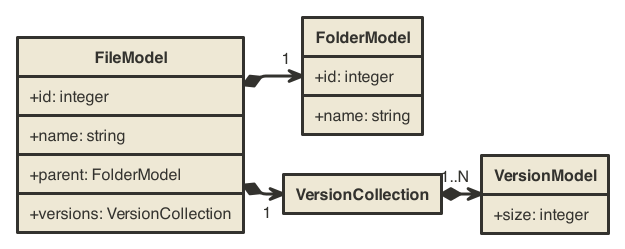
A JSON object representing a file would look like this:
```text
{
"id": ..., // unique ID of the file
"name": '...', // display name of the file
"parent": {...}, // object describing the parent folder
"versions": [...] // array of file version description objects
}
```
### Flat Model
Modelling it with a flat [`Backbone.Model`] would look like this:
```javascript
var FileModel = Backbone.Model.extend({
urlRoot: '/files'
});
```
[Backbone] events for attribute changes in models and model additions /
removals in collections work only for "flat" models; only for first-level
attributes of the main model:
```javascript
// Declare a model representing a file information
var file = new FileModel({id: 1});
// Inform whenever the file information has been fetched and is ready
file.on('sync', function (file) {
console.log('File information ready for', file.get('name'));
});
// Inform whenever the parent folder of the current file has changed
// THIS DOES NOT WORK: watching 'parent.id'
file.on('change:parent.id', function (parent) {
console.log('Location changed to', parent.get('name'));
});
// Fetch information about the initial file - only the first event above
// will be triggered; the second will be never triggered
file.fetch();
```
We would not be able to pass the parent or version information alone to some
view and let it refreshed as another file would be fetched, for example.
### Manual Composite Model
If the `parent` and `versions` child objects should be exposed like real
[Backbone] objects, to be able to work with their events in controllers
and views, associated objects can be created and maintained whenever the
"master" model changes, for example:
```javascript
var FolderModel = Backbone.Model.extend({...}),
VersionModel = Backbone.Model.extend({...}),
VersionCollection = Backbone.Collection.extend({
model: VersionModel,
...
}),
FileModel = Backbone.Model.extend({
initialize: function (attributes, options) {
// Initialize the child models and collections
attributes || (attributes = {});
this.parent = new FolderModel(attributes.parent, options);
this.versions = new VersionCollection(attributes.versions, options);
// Whenever the "master" model is re-fetched, update the child ones
this.on('sync', function (model, response, options) {
this.parent.set(this.attributes.parent, options);
this.versions.reset(this.attributes.versions, options);
}, this);
},
urlRoot: '/files'
});
```
Accessing the child models or collections is possible using the
[Backbone] interface, including the change events:
```javascript
// Declare a model representing a file information
var file = new FileModel({id: 1});
// Inform whenever the file information has been fetched and is ready
file.on('sync', function (file) {
console.log('File information ready for', file.get('name'));
});
// Inform whenever the parent folder of the current file has changed
// THIS WORKS NOW: watching 'id' of the child model `file.parent`
file.parent.on('change:id', function (parent) {
console.log('Location changed to', parent.get('name'));
});
// Fetch information about the initial file - both events above will be
// triggered
file.fetch();
// Fetch information about another file - the first event will be always
// triggered, the second one will be triggered only if the new file has
// a different parent folder than the previous one
file.set('id', 2)
.fetch();
```
### Reusable Composite Model
Modelling the same scenario with the help of the `Backbone.CompositeModel`
would look like this:
```javascript
var FileModel = Backbone.Model.extend({
// Declare what attributes map to what child models or collections
composite: {
parent: FolderModel,
versions: VersionCollection
},
initialize: function (attributes, options) {
// Initialize the child models and collections
this.makeComposite(options);
},
urlRoot: '/files'
});
// Extend the prototype with methods managing the child models and collections
Backbone.mixinCompositeModel(FileModel.prototype);
```
The `FileModel` above will have the child objects `parent` and `versions`
maintained automatically, whenever they change in the "master" model.
## Synopsis
The `Backbone.CompositeModel` offers a common implementation of the so-called
"master-slave" or "parent-child" model/collection pattern, that propagates
the changes caused by `set`, `unset`, `clear`, `fetch` and `save` methods on
the "master" model to the "slave" models and/or collections, which are fully
owned by the "master" model, including their creation.
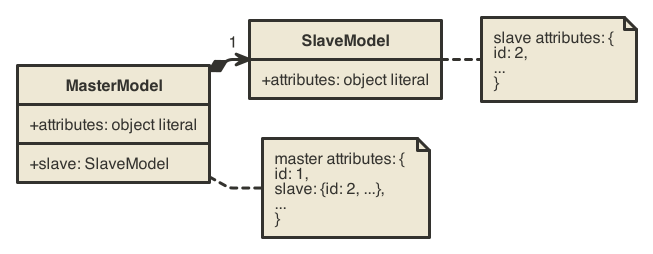
Child models are supposed to be created from object literals:
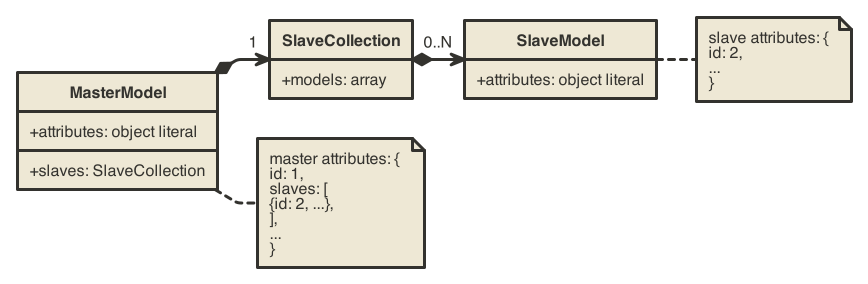
Child collections are supposed to be created from arrays:
Initialization of a *composite model* should include the following parts:
1. Provide the `composite` configuration object as a property in the
prototype or in the new instance initialization `options`
2. Call the `makeComposite` method from the `constructor` or from the
`initialize` method
3. Extend the "master" model's prototype by calling the
`Backbone.mixinCompositeModel` method
```javascript
var MasterModel = Backbone.Model.extend({
// Declare what attributes map to what child models or collections
composite: {
child: SlaveModel,
},
initialize: function (attributes, options) {
// Initialize the child models and collections
this.makeComposite(options);
},
...
});
// Extend the prototype with methods managing the child models and collections
Backbone.mixinCompositeModel(MasterModel.prototype);
```
### Composite Configuration
The `composite` configuration object maps an attribute name to the "slave"
model specification:
```text
'': <"slave" model specification>
```
The *attribute name* has to exist in the `this.attributes` of the "master"
model and will back up the "slave" model or collection. The property on the
"master" model will be created using the attribute name by default.
The *"slave" model specification* can be either a [`Backbone.Model`]
descendant for "slave" models or a [`Backbone.Collection`] descendant for
"slave" collections. It will be the function object to create the "slave"
model or collection from:
```text
'': Backbone.Model | Backbone.Collection
```
The default creation and maintenance of the "slave" models and collections
can be overridden by passing an object literal as the "slave" model
specification:
```text
'': {
type: Backbone.Model | Backbone.Collection,
...
}
```
The following properties of the "slave" model specification object are
supported:
* `type`: [`Backbone.Model`] descendant for "slave" models or a
[`Backbone.Collection`] descendant for "slave" collections (required)
* `property`: Property name to store the "slave" model or collection on the
"master" model with (optional; the attribute name is the default)
* `options`: Additional options to pass to the constructor of the "slave"
model or collection (optional; undefined by default)
* `method`: Method to call on the "slave" model or collection if updated data
are being set (optional; `set` is the default for models, `add` for
collections)
* `parse`: Function to call before the value is passed to child model or
collection constructor or to the `set` / `add` method to "massage" the
input data (optional; `undefined` is the default)
### Configuration Examples
Maintain a `parent` model based on the `this.attributes.parent` object
and a `versions` collection based on the `this.attributes.versions` array
from the composite model:
```javascript
composite: {
parent: FolderModel,
versions: VersionCollection
}
```
Name the property on the composite model "parent", although the backing up
property is called "parent_expanded":
```javascript
composite: {
parent_expanded: {
type: FolderModel,
property: 'parent'
}
}
```
Ensure that the "slave" model has always a property `child_id` with the value
of the `id` property of the "master" model:
```javascript
composite: {
parent: {
type: FolderModel,
parse: function (attributes, options) {
var id = this.get('id');
if (id != null) {
attributes || (attributes = {});
attributes.child_id = id;
}
return attributes;
}
}
}
```
Use the `reset` method to populate the "slave" collection instead of the
`add` method, which is used by default:
```javascript
composite: {
versions: {
type: VersionCollection,
method: 'reset'
}
}
```
## What Is It For?
* Forward changes (main model attributes -> child model or collection):
+ Create a property on the main model with the child model or collection
automatically
+ If the root attribute on the main model, which backs up the child model
or collection, changes by calling the `set` method, propagate the change
to the child model or collection
* You need to fetch or constantly re-fetch the main model and have the
listeners (views) notified about changes in the child models or collections.
You can get the up-to-date content of all nested models and collections by
calling `toJSON` of the master model.
## What Is It Not For?
* Backward changes (child model or collection: -> main model attributes):
+ If an attribute of the child model or a model in the child collection
changes, propagate the change to the object under the root attribute,
which backs up the child model or collection
Instead of updating `attributes` of the master model directly, you can
consider calling `set/unset/clear/add/remove/reset` methods of nested models
and collections. You will be able to get the up-to-date content of all nested
models and collections by calling `toJSON` of the master model.
## Installation
Make sure that you have [NodeJS] >= 6 installed. You can use either `npm`
or `bower` to install this package and its dependencies.
With [NPM]:
```shell
npm install backbone.composite-model
```
With [Bower]:
```shell
bower install backbone.composite-model
```
## Build
Make sure that you have [NodeJS] >= 6 installed. Clone the Github
repository to a local directory, enter it and install the package
dependencies (including the development dependencies) by `npm`:
```shell
git clone https://github.com/prantlf/backbone.composite-model.git
cd backbone.composite-model
npm install
```
Examples and tests will be functional now.
## Contributing
In lieu of a formal styleguide, take care to maintain the existing coding
style. Add unit tests for any new or changed functionality.
Before you start, make sure that you have satisfied native dependencies
of the [node-canvas](https://github.com/Automattic/node-canvas) module,
which are described for every operating system at the [documentation wiki
of the project](https://github.com/Automattic/node-canvas/wiki/_pages).
First fork this repository and clone your fork locally instead of cloning
the original. See the "Build" chapter above for more details about how to
clone it and install the build dependencies.
Before you commit, update minified files and source maps, re-generate
documentation and check if tests succeed:
```shell
npm run-script build
npm run-script doc
npm test
```
Commit your changes to a separtate branch, so that you can create a pull
request for it:
```shell
git checkout -b
git commit -a
git push origin
```
## License
Copyright (c) 2015-2022 Ferdinand Prantl
Licensed under the MIT license.
[Backbone]: http://backbonejs.org/
[`Backbone.Model`]: http://backbonejs.org/#Model
[`Backbone.Collection`]: http://backbonejs.org/#Collection
[Bower]: http://bower.io/
[NodeJS]: http://nodejs.org/
[NPM]: https://www.npmjs.com/