https://github.com/pratham2402/mini-javascript-projects
Explore a variety of small but interesting JavaScript projects designed to enhance your skills and understanding of web development. From simple games to handy utilities, each project offers a fun and educational experience.
https://github.com/pratham2402/mini-javascript-projects
beginner-project good-first-issue javascript-basics javascript-course javascript-projects
Last synced: 3 months ago
JSON representation
Explore a variety of small but interesting JavaScript projects designed to enhance your skills and understanding of web development. From simple games to handy utilities, each project offers a fun and educational experience.
- Host: GitHub
- URL: https://github.com/pratham2402/mini-javascript-projects
- Owner: pratham2402
- License: gpl-3.0
- Created: 2024-04-16T14:46:30.000Z (over 2 years ago)
- Default Branch: main
- Last Pushed: 2024-06-25T12:40:30.000Z (about 2 years ago)
- Last Synced: 2024-06-26T06:28:44.705Z (about 2 years ago)
- Topics: beginner-project, good-first-issue, javascript-basics, javascript-course, javascript-projects
- Language: CSS
- Homepage:
- Size: 13 MB
- Stars: 0
- Watchers: 1
- Forks: 0
- Open Issues: 1
-
Metadata Files:
- Readme: README.md
- License: LICENSE.md
Awesome Lists containing this project
README


[](https://github.com/pratham2402)
[](https://github.com/pratham2402?tab=repositories)
[](https://forthebadge.com)
[](https://forthebadge.com)
[](https://forthebadge.com)
# Javascript Mini Projects 
> A collection of easy & small javascript projects to help you improve your programming skills.
##  Aim Of The Project
Welcome to JS Playroom 🎉
Whether you're a curious newbie dipping your toes into the vast ocean of JavaScript or a seasoned developer looking to share your wisdom, you've found the perfect spot! This playground is where we come together to learn, collaborate, and have fun with JavaScript projects.
##  Contributing
Step 1: Star The Repo
Star the repo by pressing the topmost-right button to start your wonderful journey

---
Step 2: Fork it
On the [GitHub page for this repository](https://github.com/pratham2402/mini-javascript-projects), click on the Button "**Fork**".

---
Step 3: Clone it
- **Method 1:** GitHub Desktop
> ⚠️ **NOTE:** If you're not familiar with Git, using **GitHub Desktop Application** is a better start. If you choose this method, make sure to download it before continuing reading.
>
> ❗❗ Access link to download [**here**](https://desktop.github.com).
Learn more about how to clone the remote respository on your local machine using **GitHub Desktop** [here](https://docs.github.com/en/desktop/contributing-and-collaborating-using-github-desktop/adding-and-cloning-repositories/cloning-and-forking-repositories-from-github-desktop#cloning-a-repository).
- **Method 2:** Git
Clone the forked repository. Open git bash and type:
```bash
git clone https://github.com//mini-javascript-projects
```
> This makes a local copy of the repository in your machine.
>
> ⚠️ **Replace \!**
Learn more about [forking](https://help.github.com/en/github/getting-started-with-github/fork-a-repo) and [cloning a repo](https://docs.github.com/en/github/creating-cloning-and-archiving-repositories/cloning-a-repository).
---
Step 4: Create your feature branch
Always keep your local copy of the repository updated with the original repository.
Before making any changes and/or in an appropriate interval, follow the following steps:
- **Method 1:** GitHub Desktop
Learn more about how to create new branch [here](https://docs.github.com/en/desktop/contributing-and-collaborating-using-github-desktop/making-changes-in-a-branch/managing-branches#creating-a-branch) and how to fetch and pull origin from/to your local machine [here](https://docs.github.com/en/desktop/contributing-and-collaborating-using-github-desktop/keeping-your-local-repository-in-sync-with-github/syncing-your-branch).
Learn more about how to fetch and pull origin from/to your local machine using **GitHub Desktop** [here](https://docs.github.com/en/desktop/contributing-and-collaborating-using-github-desktop/keeping-your-local-repository-in-sync-with-github/syncing-your-branch).
- **Method 2:** Git
Run the following commands **_carefully_** to update your local repository
```sh
# If you cloned a while ago, get the latest changes from upstream
git checkout
git pull upstream
# Make a feature branch (Always check your current branch is up to date before creating a new branch from it to avoid merge conflicts)
git checkout -b
#
```
---
Step 5: Ready, Set, Go...
Once you have completed these steps, you are ready to start contributing to the project and creating **pull requests**.
- Create a folder in
[projects directory](https://github.com/pratham2402/mini-javascript-projects) according to your project name.
> The folder name should follow the following format "Your_Project_Name_Here". For example: Dice_Stimulator
- Write your code and add to the respective folder in the projects directory, locally.
- Don't forget to add a `README.md` in your folder.
* **Method 1:** GitHub Desktop
Learn more how to pull request from your local machine using **GitHub Desktop** to the main repo [here](https://docs.github.com/en/desktop/contributing-and-collaborating-using-github-desktop/working-with-your-remote-repository-on-github-or-github-enterprise/viewing-a-pull-request-in-github-desktop).
- **Method 2:** Git
Add the changes with `git add`, `git commit`:
```bash
git add -A
git commit -m ""
```
Push the code _to your repository_.
```bash
git push origin
```
---
Step 6: Pull Request
Go to the GitHub page of _your fork_, and **make a pull request**:
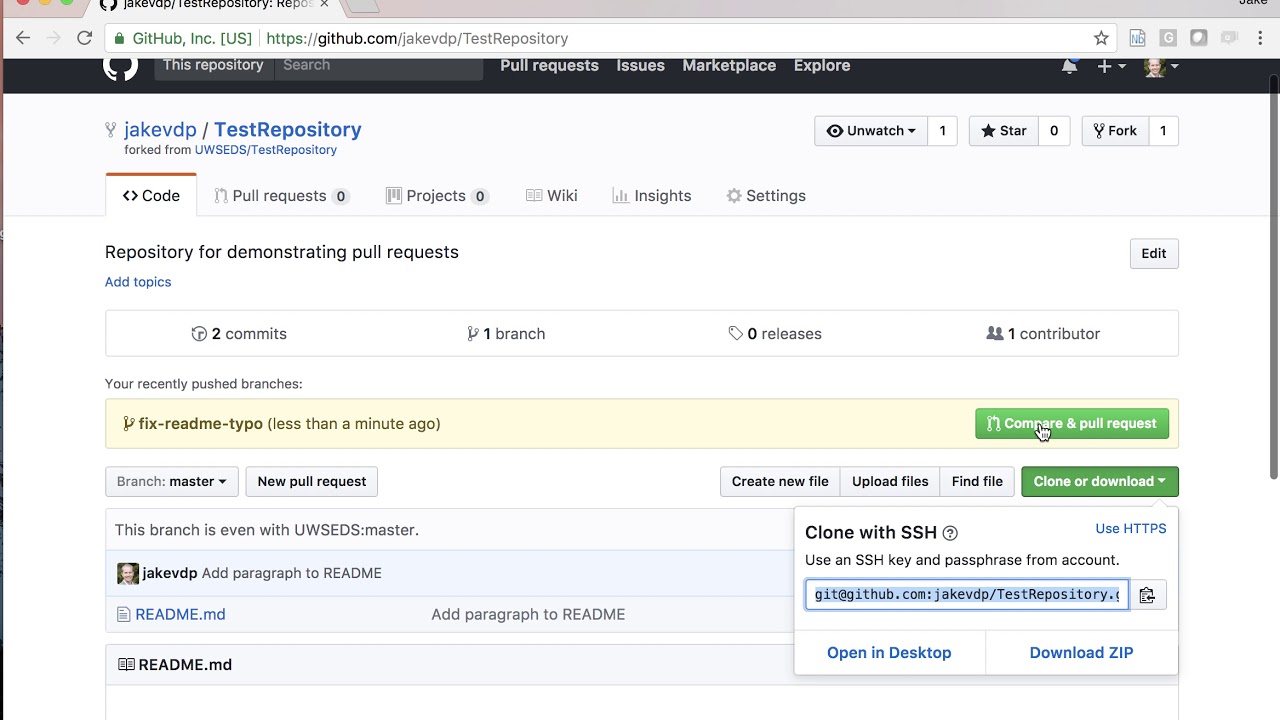
Read more about pull requests on the [GitHub help pages](https://help.github.com/en/github/collaborating-with-issues-and-pull-requests/creating-a-pull-request).
Now wait, until _your Pull Request_ is approved! If there are any conflicts, you will get a notification.
##  README Template for scripts
please make sure to add a `README.md` file that follow the same construction as this template for consistency.
[README Template](https://github.com/pratham2402/mini-javascript-projects/blob/main/README_TEMPLATE.md)
##  Projects
| Sr No | Project | Description | Author |
| ----- | --------------------------------------------------------------------------------------------------------------------- | -------------------------------------------------------------------------------------------------------------------------------------------------------------------------------------------------------------------------------------------------------------------------------------------------------- | ---------------------------------------------------------- |
| 1 | [Counter](https://github.com/pratham2402/mini-javascript-projects/tree/main/Counter) | This is a simple counter made using Javascript. | [Pratham Bhosale](https://github.com/pratham2402) |
| 2 | [Color Flipper](https://github.com/pratham2402/mini-javascript-projects/tree/main/Color%20Flipper) | This is a simple color flipper made using Javascript. Get random colors and respective hex codes by clicking the button | [Pratham Bhosale](https://github.com/pratham2402) |
| 3 | [Review Project](https://github.com/pratham2402/mini-javascript-projects/tree/main/Review%20Project) | This is a simple review project made using Javascript. Get review boxes. | [Pratham Bhosale](https://github.com/pratham2402) |
| 4 | [To-Do List](https://github.com/pratham2402/mini-javascript-projects/tree/main/Todo_list) | This is a simple to-do list made using Javascript. Complete your tasks today! | [saprameya](https://github.com/saprameya) |
##  Our Contributors

##  Feedback
If you have any feedback or ideas to improve this project, feel free to contact me via

