https://github.com/prbonn/phenobench
PhenoBench Development Kit
https://github.com/prbonn/phenobench
dataset leaf-instance-segmentation panoptic-segmentation phenobench plant-detection semantic-segmentation
Last synced: 12 months ago
JSON representation
PhenoBench Development Kit
- Host: GitHub
- URL: https://github.com/prbonn/phenobench
- Owner: PRBonn
- License: other
- Created: 2023-07-13T19:07:54.000Z (about 3 years ago)
- Default Branch: main
- Last Pushed: 2023-07-28T13:02:26.000Z (about 3 years ago)
- Last Synced: 2025-04-13T14:46:53.106Z (over 1 year ago)
- Topics: dataset, leaf-instance-segmentation, panoptic-segmentation, phenobench, plant-detection, semantic-segmentation
- Language: Python
- Homepage: https://www.phenobench.org
- Size: 22.5 KB
- Stars: 26
- Watchers: 5
- Forks: 4
- Open Issues: 1
-
Metadata Files:
- Readme: README.md
- License: LICENSE
- Citation: CITATION.cff
Awesome Lists containing this project
README
# PhenoBench Development Kit
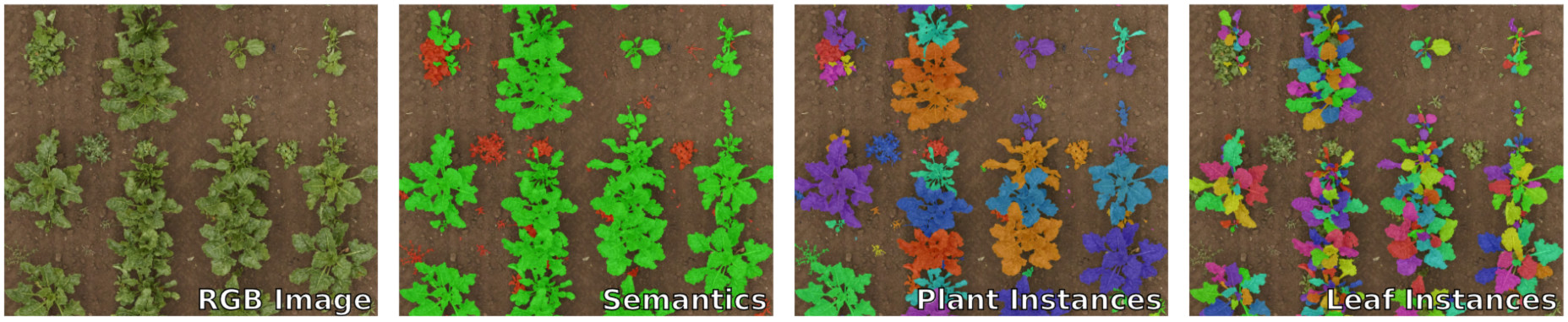
[PhenoBench](https://www.phenobench.org) is a large dataset and benchmarks for the semantic interpretation of images of real agricultural fields. Together with the dataset, we provide a development kit that provides:
- a framework-agnostic data loader.
- visualization functions for drawing our data format.
- evaluation scripts, `phenobench-eval`, for all tasks (also used on the CodaLab servers).
- validator, called `phenobench-validator`, checking CodaLab submission files for consistency
For more information on the dataset, please visit [www.phenobench.org](https://www.phenobench.org).
## Getting started
1. [Download](https://www.phenobench.org/dataset.html) the dataset.
2. Install the development kit: `pip install phenobench`.
3. Explore the data with the [tutorial notebook](phenobench_tutorial.ipynb).
4. See the [code of our baselines](https://github.com/PRBonn/phenobench-baselines) as a starting point or train your own models.
5. See the [FAQ](#frequently-asked-questions) for common questions and troubleshooting.
If you discover a problem or have general questions regarding the dataset, don't hesitate to open an issues. We will try to resolve your issue as quickly as possible.
## Evaluation scripts (`phenobench-eval`)
**Important:** Install all dependencies with `pip install "phenobench[eval]"`.
For evaluating and computing the metrics for a specific task, you can run the `phenobench-eval` tool as follows:
```bash
$ phenobench-eval --task --phenobench_dir --prediction_dir --split
```
- `task` is one of the following options: `semantics`, `panoptic`, `leaf_instances`, `plant_detection`, `leaf_detection`, or `hierarchical`.
- `phenobench_dir` is the root directory of the PhenoBench dataset, where `train`, `val` directories are located.
- `prediction_dir` is the directory containing the predictions as sub-folders, which depend on the specific tasks.
- `split` is either `train` or `val`.
Note that **all ablation studies of your approach should run on the validation set**. Thus, we also provide a comparably large validation set to enable a solid comparison of different settings of your approach.
## CodaLab Submission Validator (`phenobench-validator`)
Before you submit a zip file to our CodaLab competitions, see also our available [benchmarks](https://www.phenobench.org/benchmarks.html), you can use the `phenobench-validator` to check your submission for consistency. The tool is also part of the pip package, therefore after installing the package via pip, you can call the `phenobench-validator` as follows:
```bash
$ phenobench-validator --task --phenobench_dir --zipfile
```
- `task` is one of the following options: `semantics`, `panoptic`, `leaf_instances`, `plant_detection`, `leaf_detection`, or `hierarchical`.
- `phenobench_dir` is the root directory of the PhenoBench dataset, where `train`, `val` directories are located.
- `zipfile` is the zip file that you want to submit to the corresponding benchmark on CodaLab.
## Frequently Asked Questions
**Question:** What are the usage restrictions of the PhenoBench dataset?
**Answer:** We distribute the dataset using the CC-BY-SA International 4.0 license, which allows research but also commercial usage as long as the dataset is properly attributed (via a citation of the corresponding paper) and distributed with the same license if altered or modified. See also our [dataset overview page](https://www.phenobench.org/dataset.html) for the full license text, etc.