https://github.com/prbonn/pin_slam
📍PIN-SLAM: LiDAR SLAM Using a Point-Based Implicit Neural Representation for Achieving Global Map Consistency
https://github.com/prbonn/pin_slam
Last synced: over 1 year ago
JSON representation
📍PIN-SLAM: LiDAR SLAM Using a Point-Based Implicit Neural Representation for Achieving Global Map Consistency
- Host: GitHub
- URL: https://github.com/prbonn/pin_slam
- Owner: PRBonn
- License: mit
- Created: 2024-01-05T12:45:37.000Z (over 2 years ago)
- Default Branch: main
- Last Pushed: 2024-04-12T15:01:11.000Z (over 2 years ago)
- Last Synced: 2024-04-12T22:43:56.008Z (over 2 years ago)
- Language: Python
- Homepage:
- Size: 4.59 MB
- Stars: 200
- Watchers: 20
- Forks: 13
- Open Issues: 0
-
Metadata Files:
- Readme: README.md
- License: LICENSE
Awesome Lists containing this project
README
📍PIN-SLAM: LiDAR SLAM Using a Point-Based Implicit Neural Representation for Achieving Global Map Consistency


Yue Pan
·
Xingguang Zhong
·
Louis Wiesmann
.
Thorbjörn Posewsky
.
Jens Behley
·
Cyrill Stachniss
Paper | Video
**TL;DR: PIN-SLAM is a full-fledged implicit neural LiDAR SLAM system including odometry, loop closure detection, and globally consistent mapping**

*Globally consistent point-based implicit neural (PIN) map built with PIN-SLAM in Bonn. The high-fidelity mesh can be reconstructed from the neural point map.*
----
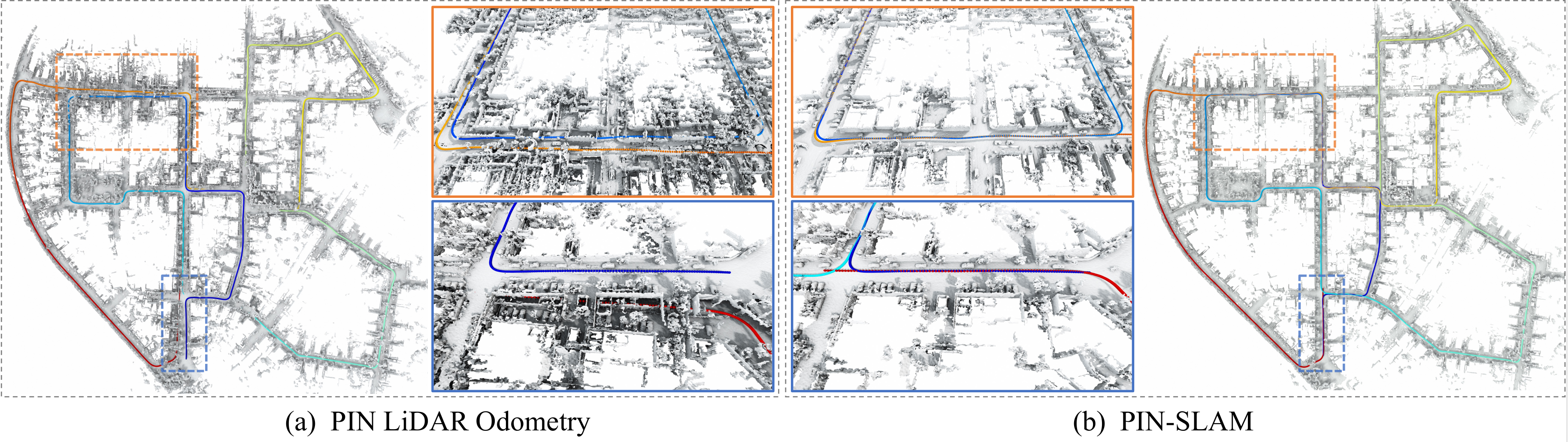
*Comparison of (a) the inconsistent mesh with duplicated structures reconstructed by PIN LiDAR odometry, and (b) the globally consistent mesh reconstructed by PIN-SLAM.*
----
| Globally Consistent Mapping | Various Scenarios | RGB-D SLAM Extension |
| :-: | :-: | :-: |
| | | |
----
**Update: New GUI**


Table of Contents
## Abstract
[Details (click to expand)]
Accurate and robust localization and mapping are
essential components for most autonomous robots. In this paper,
we propose a SLAM system for building globally consistent maps,
called PIN-SLAM, that is based on an elastic and compact
point-based implicit neural map representation. Taking range
measurements as input, our approach alternates between incremental learning of the local implicit signed distance field
and the pose estimation given the current local map using a
correspondence-free, point-to-implicit model registration. Our
implicit map is based on sparse optimizable neural points,
which are inherently elastic and deformable with the global pose
adjustment when closing a loop. Loops are also detected using the
neural point features. Extensive experiments validate that PIN-SLAM is robust to various environments and versatile to different
range sensors such as LiDAR and RGB-D cameras. PIN-SLAM
achieves pose estimation accuracy better or on par with the state-of-the-art LiDAR odometry or SLAM systems and outperforms
the recent neural implicit SLAM approaches while maintaining
a more consistent, and highly compact implicit map that can be
reconstructed as accurate and complete meshes. Finally, thanks to
the voxel hashing for efficient neural points indexing and the fast
implicit map-based registration without closest point association,
PIN-SLAM can run at the sensor frame rate on a moderate GPU.
## Installation
### Platform requirement
* Ubuntu OS (tested on 20.04)
* With GPU (recommended) or CPU only (run much slower)
* GPU memory requirement (> 4 GB recommended)
* Windows/MacOS with CPU-only mode
### 0. Clone the repository
```
git clone git@github.com:PRBonn/PIN_SLAM.git
cd PIN_SLAM
```
### 1. Set up conda environment
```
conda create --name pin python=3.10
conda activate pin
```
### 2. Install the key requirement PyTorch
```
conda install pytorch==2.5.1 torchvision==0.20.1 torchaudio==2.5.1 pytorch-cuda=11.8 -c pytorch -c nvidia
```
The commands depend on your CUDA version (check it by `nvcc --version`). You may check the instructions [here](https://pytorch.org/get-started/previous-versions/).
### 3. Install other dependency
```
pip3 install -r requirements.txt
```
----
## Run PIN-SLAM
### Sanity test
For a sanity test, do the following to download an example part (first 100 frames) of the KITTI dataset (seq 00):
```
sh ./scripts/download_kitti_example.sh
```
And then run:
```
python3 pin_slam.py ./config/lidar_slam/run_demo.yaml -vsm
```
[Details (click to expand)]
You can visualize the SLAM process in PIN-SLAM viewer GUI and check the results in the `./experiments` folder.
Use `run_demo_sem.yaml` if you want to conduct metric-semantic SLAM using semantic segmentation labels:
```
python3 pin_slam.py ./config/lidar_slam/run_demo_sem.yaml -vsm
```
Use `run_kitti_color.yaml` if you want to test PIN-SLAM with the colorized point cloud using also the RGB images:
```
python3 pin_slam.py ./config/lidar_slam/run_kitti_color.yaml kitti 00 -i ./data/kitti_example -vsmd
```
If you are running on a server without an X service (you may first try `export DISPLAY=:0`), then you can turn off the visualization `-v` flag:
```
python3 pin_slam.py ./config/lidar_slam/run_demo.yaml -sm
```
If you don't have a Nvidia GPU on your device, then you can turn on the CPU-only operation by adding the `-c` flag:
```
python3 pin_slam.py ./config/lidar_slam/run_demo.yaml -vsmc
```
### Run on your datasets
Follow the instructions on how to run PIN-SLAM by typing:
```
python3 pin_slam.py -h
```
For an arbitrary data sequence with point clouds in the format of `*.ply`, `*.pcd`, `*.las` or `*.bin`, you can run with the default config file by:
```
python3 pin_slam.py -i /path/to/your/point/cloud/folder -vsm
```
[More Usage (click to expand)]
To run PIN-SLAM with a specific config file, you can run:
```
python3 pin_slam.py path_to_your_config_file.yaml -vsm
```
The flags `-v`, `-s`, `-m` toggle the viewer GUI, map saving and mesh saving, respectively.
To specify the path to the input point cloud folder, you can either set `pc_path` in the config file or set `-i INPUT_PATH` upon running.
For pose estimation evaluation, you may also set `pose_path` in the config file to specify the path to the reference pose file (in KITTI or TUM format).
For some popular datasets, you can also set the dataset name and sequence name upon running. For example:
```
# KITTI dataset sequence 00
python3 pin_slam.py ./config/lidar_slam/run_kitti.yaml kitti 00 -vsm
# MulRAN dataset sequence KAIST01
python3 pin_slam.py ./config/lidar_slam/run_mulran.yaml mulran kaist01 -vsm
# Newer College dataset sequence 01_short
python3 pin_slam.py ./config/lidar_slam/run_ncd.yaml ncd 01 -vsm
# Replica dataset sequence room0
python3 pin_slam.py ./config/rgbd_slam/run_replica.yaml replica room0 -vsm
```
**Use specific data loaders with the -d flag**
We also support loading data from rosbag, mcap or pcap (ros2) using specific data loaders (originally from [KISS-ICP](https://github.com/PRBonn/kiss-icp)). You need to set the flag `-d` to use such data loaders. For example:
```
# Run on a rosbag or a folder of rosbags with certain point cloud topic, the same applies for mcap bags
python3 pin_slam.py ./config/lidar_slam/run.yaml rosbag point_cloud_topic_name -i /path/to/the/rosbag -vsmd
# If there's only one topic for point cloud in the rosbag, you can omit it
python3 pin_slam.py ./config/lidar_slam/run.yaml rosbag -i /path/to/the/rosbag -vsmd
```
The data loaders for [some specific datasets](https://github.com/PRBonn/PIN_SLAM/tree/main/dataset/dataloaders) are also available. You need to set the flag `-d` to use such data loaders.
```
Available dataloaders: ['apollo', 'boreas', 'generic', 'helipr', 'kitti', 'kitti360', 'kitti_mot', 'kitti_raw', 'mcap', 'mulran', 'ncd', 'nclt', 'neuralrgbd', 'nuscenes', 'ouster', 'replica', 'rosbag', 'tum']
```
For example, you can run on Replica RGB-D dataset without preprocessing the data by:
```
# Download data
sh scripts/download_replica.sh
# Run PIN-SLAM
python3 pin_slam.py ./config/rgbd_slam/run_replica.yaml replica room0 -i data/Replica -vsmd
```
For example, you can run on [KITTI-MOT dataset](https://www.cvlibs.net/datasets/kitti/eval_tracking.php) to test SLAM in dynamic scenes with online moving object segementation (MOS) by:
```
python pin_slam.py ./config/lidar_slam/run_kitti_mos.yaml kitti_mot 00 -i data/kitti_mot -vsmd --deskew
```
Other examples:
```
# MulRan sequence DCC01
python3 pin_slam.py ./config/lidar_slam/run_mulran.yaml mulran -i data/MulRan/dcc/DCC01 -vsmd
# KITTI 360 sequence 00
python3 pin_slam.py ./config/lidar_slam/run_kitti_color.yaml kitti360 00 -i data/kitti360 -vsmd --deskew
# M2DGR sequence street_01
python3 pin_slam.py ./config/lidar_slam/run.yaml rosbag -i data/m2dgr/street_01.bag -vsmd
# Newer College 128 sequence stairs
python3 pin_slam.py ./config/lidar_slam/run_ncd_128_s.yaml rosbag -i data/ncd128/staris/ -vsmd
# Hilti sequence uzh_tracking_area_run2
python3 pin_slam.py ./config/lidar_slam/run_hilti.yaml rosbag -i data/Hilti/uzh_tracking_area_run2.bag -vsmd
```
The SLAM results and logs will be output in the `output_root` folder set in the config file or specified by the `-o OUTPUT_PATH` flag.
For evaluation, you may check [here](https://github.com/PRBonn/PIN_SLAM/blob/main/eval/README.md) for the results that can be obtained with this repository on a couple of popular datasets.
The training logs can be monitored via Weights & Bias online if you set the flag `-w`. If it's your first time using [Weights & Bias](https://wandb.ai/site), you will be requested to register and log in to your wandb account. You can also set the flag `-l` to turn on the log printing in the terminal. If you want to get the dense merged point cloud map using the estimated poses of PIN-SLAM, you can set the flag `-p`.
### ROS 1 Support
If you are not using PIN-SLAM as a part of a ROS package, you can avoid the catkin stuff and simply run:
```
python3 pin_slam_ros.py path_to_your_config_file.yaml point_cloud_topic_name
```
[Details (click to expand)]
For example:
```
python3 pin_slam_ros.py ./config/lidar_slam/run.yaml /os_cloud_node/points
python3 pin_slam_ros.py ./config/lidar_slam/run.yaml /velodyne_points
```
After playing the ROS bag or launching the sensor you can then visualize the results in Rviz by:
```
rviz -d ./config/pin_slam_ros.rviz
```
You may use the ROS service `save_results` and `save_mesh` to save the results and mesh (at a default resolution) in the `output_root` folder.
```
rosservice call /pin_slam/save_results
rosservice call /pin_slam/save_mesh
```
The process will stop and the results and logs will be saved in the `output_root` folder if no new messages are received for more than 30 seconds.
If you are running without a powerful GPU, PIN-SLAM may not run at the sensor frame rate. You need to play the rosbag with a lower rate to run PIN-SLAM properly.
You can also put `pin_slam_ros.py` into a ROS package for `rosrun` or `roslaunch`.
We will add support for ROS2 in the near future.
### Inspect the results after SLAM
After the SLAM process, you can reconstruct mesh from the PIN map within an arbitrary bounding box with an arbitrary resolution by running:
```
python3 vis_pin_map.py path/to/your/result/folder -m [marching_cubes_resolution_m] -c [(cropped)_map_file.ply] -o [output_mesh_file.ply] -n [mesh_min_nn]
```
[Details (click to expand)]
Use `python3 vis_pin_map.py -h` to check the help message. The bounding box of `(cropped)_map_file.ply` will be used as the bounding box for mesh reconstruction. This file should be stored in the `map` subfolder of the result folder. You may directly use the original `neural_points.ply` or crop the neural points in software such as CloudCompare. The argument `mesh_min_nn` controls the trade-off between completeness and accuracy. The smaller number (for example `6`) will lead to a more complete mesh with more guessed artifacts. The larger number (for example `15`) will lead to a less complete but more accurate mesh. The reconstructed mesh would be saved as `output_mesh_file.ply` in the `mesh` subfolder of the result folder.
For example, for the case of the sanity test described above, run:
```
python3 vis_pin_map.py ./experiments/sanity_test_* -m 0.2 -c neural_points.ply -o mesh_20cm.ply -n 8
```
## Docker
[Details (click to expand)]
Thanks [@schneider-daniel](https://github.com/schneider-daniel) for providing a docker container.
Build the docker container:
```
cd docker
sudo chmod +x ./build_docker.sh
./build_docker.sh
```
After building the container, configure the storage path in `start_docker.sh` and then run it by:
```
sudo chmod +x ./start_docker.sh
./start_docker.sh
```
## Citation
[Details (click to expand)]
If you use PIN-SLAM for any academic work, please cite our original [paper](https://ieeexplore.ieee.org/document/10582536).
```
@article{pan2024tro,
title = {{PIN-SLAM: LiDAR SLAM Using a Point-Based Implicit Neural Representation for Achieving Global Map Consistency}},
author = {Pan, Yue and Zhong, Xingguang and Wiesmann, Louis and Posewsky, Th{\"o}rbjorn and Behley, Jens and Stachniss, Cyrill},
journal = {IEEE Transactions on Robotics (TRO)},
volume = {40},
pages = {4045--4064},
year = {2024},
codeurl = {https://github.com/PRBonn/PIN_SLAM},
url = {https://www.ipb.uni-bonn.de/wp-content/papercite-data/pdf/pan2024tro.pdf}
}
```
## Contact
If you have any questions, please contact:
- Yue Pan {[yue.pan@igg.uni-bonn.de]()}
## Related Projects
[SHINE-Mapping (ICRA 23)](https://github.com/PRBonn/SHINE_mapping): Large-Scale 3D Mapping Using Sparse Hierarchical Implicit Neural Representations
[LocNDF (RAL 23)](https://github.com/PRBonn/LocNDF): Neural Distance Field Mapping for Robot Localization
[KISS-ICP (RAL 23)](https://github.com/PRBonn/kiss-icp): A LiDAR odometry pipeline that just works
[4DNDF (CVPR 24)](https://github.com/PRBonn/4dNDF): 3D LiDAR Mapping in Dynamic Environments using a 4D Implicit Neural Representation
[ENM-MCL (ICRA 25)](https://github.com/PRBonn/enm-mcl): Efficient Neural Map for Monte Carlo Localization
[PINGS](https://github.com/PRBonn/PINGS): Gaussian Splatting Meets Distance Fields within a Point-Based Implicit Neural Map