https://github.com/prihod/docker-modx
🐳 Docker-based local development environment for MODX CMS with PHP, MariaDB, Nginx, and advanced developer tools. Features automatic installation, data import/export, Xdebug, phpMyAdmin, MailHog, and more.
https://github.com/prihod/docker-modx
blackfire development-environment docker docker-compose local-development modx modx-revolution xdebug xhprof
Last synced: about 14 hours ago
JSON representation
🐳 Docker-based local development environment for MODX CMS with PHP, MariaDB, Nginx, and advanced developer tools. Features automatic installation, data import/export, Xdebug, phpMyAdmin, MailHog, and more.
- Host: GitHub
- URL: https://github.com/prihod/docker-modx
- Owner: Prihod
- Created: 2025-01-01T19:59:16.000Z (over 1 year ago)
- Default Branch: main
- Last Pushed: 2026-06-18T00:31:53.000Z (13 days ago)
- Last Synced: 2026-06-18T02:20:26.293Z (13 days ago)
- Topics: blackfire, development-environment, docker, docker-compose, local-development, modx, modx-revolution, xdebug, xhprof
- Language: PHP
- Homepage:
- Size: 11.3 MB
- Stars: 15
- Watchers: 2
- Forks: 5
- Open Issues: 1
-
Metadata Files:
- Readme: README.md
Awesome Lists containing this project
README
# Docker MODX - Local Development Environment
A ready-made solution for quick deployment of MODX in Docker containers. Perfect for local development of sites and extensions.
## 🚀 Quick Start
Before starting, make sure you have [Docker](https://www.docker.com/get-started/) installed on your computer
Clone the repository into the project directory
```bash
git clone "https://github.com/Prihod/docker-modx.git" ./
```
Start containers
```bash
docker-compose up -d
```
View MODX installation log
```bash
docker-compose logs -f php
```
The first start can take a few minutes while MODX is unpacked and installed.
During this time, the site can temporarily return `502 Bad Gateway`.
Wait until the `php` logs show `Modx installation is complete!` and `ready to handle connections`.
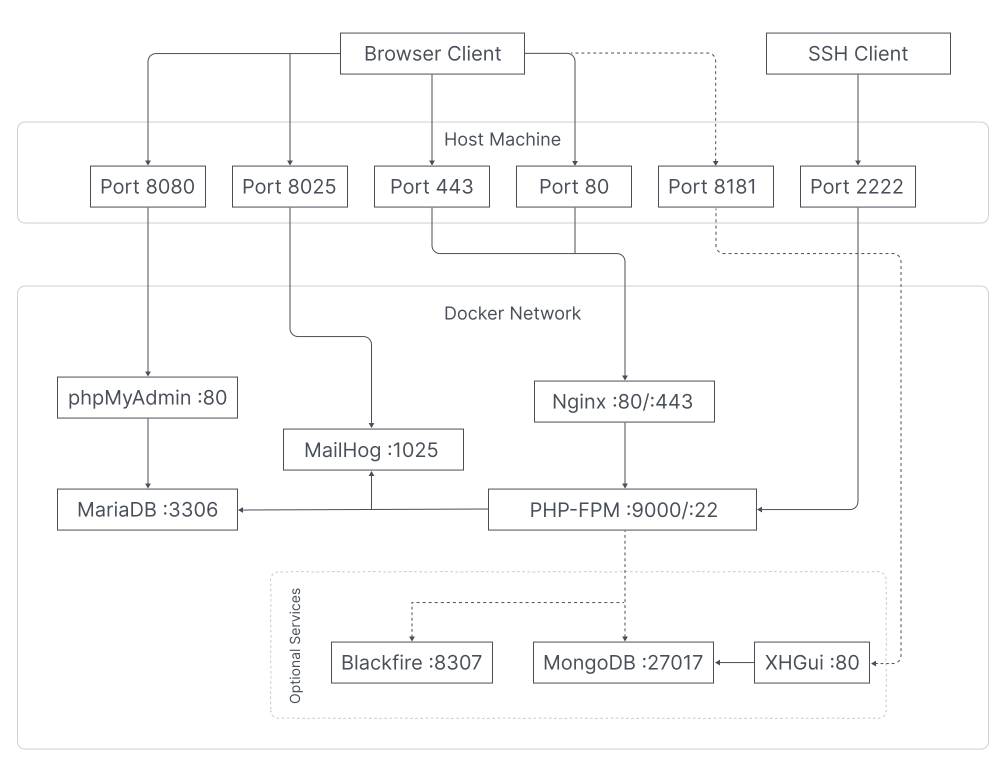
### URL list
| URL | Description |
|--------------------------|-----------------------------------------------|
| http://localhost/manager | MODX Admin. Login: `admin`, Password: `admin` |
| http://localhost:8080 | phpMyAdmin. Login: `modx`, Password: `modx` |
| http://localhost:8025 | MailHog |
| http://localhost:8181 | XHGui (optional) |
## ✨ Main Features
- Configurable PHP version
- Automatic MODX installation/update
- Data export/import with auto path correction
- Database management through phpMyAdmin
- Email testing via [MailHog](https://github.com/mailhog/MailHog)
- Self-signed SSL certificate
- SSH access
- Xdebug support
- Profiling through [Xhprof](https://www.php.net/manual/en/ref.xhprof.php) + [XHGui](https://github.com/perftools/xhgui)
- Integration with [Blackfire](https://www.blackfire.io/php)
## 🏗 Project Architecture
## 🗃️ Project Structure
Show structure
```
.
|-- .env
|-- .gitignore
|-- README.md
|-- docker
| |-- logs
| | |-- nginx
| | `-- php
| |-- mariadb
| | `-- conf
| | `-- custom.cnf
| |-- modx
| | |-- storage
| | | |-- backup
| | | `-- cache
| | `-- tools
| | `-- configurator
| | |-- composer.json
| | |-- config.inc.php
| | |-- example.config.inc.php
| | |-- run.php
| | |-- src
| | | |-- Runner
| | | | |-- Runner.php
| | | | `-- RunnerInterface.php
| | | |-- Tasks
| | | | |-- GrantAccessUserTask.php
| | | | |-- InstallPackagesTask.php
| | | | |-- MiniShop3Task.php
| | | | |-- SetOptionsTask.php
| | | | |-- Task.php
| | | | |-- TaskInterface.php
| | | | `-- TransportProvidersTask.php
| | | |-- Traits
| | | | |-- DocumentTrait.php
| | | | |-- ElementsTrait.php
| | | | |-- InitializeTrait.php
| | | | |-- OptionTrait.php
| | | | |-- PropertiesTrait.php
| | | | |-- SecurityTrait.php
| | | | `-- TransportProviderTrait.php
| | | `-- Utils
| | | `-- Logger.php
| | `-- storage
| | `-- ms3
| | |-- pages
| | | |-- cart.tpl
| | | |-- category.tpl
| | | |-- order.tpl
| | | `-- thanks.tpl
| | `-- templates
| | |-- base.tpl
| | |-- cart.tpl
| | |-- catalog.tpl
| | |-- order.tpl
| | |-- product.tpl
| | `-- thanks.tpl
| |-- nginx
| | |-- default.conf.template
| | `-- ssl
| |-- php
| | |-- Dockerfile
| | |-- conf
| | | |-- opcache.ini
| | | |-- php.ini
| | | |-- xdebug.ini
| | | `-- xhprof.ini
| | |-- sh
| | | |-- modx-clear-db.sh
| | | |-- modx-clear-site.sh
| | | |-- modx-configure.sh
| | | |-- modx-docker-start.sh
| | | |-- modx-download.sh
| | | |-- modx-export.sh
| | | |-- modx-generate-ssl.sh
| | | |-- modx-import.sh
| | | |-- modx-install.sh
| | | |-- modx-uninstall.sh
| | | `-- modx-upgrade.sh
| | `-- xhprof
| | |-- composer.json
| | `-- handler.php
| |-- volume
| | `-- mariadb
| `-- xhgui
| |-- Dockerfile
| |-- apache.conf
| |-- config.php
| `-- mongo.init.d
| `-- xhgui.js
|-- docker-compose.override.blackfire.yml
|-- docker-compose.override.xhprof.yml
|-- docker-compose.yml
`-- www
```
## 📦 PHP Extensions
- GD, PDO, MySQLi
- ImageMagick, PCNTL
- Redis, OPcache, Fileinfo
- Xdebug (optional)
- Xhprof (optional)
- Blackfire (optional)
## 🎬 Video - Practical guide
[](https://youtu.be/8rZopEWS7ao)
## 🖥️ Use Docker commands
### Reinstall MODX
```bash
MODX_RESET=1 docker-compose up -d
```
### Export Data
```bash
docker-compose exec php modx-export.sh
```
Data is saved in `./docker/modx/storage/backup`
### Import Data
Import from latest archive
```bash
MODX_IMPORT=latest docker-compose up -d
```
Import from specific archive
```bash
MODX_IMPORT= docker-compose up -d
```
The import archive should be located in the `./docker/modx/storage/backup` directory with the export file structure.
### SSH-Access
```bash
ssh dev@127.0.0.1 -p 2222 # Login: dev, Password: dev
```
## ⚙️ Configuration
All project settings are in the `.env` file. Below are the main parameters:
| Name | Default Value | Description |
|------------------------------|---------------|-------------------------------------------------------------------------------------------------------------------|
| PHP_VERSION | 8.4 | PHP-FPM version |
| MODX_VERSION | 3.2.1-pl | MODX version |
| MODX_INSTALL_ENABLE | 1 | Automatically install MODX |
| MODX_USE_CACHE_SOURCE | 1 | Save MODX setup archive |
| MODX_CONFIGURE_ENABLE | 0 | Run configuration script after MODX installation |
| MODX_CONFIGURE_DEV_MODE | 0 | Dev mode for MODX configuration script |
| MODX_TABLE_PREFIX | random:8 | Database table prefix. When set to `random:number`, generates a random string with specified number of characters |
| MODX_HTTP_HOST | localhost | Site hostname |
| MODX_LANGUAGE | en | MODX installation language |
| MODX_CMS_ADMIN | admin | MODX administrator login |
| MODX_CMS_PASS | admin | MODX administrator password |
| MODX_IMPORT_DB | 1 | Import MODX database |
| MODX_IMPORT_SITE | 1 | Import MODX files |
| MODX_EXPORT_DB | 1 | Export MODX database |
| MODX_EXPORT_SITE | 1 | Export MODX files |
| MODX_EXPORT_OVERWRITE_CONFIG | 0 | Overwrite configuration files data during export with values from `MODX_EXPORT_...` variables |
| XDEBUG_ENABLE | 0 | Install Xdebug extension for PHP-FPM |
| XHPROF_ENABLE | 0 | Install Xhprof extension for PHP-FPM |
| SSH_ENABLE | 1 | Enable SSH for `php` container |
| SSL_GENERATE | 1 | Generate self-signed SSL certificate |
| NGINX_PORT | 80 | NGINX port |
| MARIADB_PORT | 3306 | MariaDB port |
| PHPMYADMIN_PORT | 8080 | phpMyAdmin port |
| MAILHOG_PORT | 8025 | MailHog port |
| SMTP_PORT | 1025 | SMTP port |
| SMTP_HOST | mailhog | SMTP host |
## 🔧 Advanced Features
### MODX Auto-configuration
When `MODX_CONFIGURE_ENABLE = 1`, the configuration script from `./docker/modx/tools/configurator/run.php` runs after installation.
The script executes tasks specified in the `config.inc.php` configuration file in the `tasks` option.
When `MODX_CONFIGURE_DEV_MODE = 1`, after completing all tasks, MODX cache and logs won't be cleared, and the `./www/core/configurator` directory won't be deleted, allowing manual configuration script execution during development.
```sh
docker-compose exec php bash && php /var/www/html/core/configurator/run.php
```
#### Available Configuration Tasks
| Name | Key with options in config.inc.php | Description |
|------------------------|------------------------------------|--------------------------------------------------------|
| TransportProvidersTask | transport_providers | Adding transport providers |
| InstallPackagesTask | install_packages | Installing packages |
| SetOptionsTask | set_options | Configuring system parameters |
| GrantAccessUserTask | grant_access_user | Setting up access rights |
| MiniShop3Task | ms3 | Setting up miniShop3 store (optionally with demo data) |
### Creating Custom Tasks
1. Create a class in `./docker/modx/tools/configurator/src/Tasks`
2. Inherit it from the `Task` class
3. Implement `getName` and `execute` methods
4. Add the task to `config.inc.php`
### Example
Output all options from `config.inc.php` to MODX log:
```php
modx->log(\modX::LOG_LEVEL_ERROR, print_r($this->getProperties(), 1));
Logger::info("Finish execute my task!");
}
}
```
## 🛠 Developer Tools
### Xdebug
```env
XDEBUG_ENABLE=1
```
### Xhprof + XHGui
```env
XHPROF_ENABLE=1
# + rename docker-compose.override.xhprof.yml to docker-compose.override.yml
```
### Blackfire
```env
BLACKFIRE_ENABLE=1
BLACKFIRE_CLIENT_ID=
BLACKFIRE_CLIENT_TOKEN=
BLACKFIRE_SERVER_ID=
BLACKFIRE_SERVER_TOKEN=
# + rename docker-compose.override.blackfire.yml to docker-compose.override.yml
```
### ⚠️ Note
When changing configuration, rebuild the container:
```bash
docker-compose build --no-cache php
```
### Troubleshooting: `Error 503 - Could not load MODX config file`
This error means MODX installation did not finish, so `core/config/config.inc.php` was not created.
1. Rebuild the `php` container (required after updating startup scripts):
```bash
docker-compose build --no-cache php
```
2. Start containers and watch installation logs:
```bash
docker-compose up -d
docker-compose logs -f php
```
3. Wait for these lines in logs:
- `Modx installation is complete!`
- `ready to handle connections`
4. If needed, force a clean reinstall:
```bash
MODX_RESET=1 docker-compose up -d
```
## Main Docker and Docker Compose Commands
| **Command** | **Description** |
|---------------------------------------------------------|------------------------------------------------------------------------------------------|
| **Docker** | |
| `docker ps` | Shows running containers. |
| `docker restart ` | Restarts a container. |
| `docker logs ` | Shows container logs. |
| `docker exec -it bash` | Opens terminal inside container. |
| `docker system prune` | Removes unused data (containers, images, volumes, networks). |
| **Docker Compose** | |
| `docker-compose up` | Starts all services specified in `docker-compose.yml`. |
| `docker-compose up -d` | Starts services in background mode. |
| `docker-compose down` | Stops and removes services, networks, volumes created by `up`. |
| `docker-compose restart` | Restarts all services. |
| `docker-compose ps` | Shows list of running services. |
| `docker-compose logs` | Shows logs of all services. |
| `docker-compose logs --tail ` | Shows last `` lines of logs for all services. |
| `docker-compose logs -f ` | Shows and follows log stream for specified service. |
| `docker-compose logs -f --tail ` | Shows and follows log stream for specified service, starting from last `` lines. |
| `docker-compose exec bash` | Opens terminal inside specified service. |
| `docker-compose build` | Builds images for services from `docker-compose.yml`. |
| `docker-compose build --no-cache` | Builds images without using cache. |
| `docker-compose build --no-cache ` | Builds image for specified service without using cache. |
| `docker-compose top` | Shows processes running in services. |