https://github.com/primaryobjects/react-delete-row
ReactJs component for deleting a table row with a fade effect.
https://github.com/primaryobjects/react-delete-row
bootstrap css fade html5 npm-module npm-package react react-native reactjs table typescript
Last synced: 5 months ago
JSON representation
ReactJs component for deleting a table row with a fade effect.
- Host: GitHub
- URL: https://github.com/primaryobjects/react-delete-row
- Owner: primaryobjects
- Created: 2021-06-18T20:02:05.000Z (about 5 years ago)
- Default Branch: master
- Last Pushed: 2024-06-08T04:41:22.000Z (about 2 years ago)
- Last Synced: 2025-10-13T07:03:50.796Z (10 months ago)
- Topics: bootstrap, css, fade, html5, npm-module, npm-package, react, react-native, reactjs, table, typescript
- Language: JavaScript
- Homepage:
- Size: 440 KB
- Stars: 0
- Watchers: 1
- Forks: 1
- Open Issues: 0
-
Metadata Files:
- Readme: readme.md
Awesome Lists containing this project
README
React Delete Row
================
A ReactJs UI component for rendering a table row with a delete button and fade effect.
## Screenshot
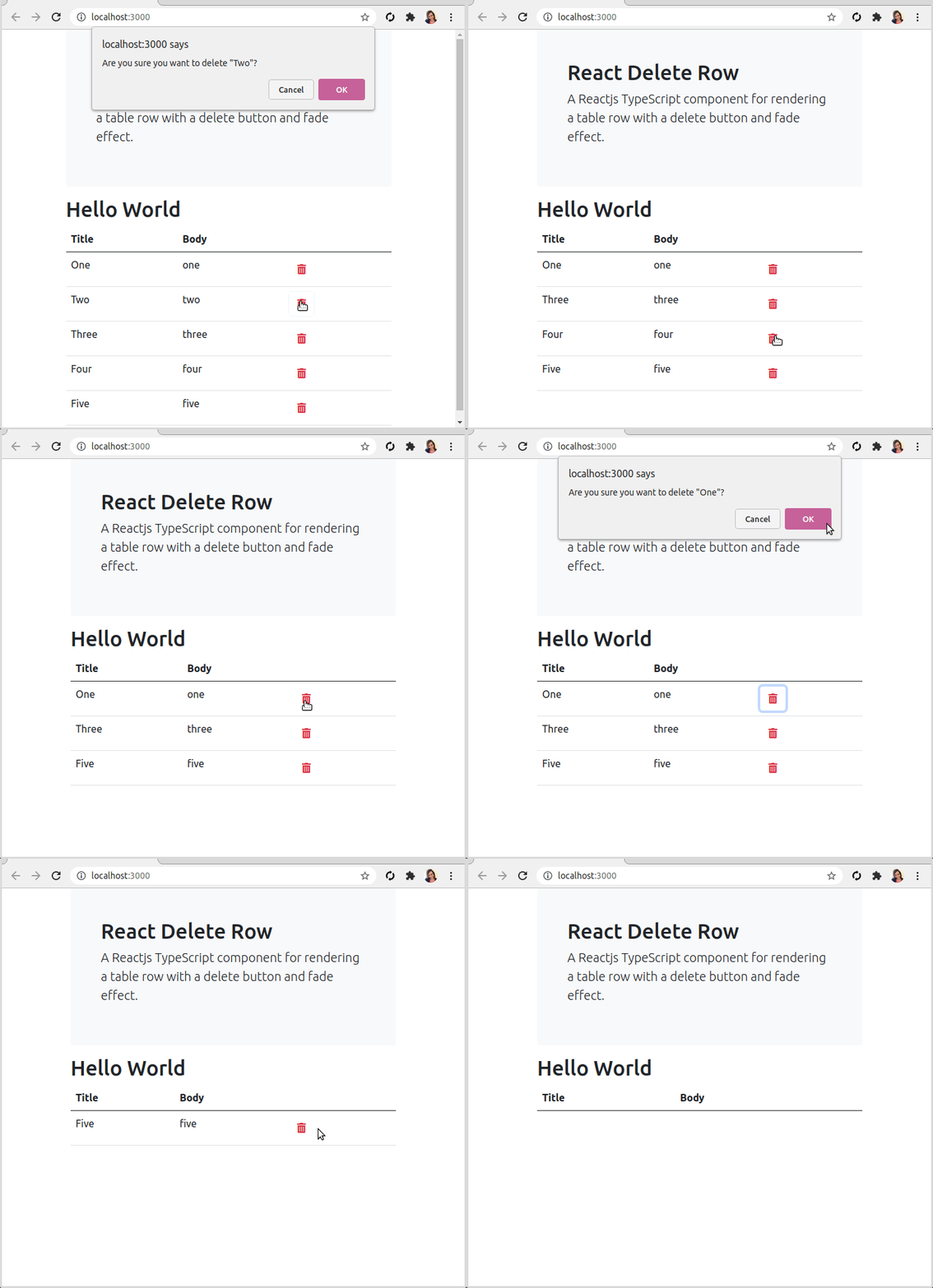
Try the [Demo](https://plnkr.co/edit/VwDltPC0SW90lCHx?preview)
## Usage
1. Install the react-delete-row module from npm.
```bash
npm install react-delete-row
```
2. Render an array of data in a table, with the first table body `` defined with ``.
```js
import ReactDeleteRow from 'react-delete-row';
// ...
const App = () => {
const data = [
{ title: 'One', body: 'one' },
{ title: 'Two', body: 'two' },
{ title: 'Three', body: 'three' }
];
return (
Title
Body
{ data.map((item, i) => { return (
{ return window.confirm(`Are you sure?`) }}>
{item.title}
{item.body}
)}) }
);
}
```
## Options
The following options are available on ReactDeleteRow:
- `data` - Payload data to return in event handler callbacks (onDelete, etc).
- `className` - CSS class to apply to the table row. *Optional*
- `iconClassName` - CSS class to apply to the delete icon. *Optional*
- `delay` - Number of milliseconds for the fade effect before removing the row from the DOM. *Default is 300ms*
- `deleteElement` - String or JSX elements (HTML) to render for the delete icon. *Default is 'X'*
- `onDelete` - Callback event handler for when the delete icon is clicked. Return `TRUE` to fade the row and remove from the DOM. Return `FALSE` to prevent removing the row. *Optional*
- `onDeleteComplete` - Callback event handler for after the row has been removed from the DOM. *Optional*
### Example Options
```js
}
iconClassName='text-danger'
className='text-success'
onDelete={ item => { return window.confirm(`Are you sure you want to delete "${item.title}"?`) }}>
{item.title}
{item.body}
```
### Example with onDeleteComplete
```js
{ if (window.confirm(`Are you sure you want to delete the item "${item.title}"?`)) {
this.onDelete(item.id);
return true;
}}}
onDeleteComplete={ item =>
// Remove item from state after row fades out.
this.setState(prevState => ({
items: prevState.items.filter(i => i.id !== item.id)
}))
}>
...
```
## Building the Library
To build the npm module, follow the steps below.
1. Clone the [repository](https://github.com/primaryobjects/react-delete-row).
2. Open a terminal and navigate to the root folder.
3. Run the command `npm install`.
4. Run the command `npm pack` to test the tarball for the npm publish.
*The contents from `npm pack` will include the `/dist` and `/src` folders, along with a package.json containing a `main` pointer to the file `/dist/index.js`.*
*You can also manually run the command `npm run prepare` to create a new build.*
## Running the Example
To run the example, follow the steps below.
1. Clone the [repository](https://github.com/primaryobjects/react-delete-row).
2. Open a terminal and navigate to the folder `test`.
3. Run the command `npm install`.
4. Run the command `npm start`.
## Notes
The component uses the CSS class `fade` to fade out the table row upon clicking. This can be overridden in your CSS to customize the animation effect.
```css
.fade {
opacity: 0;
transition: opacity 500ms;
}
```
## License
MIT
## Author
Kory Becker http://www.primaryobjects.com/kory-becker