https://github.com/pro-2684/scriptio
Load custom renderer-level scripts for QQNT
https://github.com/pro-2684/scriptio
javascript liteloaderqqnt userscript
Last synced: 4 months ago
JSON representation
Load custom renderer-level scripts for QQNT
- Host: GitHub
- URL: https://github.com/pro-2684/scriptio
- Owner: PRO-2684
- License: gpl-3.0
- Created: 2023-08-22T03:13:26.000Z (almost 3 years ago)
- Default Branch: main
- Last Pushed: 2024-11-26T08:42:50.000Z (over 1 year ago)
- Last Synced: 2024-11-26T09:32:44.038Z (over 1 year ago)
- Topics: javascript, liteloaderqqnt, userscript
- Language: JavaScript
- Homepage:
- Size: 1.03 MB
- Stars: 46
- Watchers: 1
- Forks: 5
- Open Issues: 3
-
Metadata Files:
- Readme: README.md
- License: LICENSE
Awesome Lists containing this project
README

# Scriptio
[](https://github.com/PRO-2684/Scriptio/blob/main/LICENSE)
[](https://github.com/PRO-2684/Scriptio/blob/main/.github/workflows/release.yml)
[](https://github.com/PRO-2684/Scriptio/releases)
[](https://github.com/PRO-2684/Scriptio/releases)
[](https://github.com/PRO-2684/Scriptio/releases/latest)
[LiteLoaderQQNT](https://github.com/mo-jinran/LiteLoaderQQNT) / QwQNT 插件,用于为 QQNT 加载任意 **渲染层** 的用户脚本。
你可能也感兴趣:[Transitio](https://github.com/PRO-2684/transitio),自定义用户样式加载器。
## 🪄 具体功能
- 导入/搜索/查看/删除用户脚本
- 启用/禁用用户脚本
- 用户脚本的实时响应
## 🖼️ 截图
> 演示中使用了 [MSpring-Theme](https://github.com/MUKAPP/LiteLoaderQQNT-MSpring-Theme),主题色为 `#74A9F6`。

## 📥 安装
### 稳定版
下载 Release 中的 `scriptio-release.zip`,解压后放入相对应的 `plugins/Scriptio` 文件夹中即可。(若没有该文件夹请自行创建)
### CI 版
若想体验最新的 CI 功能,可以下载源码后同上安装。(仅需保留下面列出的文件)
完成后的目录结构应该如下:
```
plugins (所有的插件目录)
└── scriptio (此插件目录)
├── manifest.json (LiteLoaderQQNT 插件元数据)
├── package.json (QwQNT 插件元数据)
├── main.js (插件代码)
├── preload.js (插件代码)
├── renderer.js (插件代码)
├── settings.html (插件设置界面)
├── icons/ (插件用到的图标)
└── modules/ (模块化的插件代码)
```
## 🤔 使用方法
> [!WARNING]
> 由于 js 代码的复杂性,禁用/修改部分脚本可能需要 **重启/重载生效**
- 导入脚本:在配置界面导入 JS 文件,或将之放入 `data/scriptio/scripts/` 文件夹。
- 用户脚本的编写请参考 [Wiki](https://github.com/PRO-2684/Scriptio/wiki)。
- 可以在此文件夹下创建多层目录,插件会自动扫描所有 JS 文件,但是设置界面导入的还是默认直接放在 `data/scriptio/scripts/` 下
- 搜索脚本:在设置界面搜索框中输入关键字即可。
- 未聚焦到其它输入框时可以直接按下 `Enter` 键或 `Ctrl+F` 聚焦到搜索框
- 根据空格将输入分解为多个关键词,所有关键词均大小写不敏感
- 可以通过 `@` 符号筛选满足指定条件的脚本
- `@enabled`/`@on`/`@1`:启用的脚本
- `@disabled`/`@off`/`@0`:禁用的脚本
- 搜索结果展示匹配 **所有普通关键词** 以及 **所有 @ 关键词** 的脚本
- 查看脚本
- 鼠标悬停在脚本标题上时,会显示其绝对路径。
- 鼠标悬停在脚本上时,会展示 "在文件夹中显示" 按钮。
- 删除脚本:鼠标悬停在脚本上并点击删除 `🗑️` 按钮,或进入,或进入 `data/scriptio/scripts/` 文件夹删除对应文件。
- 启用/禁用脚本:打开插件设置界面,将对应的脚本开关打开/关闭,支持的脚本即时生效。
- 若点击各个开关速度过快,可能会导致错位等情况,此时请重载窗口。
- 更新脚本:重新导入后重启或重载即可。
## 💻 调试
- 开发者模式 (不推荐):若您想要调试 **您的用户脚本**,可以在插件设置界面打开 *开发者模式*,此时插件会监控 `data/scriptio/scripts/` 文件夹,当发生更改时,会自动重载。
- Debug 模式:若您想要调试 **此插件本身**,可以使用 `--scriptio-debug` 参数启动 QQNT,此时插件会在控制台输出调试信息。
## 📜 用户脚本
> [!NOTE]
> 以下脚本均为由我/其它用户编写的用户脚本,不内置在插件中。
>
> 若你有愿意分享的脚本,欢迎 [提交 PR 或 Issue](https://github.com/PRO-2684/Scriptio/issues/1) 来将它们添加到这里。编写脚本前推荐先阅读 [Wiki](https://github.com/PRO-2684/Scriptio/wiki)。
访问 [此网址](https://pro-2684.github.io/?page=scriptio_userscripts) 查看用户脚本列表。
## ⭐ Star History
[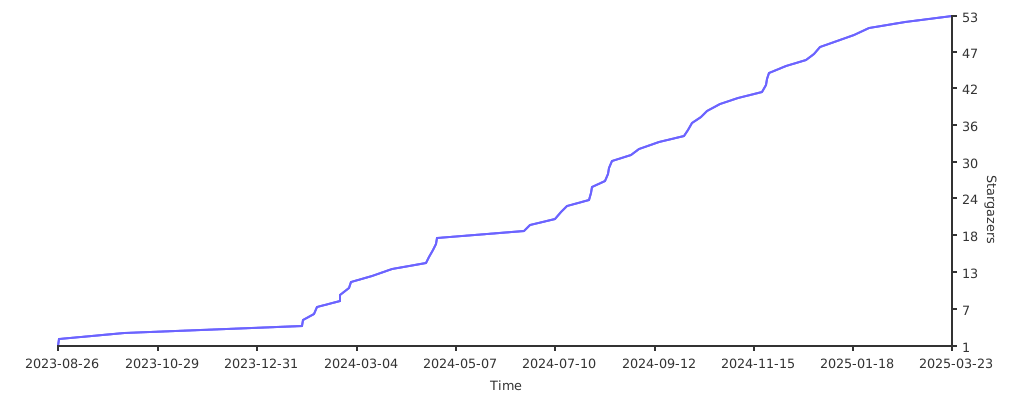](https://starchart.cc/PRO-2684/Scriptio)