https://github.com/progerxp/orphus
A Tiny Typo Reporter For Web Pages
https://github.com/progerxp/orphus
Last synced: about 1 year ago
JSON representation
A Tiny Typo Reporter For Web Pages
- Host: GitHub
- URL: https://github.com/progerxp/orphus
- Owner: ProgerXP
- License: cc0-1.0
- Created: 2020-03-18T15:19:45.000Z (over 6 years ago)
- Default Branch: master
- Last Pushed: 2023-01-24T18:12:01.000Z (over 3 years ago)
- Last Synced: 2025-04-05T12:42:03.280Z (about 1 year ago)
- Language: JavaScript
- Homepage:
- Size: 66.4 KB
- Stars: 18
- Watchers: 2
- Forks: 4
- Open Issues: 0
-
Metadata Files:
- Readme: README.md
- License: LICENSE
Awesome Lists containing this project
README
# Orphus.js - A Tiny Typo Reporter
Orphus is a tiny zero-configuration typo reporter for web pages.
- 6K minified, 2K gzipped, no dependencies
- invoked by Ctrl+Enter
- reports arriving by e-mail (by default)
- CORS-friendly (no AJAX, using `` + ``)
- cross-browser - supports even Internet Explorer 6
You can see it in action [here](https://laravel.ru), [here](https://proger.me) or [here](https://squizzle.me/js/sqimitive). Read about patching for WordPress [here](https://cs-cs.net/sistema-orphus#_orphus_progerxp____202301) (in Russian).
---
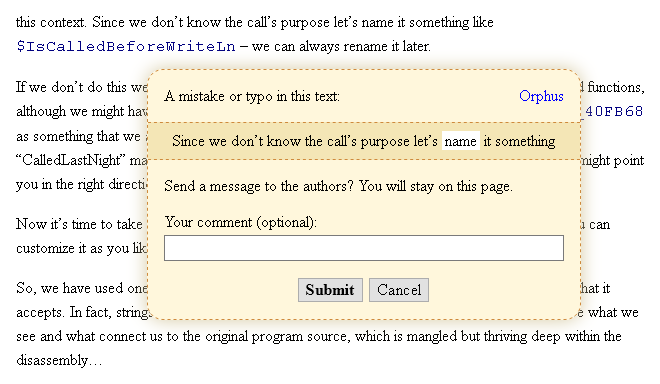
## Installation
### Frontend (JavaScript)
Put the following line anywhere **inside ``** (not inside ``):
```
```
It's best put early in `` so that Ctrl+Enter starts working without waiting for a long page to finish loading. Also, adding `async` or `defer` to that `` improves performance (but `defer` has the same effect as putting `<script>` right before `</body>`).
If you want to configure Orphus, do this anywhere **before** that line. For example, by default reports are sent to `/orphus.php` but you can use the PHP script on my page without touching your backend:
```
<script>
// Keys for what will become orphus.opt after loading.
orphus = {
action: 'https://proger.me/orphus.php',
strings: {
subject: 'Typo Reported',
},
// If using proger.me/orphus.php, tell me where to forward your reports:
//email: 'you@example.com',
}
```
`orphus.js` hooks `onkeypress` immediately after it was loaded (warning: `document`'s properties `onkeypress` and `onkeydown` must not be used outside of Orphus).
Thereafter you can call its methods via the global `orphus` object which can be also used for configuration:
```
orphus.opt.strings.send = 'Отправить'
orphus.show()
```
Finally, write and include your own styles (you can take `original/orphus-orig.css` as a basis). Note: centering works best with `#orphusp { box-sizing: border-box; }`.
### Self-Hosted (PHP 5.4+)
Follow the instructions above to install the frontend, then copy `orphus.php` to your web root (or change `orphus.opt.action`).
After that either edit the PHP script (not recommended) or create a new script `orphus-local.php` alongside the first and put your specific configuration there. At minimum, you need to set the recipient's e-mail address because for spam reasons `?email` (`orphus.opt.email`) is ignored by default.
```
`s for IE <= 6
- removed hardcoded margins (was min. X/Y 10px)
- added the check for no ranges in `getSelection()` to avoid subsequent exception in `getRangeAt(0)` (can happen if user didn't click inside `` since loading)
## To Do
- add background shader while `#orphusp` is visible
- click on it works as `Cancel`
- replace using `onkeypress`/`onkeyup` with `addEventListener()`
- migrate CSS classes to [BEM](http://bem.info) (will require changing existing stylesheets)