https://github.com/project705/nixie
RaspberryPi Nixie Tube Calculator Clock w/Android Control
https://github.com/project705/nixie
android nixie nixie-tube-clock raspberrypi
Last synced: 2 months ago
JSON representation
RaspberryPi Nixie Tube Calculator Clock w/Android Control
- Host: GitHub
- URL: https://github.com/project705/nixie
- Owner: project705
- License: mit
- Created: 2021-09-03T06:15:43.000Z (almost 5 years ago)
- Default Branch: main
- Last Pushed: 2021-09-03T22:09:25.000Z (almost 5 years ago)
- Last Synced: 2025-01-30T00:27:55.088Z (over 1 year ago)
- Topics: android, nixie, nixie-tube-clock, raspberrypi
- Language: C
- Homepage:
- Size: 847 KB
- Stars: 0
- Watchers: 1
- Forks: 0
- Open Issues: 0
-
Metadata Files:
- Readme: README.md
- License: LICENSE
Awesome Lists containing this project
README
# Nixie Tube Calculator Clock w/Android Control
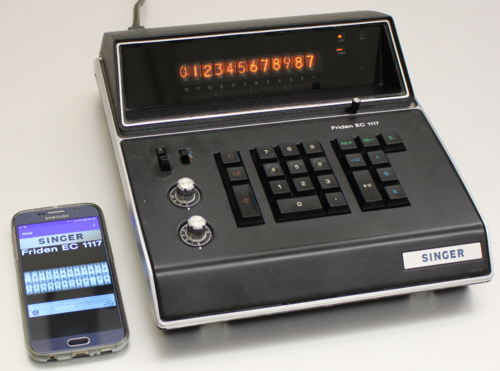
There's nothing quite like basking in the soothing orange glow of a
cold-cathode nixie tube display. An excellent vehicle for aforementioned
basking is the Singer/Friden
[EC1117](http://www.oldcalculatormuseum.com/friden1117.html) calculator.
Released in 1971, this beauty sports a full dozen Hitachi
[CD-90](http://www.tube-tester.com/sites/nixie/dat_arch/Hitachi_catalog.pdf)
nixie tubes. Given the pervasive nature of modern computers, however, the
EC1117's number crunching capabilities may seem somewhat modest and its
portability limited (despite the convenient carrying handle).
Surely you are now thinking precisely what I am: this calculator should be
turned into a clock; a clock controlled by an Android app! Ask and 'ye shall
receive! Below you'll find a write up describing the transformation and also
links to full source code, 'scope traces, schematics (those are kinda rough
since I don't have the calculator schematics), packaging info and more. Let me
know if anything seems missing.
If you want to skip right to the details:
* First [watch the demo](https://www.youtube.com/watch?v=mibd44goZ-E)
* Then [see these slides](http://epieye.com/nixie/nixie_calc.pdf) which give an overview with pictures, oscilloscope traces, schematics and more
* Read more in the [Hackaday writeup](https://hackaday.com/2016/07/15/45-year-old-nixie-calculator-turned-udp-server/)
* Get the code [from github](https://github.com/project705/nixie)
* * *
Instead of watching TV I modified my EC1117 to function as a programmable clock
and digital display. This was achieved by using an oscilloscope to reverse
engineer the display interface of the EC1117. Once I understood the interface
signaling and protocol, I used a couple of 4504 level shifters to connect it to
the GPIO bus of a Raspberry Pi 2B. Then I wrote a small C program to emulate
the bus protocol in software. The program busy polls the calculator's 860Hz
system clock waiting for a rising edge. Once the edge is found, it outputs a
serial bitstream across the 4-wire bus to produce the desired display output.
The C code also creates a thread listening for UDP packets. This thread decodes
a simple ASCII protocol that allows wireless network clients to change the
clock mode (e.g. different date/time formats), and also allows setting each
individual digit to an arbitrary value.
Part of this project was an experiment to see if it was possible to emulate
such a protocol without a real-time operating system. The answer seems to be
mostly yes, it is possible although one can observe a few glitches here and
there. Presumably this is due to being descheduled and missing the next edge
due to an inconvenient context switch. Note that the code itself always busy
waits to minimize context switch overhead. Also the clock I'm using from the
EC1117 board appears to be the system clock; its period is about 20 bittimes.
This means the emulation timing is open loop for all those bittimes, so timing
jitter will be most visible on the uppermost digits (i.e. furthest from the
system clock edge).
Another objective was writing an Android app to control the clock and display.
This was a way for me to learn about app development. The main app activity
uses an image of the calculator manufacturer's dataplate as the anchor for a
fling gesture. Swiping this image to the right increments the display mode
while swiping left decrements the mode. The activity also contains 12 wheel
controls, each mapping to a single digit on the EC1117. When in arbitrary
display mode the user can set the calculator digits in real-time using these
wheels. Each increment of a wheel results in an event which sends a UDP packet
to the calculator resulting in a change of the corresponding digit on the nixie
display. Users can manipulate multiple wheels simultaneously and all digits
will smoothly update. There is also a configuration utility to set the IP
address and port. I might eventually get rid of this in favor of full
zero-configuration with UPnP, mDNS and friends.
Nixie Tube Poetry:
i once met a Clock in Dixie
who lit up its Digits with Nixie
keeping Time with a Pixie
while Drinking a Moxie
why is Life so Boxie?
Nixie Tube Poetry by Gabe:
Amber digits dance
Calculate, enumerate
Dozen nixie tubes