https://github.com/projectweekend/angular-fully-loaded
An AngularJS directive for displaying loading and error messages
https://github.com/projectweekend/angular-fully-loaded
Last synced: 4 months ago
JSON representation
An AngularJS directive for displaying loading and error messages
- Host: GitHub
- URL: https://github.com/projectweekend/angular-fully-loaded
- Owner: projectweekend
- License: mit
- Created: 2014-03-29T17:38:54.000Z (over 12 years ago)
- Default Branch: master
- Last Pushed: 2014-05-10T15:23:11.000Z (about 12 years ago)
- Last Synced: 2025-10-25T10:45:30.125Z (8 months ago)
- Homepage:
- Size: 215 KB
- Stars: 0
- Watchers: 0
- Forks: 0
- Open Issues: 0
-
Metadata Files:
- Readme: README.md
- License: LICENSE
Awesome Lists containing this project
README
This is an [AngularJS](http://angularjs.org/) module that makes it easy to display loading and error messages in your app. It uses a simple pattern for comminucating loading/error statuses leaving all decisions about the visual presentation of these items up to the developer.
## Install it
If you're familar with how to include third-party modules in AngularJS, then you can probably skip this section. If you're new to the framework, this should help.
### Step 1
Copy the `angular-fully-loaded.js` file from this repository into your project. In this example, I'm using the directory '/js/lib' for the location. My main AngularJS app in this case is in `/js`.
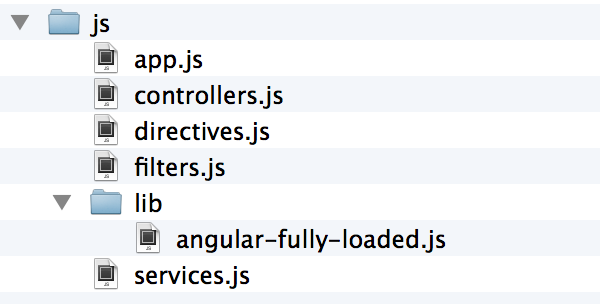
### Step 2
Include the file before the main app file:
~~~html
~~~
### Step 3
Add `angular-fully-loaded` to the app requirements (`/js/app.js`).
~~~javascript
var app = angular.module('myApp', [
'myApp.controllers',
'myApp.filters',
'myApp.services',
// 3rd party dependencies
'fully-loaded'
]);
~~~
## Use it
This module creates two custom directives (tags) that can be used anywhere in your templates.
### Loading Directive
The loading directive has two attributes that must be populated:
* **data** - This attribute must be bound to a property in your controller. This property must be an object with a booloean property of its own named `loading`. Toggling the value of `loading` from a controller or service will cause the message to show/hide.
* **template** - This is the path to the HTML template the controls the presentation of the loading message.
#### Loading Controller Example
~~~javascript
var cMod = angular.module( 'myApp.controllers', [] );
cMod.controller( 'MyCoolCtrl', function ( $scope ) {
$scope.SomethingThatLoadsData = {
status: {
loading: false // toggle this to true anywhere you wait
}
};
} );
~~~
#### Loading Template Example
~~~html
<p>This is my loading message</p>
~~~
### Error Directive
The error directive has the same two attributes as the loading directive:
* **data** - This attribute must be bound to a property in your controller. This property must be an object with a booloean property of its own named `error`. Toggling the value of `error` from a controller or service will cause the message to show/hide.
* **template** - This is the path to the HTML template the controls the presentation of the error message.
#### Error Controller Example
~~~javascript
var cMod = angular.module( 'myApp.controllers', [] );
cMod.controller( 'MyCoolCtrl', function ( $scope ) {
$scope.SomethingThatLoadsData = {
status: {
loading: false, // toggle this to true anywhere you wait
error: false // toggle this to true when something goes wrong
}
};
} );
~~~
#### Error Template Example
~~~html
<p>This is my error message</p>
~~~