https://github.com/projectweekend/angular-skycons
An AngularJS directive for Forecast.io animated skycons
https://github.com/projectweekend/angular-skycons
Last synced: 11 months ago
JSON representation
An AngularJS directive for Forecast.io animated skycons
- Host: GitHub
- URL: https://github.com/projectweekend/angular-skycons
- Owner: projectweekend
- License: mit
- Created: 2014-03-23T22:22:35.000Z (over 12 years ago)
- Default Branch: master
- Last Pushed: 2015-06-28T16:35:48.000Z (about 11 years ago)
- Last Synced: 2024-04-13T11:07:19.789Z (about 2 years ago)
- Language: JavaScript
- Homepage:
- Size: 490 KB
- Stars: 23
- Watchers: 5
- Forks: 8
- Open Issues: 1
-
Metadata Files:
- Readme: README.md
- License: LICENSE
Awesome Lists containing this project
README
This is an [AngularJS](http://angularjs.org/) module that makes it super easy to add [Forecast.io](http://forecast.io/) skycons to your app. [Skycons](http://darkskyapp.github.io/skycons/) is an open-source set of animated weather glyphs that uses JavaScript and the HTML5 canvas element.
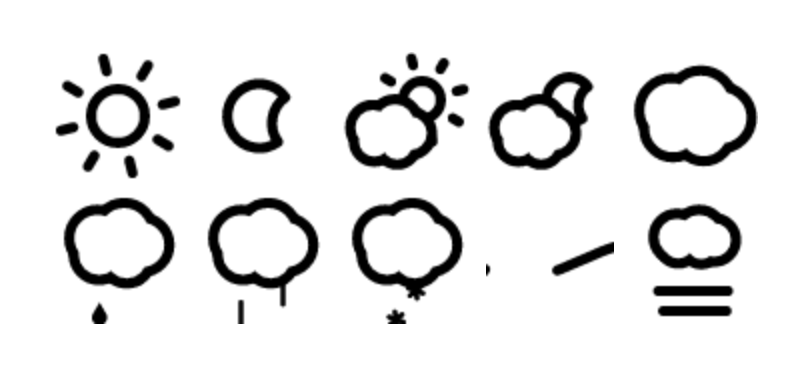
Note: my crappy screen shot image is not animated ;)
## Installation
This project, along with all of its dependencies are installed with [Bower](http://bower.io/): `bower install angular-skycons`.
## Set up
If you're familar with how to include third-party modules in AngularJS, then you can probably skip this section. If you're new to the framework, this should help.
### Step 1
Include the following files before the main app file:
~~~html
~~~
Or use the minified version. As a convenience, this version has the `skycons.js` dependency included so you only need to include one file.
~~~html
~~~
### Step 2
Add `angular-skycons` to the app requirements (`/js/app.js`).
~~~javascript
var app = angular.module('myApp', [
'myApp.controllers',
'myApp.filters',
'myApp.services',
// 3rd party dependencies
'angular-skycons'
]);
~~~
## Use it
This module creates a custom directive (tag) that you can use anywhere in your templates. This directive has four attributes:
* **icon** - This one is **required** since it defines which icon you want to display. It also must be bound to a property of a controller. The accepted values for this attribute correspond to the values returned in the `icon` property of data point objects in the [Forecast.io API](https://developer.forecast.io/docs/v2). The possible options are: `clear-day`, `clear-night`, `rain`, `snow`, `sleet`, `wind`, `fog`, `cloudy`, `partly-cloudy-day`, or `partly-cloudy-night`.
* **size** - This is optional, but must be bound to a property of a controller. Having this value come from the controller means that you can set it dynamically based on things like `$window.innerWidth`, etc. Since the icon is always a square, you only need to provide a single value. If the `size` attribute is not present, the default is a 64px square.
* **animated** - This is optional, but must be bound to a property of a controller. Setting the value to `false` or the string `"false"` will stop animation of the icon.
* **color** - This is optional, but must be bound to a property of a controller. If it is not present, the default is `black`.
* **class** - Use this to set the CSS class if needed.
#### Controller Example
~~~javascript
var cMod = angular.module( 'myApp.controllers', [] );
cMod.controller( 'WeatherCtrl', function ( $scope ) {
/*
This example is over simplified to demonstrate the relationship
between the 'controller' and the 'template' with regard to loading
the 'icon' value. Hopefully, you will be loading your controller with
data from an actual API response. :)
*/
$scope.CurrentWeather = {
forecast: {
icon: "partly-cloudy-night",
iconSize: 100,
color: "blue",
...
}
};
} );
~~~
#### Template Example
~~~html
~~~