https://github.com/prolificinteractive/iqkeyboardmanager
https://github.com/prolificinteractive/iqkeyboardmanager
Last synced: over 1 year ago
JSON representation
- Host: GitHub
- URL: https://github.com/prolificinteractive/iqkeyboardmanager
- Owner: prolificinteractive
- License: other
- Created: 2015-10-26T16:27:12.000Z (over 10 years ago)
- Default Branch: master
- Last Pushed: 2015-10-26T16:28:31.000Z (over 10 years ago)
- Last Synced: 2025-01-20T20:53:37.066Z (over 1 year ago)
- Language: Objective-C
- Size: 15 MB
- Stars: 1
- Watchers: 7
- Forks: 1
- Open Issues: 0
-
Metadata Files:
- Readme: README.md
- License: LICENSE.md
Awesome Lists containing this project
README

IQKeyboardManager
Often while developing an app, We ran into an issues where the iPhone keyboard slide up and cover the `UITextField/UITextView`. `IQKeyboardManager` allows you to prevent issues of the keyboard sliding up and cover `UITextField/UITextView` without needing you to enter any code and no additional setup required. To use `IQKeyboardManager` you simply need to add source files to your project.
####Key Features
1) **CODELESS**, Zero Line Of Code`
2) `Works Automatically`
3) `No More UIScrollView`
4) `No More Subclasses`
5) `No More Manual Work`
6) `No More #imports`
`IQKeyboardManager` works on all orientations, and with the toolbar. There are also nice optional features allowing you to customize the distance from the text field, add the next/previous done button as a keyboard UIToolbar, play sounds when the user navigations through the form and more.
####Recent Blog about IQKeyboardManager
http://www.theothertomelliott.com/node/1124
## Screenshot
[](http://youtu.be/6nhLw6hju2A)
[](http://youtu.be/6nhLw6hju2A)
## GIF animation
[](http://youtu.be/6nhLw6hju2A)
## Video
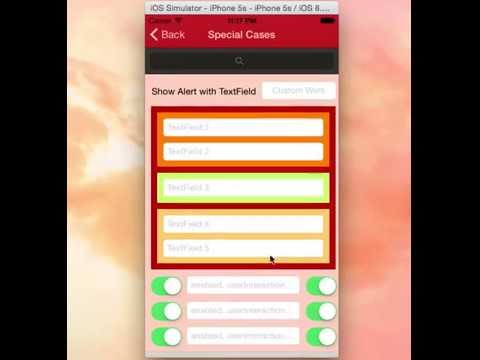
## Requirements
#### IQKeyboardManager:-
Minimum iOS Target: iOS 5.0
Minimum Xcode Version: Xcode 5.0
#### Demo Project:-
Minimum Xcode Version: Xcode 6.0
Installation
==========================
#### Cocoapod Method:-
IQKeyboardManager is available through [CocoaPods](http://cocoapods.org), to install
it simply add the following line to your Podfile: ([#9](https://github.com/hackiftekhar/IQKeyboardManager/issues/9))
pod 'IQKeyboardManager'
#### Source Code Method:-
Just ***drag and drop*** `IQKeyBoardManager` directory from demo project to your project. That's it.
## Known Issues:-

####1) Keyboard does not appear in iOS Simulator ([#62](https://github.com/hackiftekhar/IQKeyboardManager/issues/62), [#72](https://github.com/hackiftekhar/IQKeyboardManager/issues/72), [#75](https://github.com/hackiftekhar/IQKeyboardManager/issues/75), [#90](https://github.com/hackiftekhar/IQKeyboardManager/issues/90), [#100](https://github.com/hackiftekhar/IQKeyboardManager/issues/100))
If keyboard does not appear in iOS Simulator and only toolbar is appearing over it (if enableAutoToolbar = YES), then check this setting
***Xcode 6:-*** Goto ***iOS Simulator->Menu->Hardware->Keyboard->Connect Hardware Keyboard***, and deselect that.
***Xcode 5 and earlier:-*** Goto ***iOS Simulator->Menu->Hardware->Simulate Hardware Keyboard***, and deselect that.
####2) setEnable = NO doesn't disable automatic UIToolbar ([#117](https://github.com/hackiftekhar/IQKeyboardManager/issues/117), [#136](https://github.com/hackiftekhar/IQKeyboardManager/issues/136), [#147](https://github.com/hackiftekhar/IQKeyboardManager/issues/147))
If you set ***[[IQKeyboardManager sharedManager] setEnable:NO]*** and still automatic toolbar appears on textFields? Probably you haven't heard about ***@property enableAutoToolbar***.
***@property enable :*** It enable/disable managing distance between keyboard and textField, and doesn't affect autoToolbar feature.
***@property enableAutoToolbar :*** It enable/disable automatic creation of toolbar, please set enableAutoToolbar to NO if you don't want to add automatic toolbar.
####3) Swift version crashes in Release Mode ([#111](https://github.com/hackiftekhar/IQKeyboardManager/issues/111))
It may be compiler issue when compiler tries to optimize Code for best performance and compiler changes something in the middle which is not expected. Changing **Optimization Level** in Build Settings solve the problem.
**Workdaround:** Goto ***Target->Build Settings->Code Generation->Optimization Level***, and set it to ***None[-O0]***.([StackOverflow](http://stackoverflow.com/questions/3327981/app-runs-as-debug-but-crashes-as-release))
Manual Management:-
---
#### UINavigationBar:-
If you don't want to hide the default UINavigationBar of UINavigationController when keyboardManager slides up the view, then just change the UIView class to UIScrollView from the storyboard or xib.([#21](https://github.com/hackiftekhar/IQKeyboardManager/issues/21), [#24](https://github.com/hackiftekhar/IQKeyboardManager/issues/24))

If you are not using storyboard or xib and creating your view programmatically. Then you need to override '-(void)loadView' method of UIViewController, and need to set an UIScrollView instance to self.view.
-(void)loadView
{
UIScrollView *scrollView = [[UIScrollView alloc] initWithFrame:[[UIScreen mainScreen] bounds]];
self.view = scrollView;
}
#### Disable for a ViewController:-
If you would like to disable `IQKeyboardManager` for a particular ViewController then register ViewController with `-(void)disableInViewControllerClass:(Class)disabledClass` method in AppDelegate.([#117](https://github.com/hackiftekhar/IQKeyboardManager/issues/117),[#139](https://github.com/hackiftekhar/IQKeyboardManager/issues/139))
```
- (BOOL)application:(UIApplication *)application didFinishLaunchingWithOptions:(NSDictionary *)launchOptions
{
[[IQKeyboardManager sharedManager] disableInViewControllerClass:[ViewController class]];
return YES;
}
```
#### Disable toolbar for a ViewController:-
If you would like to disable `Auto Toolbar` for a particular ViewController then register ViewController with `-(void)disableToolbarInViewControllerClass:(Class)disabledClass` method in AppDelegate.
```
- (BOOL)application:(UIApplication *)application didFinishLaunchingWithOptions:(NSDictionary *)launchOptions
{
[[IQKeyboardManager sharedManager] disableToolbarInViewControllerClass:[ViewController class]];
return YES;
}
```
#### Considering Previous/Next buttons for textField inside customViews:-
If your textFields are on different customView and do not show previous/next to navigate between textField. Then you should create a SpecialView subclass of UIView, then put all customView inside SpecialView, then register SpecialView class using `-(void)considerToolbarPreviousNextInViewClass:(Class)toolbarPreviousNextConsideredClass` method in AppDelegate.([#154](https://github.com/hackiftekhar/IQKeyboardManager/issues/154), [#179](https://github.com/hackiftekhar/IQKeyboardManager/issues/179))
```
- (BOOL)application:(UIApplication *)application didFinishLaunchingWithOptions:(NSDictionary *)launchOptions
{
[[IQKeyboardManager sharedManager] considerToolbarPreviousNextInViewClass:[SpecialView class]];
return YES;
}
```
#### Keyboard Return Key Handling:-
If you would like to implement keyboard **Return Key** as **Next/Done** button, then you can use **IQKeyboardReturnKeyHandler**.([#38](https://github.com/hackiftekhar/IQKeyboardManager/issues/38), [#63](https://github.com/hackiftekhar/IQKeyboardManager/issues/63))
1) Create an instance variable of `IQKeyboardReturnKeyHandler` and instantiate it in `viewDidLoad` with ViewController object like this:-
```
@implementation ViewController
{
IQKeyboardReturnKeyHandler *returnKeyHandler;
}
- (void)viewDidLoad
{
[super viewDidLoad];
returnKeyHandler = [[IQKeyboardReturnKeyHandler alloc] initWithViewController:self];
}
```
It assign all the responderView delegates to self, and change keybord Return Key to Next key.
2) set instance variable to nil in `dealloc` method.
```
-(void)dealloc
{
returnKeyHandler = nil;
}
```
#### UIToolbar(IQToolbar):-
1) If you don't want to add automatic toolbar over keyboard for a specific textField then you should add a UIView as it's toolbar like this:-([#89](https://github.com/hackiftekhar/IQKeyboardManager/issues/89))
```
textField.inputAccessoryView = [[UIView alloc] init];
```
2) If you need your own control over the previous/next/done button then you should use the UIView category methods to add toolbar over your textField. The UIView category methods are defined in `IQUIView+IQKeyboardToolbar.h` file. You can use them like this:-([#40](https://github.com/hackiftekhar/IQKeyboardManager/issues/40))
```
-(void)viewDidLoad
{
[super viewDidLoad];
//Adding done button for textField1
[textField1 addDoneOnKeyboardWithTarget:self action:@selector(doneAction:)];
//Adding previous/next/done button for textField2
[textField2 addPreviousNextDoneOnKeyboardWithTarget:self previousAction:@selector(previousAction:) nextAction:@selector(nextAction:) doneAction:@selector(doneAction:)];
//Adding cancel/done button for textField3
[textField3 addCancelDoneOnKeyboardWithTarget:self cancelAction:@selector(cancelAction:) doneAction:@selector(doneAction:)];
}
/*! previousAction. */
-(void)previousAction:(id)button
{
//previousAction
}
/*! nextAction. */
-(void)nextAction:(id)button
{
//nextAction
}
/*! doneAction. */
-(void)doneAction:(UIBarButtonItem*)barButton
{
//doneAction
}
/*! cancelAction. */
-(void)cancelAction:(UIBarButtonItem*)barButton
{
//cancelAction
}
```
#### Doing custom work on textField with returning NO in `textFieldShouldBeginEditing:` delegate:-
Generally if developer need to perform some custom task on a particular textField click, then usually developer write their custom code inside ***textFieldShouldBeginEditing:*** and returning NO for that textField. But if you are using IQKeyboardManager, then IQKeyboardManager also asks textField to recognize it can become first responder or not using ***canBecomeFirstResponder*** in `IQUIView+Hierarchy` category, and textField asks it's delegate to respond from `textFieldShouldBeginEditing:`, so this method is called for each textField everytime when a textField becomeFirstResponder. Unintentionally custom code runs multiple times even when we do not touch the textField to become it as first responder. To overcome this situation please use ***isAskingCanBecomeFirstResponder*** BOOL property to check that the delegate is called by IQKeyboardManager or not. ([#88](https://github.com/hackiftekhar/IQKeyboardManager/issues/88))
1) You may need to import `IQUIView+Hierarchy` category
```
#import "IQUIView+Hierarchy.h"
```
2) check for ***isAskingCanBecomeFirstResponder*** in `textFieldShouldBeginEditing:` delegate.
```
-(BOOL)textFieldShouldBeginEditing:(UITextField *)textField
{
if (textField == customWorkTextField)
{
if (textField.isAskingCanBecomeFirstResponder == NO)
{
//Do your work on tapping textField.
[[[UIAlertView alloc] initWithTitle:@"IQKeyboardManager" message:@"Do your custom work here" delegate:nil cancelButtonTitle:@"OK" otherButtonTitles:nil, nil] show];
}
return NO;
}
else return YES;
}
```
## Control Flow Diagram
[](https://raw.githubusercontent.com/hackiftekhar/IQKeyboardManager/master/KeyboardTextFieldDemo/Screenshot/IQKeyboardManagerCFD.jpg)
##Properties and functions usage:-
####UIKeyboard handling
***+(instancetype)sharedManager :***
Returns the default singleton instance.
***@property BOOL enable :***
Use this to enable/disable managing distance between keyboard & textField/textView).
***@property CGFloat keyboardDistanceFromTextField :***
Set Distance between keyboard & textField. Can't be less than zero. Default is 10.
***@property BOOL preventShowingBottomBlankSpace :***
Prevent to show bottom blanck area when keyboard slide up the view. Default is YES. ([#93](https://github.com/hackiftekhar/IQKeyboardManager/issues/93)).
####IQToolbar handling
***@property BOOL enableAutoToolbar :***
Enable autoToolbar behaviour. If It is set to NO. You have to manually create UIToolbar for keyboard. Default is YES.
***@property IQAutoToolbarManageBehaviour toolbarManageBehaviour :***
Setting toolbar behaviour to IQAutoToolbarBySubviews to manage previous/next according to UITextField's hierarchy in it's SuperView. Set it to IQAutoToolbarByTag to manage previous/next according to UITextField's tag property in increasing order. Default is IQAutoToolbarBySubviews.
***@property BOOL shouldToolbarUsesTextFieldTintColor :***
If YES, then uses textField's tintColor property for IQToolbar, otherwise tintColor is black. Default is NO. ([#27](https://github.com/hackiftekhar/IQKeyboardManager/issues/27))
***@property BOOL shouldShowTextFieldPlaceholder :***
If YES, then it add the textField's placeholder text on IQToolbar. Default is YES. ([#27](https://github.com/hackiftekhar/IQKeyboardManager/issues/27))
***@property UIFont *placeholderFont :***
placeholder Font. Default is nil. ([#27](https://github.com/hackiftekhar/IQKeyboardManager/issues/27))
####UITextView handling
***@property BOOL canAdjustTextView :***
Giving permission to modify TextView's frame. Adjust textView's frame when it is too big in height. Default is NO. ([#30](https://github.com/hackiftekhar/IQKeyboardManager/issues/30))
***@property BOOL shouldFixTextViewClip :***
Adjust textView's contentInset to fix fix for iOS 7.0.x -([#Stackoverflow](http://stackoverflow.com/questions/18966675/uitextview-in-ios7-clips-the-last-line-of-text-string)). Default is YES.
####UIKeyboard Appearance overriding
***@property BOOL overrideKeyboardAppearance :***
Override the keyboardAppearance for all textField/textView. Default is NO.
***@property UIKeyboardAppearance keyboardAppearance :***
If overrideKeyboardAppearance is YES, then all the textField keyboardAppearance is set using this property.
####UITextField/UITextView Resign handling
***@property BOOL shouldResignOnTouchOutside :***
Resign textField if touched outside of UITextField/UITextView. ([#14](https://github.com/hackiftekhar/IQKeyboardManager/issues/14))
***-(void)resignFirstResponder :***
Resigns currently first responder field.
####UISound handling
***@property BOOL shouldPlayInputClicks :***
If YES, then it plays inputClick sound on next/previous/done click. Default is NO.
####UIAnimation handling
***@property BOOL shouldAdoptDefaultKeyboardAnimation :***
If YES, then uses keyboard default animation curve style to move view, otherwise uses UIViewAnimationOptionCurveEaseOut animation style. Default is YES.
## Feature:-
1) Support Device Orientation.
2) Enable/Disable Keyboard Manager when needed with `enable` boolean.
3) Easiest integration.
4) AutoHandle UIToolbar as a accessoryInputView of textField/textView with `enableAutoToolbar` boolean.
5) AutoHandle UIToolbar can be manged by superview's hierarchy or can be managed by tag property of textField/textView using `toolbarManageBehaviour` enum.
6) `UIView` Category for easily adding Next/Previous and Done button as Keyboard UIToolBar, even automatic with `enableAutoToolbar` boolean.
7) Enable/Disable Next/Previous buttons with Category methods, even automatic with `enableAutoToolbar` boolean.
8) Set keyboard distance from textFields using `keyboardDistanceFromTextField`.
9) Resign keyboard on touching outside using `shouldResignOnTouchOutside`.
10) Manage UITextView's frame when it's hight is too large to fit on screen with `canAdjustTextView` boolean.
11) Can manage `UITextField/UITextView` inside `UITableView/UIScrollView`.
12) Can play input sound on Next/Previous/Done click.
LICENSE
---
Distributed under the MIT License.
Contributions
---
Any contribution is more than welcome! You can contribute through pull requests and issues on GitHub.
Author
---
If you wish to contact me, email at: hack.iftekhar@gmail.com