https://github.com/prophetlamb/loggermessagegen
Simplifies implementing LoggerMessage extensions with attributes using source generation
https://github.com/prophetlamb/loggermessagegen
Last synced: over 1 year ago
JSON representation
Simplifies implementing LoggerMessage extensions with attributes using source generation
- Host: GitHub
- URL: https://github.com/prophetlamb/loggermessagegen
- Owner: ProphetLamb
- Created: 2022-05-13T06:39:04.000Z (about 4 years ago)
- Default Branch: main
- Last Pushed: 2022-05-18T08:22:07.000Z (about 4 years ago)
- Last Synced: 2025-01-22T04:27:27.072Z (over 1 year ago)
- Language: C#
- Size: 40 KB
- Stars: 1
- Watchers: 2
- Forks: 0
- Open Issues: 0
-
Metadata Files:
- Readme: README.md
Awesome Lists containing this project
README
# Multi Library Template
This is my best effort at creating a template for solutions that contain multiple projects, especially for libraries.
## Tech Stack
| Purpose | Technology |
| -------------- | ----------------------------------------------------------------- |
| Source control | [GitHub](https://github.com) |
| CI/CD | [AppVeyor](https://ci.appveyor.com/) |
| Documentation | [XMLDoc2Markdown](https://charlesdevandiere.github.io/xmldoc2md/) |
| Test driver | [NUnit](https://docs.nunit.org/) |
| Test converge | [coveralls](https://coveralls.io) |
## Getting started
Setting up your project in 10 minutes max.
### Setup environment
1. Create a [GitHub](https://github.com) repository and clone it
2. Add the repository to [AppVeyor](https://ci.appveyor.com/)
3. Add the repository to [coveralls](https://coveralls.io)
4. Replace [variables](#variables) with your specific information
5. Confirm your code-style in the `.editorconfig`
Lastly replace this `README.md` with your own.
### Variables
There are a few variables denoted by the `+++` prefix. Search all project files for this prefix.
The following files contain variables `appveyor.yml`, `src/AssemblyInfo.cs` & `src/Directory.Build.props`
| Variable | Explanation |
| ---------- | ----------------------------------------------------------- |
| +++PROJECT | The root name of your project. e.g. `Microsoft` or `System` |
| +++YOU | The GitHub name of the owner of the project |
| +++VALUE | Some specific value explained in the following comment |
### Include documentation
```pwsh
./scripts/doc.ps1
```
The script generates the markdown documentation, then reference it in the `README.md`.
```md
`Your.Project` [documentation](doc/Your.Project/index.md)
```
Automatically update the documentation using the following github workflow
```yml
on:
push:
branches:
- /^rc/
workflow_dispatch:
name: Update Documentation
jobs:
update:
runs-on: ubuntu-latest
steps:
- uses: actions/checkout@v2
with:
fetch-depth: 0
- name: Update documentation
shell: pwsh
run: scripts/doc.ps1
- uses: stefanzweifel/git-auto-commit-action@v4
with:
commit_message: Update documentation
file_pattern: doc/*
```
### Solution & Projects
First add a solution in the repository root.
```pwsh
dotnet new sln -n "Your"
```
Add a projects in `src/` and `tests/` and define the missing nuget and assembly information, see [more on project files](#csproj).
```pwsh
dotnet new classlib -n "Your.Project"
```
Testadapters similar packages are already included in [Build.props](tests/Directory.Build.props).
## Workflow
This template assumes that there are three kinds of branches
1. `release`: Branches with this prefix trigger deploy scripts. Only one commit should exist per branch, and it should have a tag.
2. `rc`: Branches with this prefix update the doc. If they are sound, a `release` branch may be created.
3. development: Any other branch with none of the prefixes above.
## Badges
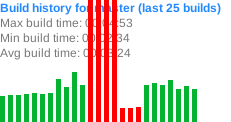
**The most fancy badges and build charts at [buildstats.info](https://buildstats.info)**

**Happy badges at [shields.io](shields.io)**

## Files
### Release notes
Contains the release notes of each project. Releases are usually separated by `---`. The file is automatically imported into the project package using the `Build.props`.
### `Build.props`
This template uses `Directory.Build.props` to reduce the redundancy in `.csproj` project files. There are distinct `props` for both `src/` and `tests/` where assembly & [nuget](nuget.org) information is defined, as well as common packages are included.
This allows new projects to be added using the [dotnet cli](https://docs.microsoft.com/en-us/dotnet/core/tools/) with minimal manual intervention.
#### License
To change the license to a file based replace `PackageLicenseExpression` with
```xml
../../LICENSE-MIT
```
### Scripts
These `scripts/` are usually used by the CI, but can be run locally as well.
- `tooling.ps1`: Installs required tools globally, requires the [choco](https://chocolatey.org/) package manager. Can be adopted to work with linux, by [installing](https://docs.microsoft.com/en-us/powershell/scripting/install/install-debian) powershell first
- `test.ps1`: Executes all test projects in `tests/`, collects code coverage, and uploads it to coveralls.
- `doc.ps1`: Generates markdown documentation from the `xml` documentation, generated by the build project, in the `doc/` directory. One subdirectory is created per project with the same name.
### `.gitignore`
The gitignore is created by [topal gitignore](https://www.toptal.com/developers/gitignore/api/visualstudio,visualstudiocode,rider) then modified to work with [VisualStudio](https://visualstudio.microsoft.com/), [JetBrains Rider](https://www.jetbrains.com/rider/) & [VSCode](https://code.visualstudio.com/).
### `.editorconfig`
The [EditorConfig](https://editorconfig.org) is a bit opinionated, so you might want to change some things. There is plugin support for all moderns IDEs and VIM.
### `.csproj`
Take a look at the [example project](src/Your.Project/Your.Project.csproj) and [source generator example](src/Your.Generator/Your.Generator.csproj).
Tags from the [Directory.Build.props](src/Directory.Build.props) are included in every `.csproj` in sub-directories. Duplicates are overwritten.
Documentation on project properties and stuff:
- [Target Frameworks](https://docs.microsoft.com/en-us/dotnet/standard/frameworks)
- [MSBuild Props](https://docs.microsoft.com/en-us/visualstudio/msbuild/common-msbuild-project-properties)
- [MSBuild Tasks](https://docs.microsoft.com/en-us/visualstudio/msbuild/msbuild-task-reference)
- [Nuget Props](https://docs.microsoft.com/en-us/dotnet/core/project-sdk/msbuild-props#nuget-metadata-properties)