https://github.com/protoconf/protoconf
Configuration as Code framework based on protobuf and Starlark
https://github.com/protoconf/protoconf
configuration-as-code configuration-management gitops protobuf starlark
Last synced: 4 months ago
JSON representation
Configuration as Code framework based on protobuf and Starlark
- Host: GitHub
- URL: https://github.com/protoconf/protoconf
- Owner: protoconf
- License: mit
- Created: 2019-12-02T13:33:43.000Z (over 6 years ago)
- Default Branch: main
- Last Pushed: 2026-02-27T09:48:07.000Z (5 months ago)
- Last Synced: 2026-02-27T15:09:23.055Z (5 months ago)
- Topics: configuration-as-code, configuration-management, gitops, protobuf, starlark
- Language: Go
- Homepage: https://www.protoconf.dev
- Size: 9.54 MB
- Stars: 190
- Watchers: 6
- Forks: 16
- Open Issues: 27
-
Metadata Files:
- Readme: README.md
- Changelog: CHANGELOG.md
- License: LICENSE
- Code of conduct: CODE_OF_CONDUCT.md
Awesome Lists containing this project
README
Protoconf

codify configuration, instant delivery


## Introduction
Modern services are comprised of many dynamic variables, that need to be changed regularly. Today, the process is unstructured and error prone. From ML model variables, kill switches, gradual rollout configuration, A/B experiment configuration and more - developers want their code to allow to be configured to the finer details.
**Protoconf is a modern approach to software configuration**, inspired by [Facebook's Configerator](https://research.fb.com/publications/holistic-configuration-management-at-facebook/).
Using Protoconf enables:
- **Code review for configuration changes**
Enables the battle tested flow of pull-request & code-review. Configuration auditing out of the box (who did what, when?). The repository is the source of truth for the configuration deployed to production.
- **No service restart required to pick up changes**
Instant delivery of configuration updates. Encourages writing software that doesn't know downtime.
- **Clear representation of complex configuration**
Write configuration in Starlark (a Python dialect), no more copying & pasting from huge JSON files.
- **Automated validation**
Config follows a fully-typed (Protobuf) schema. This allows writing validation code in Starlark, to verify your configuration before it is committed.
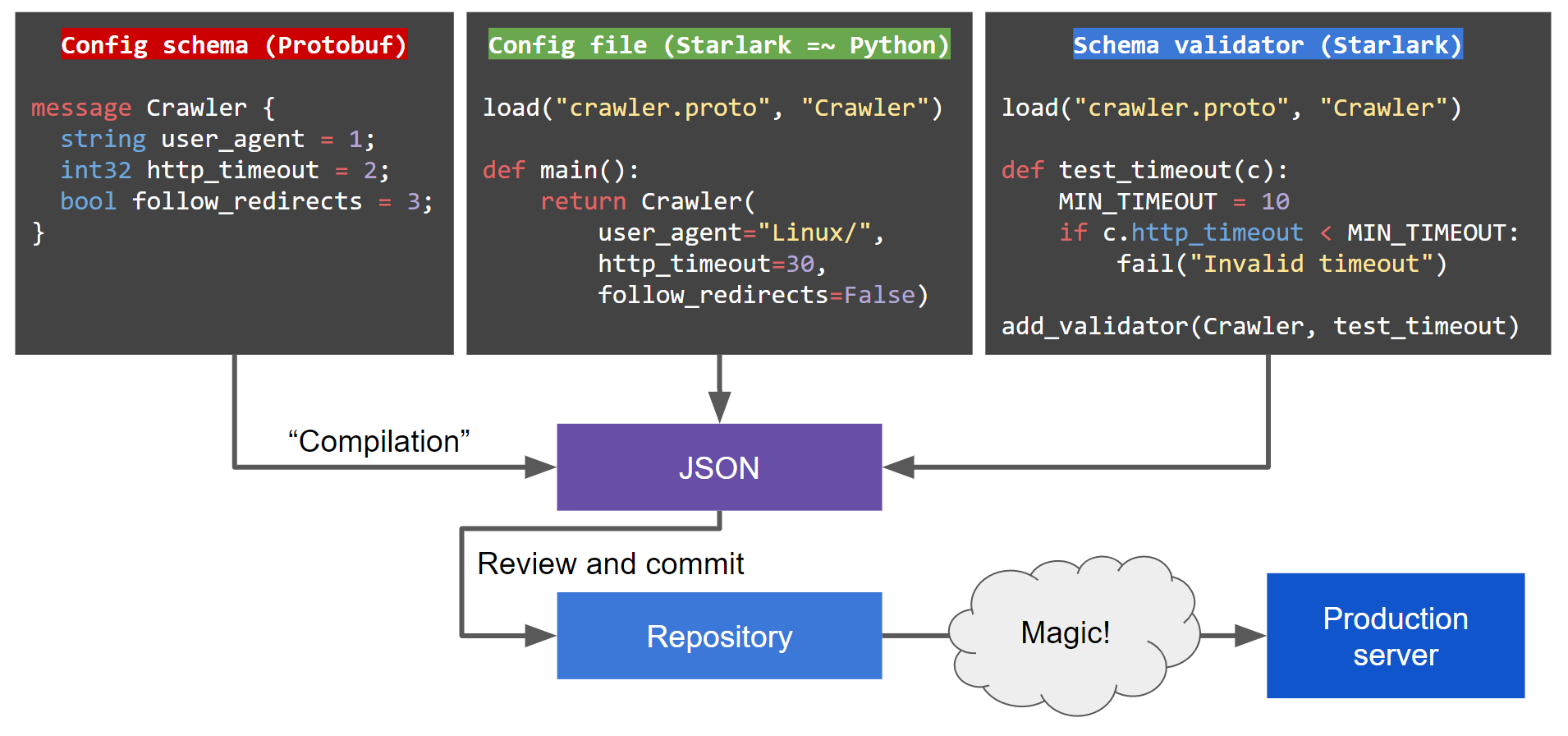
#### Configuration update flow
#### How this looks from the service's eyes
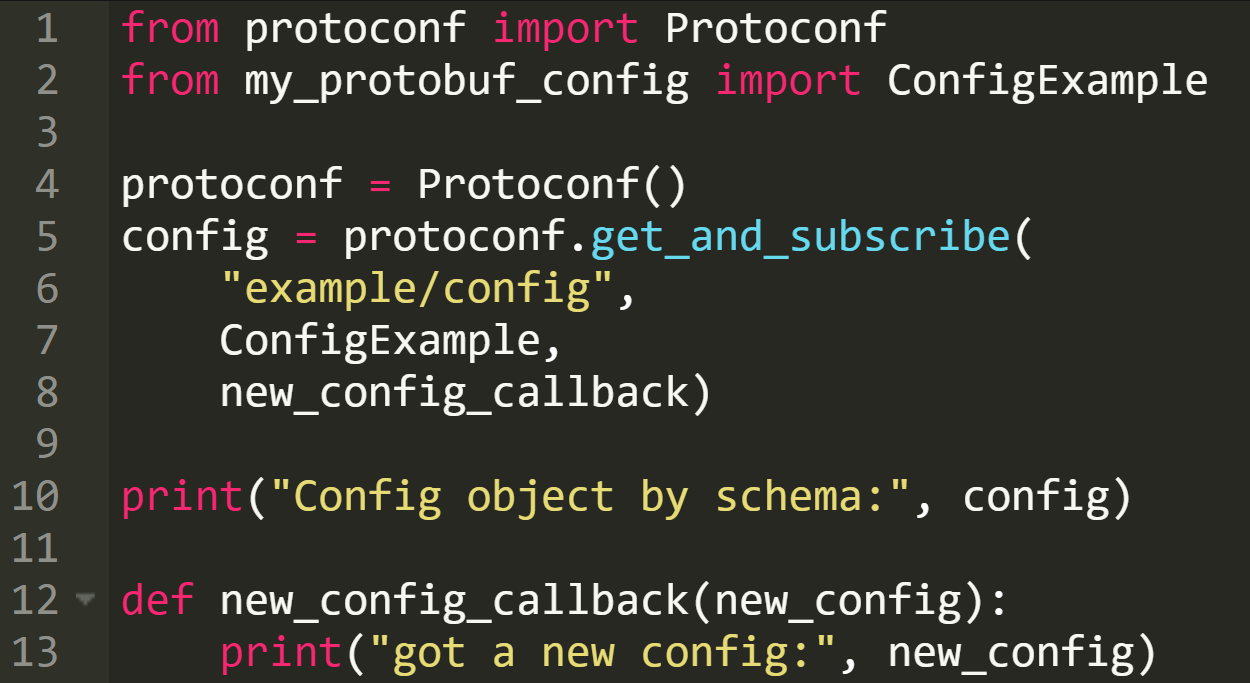
This is roughly how configuration is consumed by a service. This paradigm encourages you to write software that can reconfigure itself in runtime rather than require a restart:
As Protoconf uses Protobuf and gRPC, it supports delivering configuration to [all major languages](https://github.com/protocolbuffers/protobuf/blob/master/docs/third_party.md). See also: [Protobuf overview](https://developers.google.com/protocol-buffers/docs/overview).
## Quick start
Step by step instructions to start developing with Protoconf, with an example from an imaginary Python web crawler service. See full example under `examples/`.
1. Install the `protoconf` binary (see [build from source](#build-from-source))
2. Write a Protobuf schema under `protoconf/src/`(syntax guide https://developers.google.com/protocol-buffers/docs/proto3)
1. For example: `protoconf/src/crawler/crawler.proto`
```protobuf
syntax = "proto3";
message Crawler {
string user_agent = 1;
int32 http_timeout = 2;
bool follow_redirects = 3;
}
message CrawlerService {
repeated Crawler crawlers = 1;
enum AdminPermission {
READ_WRITE = 0;
GOD_MODE = 1;
}
map admins = 2;
int32 log_level = 3;
}
```
2. Pro tip: adding fields to an existing schema? Don't worry, Protobuf is backward and forward compatible (https://en.wikipedia.org/wiki/Protocol_Buffers)
3. Write validators _(optional)_
1. Write a Starlark file alongside the `.proto` file, with a `.proto-validator` suffix
2. For example: `protoconf/src/crawler/crawler.proto-validator`
```python
load("crawler.proto", "Crawler", "CrawlerService")
def test_crawlers_not_empty(cs):
if len(cs.crawlers) < 1:
fail("Crawlers can't be empty")
add_validator(CrawlerService, test_crawlers_not_empty)
def test_http_timeout(c):
MIN_TIMEOUT = 10
if c.http_timeout < MIN_TIMEOUT:
fail("Crawler HTTP timeout must be at least %d, got %d" % (MIN_TIMEOUT, c.http_timeout))
add_validator(Crawler, test_http_timeout)
```
4. Write a config
1. A Starlark `.pconf` file. Your code can be modular, export functions (ideally in `.pinc` files), and build a complete custom stack for your configuration needs.
2. For example: `protoconf/src/crawler/text_crawler.pconf`
```python
load("crawler.proto", "Crawler", "CrawlerService")
def default_crawler():
return Crawler(user_agent="Linux", http_timeout=30)
def main():
crawlers = []
for i in range(3):
crawler = default_crawler()
crawler.http_timeout = 30 + 30*i
if i == 0:
crawler.follow_redirects = True
crawlers.append(crawler)
admins = {'superuser': CrawlerService.AdminPermission.GOD_MODE}
return CrawlerService(crawlers=crawlers, admins=admins, log_level=2)
```
3. Compile with `protoconf compile`, this will create a materialized config file under `protoconf/materialized_configs/`
4. For example: `protoconf compile protoconf/ crawler/text/crawler` will create `protoconf/materialized_config/crawler/text_crawler.materialized_JSON`
```json
{
"protoFile": "crawler/crawler.proto",
"value": {
"@type": "https://CrawlerService",
"admins": {
"superuser": "GOD_MODE"
},
"crawlers": [
{
"userAgent": "Linux",
"httpTimeout": 30,
"followRedirects": true
},
{
"userAgent": "Linux",
"httpTimeout": 60
},
{
"userAgent": "Linux",
"httpTimeout": 90
}
],
"logLevel": 2
}
}
```
5. Run the Protoconf agent in dev mode
```bash
protoconf agent protoconf/
```
6. Prepare your application to work with Protobuf configs coming from Protoconf
1. Compile your `.proto` schema, this will generate an object to work with.
For Python you can use `grpcio-tools`, for example:
```bash
pip3 install grpcio-tools
python3 -m grpc_tools.protoc --python_out=. -I../protoconf/src ../protoconf/src/crawler/crawler.proto
```
Other languages can use the `protoc` binary (https://developers.google.com/protocol-buffers/docs/tutorials).
2. Install the Protoconf Python library:
```bash
pip3 install -r python/requirements.txt python/
```
3. In your code, setup a connection to Protoconf and get the config. See full example under `examples/`. The code mainly consists of:
```python
from protoconf import ProtoconfSync
from crawler.crawler_pb2 import CrawlerService
protoconf = ProtoconfSync()
crawler_service = protoconf.get_and_subscribe("crawler/text_crawler", CrawlerService, got_config)
print("config:", crawler_service)
def got_config(new_crawler_service):
print("got a new config:", new_crawler_service)
```
7. Commit all changes under `protoconf/` (including the `.materialized_JSON` files)
## Production setup
1. Run your preferred key-value store (e.g. Consul)
2. Run the Protoconf agent: `protoconf agent`
3. Setup a commit hook in your repository server (e.g. Github) that runs `protoconf update` on changed `.materialized_JSON` files
## Build from source
1. Clone Protoconf: `git clone https://github.com/protoconf/protoconf.git`
2. Build the binary: `cd protoconf && go install ./cmd/protoconf`
3. Ensure that GOPATH/bin is in your path
## Trying the example
1. Make sure Consul is listening locally on default port (you can achieve this with `consul agent -dev`)
2. Run the agent: `bazel run protoconf agent`
3. Compile the Protoconf config: `bazel run protoconf compile "$(pwd)/examples/protoconf" crawler/text_crawler.pconf`
4. Insert the Protoconf config to Consul: `bazel run protoconf insert "$(pwd)/examples/protoconf" crawler/text_crawler.materialized_JSON`
5. Run the Go client: `bazel run //examples/grpc_clients/go_client`, the client will get the config from the agent and will listen to changes
6. Change the config file at `examples/protoconf/src/crawler/text_crawler.pconf`
7. Repeat steps 4 & 5 to recompile and re-insert the config, observe the client got the updated config