https://github.com/protoss78/multi_thumb_slider
A customizable Flutter widget that provides a multi-thumb slider with draggable thumbs for defining ranges, breakpoints, or multiple selection points.
https://github.com/protoss78/multi_thumb_slider
Last synced: 9 months ago
JSON representation
A customizable Flutter widget that provides a multi-thumb slider with draggable thumbs for defining ranges, breakpoints, or multiple selection points.
- Host: GitHub
- URL: https://github.com/protoss78/multi_thumb_slider
- Owner: Protoss78
- License: mit
- Created: 2025-08-21T14:37:34.000Z (10 months ago)
- Default Branch: main
- Last Pushed: 2025-08-29T12:08:21.000Z (9 months ago)
- Last Synced: 2025-08-29T15:40:58.756Z (9 months ago)
- Language: Dart
- Size: 26.3 MB
- Stars: 0
- Watchers: 0
- Forks: 0
- Open Issues: 0
-
Metadata Files:
- Readme: README.md
- Changelog: CHANGELOG.md
Awesome Lists containing this project
README
# Multi Thumb Range Slider
A customizable Flutter widget that provides a multi-thumb slider with draggable thumbs for defining ranges, breakpoints, or multiple selection points.
## 🚀 Live Example
Try the interactive example app: **[Live Demo](https://protoss78.github.io/multi_thumb_slider/)**
The live demo showcases all the features of the multi-thumb slider with interactive examples you can test in your browser.
## Features
- **Multiple Thumbs**: Set multiple values on a single slider track with intuitive drag-and-drop interaction
- **Generic Type Support**: Full support for `int`, `double`, `enum`, and other comparable types
- **Open Segments**: Support for open-ended ("80kg+") and open-started ("55kg or less") segments with visual arrows
- **Customizable Appearance**: Extensive styling options for colors, sizes, and visual elements
- **Responsive Design**: Adapts to different screen sizes and orientations with smooth animations
- **Tickmarks & Labels**: Configurable tickmarks with positioning options (above, below, on-track)
- **Segment Display**: Built-in segment visualization with multiple content types
- **Custom Formatting**: Flexible value formatting for currency, percentages, weights, and more
- **Segment Editing**: Add and remove segments dynamically with visual buttons
## Getting Started
### Installation
Add this to your package's `pubspec.yaml` file:
```yaml
dependencies:
multi_thumb_range_slider: ^1.3.0
```
## Quick Start Examples
### Minimal Setup
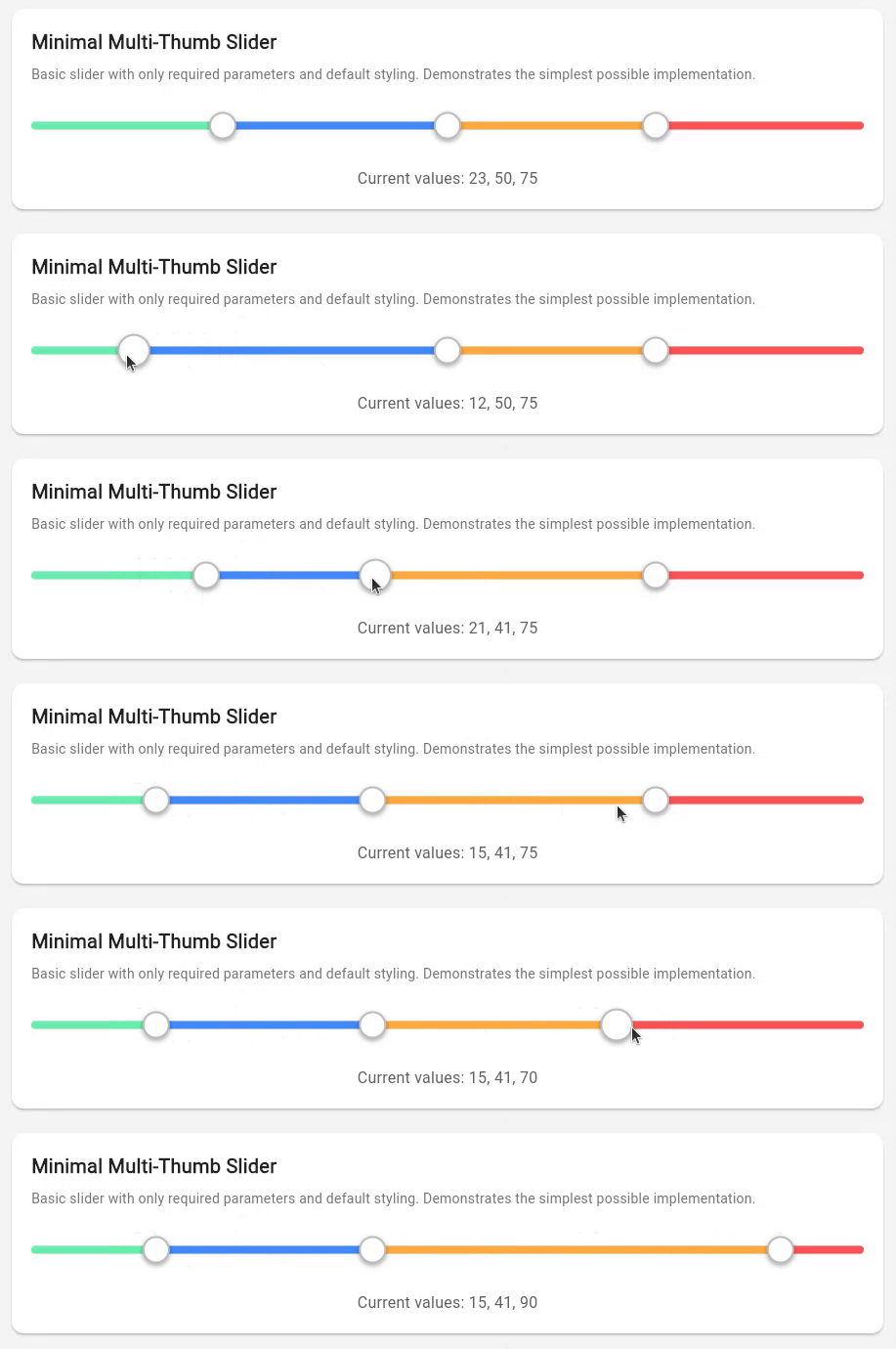
```dart
CustomMultiThumbSlider.withInt(
values: [20, 80],
)
```
### With Visual Enhancements
```dart
CustomMultiThumbSlider.withInt(
values: [25, 75],
showTickmarks: true,
showTooltip: true,
showSegments: true,
)
```
### Interactive Editing Mode
```dart
CustomMultiThumbSlider.withInt(
values: [30, 70],
showSegments: true,
enableSegmentEdit: true,
enableDescriptionEdit: true,
onSegmentAdd: (index) => handleSegmentAdd(index),
onSegmentRemove: (index) => handleSegmentRemove(index),
onChanged: (values) => setState(() => _values = values),
)
```
### Basic Usage
#### Basic Integer Slider with Built-in Features
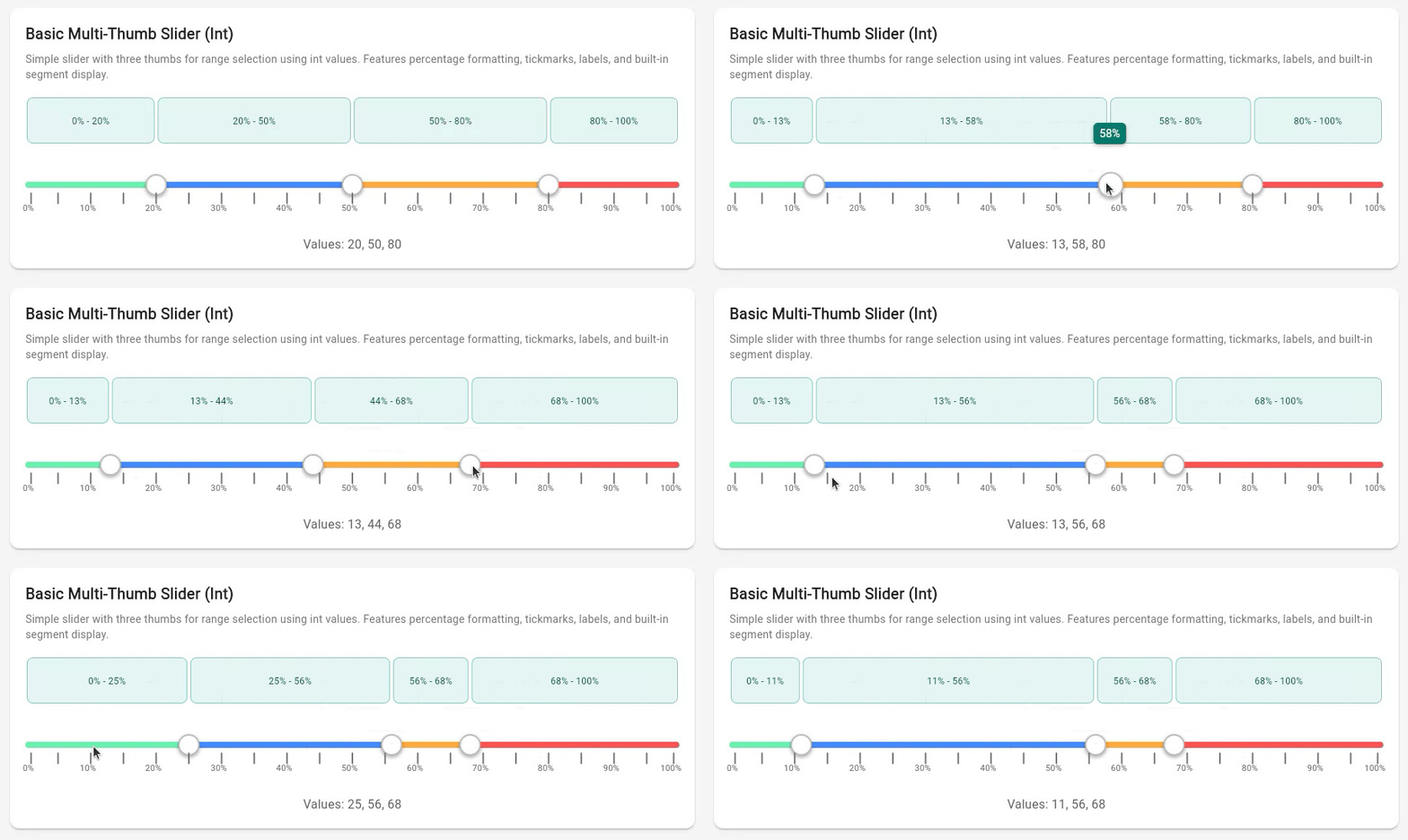
```dart
import 'package:flutter/material.dart';
import 'package:multi_thumb_range_slider/multi_thumb_range_slider.dart';
class BasicExampleWidget extends StatefulWidget {
@override
State createState() => _BasicExampleWidgetState();
}
class _BasicExampleWidgetState extends State {
List _values = [20, 50, 80];
@override
Widget build(BuildContext context) {
return CustomMultiThumbSlider.withInt(
values: _values,
min: 0,
max: 100,
// Visual enhancements
showTickmarks: true,
tickmarkInterval: 5,
showTickmarkLabels: true,
tickmarkLabelInterval: 10,
showTooltip: true,
valueFormatter: (value) => '$value%',
// Built-in segment display
showSegments: true,
segmentContentType: SegmentContentType.fromToRange,
onChanged: (newValues) {
setState(() {
_values = newValues;
});
},
);
}
}
```
#### Double Precision Slider with Decimal Formatting
*[🎬 Animated example placeholder - GIF will be added here]*
```dart
class DoubleExampleWidget extends StatefulWidget {
@override
State createState() => _DoubleExampleWidgetState();
}
class _DoubleExampleWidgetState extends State {
List _values = [15.5, 42.3, 78.9];
@override
Widget build(BuildContext context) {
return CustomMultiThumbSlider(
values: _values,
min: 0.0,
max: 100.0,
showTooltip: true,
valueFormatter: (value) => value.toStringAsFixed(1),
// Show segment widths with decimal precision
showSegments: true,
segmentContentType: SegmentContentType.width,
onChanged: (newValues) {
setState(() {
_values = newValues;
});
},
);
}
}
```
#### Enum Slider with Educational Dan Rank System
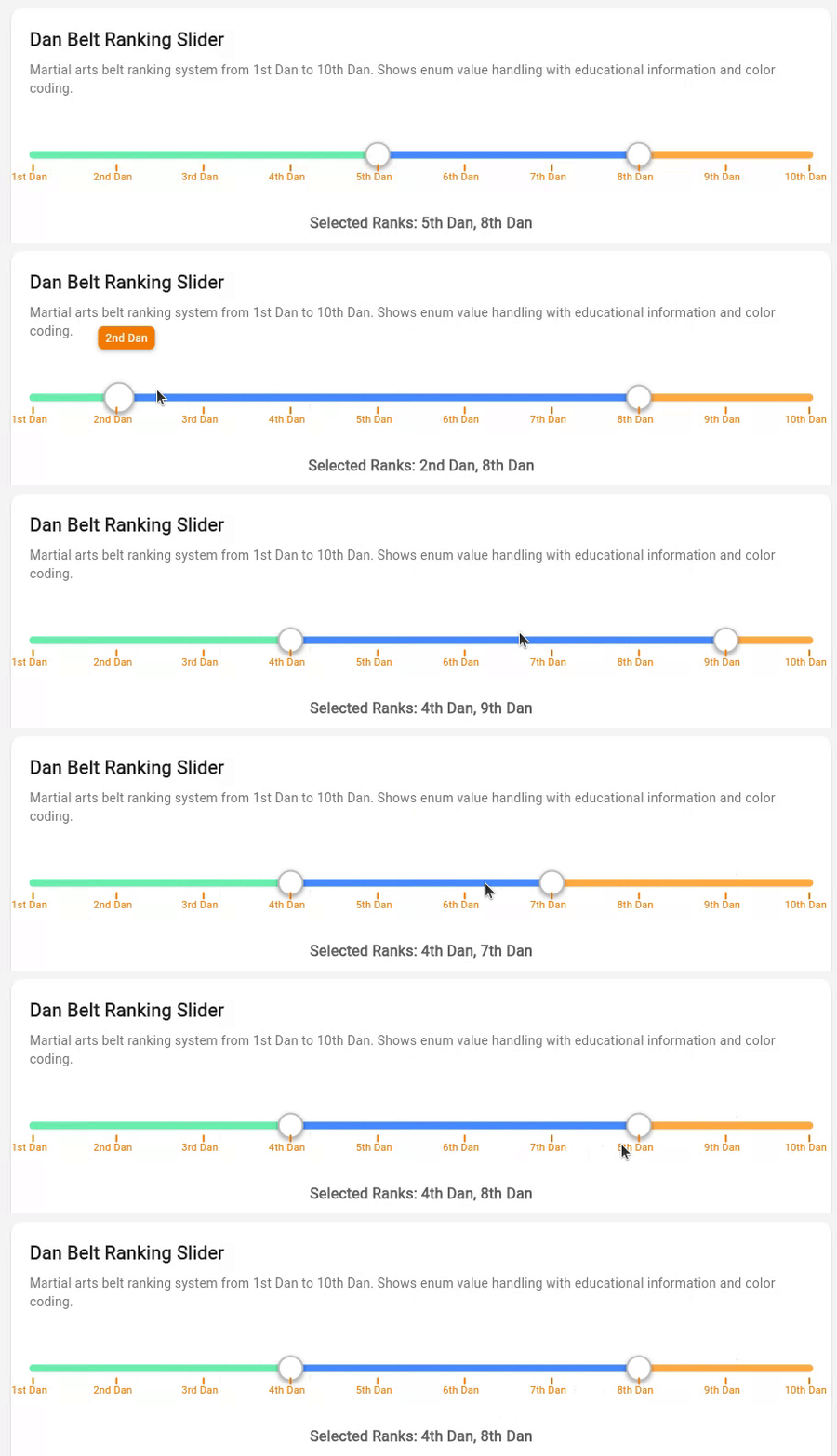
```dart
enum DanRank {
firstDan, secondDan, thirdDan, fourthDan, fifthDan,
sixthDan, seventhDan, eighthDan, ninthDan, tenthDan
}
extension DanRankExtension on DanRank {
String get displayName {
switch (this) {
case DanRank.firstDan: return '1st Dan';
case DanRank.secondDan: return '2nd Dan';
// ... more cases
default: return '${index + 1}th Dan';
}
}
}
class DanRankExampleWidget extends StatefulWidget {
@override
State createState() => _DanRankExampleWidgetState();
}
class _DanRankExampleWidgetState extends State {
List _values = [DanRank.fifthDan, DanRank.eighthDan];
@override
Widget build(BuildContext context) {
return CustomMultiThumbSlider.withEnum(
values: _values,
min: DanRank.firstDan,
max: DanRank.tenthDan,
allPossibleValues: DanRank.values,
showTickmarks: true,
showTickmarkLabels: true,
tickmarkLabelInterval: 1,
showTooltip: true,
valueFormatter: (value) => value.displayName,
onChanged: (newValues) {
setState(() {
_values = newValues;
});
},
);
}
}
```
## Advanced Examples
### Price Range Selector
*[🎬 Animated example placeholder - GIF will be added here]*
Applications with currency formatting and range categorization:
```dart
class PriceRangeExampleWidget extends StatefulWidget {
@override
State createState() => _PriceRangeExampleWidgetState();
}
class _PriceRangeExampleWidgetState extends State {
List _values = [50, 150, 300];
@override
Widget build(BuildContext context) {
return CustomMultiThumbSlider.withInt(
values: _values,
min: 0,
max: 500,
showTooltip: true,
valueFormatter: (value) => '\$$value',
// E-commerce styled segments
showSegments: true,
segmentContentType: SegmentContentType.toRange,
segmentCardBackgroundColor: Colors.green.shade50,
segmentCardBorderColor: Colors.green.shade200,
segmentTextColor: Colors.green.shade800,
onChanged: (newValues) {
setState(() {
_values = newValues;
});
},
);
}
}
```
### Weight Class Selector for Sports Applications
*[🎬 Animated example placeholder - GIF will be added here]*
Weight class ranges:
```dart
class WeightClassExampleWidget extends StatefulWidget {
@override
State createState() => _WeightClassExampleWidgetState();
}
class _WeightClassExampleWidgetState extends State {
List _values = [60, 70, 80, 90];
@override
Widget build(BuildContext context) {
return CustomMultiThumbSlider.withInt(
values: _values,
min: 50,
max: 100,
height: 60,
thumbRadius: 18,
showTooltip: true,
valueFormatter: (value) => '${value}kg',
onChanged: (newValues) {
setState(() {
_values = newValues;
});
},
);
}
}
```
### Interactive Segment Editing
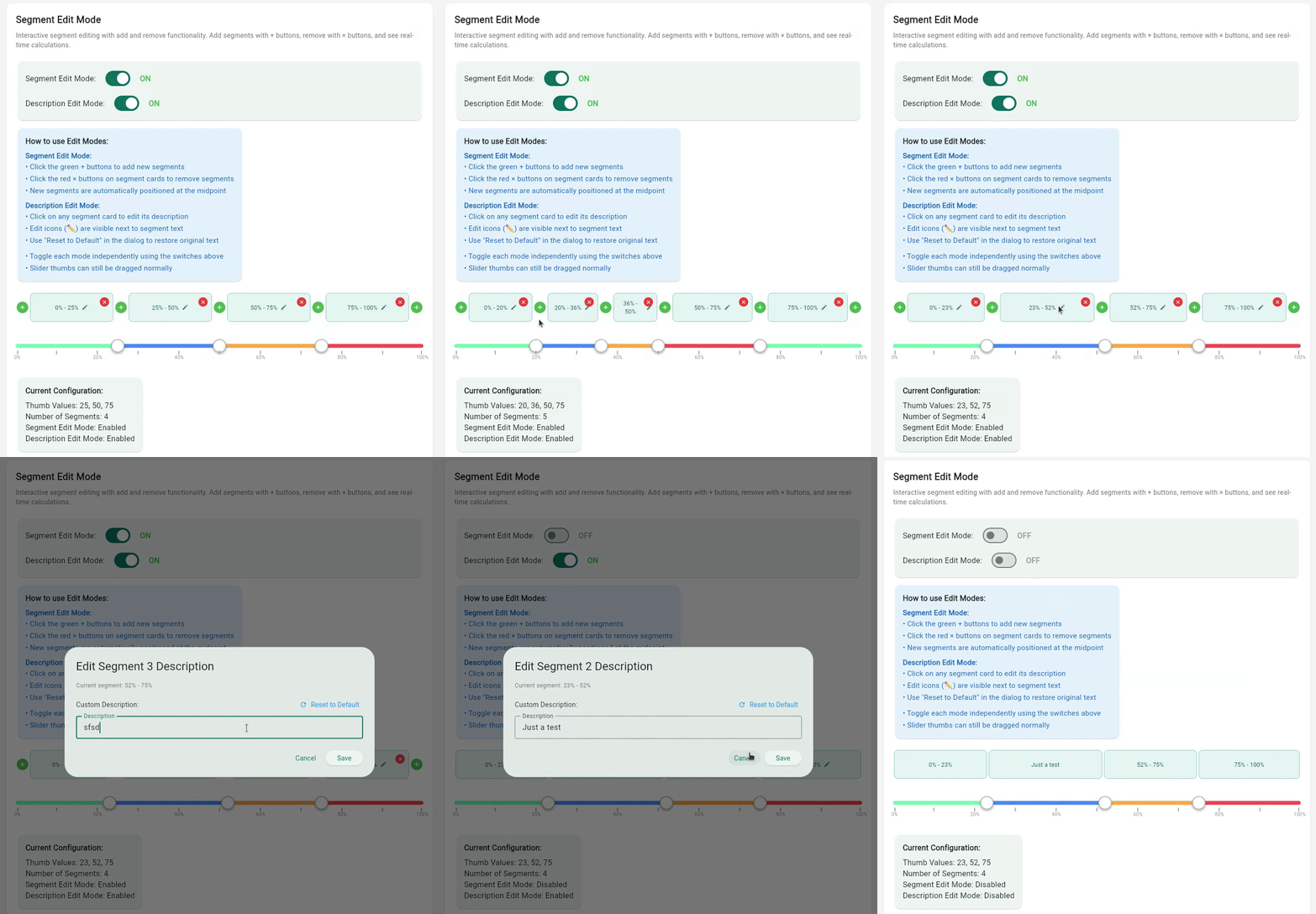
Advanced segment editing capabilities with add/remove functionality:
```dart
class SegmentEditExampleWidget extends StatefulWidget {
@override
State createState() => _SegmentEditExampleWidgetState();
}
class _SegmentEditExampleWidgetState extends State {
List _values = [25, 50, 75];
bool _editModeEnabled = true;
bool _descriptionEditEnabled = true;
@override
Widget build(BuildContext context) {
return CustomMultiThumbSlider.withInt(
values: _values,
min: 0,
max: 100,
// Enable segment display and editing
showSegments: true,
segmentContentType: SegmentContentType.fromToRange,
enableSegmentEdit: _editModeEnabled,
enableDescriptionEdit: _descriptionEditEnabled,
// Optional editing callbacks
onSegmentAdd: (segmentIndex) {
// Handle adding new segment
final newValues = calculateNewValues(segmentIndex);
setState(() => _values = newValues);
},
onSegmentRemove: (segmentIndex) {
// Handle removing segment
final newValues = calculateRemovedValues(segmentIndex);
setState(() => _values = newValues);
},
onDescriptionChanged: (segmentIndex, description) {
// Handle custom description changes
print('Segment $segmentIndex: $description');
},
onChanged: (newValues) {
setState(() {
_values = newValues;
});
},
);
}
}
```
## Tickmark & Visual Features
### Tickmark Positioning Options
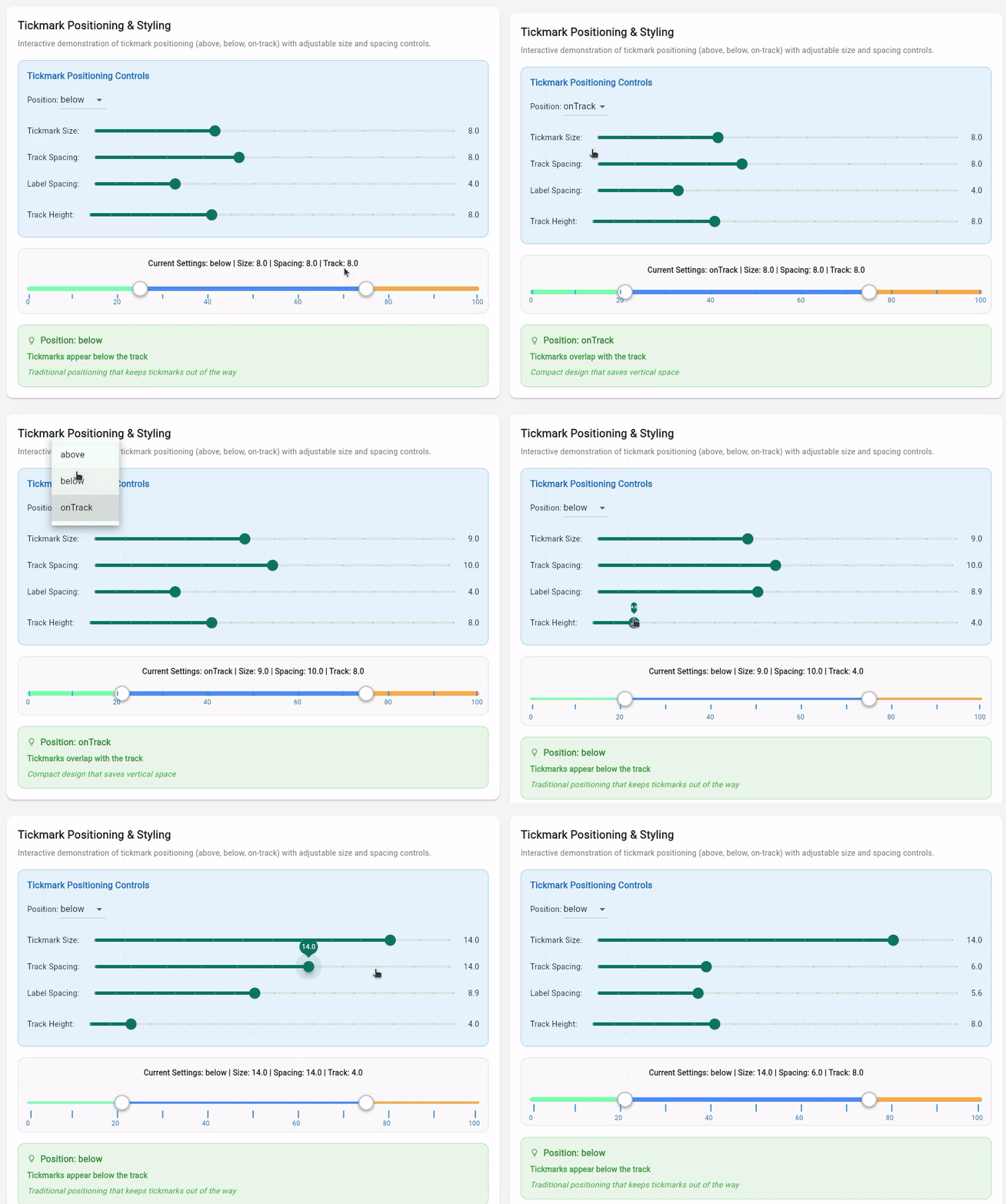
Configure tickmarks to appear above, below, or on the track itself:
```dart
class TickmarkPositioningExample extends StatefulWidget {
@override
State createState() => _TickmarkPositioningExampleState();
}
class _TickmarkPositioningExampleState extends State {
List _values = [25, 75];
TickmarkPosition _position = TickmarkPosition.below;
@override
Widget build(BuildContext context) {
return CustomMultiThumbSlider(
values: _values,
min: 0,
max: 100,
// Tickmark configuration
showTickmarks: true,
tickmarkInterval: 10,
tickmarkSize: 8.0,
tickmarkPosition: _position, // above, below, or onTrack
tickmarkSpacing: 8.0, // Distance from track
// Label configuration
showTickmarkLabels: true,
tickmarkLabelInterval: 20,
labelSpacing: 4.0, // Distance from tickmarks
onChanged: (newValues) => setState(() => _values = newValues),
);
}
}
```
### Tooltip Configuration
Interactive tooltips with custom formatting:
```dart
CustomMultiThumbSlider.withInt(
values: [20, 50, 80],
showTooltip: true,
tooltipColor: Colors.blue.shade700,
tooltipTextColor: Colors.white,
tooltipTextSize: 14.0,
valueFormatter: (value) => '$value%', // Custom formatting
onChanged: (newValues) => setState(() => _values = newValues),
)
```
### Custom Styling and Color Schemes
Extensive styling options for different themes:
```dart
CustomMultiThumbSlider.withInt(
values: [30, 60, 90],
min: 0,
max: 100,
// Track styling
height: 50,
trackHeight: 8.0,
trackColor: Colors.grey[300]!,
// Thumb styling
thumbColor: Colors.blue[600]!,
thumbRadius: 16,
// Range colors (cycles if more ranges than colors)
rangeColors: [
Colors.green.shade200,
Colors.blue.shade200,
Colors.purple.shade200,
Colors.red.shade200,
],
onChanged: (newValues) => setState(() => _values = newValues),
)
```
## Segment Display & Editing Features
The multi-thumb range slider includes segment visualization and editing capabilities for interactive application use cases.
### Segment Display Options
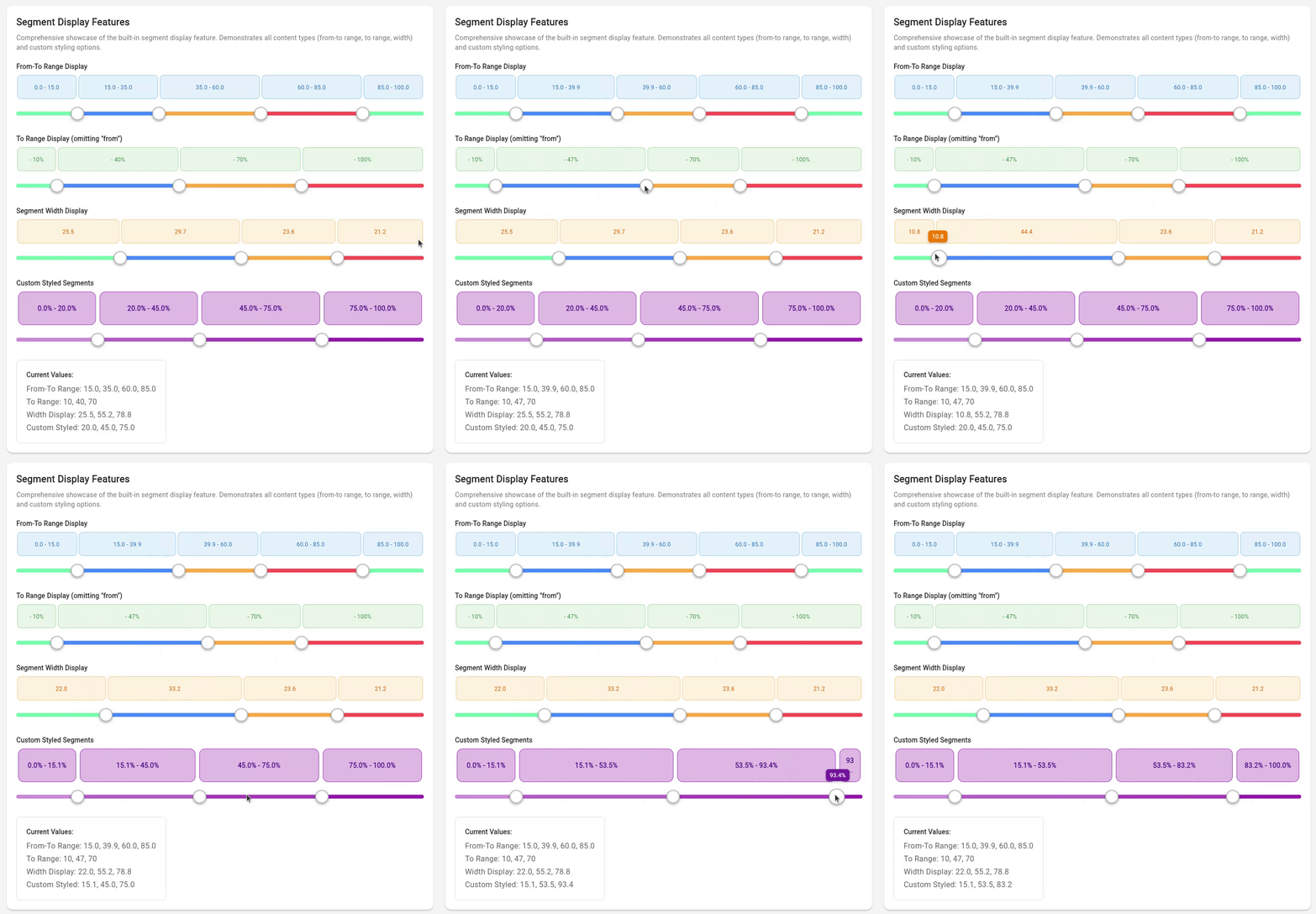
The segment display supports three different content types:
```dart
// 1. From-To Range Display (shows "0-20", "20-50", "50-100")
CustomMultiThumbSlider.withInt(
values: [20, 50, 80],
showSegments: true,
segmentContentType: SegmentContentType.fromToRange,
onChanged: (newValues) => setState(() => _values = newValues),
)
// 2. To Range Display (shows "-20", "-50", "-100")
CustomMultiThumbSlider.withInt(
values: [20, 50, 80],
showSegments: true,
segmentContentType: SegmentContentType.toRange,
onChanged: (newValues) => setState(() => _values = newValues),
)
// 3. Width Display (shows calculated segment widths "20", "30", "20")
CustomMultiThumbSlider.withInt(
values: [20, 50, 80],
showSegments: true,
segmentContentType: SegmentContentType.width,
onChanged: (newValues) => setState(() => _values = newValues),
)
```
### Segment Editing Capabilities
Enable dynamic segment editing with visual add/remove buttons:
```dart
CustomMultiThumbSlider.withInt(
values: [25, 50, 75],
showSegments: true,
enableSegmentEdit: true, // Enable add/remove buttons
enableDescriptionEdit: true, // Enable description editing
onSegmentAdd: (index) {
// Add new segment at specified position
},
onSegmentRemove: (index) {
// Remove segment at specified position
},
onDescriptionChanged: (index, description) {
// Handle custom description changes
},
onChanged: (newValues) => setState(() => _values = newValues),
)
```
### Custom Segment Styling
Customize the appearance of segment cards with extensive styling options:
```dart
CustomMultiThumbSlider.withInt(
values: [20, 50, 80],
showSegments: true,
segmentContentType: SegmentContentType.fromToRange,
// Segment styling
segmentHeight: 70,
segmentCardPadding: 12,
segmentCardMargin: 4,
segmentCardBorderRadius: 12,
segmentCardBackgroundColor: Colors.purple.shade100,
segmentCardBorderColor: Colors.purple.shade400,
segmentTextColor: Colors.purple.shade900,
segmentTextSize: 14,
segmentTextWeight: FontWeight.bold,
showSegmentBorders: true,
showSegmentBackgrounds: true,
valueFormatter: (value) => '${value}%',
onChanged: (newValues) => setState(() => _values = newValues),
)
```
## Open Segments
The multi-thumb slider supports open segments that extend infinitely in one direction, perfect for representing ranges like "55kg or less" or "80kg and above".
### Open-Ended Segments
Enable segments with no upper bound using `enableOpenEndedSegment`:
```dart
CustomMultiThumbSlider.withInt(
values: [60, 80],
min: 40,
max: 120,
enableOpenEndedSegment: true,
showSegments: true,
segmentContentType: SegmentContentType.fromToRange,
valueFormatter: (value) => '${value}kg',
onChanged: (values) => print(values),
)
```
This creates segments:
- `40kg - 60kg` (Light)
- `60kg - 80kg` (Medium)
- `80kg+` (Heavy) ← **Open-ended with right arrow**
### Open-Started Segments
Enable segments with no lower bound using `enableOpenStartedSegment`:
```dart
CustomMultiThumbSlider.withInt(
values: [55, 75],
min: 40,
max: 120,
enableOpenStartedSegment: true,
showSegments: true,
segmentContentType: SegmentContentType.fromToRange,
valueFormatter: (value) => '${value}kg',
onChanged: (values) => print(values),
)
```
This creates segments:
- `- 55kg` (Light) ← **Open-started with left arrow**
- `55kg - 75kg` (Medium)
- `75kg - 120kg` (Heavy)
### Dual Open Segments
Combine both for maximum flexibility:
```dart
CustomMultiThumbSlider.withInt(
values: [55, 75],
min: 40,
max: 120,
enableOpenStartedSegment: true,
enableOpenEndedSegment: true,
showSegments: true,
segmentContentType: SegmentContentType.fromToRange,
valueFormatter: (value) => '${value}kg',
onChanged: (values) => print(values),
)
```
This creates segments:
- `- 55kg` (Light) ← **Left arrow**
- `55kg - 75kg` (Medium)
- `75kg+` (Heavy) ← **Right arrow**
### Visual Indicators
Open segments are clearly indicated with:
- **Custom painted arrows** on the track itself
- **Appropriate labels** (e.g., "55kg+", "- 80kg")
- **Proportional widths** for visual balance
## Value Formatting & Localization
Built-in formatters for common use cases with custom formatting support:
```dart
// Percentage formatting
CustomMultiThumbSlider.withInt(
values: [20, 50, 80],
valueFormatter: (value) => '$value%',
onChanged: (newValues) => setState(() => _values = newValues),
)
// Currency formatting
CustomMultiThumbSlider.withInt(
values: [50, 150, 300],
valueFormatter: (value) => '\$$value',
onChanged: (newValues) => setState(() => _values = newValues),
)
// Weight formatting
CustomMultiThumbSlider.withInt(
values: [60, 80, 100],
valueFormatter: (value) => '${value}kg',
onChanged: (newValues) => setState(() => _values = newValues),
)
// Decimal precision formatting
CustomMultiThumbSlider(
values: [15.5, 42.3, 78.9],
valueFormatter: (value) => value.toStringAsFixed(1),
onChanged: (newValues) => setState(() => _values = newValues),
)
```
## Read-Only Mode
```dart
CustomMultiThumbSlider.withInt(
values: [25, 50, 75],
min: 0,
max: 100,
readOnly: true, // Disables all interaction
showSegments: true, // Can still show segment information
showTickmarks: true, // Visual elements remain functional
onChanged: (values) {}, // Callback not called in read-only mode
)
```
## API Reference
### CustomMultiThumbSlider
The main widget providing multi-thumb slider functionality with support for generic value types, extensive visual customization, and interactive features.
#### Constructors
##### Generic Constructor
```dart
const CustomMultiThumbSlider({
Key? key,
required List values,
ValueChanged> onChanged,
required T min,
required T max,
// Basic Layout
double height = 45.0,
double trackHeight = 8.0,
bool readOnly = false,
// Colors & Styling
Color trackColor = const Color(0xFFE0E0E0),
List rangeColors = defaultRangeColors,
Color thumbColor = Colors.white,
double thumbRadius = 14.0,
// Value Formatting
String Function(T)? valueFormatter,
List? allPossibleValues, // Required for enum types
// Tickmarks & Labels
bool showTickmarks = false,
int? tickmarkInterval,
double tickmarkSize = 6.0,
Color tickmarkColor = Colors.grey,
TickmarkPosition tickmarkPosition = TickmarkPosition.below,
double tickmarkSpacing = 6.0,
bool showTickmarkLabels = false,
int? tickmarkLabelInterval,
double tickmarkLabelSize = 12.0,
Color tickmarkLabelColor = Colors.black87,
double labelSpacing = 4.0,
// Tooltips
bool showTooltip = false,
Color tooltipColor = Colors.black87,
Color tooltipTextColor = Colors.white,
double tooltipTextSize = 12.0,
// Segment Display
bool showSegments = false,
SegmentContentType segmentContentType = SegmentContentType.fromToRange,
double segmentHeight = 60.0,
double segmentCardPadding = 8.0,
double segmentCardMargin = 2.0,
double segmentCardBorderRadius = 8.0,
Color segmentCardBackgroundColor = const Color(0xFFF5F5F5),
Color segmentCardBorderColor = const Color(0xFFE0E0E0),
Color segmentTextColor = const Color(0xFF424242),
double segmentTextSize = 12.0,
FontWeight segmentTextWeight = FontWeight.normal,
bool showSegmentBorders = true,
bool showSegmentBackgrounds = true,
// Segment Editing
bool enableSegmentEdit = false,
bool enableDescriptionEdit = false,
Color segmentAddButtonColor = Colors.green,
Color segmentRemoveButtonColor = Colors.red,
double segmentButtonSize = 20.0,
Function(int)? onSegmentAdd,
Function(int)? onSegmentRemove,
Function(int, String?)? onDescriptionChanged,
})
```
##### Int Convenience Constructor
```dart
const CustomMultiThumbSlider.withInt({
// Same parameters as generic constructor but with int defaults
int min = 0,
int max = 100,
// ... all other parameters
})
```
##### Enum Convenience Constructor
```dart
const CustomMultiThumbSlider.withEnum({
required List allPossibleValues,
// ... all other parameters
})
```
#### Key Parameters
| Category | Parameter | Description |
|----------|-----------|-------------|
| **Core** | `values` | List of current thumb values |
| | `min` / `max` | Value range boundaries |
| | `readOnly` | Disable interaction for display-only mode |
| **Visual** | `showTickmarks` | Enable tickmark display |
| | `showTooltip` | Enable interactive tooltips |
| | `showSegments` | Enable segment visualization |
| | `valueFormatter` | Custom value formatting function |
| **Interaction** | `enableSegmentEdit` | Enable add/remove segment buttons |
| | `enableDescriptionEdit` | Enable segment description editing |
| | `onSegmentAdd` / `onSegmentRemove` | Segment editing callbacks |
| | `onDescriptionChanged` | Description change callback |
| **Open Segments** | `enableOpenEndedSegment` | Enable open-ended segments (no upper bound) |
| | `enableOpenStartedSegment` | Enable open-started segments (no lower bound) |
#### Enums
```dart
enum SegmentContentType { fromToRange, toRange, width }
enum TickmarkPosition { above, below, onTrack }
```
## Type Support & Behavior
| Type | Usage | Behavior |
|------|-------|----------|
| **`int`** | Most common use case | Values automatically rounded to nearest integer |
| **`double`** | Precise measurements | Full decimal precision maintained |
| **`enum`** | Categorical selection | Discrete values with custom display names |
| **Custom** | Any comparable type | Must implement comparison operators |
### Type-Specific Features
- **All types**: Tooltips, segments, tickmarks, formatting
- **Int/Double**: Automatic interval calculation for tickmarks
- **Enums**: Requires `allPossibleValues` parameter for proper spacing
- **Custom types**: Must provide custom `valueFormatter` for display
## Customization Options
### Visual Theming
- **Colors**: Track, thumb, range, and segment colors
- **Sizing**: Height, radius, padding, and spacing controls
- **Typography**: Font sizes, weights, and colors for labels
- **Borders**: Border radius, width, and styling options
### Layout Control
- **Positioning**: Tickmarks above, below, or on track
- **Spacing**: Configurable gaps between elements
- **Responsive**: Automatic adaptation to screen sizes
- **Overflow**: Smart handling of limited space
### Interaction Design
- **Touch Targets**: Optimized thumb sizes for mobile
- **Visual Feedback**: Hover states and selection indicators
- **Accessibility**: Screen reader and keyboard navigation support
- **Animation**: Smooth transitions and state changes
## Contributing
Contributions are welcome! Please feel free to submit a Pull Request. For major changes, please open an issue first to discuss what you would like to change.
## License
This project is licensed under the MIT License - see the [LICENSE](LICENSE) file for details.
## Support
If you encounter any issues or have questions, please:
1. Check the [existing issues](https://github.com/protoss78/multi_thumb_slider/issues)
2. Create a new issue with a detailed description
3. Include your Flutter version and device information
## Changelog
### 1.3.0
- **Custom Segment Descriptions**: Interactive editing of segment descriptions
- Tap-to-edit functionality with popup dialogs
- Reset to default button for easy restoration
- Visual indicators for customized segments
- `onDescriptionChanged` callback for monitoring changes
- **Segment Data Access**: New `getSegmentsWithDescriptions()` method
- Returns complete segment information including custom descriptions
- `SliderSegment` and `SegmentDescription` data models
- Full type safety and generic support
- **Enhanced UX**: Improved segment editing experience with better visual feedback
### 1.2.0
- **New Segment Display Feature**: Built-in segment visualization above the slider
- Three content types: from-to range, to range, and width display
- Extensive styling customization options
- Integration with value formatters
- Works with numeric types (int, double)
- **Enhanced Examples**: New examples showcasing segment display features
- **Improved Documentation**: Comprehensive examples and API documentation
### 1.1.0
- Added generic type support for `int`, `double`, `enum`, and other types
- Changed default type from `double` to `int`
- Added convenience constructor `CustomMultiThumbSlider.int()` with default min/max values
- Improved type safety and flexibility
### 1.0.0
- Initial release
- Multi-thumb slider with draggable interface
- Customizable appearance and styling
- Range constraint enforcement
- Responsive design support