https://github.com/psalias2006/gpu-hot
🔥 Real-time NVIDIA GPU dashboard
https://github.com/psalias2006/gpu-hot
charts cuda dashboard devops docker flask gpu gpu-monitoring llm mlops nvidia nvidia-docker nvidia-smi python real-time real-time-monitoring system-monitoring
Last synced: 5 months ago
JSON representation
🔥 Real-time NVIDIA GPU dashboard
- Host: GitHub
- URL: https://github.com/psalias2006/gpu-hot
- Owner: psalias2006
- License: mit
- Created: 2025-10-05T11:48:17.000Z (9 months ago)
- Default Branch: main
- Last Pushed: 2025-12-25T13:37:02.000Z (7 months ago)
- Last Synced: 2025-12-27T01:19:10.940Z (7 months ago)
- Topics: charts, cuda, dashboard, devops, docker, flask, gpu, gpu-monitoring, llm, mlops, nvidia, nvidia-docker, nvidia-smi, python, real-time, real-time-monitoring, system-monitoring
- Language: JavaScript
- Homepage: https://psalias2006.github.io/gpu-hot/
- Size: 69.2 MB
- Stars: 1,254
- Watchers: 2
- Forks: 58
- Open Issues: 5
-
Metadata Files:
- Readme: README.md
- License: LICENSE
Awesome Lists containing this project
README
# GPU Hot
Real-time NVIDIA GPU monitoring dashboard. Lightweight, web-based, and self-hosted.
[](https://www.python.org/)
[](https://www.docker.com/)
[](LICENSE)
[](https://www.nvidia.com/)


---
## Usage
Monitor a single machine or an entire cluster with the same Docker image.
**Single machine:**
```bash
docker run -d --gpus all -p 1312:1312 ghcr.io/psalias2006/gpu-hot:latest
```
**Multiple machines:**
```bash
# On each GPU server
docker run -d --gpus all -p 1312:1312 -e NODE_NAME=$(hostname) ghcr.io/psalias2006/gpu-hot:latest
# On a hub machine (no GPU required)
docker run -d -p 1312:1312 -e GPU_HOT_MODE=hub -e NODE_URLS=http://server1:1312,http://server2:1312,http://server3:1312 ghcr.io/psalias2006/gpu-hot:latest
```
Open `http://localhost:1312`
**Older GPUs:** Add `-e NVIDIA_SMI=true` if metrics don't appear.
**Process monitoring:** Add `--init --pid=host` to see process names. Note: This allows the container to access host process information.
**From source:**
```bash
git clone https://github.com/psalias2006/gpu-hot
cd gpu-hot
docker-compose up --build
```
**Requirements:** Docker + [NVIDIA Container Toolkit](https://docs.nvidia.com/datacenter/cloud-native/container-toolkit/latest/install-guide.html)
---
## Features
- Real-time metrics (sub-second)
- Automatic multi-GPU detection
- Process monitoring (PID, memory usage)
- Historical charts (utilization, temperature, power, clocks)
- System metrics (CPU, RAM)
- Scale from 1 to 100+ GPUs
**Metrics:** Utilization, temperature, memory, power draw, fan speed, clock speeds, PCIe info, P-State, throttle status, encoder/decoder sessions
---
## Configuration
**Environment variables:**
```bash
NVIDIA_VISIBLE_DEVICES=0,1 # Specific GPUs (default: all)
NVIDIA_SMI=true # Force nvidia-smi mode for older GPUs
GPU_HOT_MODE=hub # Set to 'hub' for multi-node aggregation (default: single node)
NODE_NAME=gpu-server-1 # Node display name (default: hostname)
NODE_URLS=http://host:1312... # Comma-separated node URLs (required for hub mode)
```
**Backend (`core/config.py`):**
```python
UPDATE_INTERVAL = 0.5 # Polling interval in seconds
PORT = 1312 # Server port
```
---
## API
### HTTP
```bash
GET / # Dashboard
GET /api/gpu-data # JSON metrics snapshot
GET /api/version # Version and update info
```
### WebSocket
```javascript
const ws = new WebSocket('ws://localhost:1312/socket.io/');
ws.onmessage = (event) => {
const data = JSON.parse(event.data);
// data.gpus — per-GPU metrics
// data.processes — active GPU processes
// data.system — host CPU, RAM, swap, disk, network
};
```
---
## Project Structure
```
gpu-hot/
├── app.py # FastAPI server + routes
├── version.py # Version info
├── core/
│ ├── config.py # Configuration
│ ├── monitor.py # NVML GPU monitoring
│ ├── handlers.py # WebSocket handlers
│ ├── hub.py # Multi-node hub aggregator
│ ├── hub_handlers.py # Hub WebSocket handlers
│ ├── nvidia_smi_fallback.py # nvidia-smi fallback for older GPUs
│ └── metrics/
│ ├── collector.py # Metrics collection
│ └── utils.py # Metric utilities
├── static/
│ ├── css/
│ │ ├── tokens.css # Design tokens (colors, spacing)
│ │ ├── layout.css # Page layout (sidebar, main)
│ │ └── components.css # UI components (cards, charts)
│ ├── js/
│ │ ├── chart-config.js # Chart.js configurations
│ │ ├── chart-manager.js # Chart data + lifecycle
│ │ ├── chart-drawer.js # Correlation drawer
│ │ ├── gpu-cards.js # GPU card rendering
│ │ ├── socket-handlers.js # WebSocket + batched rendering
│ │ ├── ui.js # Sidebar navigation
│ │ └── app.js # Init + version check
│ └── favicon.svg
├── templates/index.html
├── Dockerfile
├── docker-compose.yml
└── requirements.txt
```
---
## Troubleshooting
**No GPUs detected:**
```bash
nvidia-smi # Verify drivers work
docker run --rm --gpus all nvidia/cuda:12.1.0-base-ubuntu22.04 nvidia-smi # Test Docker GPU access
```
**Hub can't connect to nodes:**
```bash
curl http://node-ip:1312/api/gpu-data # Test connectivity
sudo ufw allow 1312/tcp # Check firewall
```
**Performance issues:** Increase `UPDATE_INTERVAL` in `core/config.py`
---
## Star History
[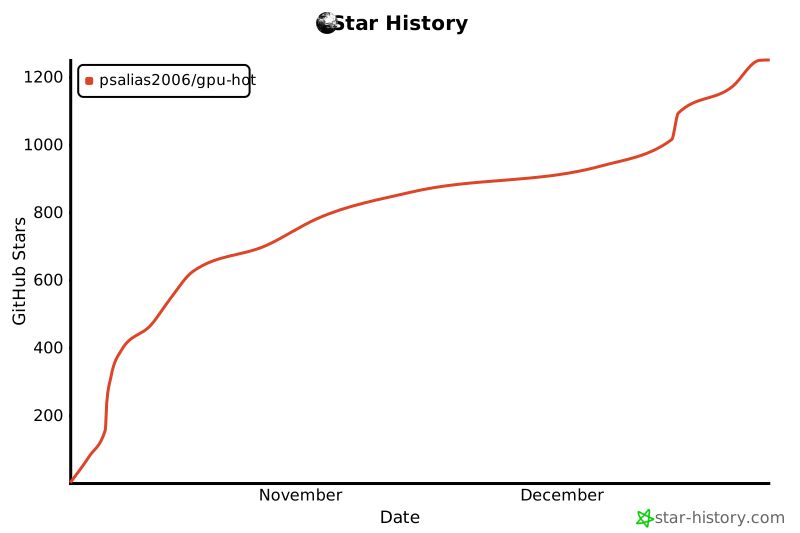](https://www.star-history.com/#psalias2006/gpu-hot&type=date&legend=top-left)
## Contributing
PRs welcome. Open an issue for major changes.
## License
MIT - see [LICENSE](LICENSE)