https://github.com/psu3d0/spreadsheet-mcp
MCP server for spreadsheet analysis and editing. Slim, token-efficient tool surface designed for LLM agents.
https://github.com/psu3d0/spreadsheet-mcp
spreadsheet spreadsheet-agent spreadsheet-ai spreadsheet-mcp
Last synced: 3 months ago
JSON representation
MCP server for spreadsheet analysis and editing. Slim, token-efficient tool surface designed for LLM agents.
- Host: GitHub
- URL: https://github.com/psu3d0/spreadsheet-mcp
- Owner: PSU3D0
- License: apache-2.0
- Created: 2025-09-19T01:56:38.000Z (9 months ago)
- Default Branch: main
- Last Pushed: 2026-03-04T22:59:37.000Z (3 months ago)
- Last Synced: 2026-03-05T04:26:04.001Z (3 months ago)
- Topics: spreadsheet, spreadsheet-agent, spreadsheet-ai, spreadsheet-mcp
- Language: Rust
- Homepage:
- Size: 7.8 MB
- Stars: 37
- Watchers: 0
- Forks: 3
- Open Issues: 1
-
Metadata Files:
- Readme: README.md
- License: LICENSE
Awesome Lists containing this project
README
# spreadsheet-kit
[](https://github.com/PSU3D0/spreadsheet-mcp/actions/workflows/ci.yml)
[](https://crates.io/crates/spreadsheet-mcp)
[](https://www.npmjs.com/package/agent-spreadsheet)
[](https://github.com/PSU3D0/spreadsheet-mcp/blob/main/LICENSE)
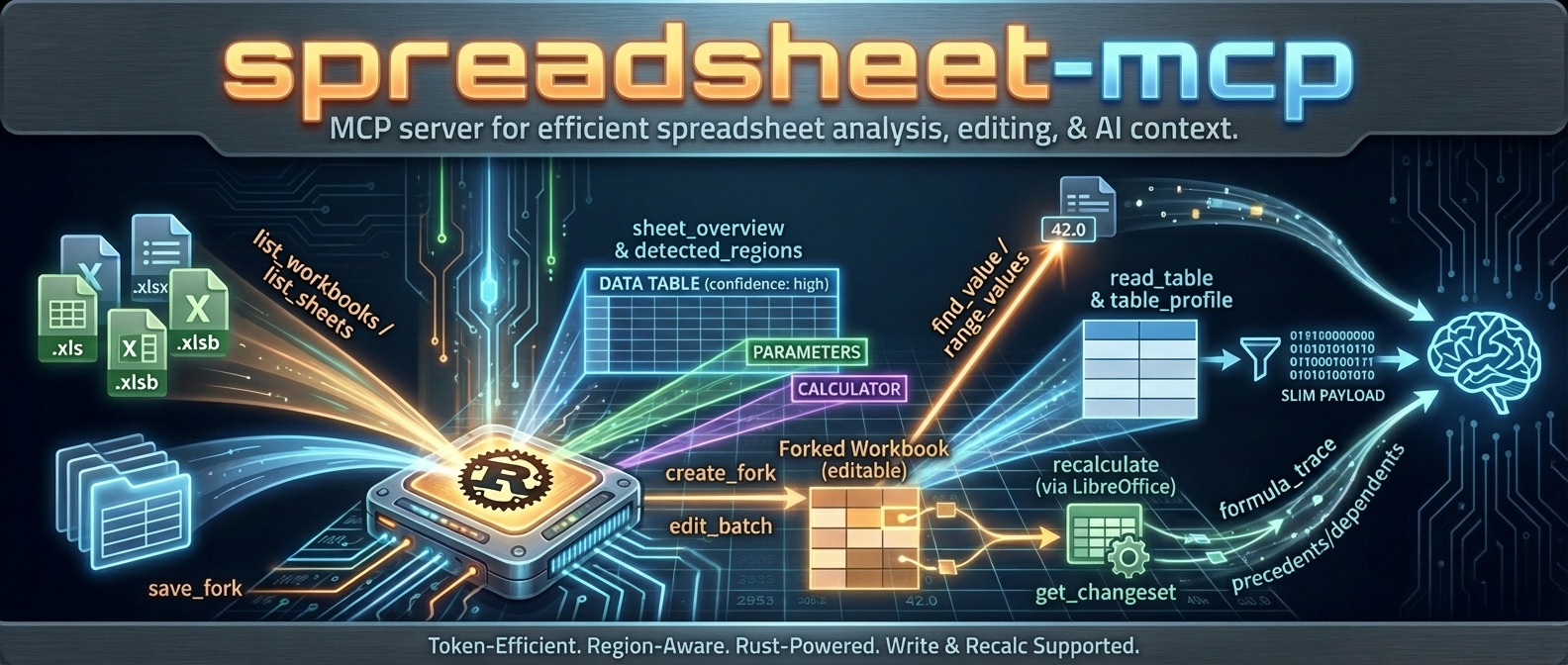
**Spreadsheet automation for AI agents.** Read, profile, edit, and recalculate `.xlsx` workbooks with tooling designed to be token-efficient, structurally aware, and agent-friendly.
spreadsheet-kit ships two surfaces:
| Surface | Binary | Mode | Best for |
| --- | --- | --- | --- |
| **[agent-spreadsheet](#quickstart-cli)** | `agent-spreadsheet` | Stateless CLI | Scripts, pipelines, one-shot agent tasks |
| **[spreadsheet-mcp](#quickstart-mcp-server)** | `spreadsheet-mcp` | Stateful MCP server | Multi-turn agent sessions with caching and fork/recalc |
Both share the same core engine and support `.xlsx` / `.xlsm` (read + write) and `.xls` / `.xlsb` (discovery only).
---
## Install
### npm (recommended for CLI)
```bash
npm i -g agent-spreadsheet
agent-spreadsheet --help
```
Downloads a prebuilt native binary for your platform. No Rust toolchain required.
### Cargo
```bash
# CLI
cargo install agent-spreadsheet
# MCP server
cargo install spreadsheet-mcp
```
Formualizer (native Rust recalc engine) is included by default. To build without it, use `--no-default-features`.
### Prebuilt binaries
Download from [GitHub Releases](https://github.com/PSU3D0/spreadsheet-mcp/releases).
Builds are published for Linux x86_64, macOS x86_64/aarch64, and Windows x86_64.
### Docker (MCP server)
```bash
# Read-only (~15 MB)
docker pull ghcr.io/psu3d0/spreadsheet-mcp:latest
# With write/recalc support (~800 MB, includes LibreOffice)
docker pull ghcr.io/psu3d0/spreadsheet-mcp:full
```
---
## Quickstart: CLI
The CLI is the fastest path to working with spreadsheets from code. Every command is stateless — pass a file, get JSON.
```bash
# List sheets
agent-spreadsheet list-sheets data.xlsx
# Profile structure and detected regions
agent-spreadsheet sheet-overview data.xlsx "Sheet1"
# Read a table as structured data
agent-spreadsheet read-table data.xlsx --sheet "Sheet1"
# Read one or more raw ranges
agent-spreadsheet range-values data.xlsx Sheet1 A1:C20
# Search values directly (default mode is value)
agent-spreadsheet find-value data.xlsx "Revenue" --mode value
# Label lookup: match a label cell, then read an adjacent value
agent-spreadsheet find-value data.xlsx "Net Income" --mode label --label-direction below
# Describe workbook metadata
agent-spreadsheet describe data.xlsx
```
### Deterministic pagination loops
```bash
# sheet-page continuation
agent-spreadsheet sheet-page data.xlsx Sheet1 --format compact --page-size 200
agent-spreadsheet sheet-page data.xlsx Sheet1 --format compact --page-size 200 --start-row 201
# read-table continuation
agent-spreadsheet read-table data.xlsx --sheet "Sheet1" --table-format values --limit 200 --offset 0
agent-spreadsheet read-table data.xlsx --sheet "Sheet1" --table-format values --limit 200 --offset 200
```
### Edit → recalculate → diff
```bash
agent-spreadsheet copy data.xlsx /tmp/draft.xlsx
agent-spreadsheet edit /tmp/draft.xlsx Sheet1 "B2=500" "C2==B2*1.1"
agent-spreadsheet recalculate /tmp/draft.xlsx
agent-spreadsheet diff data.xlsx /tmp/draft.xlsx
```
### Stateless batch writes (`--ops @...`)
```bash
agent-spreadsheet transform-batch data.xlsx --ops @ops.json --dry-run
agent-spreadsheet style-batch data.xlsx --ops @style_ops.json --dry-run
agent-spreadsheet apply-formula-pattern data.xlsx --ops @formula_ops.json --in-place
agent-spreadsheet structure-batch data.xlsx --ops @structure_ops.json --dry-run
agent-spreadsheet column-size-batch data.xlsx --ops @column_size_ops.json --output resized.xlsx
agent-spreadsheet sheet-layout-batch data.xlsx --ops @layout_ops.json --dry-run
agent-spreadsheet rules-batch data.xlsx --ops @rules_ops.json --output ruled.xlsx --force
```
#### Batch payload examples (JSON body passed via `--ops @file.json`)
All batch payloads use a top-level envelope object. Most commands require `{"ops":[...]}`; `column-size-batch` prefers `{"sheet_name":"...","ops":[...]}` and also accepts per-op `sheet_name` inside `{"ops":[...]}`.
##### transform-batch payloads (`@transform_ops.json`)
- Minimal: `{"ops":[{"kind":"fill_range","sheet_name":"Sheet1","target":{"kind":"range","range":"B2:B4"},"value":"0"}]}`
- Advanced: `{"ops":[{"kind":"replace_in_range","sheet_name":"Sheet1","target":{"kind":"region","region_id":1},"find":"N/A","replace":"","match_mode":"contains","case_sensitive":false,"include_formulas":true}]}`
##### style-batch payloads (`@style_ops.json`)
- Minimal: `{"ops":[{"sheet_name":"Sheet1","target":{"kind":"range","range":"B2:B2"},"patch":{"font":{"bold":true}}}]}`
- Advanced: `{"ops":[{"sheet_name":"Sheet1","target":{"kind":"cells","cells":["B2","B3"]},"patch":{"number_format":"$#,##0.00","alignment":{"horizontal":"right"}},"op_mode":"merge"}]}`
##### apply-formula-pattern payloads (`@formula_ops.json`)
- Minimal: `{"ops":[{"sheet_name":"Sheet1","target_range":"C2:C4","anchor_cell":"C2","base_formula":"B2*2"}]}`
- Advanced: `{"ops":[{"sheet_name":"Sheet1","target_range":"C2:E4","anchor_cell":"C2","base_formula":"B2*2","fill_direction":"both","relative_mode":"excel"}]}`
- `relative_mode` valid values: `excel`, `abs_cols`, `abs_rows`
##### structure-batch payloads (`@structure_ops.json`)
- Minimal: `{"ops":[{"kind":"rename_sheet","old_name":"Summary","new_name":"Dashboard"}]}`
- Advanced: `{"ops":[{"kind":"copy_range","sheet_name":"Sheet1","dest_sheet_name":"Summary","src_range":"A1:C4","dest_anchor":"A1","include_styles":true,"include_formulas":true}]}`
##### column-size-batch payloads (`@column_size_ops.json`)
- Minimal (preferred): `{"sheet_name":"Sheet1","ops":[{"range":"A:A","size":{"kind":"width","width_chars":12.0}}]}`
- Advanced (preferred): `{"sheet_name":"Sheet1","ops":[{"target":{"kind":"columns","range":"A:C"},"size":{"kind":"auto","min_width_chars":8.0,"max_width_chars":24.0}}]}`
- Also accepted (harmonized shape): `{"ops":[{"sheet_name":"Sheet1","range":"A:A","size":{"kind":"width","width_chars":12.0}}]}`
##### sheet-layout-batch payloads (`@layout_ops.json`)
- Minimal: `{"ops":[{"kind":"freeze_panes","sheet_name":"Sheet1","freeze_rows":1,"freeze_cols":1}]}`
- Advanced: `{"ops":[{"kind":"set_page_setup","sheet_name":"Sheet1","orientation":"landscape","fit_to_width":1,"fit_to_height":1}]}`
##### rules-batch payloads (`@rules_ops.json`)
- Minimal: `{"ops":[{"kind":"set_data_validation","sheet_name":"Sheet1","target_range":"B2:B4","validation":{"kind":"list","formula1":"\"A,B,C\""}}]}`
- Advanced: `{"ops":[{"kind":"set_conditional_format","sheet_name":"Sheet1","target_range":"C2:C10","rule":{"kind":"expression","formula":"C2>100"},"style":{"fill_color":"#FFF2CC","bold":true}}]}`
`apply-formula-pattern` clears cached results for touched formula cells; run `recalculate` to refresh computed values.
All output is JSON by default.
Use `--shape canonical|compact` (default: `canonical`) to control response shape.
### Formula parse policy
Commands that tokenize or validate formulas accept `--formula-parse-policy `:
| Mode | Behavior | Default for |
| --- | --- | --- |
| **fail** | Abort on any formula parse error | `edit` (single-write) |
| **warn** | Continue; attach `formula_parse_diagnostics` to the response | `scan-volatiles`, `formula-map`, `formula-trace`, `transform-batch`, `structure-batch`, `rules-batch` |
| **off** | Silently skip parse errors | — |
When the policy is `warn` (or `fail` with errors), the response includes a `formula_parse_diagnostics` object:
```json
{
"formula_parse_diagnostics": {
"policy": "warn",
"total_errors": 400,
"groups_truncated": false,
"groups": [
{
"error_code": "FORMULA_PARSE_FAILED",
"error_message": "No matching opener for closer at position 161",
"sheet_name": "Assessments",
"formula_preview": "=IF(C4=\"\",\"\",IF(C4=\"N/A\",…",
"count": 400,
"sample_addresses": ["D4", "D5", "D10", "D11", "D12"]
}
]
}
}
```
Errors are grouped by structural pattern — formulas that differ only in cell references (e.g., `=IF(C4=…)` and `=IF(C5=…)`) collapse into a single group with a count and sample addresses.
Shape policy:
- **Canonical (default/omitted):** preserve the full response schema.
- **range-values:** returns a stable `values: [...]` envelope in both canonical and compact modes.
- **range-values default encoding:** dense JSON (`dense.encoding = "dense_v1"`) with `dictionary` + run-length `row_runs`.
- **range-values `--include-formulas`:** includes sparse formula coordinates in dense mode (`dense.formulas`), or a matrix in explicit `json` format.
- **read-table and sheet-page: compact preserves the active branch and continuation fields (`next_offset`, `next_start_row`)**.
- **formula-trace compact:** omits per-layer `highlights` while preserving `layers` and `next_cursor`.
#### `sheet-page` machine contract
- Inspect top-level `format` before reading payload fields.
- `format=full`: read top-level `rows` plus optional `header_row` and `next_start_row`.
- `format=compact`: read `compact.headers`, `compact.header_row`, `compact.rows` plus optional `next_start_row`.
- `format=values_only`: read `values_only.rows` plus optional `next_start_row`.
- Continuation is always driven by top-level `next_start_row` when present.
- Global `--shape compact` preserves the active `sheet-page` branch; it does not flatten `sheet-page` payloads.
Machine continuation example:
1. Request page 1 without `--start-row`.
2. If `next_start_row` is present, call `sheet-page` again with `--start-row `.
3. Stop when `next_start_row` is omitted.
JSON output is compact by default; use `--quiet` to suppress warnings.
Global `--output-format csv` is currently unsupported; use command-specific CSV options like `read-table --table-format csv`.
### CLI command reference
| Command | Description |
| --- | --- |
| `list-sheets ` | List sheets with summaries |
| `sheet-overview ` | Region detection + orientation |
| `describe ` | Workbook metadata |
| `read-table [--sheet S] [--range R] [--table-name T] [--region-id ID] [--limit N] [--offset N] [--sample-mode first\|last\|distributed] [--table-format json\|values\|csv]` | Structured table read with deterministic offset pagination |
| `sheet-page --format [--start-row ROW] [--page-size N]` | Deterministic row paging with `next_start_row` continuation |
| `range-values [range...] [--format dense\|json\|values\|csv] [--include-formulas]` | Raw cell values in dense JSON encoding by default, optionally with sparse formula metadata |
| `inspect-cells [target...] [--include-empty]` | Detail-view per-cell formula/value/cached/style snapshots (max 25 cells per request) |
| `find-value [--sheet S] [--mode value\|label] [--label-direction right\|below\|any]` | Search cell values (`value`) or match labels and return adjacent values (`label`) |
| `named-ranges [--sheet S] [--name-prefix P]` | List named ranges/tables/formula items |
| `find-formula [--sheet S] [--limit N] [--offset N]` | Formula text search with continuation |
| `scan-volatiles [--sheet S] [--limit N] [--offset N] [--formula-parse-policy P]` | Scan formulas for volatile functions |
| `sheet-statistics ` | Per-sheet density and type stats |
| `formula-map [--sort-by complexity\|count] [--limit N] [--formula-parse-policy P]` | Formula inventory summary |
| `formula-trace [--depth N] [--page-size N] [--cursor-depth N --cursor-offset N] [--formula-parse-policy P]` | Trace formula dependencies with cursor continuation |
| `table-profile [--sheet S]` | Column types, cardinality, distributions |
| `create-workbook [--sheets Inputs,Calc,...] [--overwrite]` | Create a blank workbook with configurable initial sheets |
| `copy ` | Copy workbook (for edit workflows) |
| `edit [--dry-run\|--in-place\|--output PATH] [--force] [--formula-parse-policy P]` | Apply cell edits with preview/output safety modes (`A1=42` literal, `B2==SUM(...)` formula) |
| `transform-batch --ops @ops.json (--dry-run\|--in-place\|--output PATH) [--formula-parse-policy P]` | Generic stateless transform batch pipeline |
| `style-batch --ops @ops.json (--dry-run|--in-place|--output PATH)` | Stateless style operations |
| `apply-formula-pattern --ops @ops.json (--dry-run|--in-place|--output PATH)` | Stateless formula fill/pattern operations (clears touched formula caches; run `recalculate`) |
| `structure-batch --ops @ops.json (--dry-run\|--in-place\|--output PATH) [--formula-parse-policy P]` | Stateless structure operations (sheet rows/columns) |
| `column-size-batch --ops @ops.json (--dry-run|--in-place|--output PATH)` | Stateless column sizing operations |
| `sheet-layout-batch --ops @ops.json (--dry-run|--in-place|--output PATH)` | Stateless layout operations (freeze/split/hide/view) |
| `rules-batch --ops @ops.json (--dry-run\|--in-place\|--output PATH) [--formula-parse-policy P]` | Stateless validation/conditional-format operations |
| `recalculate [--output PATH] [--force]` | Recalculate formulas via backend (in-place or to output) |
| `diff [--details --limit N --offset N] [--sheet S] [--range A1:C10]` | Summary-first workbook diff with optional paged details and filters |
#### Formula write-path provenance (`write_path_provenance`)
Formula-writing commands emit optional provenance metadata for troubleshooting:
- `written_via`: write path (`edit`, `transform_batch`, `apply_formula_pattern`)
- `formula_targets`: sheet/cell or sheet/range targets touched by formula writes
Debug compare workflow (same-target by write path):
1. Apply the same formula target via two paths (for example `edit` vs `apply-formula-pattern`).
2. Compare `write_path_provenance.written_via` and `formula_targets` in responses.
3. Use `inspect-cells` plus `recalculate` to compare resulting behavior.
#### Financial presentation starter defaults
- Keep label columns (often column A) explicitly sized (roughly `24–36` chars) to prevent clipping.
- Apply consistent number formats by semantic type:
- Currency: `"$"#,##0.00_);[Red]("$"#,##0.00)`
- Percent: `0.0%`
- Integer/count: `#,##0`
- Apply `sheet-layout-batch` freeze panes after header layout stabilizes.
---
## Quickstart: MCP Server
The MCP server provides agents a stateful session with workbook caching, fork management, and recalculation. Connect any MCP-compatible client.
### Claude Code / Claude Desktop
Add to `~/.claude.json` or project `.mcp.json`:
```json
{
"mcpServers": {
"spreadsheet": {
"command": "spreadsheet-mcp",
"args": ["--workspace-root", "/path/to/workbooks", "--transport", "stdio"]
}
}
}
```
Or with Docker:
```json
{
"mcpServers": {
"spreadsheet": {
"command": "docker",
"args": [
"run", "-i", "--rm",
"-v", "/path/to/workbooks:/data",
"ghcr.io/psu3d0/spreadsheet-mcp:latest",
"--transport", "stdio"
]
}
}
}
```
### Cursor / VS Code
```json
{
"mcp.servers": {
"spreadsheet": {
"command": "spreadsheet-mcp",
"args": ["--workspace-root", "${workspaceFolder}", "--transport", "stdio"]
}
}
}
```
### HTTP mode
```bash
spreadsheet-mcp --workspace-root /path/to/workbooks
# → http://127.0.0.1:8079 — POST /mcp
```
More MCP client configurations
**Claude Code — Docker with VBA:**
```json
{
"mcpServers": {
"spreadsheet": {
"command": "docker",
"args": ["run", "-i", "--rm", "-v", "/path/to/workbooks:/data", "ghcr.io/psu3d0/spreadsheet-mcp:latest", "--transport", "stdio", "--vba-enabled"]
}
}
}
```
**Claude Code — Docker with write/recalc:**
```json
{
"mcpServers": {
"spreadsheet": {
"command": "docker",
"args": ["run", "-i", "--rm", "-v", "/path/to/workbooks:/data", "ghcr.io/psu3d0/spreadsheet-mcp:full", "--transport", "stdio", "--recalc-enabled"]
}
}
}
```
**Cursor / VS Code — Docker read-only:**
```json
{
"mcp.servers": {
"spreadsheet": {
"command": "docker",
"args": ["run", "-i", "--rm", "-v", "${workspaceFolder}:/data", "ghcr.io/psu3d0/spreadsheet-mcp:latest", "--transport", "stdio"]
}
}
}
```
**Cursor / VS Code — Docker write/recalc:**
```json
{
"mcp.servers": {
"spreadsheet": {
"command": "docker",
"args": ["run", "-i", "--rm", "-v", "${workspaceFolder}:/data", "ghcr.io/psu3d0/spreadsheet-mcp:full", "--transport", "stdio", "--recalc-enabled"]
}
}
}
```
---
## When to use what
| You want to… | Use |
| --- | --- |
| One-shot reads from scripts or pipelines | **CLI** (`agent-spreadsheet`) |
| Agent sessions with caching across calls | **MCP** (`spreadsheet-mcp`) |
| Fork → edit → recalc → diff workflows | **MCP** (fork lifecycle + recalc backend) |
| Embed in an LLM tool-use loop | **MCP** (designed for multi-turn agent use) |
| Quick CLI edits without running a server | **CLI** (`copy` → `edit` → `diff`) |
| npm/npx install with zero Rust toolchain | **npm** (`npm i -g agent-spreadsheet`) |
---
## Token efficiency
Dumping a 50,000-row spreadsheet into context is expensive and usually unnecessary. spreadsheet-kit tools are built around **discover → profile → extract** — agents get structural awareness without burning tokens on cells they don't need.
### Output profiles
The server defaults to **token-dense** output:
- `read_table` → CSV format (flat string, minimal overhead)
- `range_values` → values array (no metadata wrapper)
- `sheet_page` → compact format (no formulas/styles unless requested)
- `table_profile` / `sheet_statistics` → summary only (no samples unless requested)
- Pagination fields (`next_offset`, `next_start_row`) only appear when more data exists
Switch to verbose output with `--output-profile verbose` or `SPREADSHEET_MCP_OUTPUT_PROFILE=verbose`.
### Recommended agent workflow
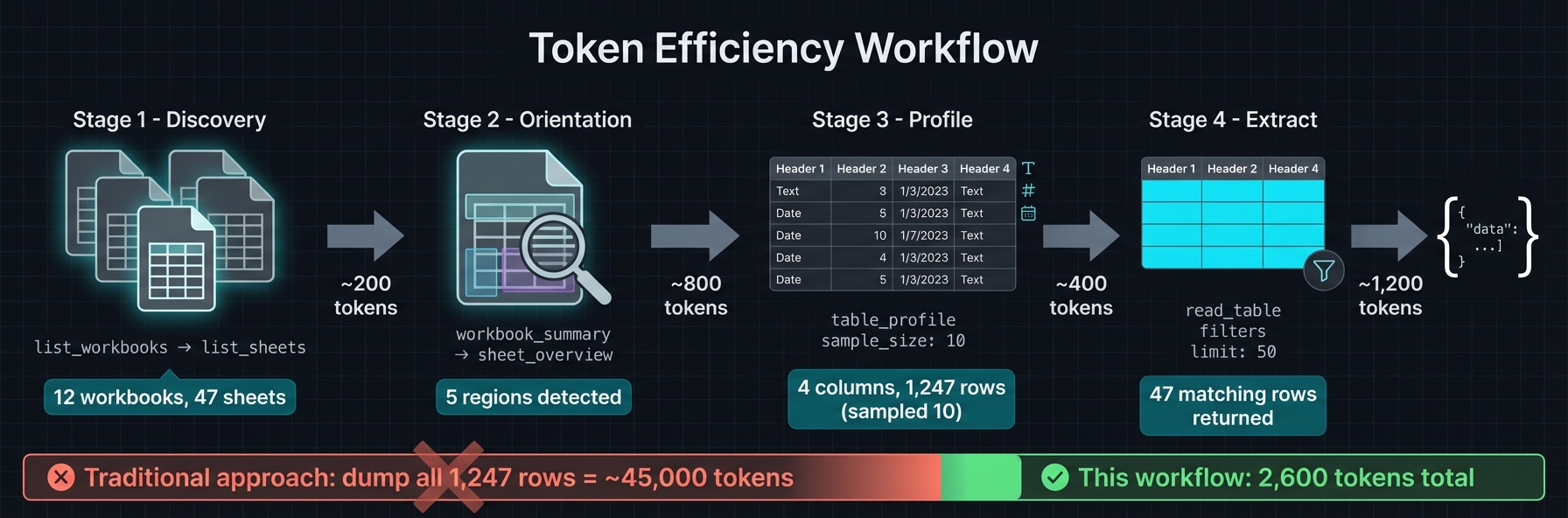
1. `list_workbooks` → `list_sheets` → `workbook_summary` for orientation
2. `sheet_overview` to get detected regions (ids, bounds, kind, confidence)
3. `table_profile` → `read_table` with `region_id` and small `limit`
4. `find_value` (label mode) or `range_values` for targeted pulls
5. Reserve `sheet_page` for unknown layouts; prefer `compact` format
6. Page and filter — avoid full-sheet reads
---
## Tool surface (MCP)
### Read-only tools (always available)
| Tool | Purpose |
| --- | --- |
| `list_workbooks` | List spreadsheet files in workspace |
| `describe_workbook` | Workbook metadata |
| `list_sheets` | Sheets with summaries |
| `workbook_summary` | Summary + optional entry points / named ranges |
| `sheet_overview` | Orientation + region detection (cached) |
| `sheet_page` | Page through cells (compact / full / values_only) |
| `read_table` | Structured region/table read (csv / values / json) |
| `range_values` | Raw cell values for specific ranges |
| `table_profile` | Column types, cardinality, sample distributions |
| `find_value` | Search values or labels |
| `find_formula` | Search formulas with paging |
| `sheet_statistics` | Density, nulls, duplicates |
| `sheet_formula_map` | Formulas by complexity / count |
| `formula_trace` | Precedent / dependent tracing |
| `scan_volatiles` | Find volatile formulas (NOW, RAND, etc.) |
| `named_ranges` | Defined names + tables |
| `sheet_styles` | Style inspection (sheet-scoped) |
| `workbook_style_summary` | Workbook-wide style summary |
| `get_manifest_stub` | Generate SheetPort manifest scaffold |
| `close_workbook` | Evict from cache |
### VBA tools (opt-in: `--vba-enabled`)
| Tool | Purpose |
| --- | --- |
| `vba_project_summary` | VBA project metadata + module list |
| `vba_module_source` | Paged VBA module source extraction |
Read-only — does not execute macros, only extracts source text from `.xlsm` files.
### Write & recalc tools (opt-in: `--recalc-enabled`)
| Tool | Purpose |
| --- | --- |
| `create_fork` / `list_forks` / `discard_fork` | Fork lifecycle |
| `checkpoint_fork` / `restore_checkpoint` / `list_checkpoints` / `delete_checkpoint` | Snapshot + rollback |
| `edit_batch` | Cell value / formula edits |
| `transform_batch` | Range-first clear / fill / replace |
| `style_batch` | Batch style edits (range / region / cells) |
| `apply_formula_pattern` | Autofill-like formula fills |
| `structure_batch` | Rows / cols / sheets + copy / move ranges |
| `column_size_batch` | Column width operations |
| `sheet_layout_batch` | Freeze panes, zoom, print area, page setup |
| `rules_batch` | Data validation + conditional formatting |
| `recalculate` | Trigger formula recalculation |
| `get_changeset` | Diff fork vs original (paged, filterable) |
| `screenshot_sheet` | Render range to PNG (max 100x30 cells) |
| `save_fork` | Export fork to file |
| `list_staged_changes` / `apply_staged_change` / `discard_staged_change` | Manage previewed changes |
| `get_edits` | List applied edits on a fork |
---
## Recalc backends
Formula recalculation is handled by a pluggable backend. Two are supported:
| Backend | How | Default | When to use |
| --- | --- | --- | --- |
| **Formualizer** | Native Rust engine (320+ functions) | **Yes** (default feature) | Fast, zero external deps. Ships with every `cargo install`. |
| **LibreOffice** | Headless `soffice` process | Docker `:full` only | Full Excel formula compatibility. Used by the `:full` Docker image. |
**Default behavior:** `cargo install` includes Formualizer out of the box — recalculation works immediately with no extra setup. LibreOffice is only used in the Docker `:full` image, which bundles `soffice` with pre-configured macros for maximum formula coverage.
Compile-time feature flags:
- `recalc-formualizer` (**default**) — pure Rust, bundled via Formualizer
- `recalc-libreoffice` — uses LibreOffice (requires `soffice` on PATH)
- `--no-default-features` — read-only mode, no recalc support
If recalc is disabled, all read, edit, and diff operations still work — only `recalculate` requires a backend.
---
## Deployment modes
| Mode | Binary | State | Recalc | Transport |
| --- | --- | --- | --- | --- |
| **CLI** | `agent-spreadsheet` | Stateless | Yes (Formualizer, default) | stdin → stdout JSON |
| **MCP (stdio)** | `spreadsheet-mcp` | Stateful (LRU cache) | Optional (`--recalc-enabled`) | MCP over stdio |
| **MCP (HTTP)** | `spreadsheet-mcp` | Stateful (LRU cache) | Optional (`--recalc-enabled`) | Streamable HTTP `POST /mcp` |
| **Docker slim** | `spreadsheet-mcp` | Stateful | No | HTTP (default) or stdio |
| **Docker full** | `spreadsheet-mcp` | Stateful | Yes (LibreOffice) | HTTP (default) or stdio |
| **WASM** | — | — | — | *Planned* |
---
## Workspace layout
```
spreadsheet-kit/
├── crates/
│ ├── spreadsheet-kit/ # Shared engine + agent-spreadsheet CLI binary
│ └── spreadsheet-mcp/ # Stateful MCP server adapter
├── npm/
│ └── agent-spreadsheet/ # npm binary distribution package
├── formualizer/ # Formula recalc engine (default backend)
├── docs/ # Architecture and design docs
└── .github/workflows/ # CI, release, Docker builds
```
| Crate | Role |
| --- | --- |
| [`spreadsheet-kit`](crates/spreadsheet-kit/) | Shared engine + `agent-spreadsheet` CLI binary |
| [`spreadsheet-mcp`](crates/spreadsheet-mcp/) | MCP server adapter + transport layer |
| [`agent-spreadsheet` (npm)](npm/agent-spreadsheet/) | npm wrapper — downloads prebuilt native binary on install |
---
## Region detection
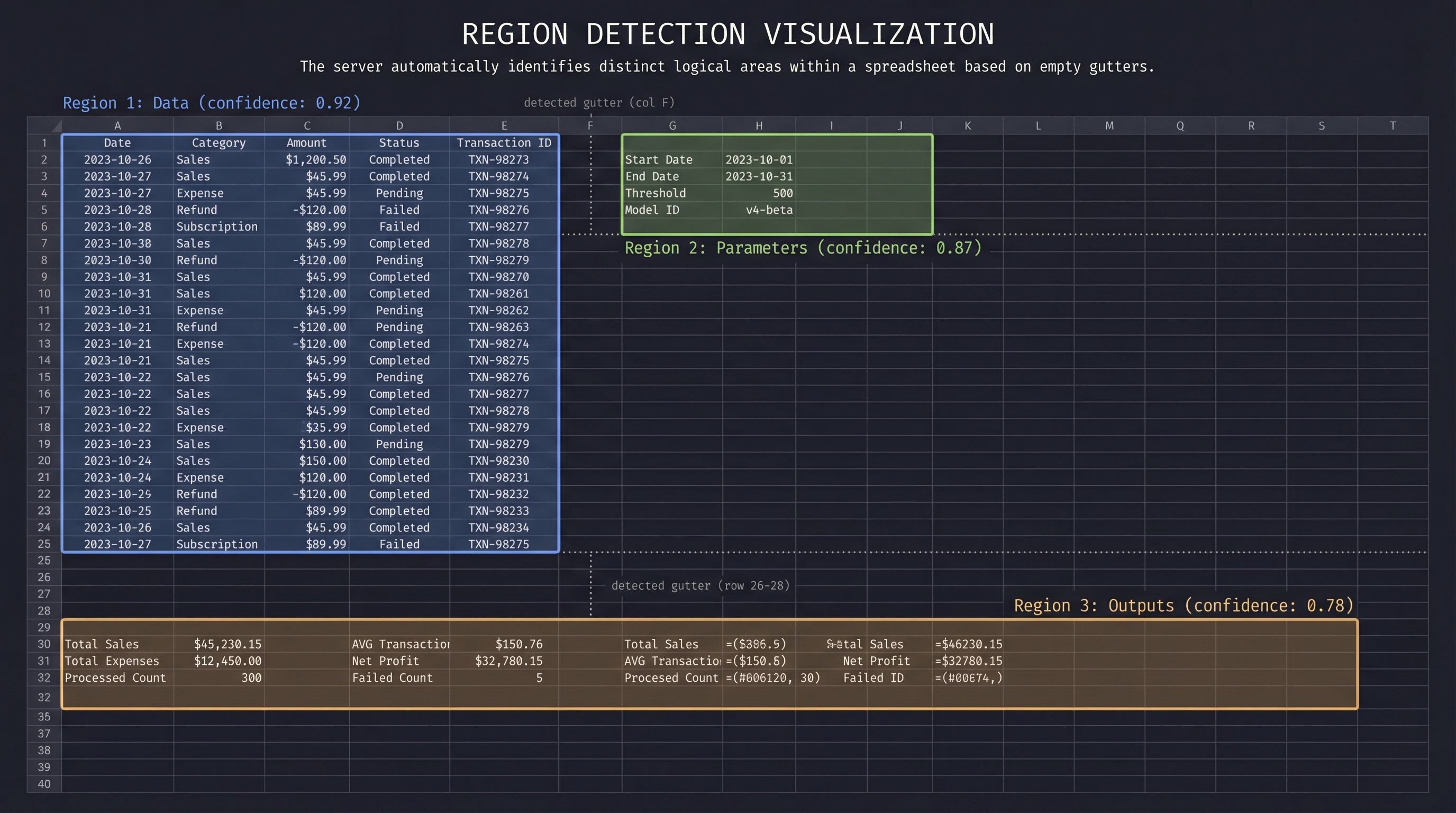
Spreadsheets often contain multiple logical tables, parameter blocks, and output areas on a single sheet. The server detects these automatically:
1. **Gutter detection** — scans for empty rows/columns separating content blocks
2. **Recursive splitting** — subdivides areas along detected gutters
3. **Border trimming** — removes sparse edges to tighten bounds
4. **Header detection** — identifies header rows (including multi-row merged headers)
5. **Classification** — labels each region: `data`, `parameters`, `outputs`, `calculator`, `metadata`
6. **Confidence scoring** — higher scores for well-structured regions with clear headers
Regions are cached per sheet. Tools like `read_table` accept a `region_id` to scope reads without manually specifying ranges. See [docs/HEURISTICS.md](docs/HEURISTICS.md) for details.
---
## Architecture
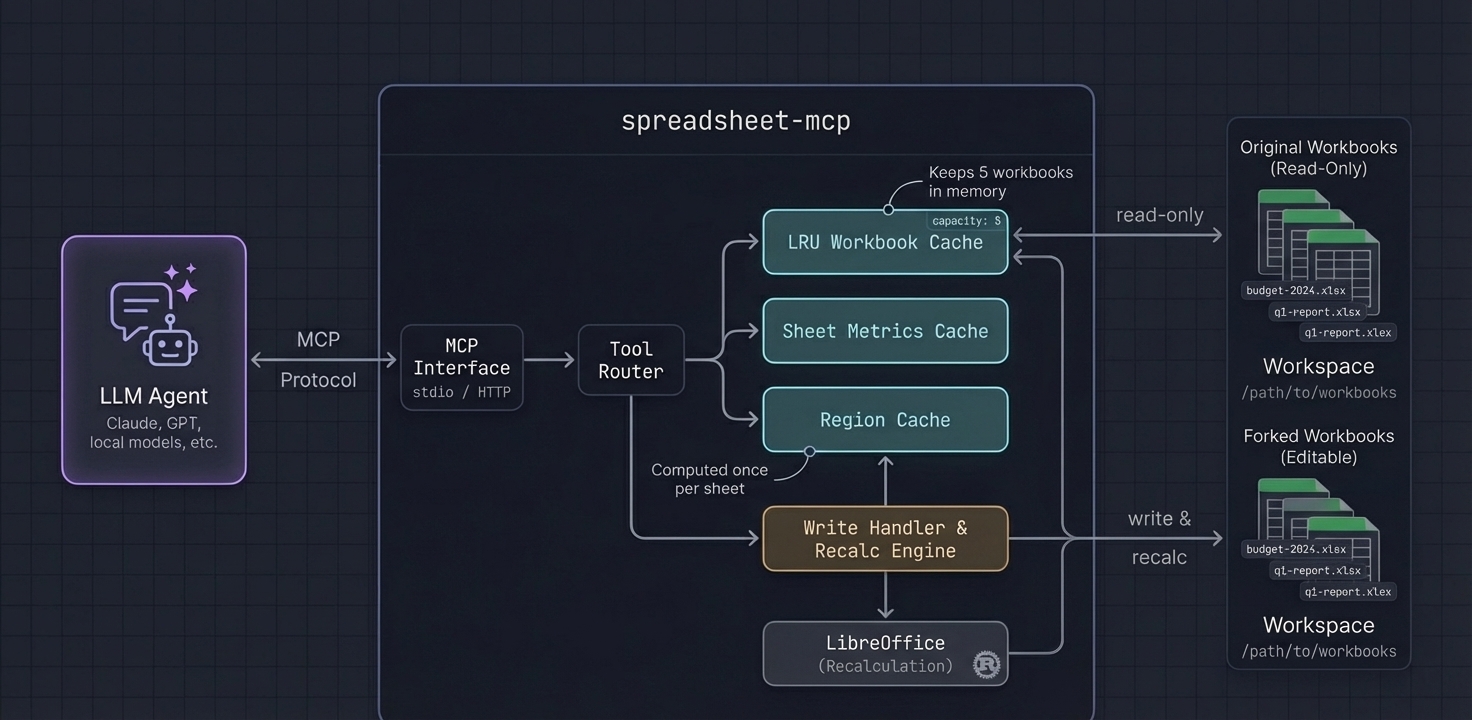
- **LRU cache** keeps recently-accessed workbooks in memory (configurable capacity)
- **Lazy sheet metrics** computed once per sheet, reused across tools
- **Region detection on demand** runs for `sheet_overview` and is cached for `region_id` lookups
- **Fork isolation** — write operations work on copies, never mutate originals in-place
- **Sampling modes** — `distributed` sampling reads evenly across rows without loading everything
- **Output caps** — truncated by default; use tool params to expand
---
## Configuration reference
All flags can also be set via environment variables prefixed with `SPREADSHEET_MCP_`.
| Flag | Env | Default | Description |
| --- | --- | --- | --- |
| `--workspace-root ` | `SPREADSHEET_MCP_WORKSPACE` | cwd | Directory to scan for workbooks |
| `--cache-capacity ` | `SPREADSHEET_MCP_CACHE_CAPACITY` | `5` | LRU workbook cache size |
| `--extensions ` | `SPREADSHEET_MCP_EXTENSIONS` | `xlsx,xlsm,xls,xlsb` | Allowed file extensions |
| `--workbook ` | `SPREADSHEET_MCP_WORKBOOK` | — | Single-workbook mode |
| `--enabled-tools ` | `SPREADSHEET_MCP_ENABLED_TOOLS` | all | Whitelist exposed tools |
| `--transport ` | `SPREADSHEET_MCP_TRANSPORT` | `http` | `http` or `stdio` |
| `--http-bind ` | `SPREADSHEET_MCP_HTTP_BIND` | `127.0.0.1:8079` | HTTP bind address |
| `--output-profile
` | `SPREADSHEET_MCP_OUTPUT_PROFILE` | `token-dense` | `token-dense` or `verbose` |
| `--recalc-enabled` | `SPREADSHEET_MCP_RECALC_ENABLED` | `false` | Enable write/recalc tools |
| `--max-concurrent-recalcs ` | `SPREADSHEET_MCP_MAX_CONCURRENT_RECALCS` | `2` | Parallel recalc limit |
| `--tool-timeout-ms ` | `SPREADSHEET_MCP_TOOL_TIMEOUT_MS` | `30000` | Per-tool timeout (0 = disabled) |
| `--max-response-bytes ` | `SPREADSHEET_MCP_MAX_RESPONSE_BYTES` | `1000000` | Max response size (0 = disabled) |
| `--allow-overwrite` | `SPREADSHEET_MCP_ALLOW_OVERWRITE` | `false` | Allow `save_fork` to overwrite originals |
| `--vba-enabled` | `SPREADSHEET_MCP_VBA_ENABLED` | `false` | Enable VBA inspection tools |
| `--screenshot-dir ` | `SPREADSHEET_MCP_SCREENSHOT_DIR` | `/screenshots` | Screenshot output directory |
| `--path-map ` | `SPREADSHEET_MCP_PATH_MAP` | — | Docker path remapping (`/data=/host/path`) |
---
## Docker deployment
### Image variants
| Image | Size | Recalc | Use case |
| --- | --- | --- | --- |
| `ghcr.io/psu3d0/spreadsheet-mcp:latest` | ~15 MB | No | Read-only analysis |
| `ghcr.io/psu3d0/spreadsheet-mcp:full` | ~800 MB | Yes (LibreOffice) | Write + recalc + screenshots |
### Basic usage
```bash
# Read-only
docker run -v /path/to/workbooks:/data -p 8079:8079 \
ghcr.io/psu3d0/spreadsheet-mcp:latest
# With VBA tools
docker run -v /path/to/workbooks:/data -p 8079:8079 \
-e SPREADSHEET_MCP_VBA_ENABLED=true \
ghcr.io/psu3d0/spreadsheet-mcp:latest
# Write + recalc
docker run -v /path/to/workbooks:/data -p 8079:8079 \
ghcr.io/psu3d0/spreadsheet-mcp:full
```
### Path mapping
When the server runs in Docker but your agent reads files from the host, configure path mapping so responses include host-visible paths:
```bash
docker run \
-v /path/to/workbooks:/data \
-e SPREADSHEET_MCP_PATH_MAP="/data=/path/to/workbooks" \
-p 8079:8079 \
ghcr.io/psu3d0/spreadsheet-mcp:full
```
This adds `client_path`, `client_output_path`, and `client_saved_to` fields to tool responses.
### Separate screenshot output
```bash
docker run \
-v /path/to/workbooks:/data \
-v /path/to/screenshots:/screenshots \
-e SPREADSHEET_MCP_SCREENSHOT_DIR=/screenshots \
-e SPREADSHEET_MCP_PATH_MAP="/data=/path/to/workbooks,/screenshots=/path/to/screenshots" \
-p 8079:8079 \
ghcr.io/psu3d0/spreadsheet-mcp:full
```
### Privilege handling
The `:full` image entrypoint drops privileges to match the owner of the mounted workspace directory. Override with `SPREADSHEET_MCP_RUN_UID` / `SPREADSHEET_MCP_RUN_GID` or `docker run --user`.
---
## Write & recalc workflows
Write tools use a **fork-based** model for safety. Edits never mutate the original file — work on a fork, inspect changes, and export when satisfied.
```
create_fork → edit_batch / transform_batch → recalculate → get_changeset → save_fork
↑ |
checkpoint_fork ←──── restore_checkpoint ←────────────┘
```
### Edit shorthand
`edit_batch` accepts both canonical objects and shorthand strings:
```json
{
"edits": [
{ "address": "A1", "value": "Revenue" },
{ "address": "B2", "formula": "SUM(B3:B10)" },
"C1=100",
"D1==SUM(A1:A2)"
]
}
```
`"A1=100"` sets a value. `"A1==SUM(...)"` sets a formula (double `=`).
Write tool shapes reference
**edit_batch**
```json
{
"tool": "edit_batch",
"arguments": {
"fork_id": "fork-123",
"sheet_name": "Inputs",
"edits": [
{ "address": "A1", "value": "Financial Model Inputs" },
{ "address": "B2", "formula": "SUM(B3:B10)" },
"C1=100",
"D1==SUM(A1:A2)"
]
}
}
```
**style_batch**
```json
{
"tool": "style_batch",
"arguments": {
"fork_id": "fork-123",
"ops": [
{
"sheet_name": "Accounts",
"target": { "kind": "range", "range": "A2:F2" },
"patch": {
"font": { "bold": true },
"fill": { "kind": "pattern", "pattern_type": "solid", "foreground_color": "FFF5F7FA" }
}
},
{
"sheet_name": "Accounts",
"range": "A3:F3",
"style": { "fill": { "color": "#F5F7FA" } }
}
]
}
}
```
**structure_batch**
```json
{
"tool": "structure_batch",
"arguments": {
"fork_id": "fork-123",
"ops": [
{ "kind": "create_sheet", "name": "Inputs" },
{ "kind": "insert_rows", "sheet_name": "Data", "start": 5, "count": 3 },
{ "kind": "copy_range", "sheet_name": "Data", "source": "A1:D1", "target": "A5" }
]
}
}
```
**column_size_batch**
```json
{
"tool": "column_size_batch",
"arguments": {
"fork_id": "fork-123",
"sheet_name": "Accounts",
"mode": "apply",
"ops": [
{ "target": { "kind": "columns", "range": "A:C" }, "size": { "kind": "auto", "max_width_chars": 40.0 } },
{ "range": "D:D", "size": { "kind": "width", "width_chars": 24.0 } }
]
}
}
```
**sheet_layout_batch**
```json
{
"tool": "sheet_layout_batch",
"arguments": {
"fork_id": "fork-123",
"mode": "preview",
"ops": [
{ "kind": "freeze_panes", "sheet_name": "Dashboard", "freeze_rows": 1, "freeze_cols": 1 },
{ "kind": "set_zoom", "sheet_name": "Dashboard", "zoom_percent": 110 },
{ "kind": "set_print_area", "sheet_name": "Dashboard", "range": "A1:G30" },
{ "kind": "set_page_setup", "sheet_name": "Dashboard", "orientation": "landscape", "fit_to_width": 1, "fit_to_height": 1 }
]
}
}
```
**rules_batch**
```json
{
"tool": "rules_batch",
"arguments": {
"fork_id": "fork-123",
"mode": "apply",
"ops": [
{
"kind": "set_data_validation",
"sheet_name": "Inputs",
"target_range": "B3:B100",
"validation": { "kind": "list", "formula1": "=Lists!$A$1:$A$10", "allow_blank": false }
},
{
"kind": "set_conditional_format",
"sheet_name": "Dashboard",
"target_range": "D3:D100",
"rule": { "kind": "cell_is", "operator": "less_than", "formula": "0" },
"style": { "fill_color": "#FFE0E0", "font_color": "#8A0000", "bold": true }
}
]
}
}
```
### Screenshot tool
`screenshot_sheet` renders a range to a cropped PNG via LibreOffice (requires `:full` image or `--recalc-enabled`).
- Max range: **100 rows x 30 columns** per screenshot
- Pixel guard: **4096 px** per side, **12 MP** area (override via `SPREADSHEET_MCP_MAX_PNG_DIM_PX` / `SPREADSHEET_MCP_MAX_PNG_AREA_PX`)
- On rejection, the tool returns suggested sub-range splits
See [docs/RECALC.md](docs/RECALC.md) for architecture details.
---
## Example
**Request:** Profile a detected region
```json
{
"tool": "table_profile",
"arguments": {
"workbook_id": "wb-23456789ab",
"sheet_name": "Q1 Actuals",
"region_id": 1,
"sample_size": 10,
"sample_mode": "distributed"
}
}
```
**Response:**
```json
{
"sheet_name": "Q1 Actuals",
"headers": ["Date", "Category", "Amount", "Notes"],
"column_types": [
{ "name": "Date", "inferred_type": "date", "nulls": 0, "distinct": 87 },
{ "name": "Category", "inferred_type": "text", "nulls": 2, "distinct": 12, "top_values": ["Payroll", "Marketing", "Infrastructure"] },
{ "name": "Amount", "inferred_type": "number", "nulls": 0, "min": 150.0, "max": 84500.0, "mean": 12847.32 },
{ "name": "Notes", "inferred_type": "text", "nulls": 45, "distinct": 38 }
],
"row_count": 1247
}
```
The agent now knows column types, cardinality, and value distributions — without reading 1,247 rows.
---
## Development
```bash
# Run tests
cargo test
# Build all crates
cargo build --release
# Test local binary with an MCP client
```
Point your MCP client config at the local binary:
```json
{
"mcpServers": {
"spreadsheet": {
"command": "./target/release/spreadsheet-mcp",
"args": ["--workspace-root", "/path/to/workbooks", "--transport", "stdio"]
}
}
}
```
Or use the Docker rebuild script for live iteration:
```bash
WORKSPACE_ROOT=/path/to/workbooks ./scripts/local-docker-mcp.sh
```
---
## License
Apache-2.0