https://github.com/publiclab/spectral-workbench.js
The JavaScript heart of Spectral Workbench; a Public Lab project to record, manipulate, and analyze spectrometric data.
https://github.com/publiclab/spectral-workbench.js
javascript science spectrometry
Last synced: about 1 year ago
JSON representation
The JavaScript heart of Spectral Workbench; a Public Lab project to record, manipulate, and analyze spectrometric data.
- Host: GitHub
- URL: https://github.com/publiclab/spectral-workbench.js
- Owner: publiclab
- License: gpl-3.0
- Created: 2016-04-05T18:07:14.000Z (about 10 years ago)
- Default Branch: main
- Last Pushed: 2023-02-27T09:59:28.000Z (over 3 years ago)
- Last Synced: 2025-04-15T06:56:00.204Z (about 1 year ago)
- Topics: javascript, science, spectrometry
- Language: JavaScript
- Homepage: https://spectralworkbench.org
- Size: 7.92 MB
- Stars: 47
- Watchers: 4
- Forks: 37
- Open Issues: 47
-
Metadata Files:
- Readme: README.md
- Contributing: Contributing.md
- License: LICENSE
- Code of conduct: Code_of_Conduct.md
Awesome Lists containing this project
README
spectral-workbench.js
====
[](https://travis-ci.com/publiclab/spectral-workbench.js)
[](https://www.npmjs.com/package/spectral-workbench)
[](https://gitpod.io/#https://github.com/publiclab/spectral-workbench.js/)
[](https://publiclab.org/chat)
[](https://publiclab.org/conduct)
The JavaScript heart of Spectral Workbench; a Public Lab project to record, manipulate, and analyze spectrometric data.
spectral-workbench.js is currently set up to run in a browser, but some parts may work headless, in a JavaScript console. We hope to further separate the views from the library logic so that headless or Node.js usage is easier.
This library is primarily used in the Spectral Workbench application, running at http://spectralworkbench.org, which is a Ruby on Rails project that is also [open source](https://github.com/publiclab/spectral-workbench). Read about how to build and use your own spectrometer with it here: http://publiclab.org/wiki/spectrometer
See static demo here: https://publiclab.github.io/spectral-workbench.js/examples/
And static demo of capture interface: https://publiclab.github.io/spectral-workbench.js/examples/capture/
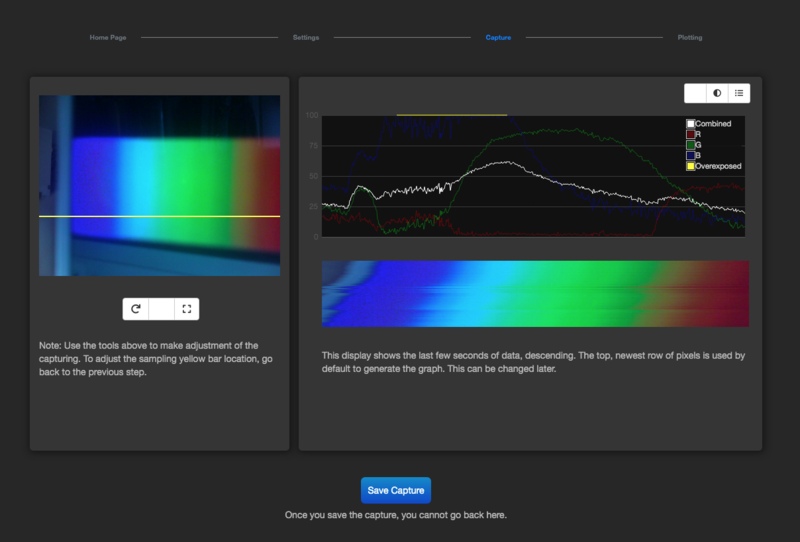
Try a demo of the newly rewritten capture interface here: https://publiclab.github.io/spectral-workbench.js/examples/new-capture/
****
## Installation
### In Node.js
To install spectral-workbench, run:
npm install spectral-workbench
The `SpectralWorkbench.Image` class uses the `node-canvas` package when run without a browser, so you'll need to install it by:
* running (on Debian): `sudo apt-get install libcairo2-dev libjpeg8-dev libpango1.0-dev libgif-dev build-essential g++` See build instructions for [other platforms here](https://github.com/Automattic/node-canvas#installation).
* running `npm install`
### In a browser
To begin using spectral-workbench.js on a webpage, you'll need to include jQuery, and to use any HTML-based features (such as UI or graphing), you'll need to include its dependencies.
First, run:
npm install
then:
bower install
Your page should include:
````html
````
Then include the library itself:
````html
````
To see graphed output, you'll need a `
` with the `id` "graph", like so:
````html
````
A spectrum may be displayed in a [d3-based](http://d3js.org) graph with the Graph constructor:
````js
jQuery(document).ready(function($) {
graph = new SpectralWorkbench.Graph({
spectrum_id: 1, // unique id , typically a database primary key
selector: '#graph' // defaults to "#graph" using jQuery selector syntax
});
});
````
****
## Usage
### Running
If you're using this locally, the best way to run it locally is to use the `http-server` npm module. Install it with:
`npm install -g http-server`
then run the app with:
`http-server`
and it will open at the address: http://localhost:8080/
### Inputting data
You can pass a nested array of `[wavelength, intensity]` data to the Spectrum constructor like this:
````js
var data = [
[0, 24],
[1, 44],
[2, 42],
[3, 45],
[4, 20]
];
var spectrum = new SpectralWorkbench.Spectrum(data);
spectrum.getJSON();
/*
// Output:
[ { average: 22.95, r: 22.95, g: 22.95, b: 22.95, pixel: 0 },
{ average: 43.35, r: 43.35, g: 43.35, b: 43.35, pixel: 1 },
{ average: 40.8, r: 40.8, g: 40.8, b: 40.8, pixel: 2 },
{ average: 43.35, r: 43.35, g: 43.35, b: 43.35, pixel: 3 },
{ average: 17.85, r: 17.85, g: 17.85, b: 17.85, pixel: 4 } ]
*/
// this is non-ideal, but will be expanded upon with a better calibrate API:
spectrum.json.data.lines = spectrum.calibrate(400, 500, 0, 4);
spectrum.load(); // calibrate does not save
spectrum.getJSON();
/*
// Output:
[ { average: 22.95, r: 22.95, g: 22.95, b: 22.95, wavelength: 400 },
{ average: 43.35, r: 43.35, g: 43.35, b: 43.35, wavelength: 425 },
{ average: 40.8, r: 40.8, g: 40.8, b: 40.8, wavelength: 450 },
{ average: 43.35, r: 43.35, g: 43.35, b: 43.35, wavelength: 475 },
{ average: 17.85, r: 17.85, g: 17.85, b: 17.85, wavelength: 500 } ]
*/
````
This assumes monochrome input with units `[nanometers, 0-255]`, although if you're using a [Public Lab webcam-based spectrometer](https://publiclab.org/wiki/spectrometer), you'll be dealing with RGB data.
For a working example of an array-based spectrum see: https://publiclab.github.io/spectral-workbench.js/examples/array.html
You can also use a string of comma-separated values (a CSV), where each line is `wavelength,intensity` (similarly to the array format above):
````js
// \n instead of linebreaks here:
var string = "400,24\n410,44\n420,42\n430,45\n440,20";
var spectrum = new SpectralWorkbench.Spectrum(string);
````
TSVs (tab-separated values) are also supported as of v0.0.10.
Most tests continue to use a legacy data format (that used by the SpectralWorkbench.org service) which we'd like to simplify, but for now, you can create a Spectrum object from JSON data in the following format, that does accept RGB pixel data:
````js
var data = {
"data": {
"name": "Test spectrum",
"lines":[ // as many data points as you like may be entered here:
{ "average":64.3333, "r":69, "g":46, "b":78, "wavelength":269.089 },
{ "average":31, "r":33, "g":19, "b":41, "wavelength":958.521 }
]
}
}
var spectrum = new SpectralWorkbench.Spectrum(data);
````
For a working example, see: https://publiclab.github.io/spectral-workbench.js/examples/
### In Node.js
An example node script is available in the `/examples/` directory, and some command line utilities are available in the `/scripts/` directory, including ones to upload from JSON files to https://spectralworkbench.org and to extract JSON from images. For example, you could extract data from an image with:
scripts/image-extract.js --file spec/javascripts/fixtures/test-spectrum-9.png --format json > test.json
Then upload the JSON data with (replacing XXXX with your API key):
scripts/upload.js --file test.json --token XXXXXXXXXXXXXX
To write a script in Node.js, you could create and run a file like this:
````js
#!/usr/bin/env node
var SpectralWorkbench = require('spectral-workbench').SpectralWorkbench;
var data = {
"data": {
"name": "Test spectrum",
"lines":[ // as many data points as you like may be entered here:
{"average":64.3333,"r":69,"g":46,"b":78,"wavelength":269.089},
{"average":63.3333,"r":71,"g":45,"b":74,"wavelength":277.718},
{"average":64,"r":71,"g":47,"b":74,"wavelength":291.524},
{"average":64,"r":68,"g":49,"b":75,"wavelength":303.604}
]
}
}
var spectrum = new SpectralWorkbench.Spectrum(data);
console.log(spectrum.getIntensity(282));
````
And run it with `node yourscript.js`. If you make a useful one, submit a pull request and I'll pull it in!
```js
spectrum.upload(
'https://spectralworkbench.org/spectrums.json',
function callback(err, httpResponse, body) { console.log(body) },
{ token: "31343338303237303934" }
);
```
Note that this direct upload feature is experimental.
### Manipulating spectrum data
Once you've initialized a Spectrum, you can add Operations to it using the following syntax:
````js
var spectrum = new SpectralWorkbench.Spectrum(data);
spectrum.addAndParseTag('smooth:3');
````
Operations are a type of tag that are passed as strings in `operation:value` format, and there are a variety of operations available, including:
* `smooth`
* `subtract`
* `transform`
* `crossSection` (requires an image)
* plus several more
Read more at https://publiclab.org/wiki/spectral-workbench-operations
****
An in-progress project to port the HTML capture interface to this library can be tested at:
https://publiclab.github.io/spectral-workbench.js/examples/capture/
Follow progress at https://github.com/publiclab/spectral-workbench.js/issues/56
****
## Contributing
We welcome community contributions to spectral-workbench.js! Learn more about contributing to Spectral Workbench or other Public Lab code projects on this page: http://publiclab.org/wiki/developers
## Bug reports & troubleshooting
If you are submitting a bug, please include:
* where/when you see the issue, so we can try to reproduce it
* any relevant JavaScript console output
* your browser (and version if possible!)
* anything you can about the sequence of events which led to the bug
Thank you for your help!
## Automated tests
To run Jasmine tests, open `test.html` in a browser. You can also run them on our Github Pages-hosted suite here: http://publiclab.github.io/spectral-workbench.js/test.
Alternatively, if you have phantomjs installed, run: `grunt jasmine` to run tests from the command line.
## Building
spectral-workbench.js is built using a Grunt task from the source files in `/src/`, and the compiled file is saved to `/dist/spectral-workbench.js`. To build, run `grunt build`. To watch files for changes, and build whenever they occur, run `grunt`. You'll need the Grunt CLI -- `npm install -g grunt-cli`.
****
Copyright 2011-2015 Public Lab
publiclab.org | spectralworkbench.org
## License
spectral-workbench.js is free software: you can redistribute it and/or modify
it under the terms of the GNU General Public License as published by
the Free Software Foundation, either version 3 of the License, or
(at your option) any later version.
Spectral Workbench is distributed in the hope that it will be useful,
but WITHOUT ANY WARRANTY; without even the implied warranty of
MERCHANTABILITY or FITNESS FOR A PARTICULAR PURPOSE. See the
GNU General Public License for more details.
You should have received a copy of the GNU General Public License
along with Spectral Workbench. If not, see .