https://github.com/pyccel/pyccel
Python extension language using accelerators
https://github.com/pyccel/pyccel
dsl fortran hpc mpi openacc openmp python python3 sympy transpiler
Last synced: 4 months ago
JSON representation
Python extension language using accelerators
- Host: GitHub
- URL: https://github.com/pyccel/pyccel
- Owner: pyccel
- License: mit
- Created: 2017-08-16T07:59:14.000Z (almost 9 years ago)
- Default Branch: devel
- Last Pushed: 2025-02-04T23:15:56.000Z (over 1 year ago)
- Last Synced: 2025-02-05T15:25:24.295Z (over 1 year ago)
- Topics: dsl, fortran, hpc, mpi, openacc, openmp, python, python3, sympy, transpiler
- Language: Python
- Homepage:
- Size: 19.9 MB
- Stars: 357
- Watchers: 13
- Forks: 60
- Open Issues: 227
-
Metadata Files:
- Readme: README.md
- Changelog: CHANGELOG.md
- Contributing: docs/CONTRIBUTING.md
- License: LICENSE
- Support: docs/supported-libraries.md
- Authors: AUTHORS
Awesome Lists containing this project
README
# Pyccel : write Python code, get Fortran speed
[](https://github.com/pyccel/pyccel/actions/workflows/linux.yml) [](https://github.com/pyccel/pyccel/actions/workflows/macosx.yml) [](https://github.com/pyccel/pyccel/actions/workflows/windows.yml) [](https://github.com/pyccel/pyccel/actions/workflows/anaconda_linux.yml) [](https://github.com/pyccel/pyccel/actions/workflows/anaconda_windows.yml) [](https://github.com/pyccel/pyccel/actions/workflows/intel.yml)
[](https://github.com/pyccel/pyccel/actions/workflows/documentation-deploy.yml) [](https://www.codacy.com/gh/pyccel/pyccel?utm_source=github.com&utm_medium=referral&utm_content=pyccel/pyccel&utm_campaign=Badge_Grade) [](https://doi.org/10.21105/joss.04991)
**Pyccel** stands for Python extension language using accelerators.
The aim of **Pyccel** is to provide a simple way to generate automatically, parallel low level code. The main uses would be:
1. Convert a _Python_ code (or project) into a Fortran or C code.
2. Accelerate _Python_ functions by converting them to _Fortran_ or _C_ functions.
**Pyccel** can be viewed as:
- _Python-to-Fortran/C_ converter
- a compiler for a _Domain Specific Language_ with _Python_ syntax
Pyccel comes with a selection of **extensions** allowing you to convert calls to some specific Python packages to Fortran/C. The following packages will be (partially) covered:
- `numpy`
- `scipy`
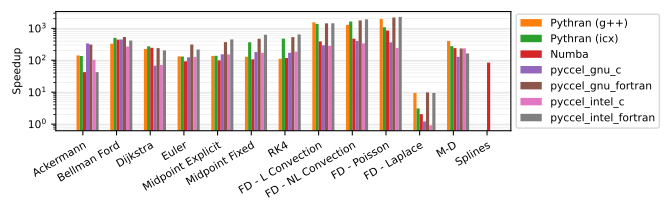
Pyccel's acceleration capabilities lead to much faster code. Comparisons of Python vs Pyccel or other tools can be found in the [benchmarks](https://github.com/pyccel/pyccel-benchmarks) repository.
The results for the `devel` branch currently show the following performance on Python 3.10:
If you are eager to try Pyccel out, we recommend reading our [quick-start guide](https://pyccel.github.io/pyccel/docs/quickstart.html).
## Citing Pyccel
If Pyccel has been significant in your research, and you would like to acknowledge the project in your academic publication, we would ask that you cite the following paper:
Bourne, Güçlü, Hadjout and Ratnani (2023). Pyccel: a Python-to-X transpiler for scientific high-performance computing. Journal of Open Source Software, 8(83), 4991,
The associated bibtex can be found [here](https://github.com/pyccel/pyccel/blob/devel/pyccel.bib).
## Installation
Pyccel has a few system requirements to ensure that the system where it is installed is capable of compiling Fortran code.
These requirements are detailed in the [documentation](https://pyccel.github.io/pyccel/docs/installation.html).
Once all requirements are satisfied, we recommend installing Pyccel into a Python virtual environment, which can be created with [venv](https://packaging.python.org/en/latest/guides/installing-using-pip-and-virtual-environments/#creating-a-virtual-environment).
Once the Python virtual environment is ready and activated, Pyccel can be easily installed using [pip](https://github.com/pypa/pip?tab=readme-ov-file#pip---the-python-package-installer), the Python package installer.
The simple command
```sh
pip install pyccel
```
will download the latest release of Pyccel from [PyPI](https://pypi.org/project/pyccel/), the Python package index.
Alternative installation methods such as installing from source, or installing with a docker, are described in the [documentation](https://pyccel.github.io/pyccel/docs/installation.html).
## Testing
It is good practice to test that Pyccel works as intended on the machine where it is installed.
To this end Pyccel provides an extended test suite which can be downloaded from the official repository.
Assuming the Python virtual environment is in the directory ``, we activate it with
```sh
source /bin/activate
```
and install the `test` component of the Pyccel package:
```sh
pip install "pyccel[test]"
```
This installs a few additional Python packages which are necessary for running the unit tests and getting a coverage report.
The recommended way of running the unit tests is simply using the command line tool `pyccel test` which is installed with Pyccel.
This runs all unit tests using Pytest under the hood.
Alternatively, if more fine-grained control over which tests are run is desired, e.g. for debugging local modifications to Pyccel, Pytest can be called directly using the commands provided in the [documentation](https://pyccel.github.io/pyccel/docs/testing.html).
## Environment variables affecting Pyccel's behaviour
Pyccel's behaviour is affected by some environment variables:
- `PYCCEL_DEFAULT_COMPILER` : Changes the default compiler from `GNU` to a new compiler family or JSON compiler configuration file.
- `PYCCEL_CONFIG_HOME` : Changes the default location for new compiler families from `~/.pyccel`.
- `PYCCEL_ERROR_MODE` : Can be set to 'developer' or 'user' to control the default verbosity of the errors.
## Contributing
We welcome any and all contributions.
There are many ways to help with the Pyccel project which are more or less involved.
A summary can be found in the [documentation](https://pyccel.github.io/pyccel/docs/CONTRIBUTING.html).
We can also be contacted via the [Pyccel Discord Server](https://discord.gg/2Q6hwjfFVb).