https://github.com/pypp/letterboxd-services
🍿 Get torrents straight from Letterboxd
https://github.com/pypp/letterboxd-services
chrome chrome-extension firefox firefox-addon firefox-extension letterboxd torrent torrents
Last synced: 3 months ago
JSON representation
🍿 Get torrents straight from Letterboxd
- Host: GitHub
- URL: https://github.com/pypp/letterboxd-services
- Owner: pypp
- License: gpl-3.0
- Created: 2021-06-03T13:33:31.000Z (about 5 years ago)
- Default Branch: main
- Last Pushed: 2026-03-29T20:53:57.000Z (3 months ago)
- Last Synced: 2026-03-29T22:26:14.250Z (3 months ago)
- Topics: chrome, chrome-extension, firefox, firefox-addon, firefox-extension, letterboxd, torrent, torrents
- Language: JavaScript
- Homepage: https://chromewebstore.google.com/detail/letterboxd-services/bapjnacilodfnmciacfljidhhnbbippn
- Size: 4.53 MB
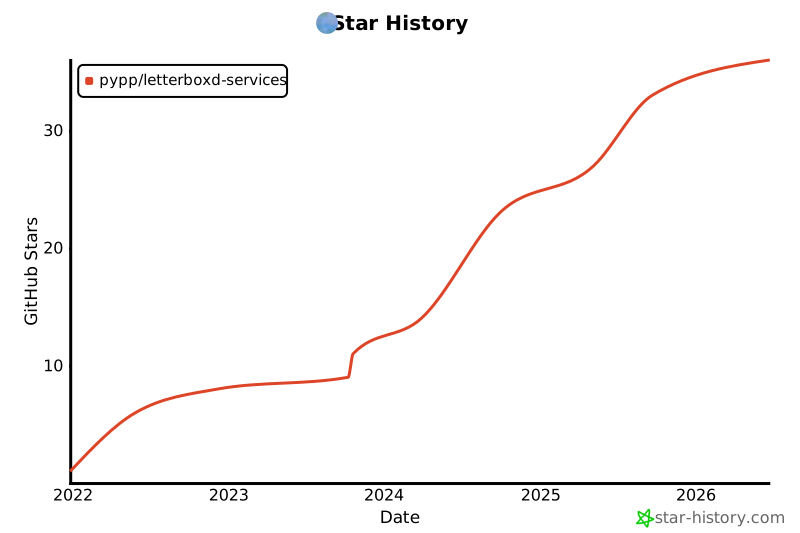
- Stars: 36
- Watchers: 1
- Forks: 6
- Open Issues: 0
-
Metadata Files:
- Readme: README.md
- License: LICENSE
Awesome Lists containing this project
README

Letterboxd Services
Letterboxd Extension that provides you torrents for movies.
## 🎬 About The Project

Idea is taken from [here](https://github.com/Hame-daani/letterboxd_util).
Letterboxd Services is a Chrome extension that will make your life easier by providing you torrents for movies straight through [letterboxd](https://letterboxd.com/) movie page
## 📦 Installation
If you are using Chrome you can download the extension straight from the Chrome Web Store [letterboxd-services](https://chrome.google.com/webstore/detail/letterboxd-services/bapjnacilodfnmciacfljidhhnbbippn).
If you are not using chrome or you don't want to install it from the Chrome Web Store, you can also install it [manually](#manual-installation).
## 🔧 Manual Installation
1. Clone the repo
```sh
git clone https://github.com/pypp/letterboxd-services.git
```
### Chrome
1. Open Chrome and go to **chrome://extensions**
2. Toggle on **Developer mode** checkbox in the top right-hand corner.
3. Click the **Load unpacked extension** button and select the folder **extension**.
### Firefox
NOTE: If you are using Firefox version < 109 the extension won't work for you
1. Open Firefox and go to **about:debugging#addons**
2. Click **Temporary Extensions**
3. Click the **Load Temporary Add-on…** and select the **manifest.json** file from the folder **extension**.
4. Go to **about:addons**, find the extension, click on the **Permissions** tab, toggle on the optional permission.
## ⭐ Support
If you enjoy using this project, please consider giving it a star ⭐ on GitHub — it helps a lot!
## 🤝 Contributing
Pull requests and issues are welcome.
## 👥 Contributors
- [mancube](https://github.com/mancube)
- [leonardovida](https://github.com/leonardovida)
## 📈 Star History