https://github.com/pyrustic/braq
Structured text format with sections
https://github.com/pyrustic/braq
ai code-documentation config configfile prompts
Last synced: 12 months ago
JSON representation
Structured text format with sections
- Host: GitHub
- URL: https://github.com/pyrustic/braq
- Owner: pyrustic
- License: mit
- Created: 2023-12-18T15:41:49.000Z (over 2 years ago)
- Default Branch: master
- Last Pushed: 2024-12-10T20:57:53.000Z (over 1 year ago)
- Last Synced: 2025-06-23T23:06:11.487Z (about 1 year ago)
- Language: Python
- Homepage:
- Size: 115 KB
- Stars: 7
- Watchers: 3
- Forks: 0
- Open Issues: 0
-
Metadata Files:
- Readme: README.md
- License: LICENSE
Awesome Lists containing this project
README
[](https://opensource.org/licenses/MIT)
[](https://pypi.org/project/braq)
[](https://pepy.tech/project/braq)
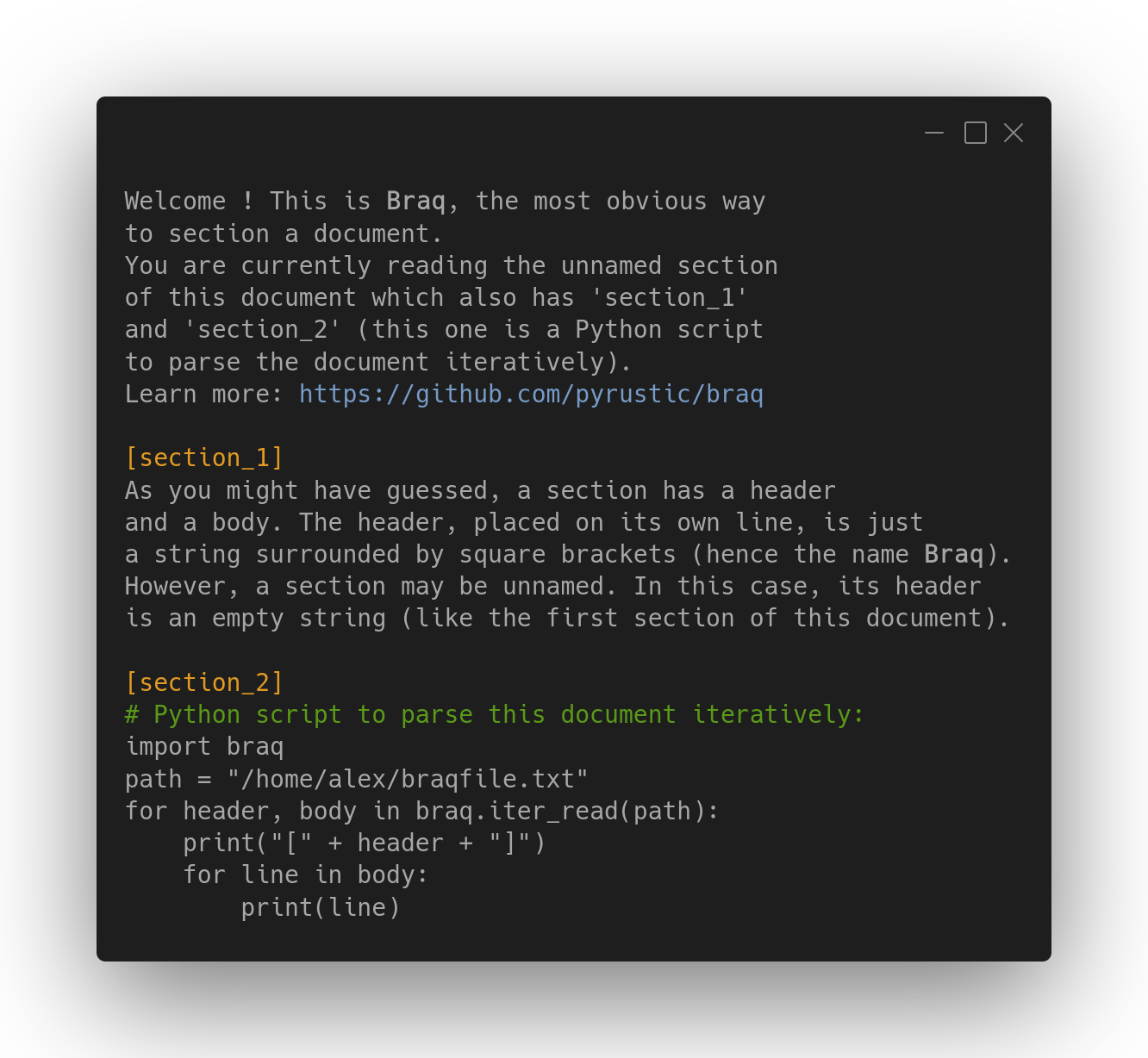
Braq document with 3 sections
# Braq
Section-based human-readable data format
## Table of contents
- [Overview](#overview)
- [Data format specification](#data-format-specification)
- [Notable use cases](#notable-use-cases)
- [Config files](#config-files)
- [Source code documentation](#source-code-documentation)
- [AI prompts](#ai-prompts)
- [Section class](#section-class)
- [Base functions](#base-functions)
- [Parse a document](#parse-a-document)
- [Parse a document iteratively](#parse-a-document-iteratively)
- [Render a document](#render-a-document)
- [Misc functions](#misc-functions)
- [Miscellaneous](#miscellaneous)
- [Testing and contributing](#testing-and-contributing)
- [Installation](#installation)
# Overview
**Braq** (pronounced `/ˈbɹæk/`) is a human-readable customizable data format whose reference parser is an eponymous lightweight [Python](https://www.python.org/) library available on [PyPI](#installation).
A Braq **document** is made up of **sections**, each defined by a **header** surrounded by square brackets (hence the name Braq) and a **body** which is just lines of text.
# Data format specification
Here are the specs and recommended practices for a valid and neat Braq document:
- A Braq document, when not empty, can be divided into sections.
- A **section** is made up of two parts: a **header** and a **body**.
- The header is defined on its own line, surrounded by two single [square brackets](https://en.wikipedia.org/wiki/Bracket) (opening and closing brackets respectively).
- The body is what is between two consecutive headers or between a header and the end of the document.
- A section can be defined multiple times in the same document. In this case, the parser will concatenate its bodies from top to bottom.
- A section with an empty header is called an **unnamed section**.
- It is recommended to define no more than a single occurrence of a section in a document.
- When a document contains a single unnamed section, it is recommended to place this section at the top of the document.
- When an unnamed document starts a document, it is recommended to omit its header.
- A dictionary data structure encoded with the human-readable [Paradict](https://github.com/pyrustic/paradict) data format can be safely embedded into a section. This section should then be referenced as a **dict section**.
- It is recommended to put 1 empty line as spacing between two consecutive sections.
**Example:**
```
This is the unnamed section
that starts this document.
[section 1]
Lorem ipsum dolor sit amet,
consectetur adipiscing elit.
[section 2]
# dictionary data structure encoded with Paradict
id = 42
user = "alex"
books = (dict)
sci-fi = (list)
"book 1"
"book 2"
thriller = (set)
"book 3"
[section 1]
it is not recommended to multiply the occurrences
of a section, however the parser will append this
occurrence of 'section 1' to the previous one.
```
# Notable use cases
This section outlines three notable use cases for **Braq**, namely config files, AI prompts, and code documentation.
## Config files
Being able to embed a dictionary data structure in a section makes Braq de facto suitable for config files.
**Example of a KvF config file:**
```
# This is the unnamed section of 'my_config.kvf' file.
# This section will serve as HELP text.
[user]
id = 42
name = 'alex'
[gui]
theme = 'dark'
window-size = '1024x420'
```
> Check out the config file format [KvF](https://github.com/pyrustic/kvf)
## Source code documentation
The flexibility of Braq gives the possibility to define custom data formats for specific use cases. Source code documentation is one of those use cases that need Braq with a custom format on top of it.
This is how Braq can be used to document a function:
```python
def add(a, b):
"""
This function adds together the values of
the provided arguments.
[params]
- a: first integer
- b: second integer
[returns]
Returns the sum of `a` and `b`
"""
return a + b
```
> [MikeDoc](https://github.com/pyrustic/mikedoc) is a docstring format for generating API references. The library uses **Braq** to parse [docstrings](https://en.wikipedia.org/wiki/Docstring).
## AI prompts
The capability to seamlessly interweave human-readable structured data with prose within a single document is a fundamental capability that a language designed to interact with AI must possess.
Additionally, the fact that Braq natively supports indentation removes the need for input sanitization, thereby eliminating an entire class of injection attacks.
### Specs
Following are specs for building structured AI prompts with Braq:
- A prompt document must start with the **root instructions** defined inside the top unnamed section.
- The next section that the AI should actively care about, after the top unnamed section, should be explicitly referenced in the root instructions.
- User input must be programmatically embedded as a text value of a dictionary key inside a section that is not the top unnamed section.
That's it ! The specification is deliberately short to avoid unnecessary complexity and also to leave room for creativity.
### Example
```
You are an AI assistant, your name is Jarvis.
You will access the websites defined in the WEB section
to answer the question that will be submitted to you.
The question is stored in the 'input' key of the USER
dict section.
Be kind and consider the conversation history stored
in the 'data' key of the HISTORY dict section.
[USER]
timestamp = 2024-12-25T16:20:59Z
input = (raw)
Today, I want you to teach me prompt engineering.
Please be concise.
---
[WEB]
https://github.com
https://www.xanadu.net
https://www.wikipedia.org
https://news.ycombinator.com
[HISTORY]
0 = (dict)
timestamp = 2024-12-20T13:10:51Z
input = (raw)
What is the name of the planet
closest to the sun ?
---
output = (raw)
Mercury is the planet closest
to the sun !
---
1 = (dict)
timestamp = 2024-12-22T14:15:54Z
input = (raw)
What is the largest planet in
the solar system?
---
output = (raw)
Jupiter is the largest planet
in the solar system !
---
```
# Section class
The `Section` class is an abstraction representing a Braq section. It exposes the `header` and `body` properties and renders itself when its `__str__` method is called implicitly.
```python
import braq
# create a Section object
header, body = "my header", ("line a", "line b")
section = braq.Section(header, body)
# test the properties
assert section.header == "my header"
assert section.body == "line a\nline b"
# test the rendering
assert str(section) == """\
[my header]
line a
line b"""
```
# Base functions
Base functions allow you to parse and render documents.
## Parse a document
The library exposes the `parse` function which takes as input the text stream to be parsed, then returns a **dictionary** whose keys and values are strings representing headers and bodies respectively.
> Sections sharing the same header are concatenated !
> The header of an unnamed section is an empty string.
```python
import braq
text = """\
this is the unnamed section at
the top of this document...
[section 1]
this is section 1"""
d = braq.decode(text)
# check headers
assert tuple(d.keys()) == ("", "section 1")
# check the body of 'section 1'
assert d["section 1"] == "this is section 1"
```
> Check out the API reference for `braq.parse` [here](https://github.com/pyrustic/braq/blob/master/docs/api/modules/braq/__init__/funcs.md#parse).
## Parse a document iteratively
A document can be parsed line by line as following:
```python
import braq
text = """\
this is the unnamed section
[section 1]
this is section 1"""
for header, body in braq.parse(text):
if header:
print("[" + header + "]")
for line in body:
print(line)
```
Output:
```text
this is the unnamed section
[section 1]
this is section 1
```
> Check out the API reference for `braq.parse_iter` [here](https://github.com/pyrustic/braq/blob/master/docs/api/modules/braq/__init__/funcs.md#parse_iter).
## Render a document
Rendering a document involves transforming Python objects representing sections into Braq text which is a string that can be displayed on the screen or stored in a file.
The library exposes the `render` function which accepts as input a sequence of sections (either header-body tuples or `Section` objects) and returns a Braq document.
```python
import braq
# sections
section_1 = braq.Section("section 1", "line a\nline b")
section_2 = "section 2", "line c\nline d"
section_3 = "section 3", ("line e", "line f")
# rendering
r = braq.render(section_1, section_2, section_3)
print(r)
```
Output:
```text
[section 1]
line a
line b
[section 2]
line c
line d
[section 3]
line e
line f
```
> The `render` function also accepts the `spacing` argument which defaults to 1 and represents the number of lines of spacing between two adjacent sections.
> Check out the API reference for `braq.render` [here](https://github.com/pyrustic/braq/blob/master/docs/api/modules/braq/__init__/funcs.md#render).
# Misc functions
The `is_header` function accepts a line of text as input and then returns a boolean to indicate whether this line is a header or not.
```python
import braq
line_1 = "[my header]"
line_2 = "[this isn't a header] at all"
assert braq.is_header(line_1) is True
assert braq.is_header(line_2) is False
```
The `get_header` function accepts a line of text as input and returns a string if the line is a header. Otherwise, `None` is returned.
```python
import braq
line_1 = "[my header]"
line_2 = "[this isn't a header] at all"
assert braq.get_header(line_1) == "my header"
assert braq.get_header(line_2) is None
```
> Check out the API reference for `braq.check_header` and `braq.get_header` [here](https://github.com/pyrustic/braq/blob/master/docs/api/modules/braq/__init__/funcs.md#check_header).
# Miscellaneous
Collection of miscellaneous notes.
## Cover image
The beautiful cover image is generated with [Carbon](https://carbon.now.sh/about).
# Testing and contributing
Feel free to **open an issue** to report a bug, suggest some changes, show some useful code snippets, or discuss anything related to this project. You can also directly email [me](https://pyrustic.github.io/#contact).
## Setup your development environment
Following are instructions to setup your development environment
```bash
# create and activate a virtual environment
python -m venv venv
source venv/bin/activate
# clone the project then change into its directory
git clone https://github.com/pyrustic/braq.git
cd braq
# install the package locally (editable mode)
pip install -e .
# run tests
python -m tests
# deactivate the virtual environment
deactivate
```
# Installation
**Braq** is **cross-platform**. It is built on [Ubuntu](https://ubuntu.com/download/desktop) and should work on **Python 3.5** or **newer**.
## Create and activate a virtual environment
```bash
python -m venv venv
source venv/bin/activate
```
## Install for the first time
```bash
pip install braq
```
## Upgrade the package
```bash
pip install braq --upgrade --upgrade-strategy eager
```
## Deactivate the virtual environment
```bash
deactivate
```
# About the author
Hello world, I'm Alex, a tech enthusiast ! Feel free to get in touch with [me](https://pyrustic.github.io/#contact) !
[Back to top](#readme)