https://github.com/pyrustic/cyberpunk-theme
The default dark theme for Pyrustic Framework
https://github.com/pyrustic/cyberpunk-theme
beautiful cyberpunk dark dark-theme desktop frontend gui pyrustic python theme tkinter
Last synced: 12 months ago
JSON representation
The default dark theme for Pyrustic Framework
- Host: GitHub
- URL: https://github.com/pyrustic/cyberpunk-theme
- Owner: pyrustic
- License: mit
- Created: 2021-03-27T20:45:22.000Z (about 5 years ago)
- Default Branch: master
- Last Pushed: 2022-03-21T20:29:02.000Z (over 4 years ago)
- Last Synced: 2025-06-08T20:52:24.636Z (about 1 year ago)
- Topics: beautiful, cyberpunk, dark, dark-theme, desktop, frontend, gui, pyrustic, python, theme, tkinter
- Language: Python
- Homepage: https://pyrustic.github.io
- Size: 98.6 KB
- Stars: 8
- Watchers: 3
- Forks: 0
- Open Issues: 0
-
Metadata Files:
- Readme: README.md
- License: LICENSE
Awesome Lists containing this project
README
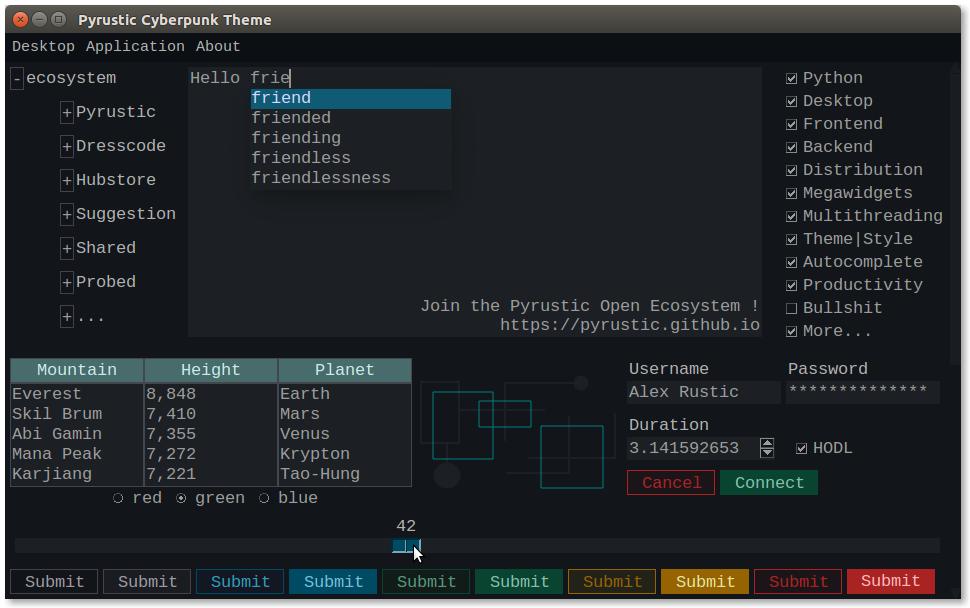
     Cyberpunk theme made with TkStyle


# Cyberpunk-Theme

 A Dark Theme for your Tkinter Python apps

This project is part of the [Pyrustic Open Ecosystem](https://pyrustic.github.io).

[Installation](#installation) | [Reference](https://github.com/pyrustic/cyberpunk-theme/tree/master/docs/reference#readme) | [TkStyle](https://github.com/pyrustic/tkstyle)

## Usage

Thanks to [TkStyle](https://github.com/pyrustic/tkstyle), the `cyberpunk-theme` is both flexible and easy to use.

### Set the theme

```python

import tkinter as tk

from cyberpunk_theme import Cyberpunk

# root

root = tk.Tk()

# apply the Cyberpunk theme to the GUI

cyberpunk_theme = Cyberpunk()

cyberpunk_theme.target(root)

# From now on, the theme applies to the entire GUI

# (your awesome code)

# ...

# mainloop

root.mainloop()

```

What if you want to customize the style of a specific widget ?

### Style a specific widget

Each generic widget has a default style which can be retrieved via a function named `get_{widget-name}_style_1'`.

Some generic widgets like the `Button` widget have multiple styles.

```python

import tkinter as tk

from cyberpunk_theme.widget.button import get_button_dark_style

# root

root = tk.Tk()

# button

button = tk.Button(root, text="Click")

button.pack()

# style

button_style_1 = get_button_dark_style()

button_style_1.target(button)

# mainloop

root.mainloop()

```

The generic `Button` widget has up to ten styles.

The package [megawidget](https://github.com/pyrustic/megawidget) contains a collection of useful custom widgets built with the standard tkinter widgets.

You can set specific styles to `megawidgets` too !

### Style a specific megawidget

```python

import tkinter as tk

from megawidget.table import Table

from cyberpunk_theme.megawidget.table import get_table_style_1

# root

root = tk.Tk()

# the table megawidget

titles = ("Name", "Age")

data = [("Jack", 39), ("Jane", 42)]

table = Table(root, titles=titles, data=data)

table.pack()

# style the table

table_style_1 = get_table_style_1()

table_style_1.target(table)

# mainloop

root.mainloop()

```

## Create your own theme

You can create your own theme or style, or modify the `cyberpunk-theme` as you wish.

Check out [TkStyle](https://github.com/pyrustic/tkstyle) !

## Installation

```bash

$ pip install cyberpunk-theme

```