https://github.com/qbicsoftware/barcode-dragon-portlet
https://github.com/qbicsoftware/barcode-dragon-portlet
portlet
Last synced: 5 months ago
JSON representation
- Host: GitHub
- URL: https://github.com/qbicsoftware/barcode-dragon-portlet
- Owner: qbicsoftware
- License: mit
- Created: 2017-06-08T12:43:48.000Z (about 9 years ago)
- Default Branch: master
- Last Pushed: 2022-06-21T04:24:19.000Z (about 4 years ago)
- Last Synced: 2024-04-16T03:51:51.012Z (about 2 years ago)
- Topics: portlet
- Language: CSS
- Size: 4.21 MB
- Stars: 1
- Watchers: 8
- Forks: 0
- Open Issues: 5
-
Metadata Files:
- Readme: README.md
- Changelog: CHANGELOG.rst
- License: LICENSE
- Code of conduct: CODE_OF_CONDUCT.md
Awesome Lists containing this project
README
# Barcode Dragon Portlet
Barcode Dragon Portlet, Portlet which allows the creation of sample sheets for customers.
[](https://github.com/qbicsoftware/barcode-dragon-portlet/actions/workflows/build_package.yml)
[](https://github.com/qbicsoftware/barcode-dragon-portlet/actions/workflows/run_tests.yml)
[](https://github.com/qbicsoftware/barcode-dragon-portlet/actions/workflows/codeql-analysis.yml)
[](https://github.com/qbicsoftware/barcode-dragon-portlet/releases)
[](https://github.com/qbicsoftware/barcode-dragon-portlet/blob/main/LICENSE)

## How to Run
This portlet requires the following installations on the executing system:
Additionally the following repositories have to be downloaded and setup as outlined in the [properties section](#properties):
Compile the project with java 8 and build a web application archive with Maven:
```
mvn clean package
```
The WAR file will be created in the ``/target`` folder:
```
|-target
|---barcode-dragon-portlet-.war
|---...
```
The application can be run as follows:
```
mvn jetty:run
```
### Configuration
The default configuration of the app binds to the local port 8080 of the systems localhost:
```
http://localhost:8080
```
#### Properties
To run the tool you need to fill in a multitude of credentials.
To do so you can copy and adapt the following template portlet.properties found in the ``setup_samples`` directory:
| Property | Description | Default Value |
|------------------------|-------------------------------------------------------------|---------------------------------|
| `datasource.url` | The URL to the host of the openBis instance | `localhost ` |
| `datasource.user` | The openBis user name | `openbisusername` |
| `datasource.password` | The openBis user password | `openbispassphrase!` |
| `tmp.folder` | Path into which the postscript tmp files should be stored | `my/postscript/tmp/folder!` |
| `barcode.postscript` | Path to the downloaded postscriptbarcode repository | `/downloads/postscriptbarcode/` |
| `barcode.result` | Path where the created barcodes should be stored | `/my/created/barcodes` |
| `barcode.scripts` | Path to the downloaded barcodescripts repository | `downloads/barcodescripts/` |
| `path.variable` | Path to the Python 2.7 installation on the executing system | `/my/python/path/` |
| `mysql.host` | The URL to the host of the user database | `localhost ` |
| `mysql.db` | The name of the database | `user_management_database` |
| `mysql.user` | The database user name | `dbusername` |
| `mysql.port` | The port on which the user database can be accessed | `8080` |
| `mysql.pass` | The database user password | `dbpassphrase!` |
| `mysql.input.usergrp` | The liferay user group able to view the barcode printer | `privilegedliferayuser` |
| `mysql.input.admingrp` | The liferay admim group able to view the barcode printer | `privilegedliferayadmin` |
| `metadata.write.group` | The group able to write metadata | `metadata-writers` |
Additionally you need to provide and adapt the following repositories:
- Monolithic release of postscriptbarcode
1. Adapt the ``barcode.postscript`` property in the ``portlet.property`` file of the barcode-dragon-portlet repository to the path of the downloaded postscriptbarcode repository
- barcode-creation
1. Adapt the ``barcode.scripts`` property in the ``portlet.property`` file of the barcode-dragon-portlet repository to the path of the downloaded barcode-creation repository.
2. Navigate into the folder ``wizard_scripts`` of the cloned barcode-creation repository and create the following files:
1. `properties_path.txt` file solely containing the path to the ``portlet.properties`` file of the barcode-dragon-portlet repository:
/path/to/barcode-dragon-portlet/portlet.properties
2. `test.properties` file containing the same property specification as are set in the ``portlet.property`` file of the barcode-dragon-portlet repository:
barcode.postscript =
barcode.results =
tmp.folder =
An example for both files are provided in the ``setup_samples`` folder of the barcode-dragon-portlet repository
## How to use
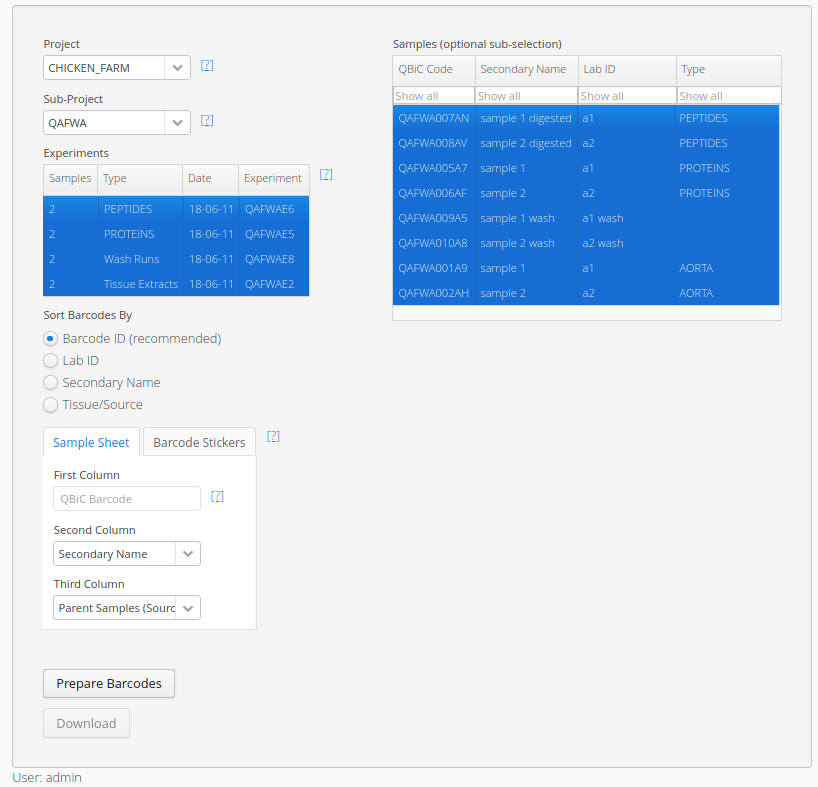
This portlet allows the creation of sample sheets and barcode stickers for customers.
Sample sheets contain QBiC's logo, QBiC's contact information, the customer's name and address and finally the respective QBiC contact's name and contact information.
Additionally, barcodes and detailed information related to the barcodes is added in their respective columns.
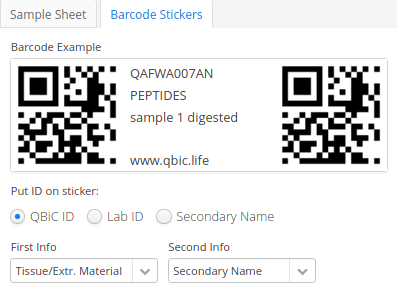
Barcodes can be customized, take a look at the screenshots.
## License
This work is licensed under the [MIT license](https://mit-license.org/).