https://github.com/qczone/switch2cursor
A JetBrains IDE plugin that enables smooth switching between JetBrains IDE and Cursor, with automatic cursor position sync. Features keyboard shortcuts, context menu integration, and tools menu access. Supports all JetBrains IDEs.
https://github.com/qczone/switch2cursor
cursor development-tools idea-plugin jetbrains-plugin open-in-cursor switch-to-cursor
Last synced: 6 months ago
JSON representation
A JetBrains IDE plugin that enables smooth switching between JetBrains IDE and Cursor, with automatic cursor position sync. Features keyboard shortcuts, context menu integration, and tools menu access. Supports all JetBrains IDEs.
- Host: GitHub
- URL: https://github.com/qczone/switch2cursor
- Owner: qczone
- License: mit
- Created: 2025-01-12T03:58:40.000Z (over 1 year ago)
- Default Branch: main
- Last Pushed: 2025-02-23T13:11:44.000Z (over 1 year ago)
- Last Synced: 2025-12-27T08:51:04.636Z (6 months ago)
- Topics: cursor, development-tools, idea-plugin, jetbrains-plugin, open-in-cursor, switch-to-cursor
- Language: Kotlin
- Homepage:
- Size: 3.02 MB
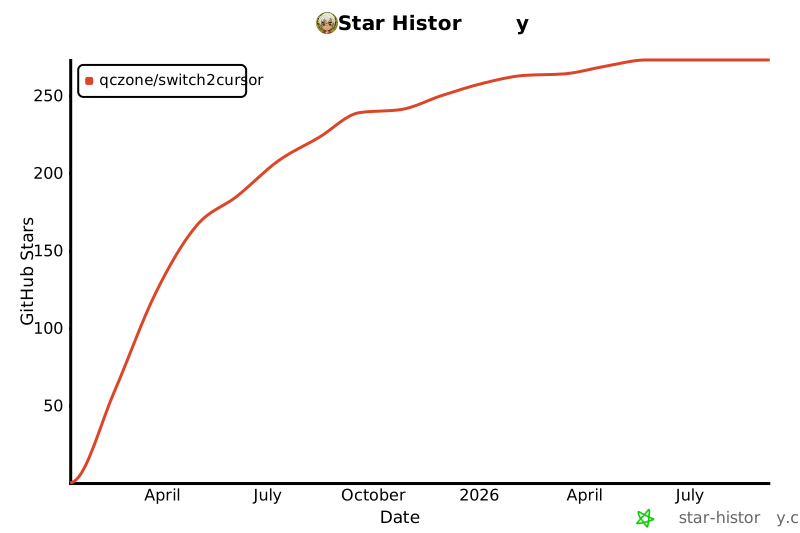
- Stars: 263
- Watchers: 1
- Forks: 32
- Open Issues: 18
-
Metadata Files:
- Readme: README.md
- License: LICENSE
Awesome Lists containing this project
README
# Switch2Cursor
[中文文档](README_zh.md)
> 💡 Recommended to use with [Switch2IDEA](https://github.com/qczone/switch2idea) in Cursor
[](https://plugins.jetbrains.com/plugin/26309-switch2cursor)
[](https://plugins.jetbrains.com/plugin/26309-switch2cursor)
[](LICENSE)
## 🔍 Introduction
A JetBrains IDE plugin that enhances development efficiency by enabling seamless switching between JetBrains IDE and Cursor

## 🌟 Features
- 🚀 Seamless Editor Switching
- One-click switch between JetBrains IDE and Cursor
- Automatically positions to the same cursor location (line and column)
- Perfectly maintains editing context without interrupting workflow
- ⌨️ Convenient Shortcut Support
- macOS:
- `Option+Shift+P` - Open project in Cursor
- `Option+Shift+O` - Open current file in Cursor
- Windows:
- `Alt+Shift+P` - Open project in Cursor
- `Alt+Shift+O` - Open current file in Cursor
- 🔧 Multiple Access Methods
- Keyboard shortcuts
- Editor context menu
- IDE tools menu
## 🛠️ Installation Guide
### Method 1: Install via JetBrains Marketplace
1. Open IDE → `Settings` → `Plugins` → `Marketplace`
2. Search for switch2cursor
3. Click `Install` to complete installation
4. Click `OK` to apply changes
### Method 2: Local Installation
1. Download the latest plugin package from [JetBrains Marketplace](https://plugins.jetbrains.com/plugin/26309-switch2cursor)
2. IDE → `Settings` → `Plugins` → `⚙️`→ `Install Plugin from Disk...`
3. Select the downloaded plugin package
4. Click `OK` to apply changes
## 🚀 Usage Guide
### Basic Usage
#### Open Project
- Shortcuts:
- macOS: `Option+Shift+P`
- Windows: `Alt+Shift+P`
- Context Menu: Right-click in project view → `Open Project In Cursor`
- Tools Menu: `Tools` → `Open Project In Cursor`
#### Open Current File
- Shortcuts:
- macOS: `Option+Shift+O`
- Windows: `Alt+Shift+O`
- Context Menu: Right-click in editor → `Open File In Cursor`
- Tools Menu: `Tools` → `Open File In Cursor`
### Configuration
- In `Settings/Preferences` → `Tools` → `Switch2Cursor`:
- Set Cursor executable path (default is "cursor")
- Customize shortcuts through Keymap settings
### Requirements
- [Cursor](https://cursor.com) installed
- Compatible with all JetBrains IDEs (version 2022.3 and above)
## 🧑💻 Developer Guide
### Build Project
```bash
# Clone repository
git clone https://github.com/qczone/switch2cursor.git
# Build plugin
cd switch2cursor
./gradlew buildPlugin
# Plugin package will be generated in build/distributions/ directory
```
### Contributing
1. Fork this repository
2. Create a feature branch
3. Commit your changes
4. Push to the branch
5. Submit a Pull Request
## 🙋 FAQ
### 1. Why doesn't the shortcut/menu click switch to Cursor after installation?
Check if the correct Cursor executable path is configured in `Settings` → `Tools` → `Switch2Cursor`
### 2. Which IDEs are supported?
Supports all JetBrains IDEs, including: IntelliJ IDEA, PyCharm, WebStorm, GoLand, RustRover, Android Studio, etc.
### 3. Which versions are supported?
The plugin is developed based on JDK 17 and currently only supports JetBrains IDE version 2022.3 and above
### 4. How to modify plugin shortcuts?
Modify in `Settings` → `Keymap` → `Plugins` → `Switch2Cursor`
## 📄 License
This project is licensed under the [MIT License](LICENSE)
## 📮 Feedback
If you encounter any issues or have suggestions, please provide feedback through:
- [Submit GitHub Issue](https://github.com/qczone/switch2cursor/issues)
## 🌟 Star History
[](https://star-history.com/#qczone/switch2cursor&Date)