https://github.com/qjake/psrunner
PS C:\> A Windows Run-like dialog for PowerShell.
https://github.com/qjake/psrunner
dialog hotkey powershell run runner
Last synced: about 1 year ago
JSON representation
PS C:\> A Windows Run-like dialog for PowerShell.
- Host: GitHub
- URL: https://github.com/qjake/psrunner
- Owner: qJake
- License: mit
- Archived: true
- Created: 2016-01-12T16:41:49.000Z (over 10 years ago)
- Default Branch: master
- Last Pushed: 2021-08-17T03:58:05.000Z (almost 5 years ago)
- Last Synced: 2025-03-22T00:45:03.668Z (over 1 year ago)
- Topics: dialog, hotkey, powershell, run, runner
- Language: C#
- Homepage:
- Size: 97.7 KB
- Stars: 4
- Watchers: 1
- Forks: 1
- Open Issues: 1
-
Metadata Files:
- Readme: README.md
- License: LICENSE
Awesome Lists containing this project
README
# PSRunner
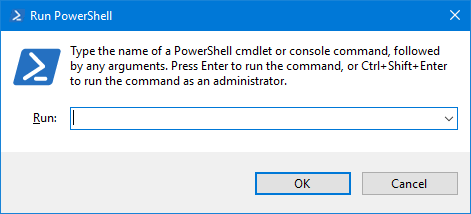
A Windows Run-like dialog for PowerShell.
## Releases
Current release: [Version 2.2.0](https://github.com/qJake/PSRunner/releases/tag/2.2.0) (2016/06/21)
[View all releases](https://github.com/qJake/PSRunner/releases)
### Compatibility
As of 2021-08-16, confirmed working on Windows builds as recent as 21H1 (19043.1165).
### Changelog
* Changed global hotkey to Win + N, due to a recent Insider build of Windows 10 stealing the Win + F shortcut.
* Added the ability for the hotkey to be overridden via the command-line - pass in an enum value from the [`Keys` enumeration](https://msdn.microsoft.com/en-us/library/system.windows.forms.keys(v=vs.110).aspx) as the only command-line argument, for example: `PSRunner.exe Y` will use the Win + Y binding instead of the default.
* If no command is entered (the command box is left empty), a new, empty PowerShell session will be opened.
## PSWrap
A second project is included in the solution called "PSWrap". This small executable is a non-interactive wrapper for PowerShell. It passes all command-line arguments to `powershell.exe`, but will hide the window completely, enabling you to run PowerShell commands without a window appearing or flashing on-screen. This is especially useful when using PowerShell for scheduled tasks.
## Contributing
Report bugs, request enhancements, fork it, and send me pull requests via this repo.
Not sure where to start? [Search the code for "TODO:"](https://github.com/qJake/PSRunner/search?q=TODO%3A) and do it! :smile:
## License
Licensed under the [MIT License](https://opensource.org/licenses/MIT).