https://github.com/qrush/motion-layout
A nice way to use iOS6+ autolayout in your RubyMotion app. Use ASCII-art inspired format strings to build your app's layout!
https://github.com/qrush/motion-layout
Last synced: over 1 year ago
JSON representation
A nice way to use iOS6+ autolayout in your RubyMotion app. Use ASCII-art inspired format strings to build your app's layout!
- Host: GitHub
- URL: https://github.com/qrush/motion-layout
- Owner: qrush
- License: mit
- Created: 2013-03-20T21:24:15.000Z (over 13 years ago)
- Default Branch: master
- Last Pushed: 2014-01-27T19:50:44.000Z (over 12 years ago)
- Last Synced: 2025-03-30T01:11:17.484Z (over 1 year ago)
- Language: Ruby
- Homepage:
- Size: 269 KB
- Stars: 216
- Watchers: 7
- Forks: 27
- Open Issues: 5
-
Metadata Files:
- Readme: README.md
- License: LICENSE
Awesome Lists containing this project
README
# motion-layout
A nice way to use iOS6+ autolayout in your RubyMotion app. Use ASCII-art inspired format strings to build your app's layout!
## Installation
Add this line to your application's Gemfile:
gem 'motion-layout'
And then execute:
bundle
Or install it yourself as:
gem install motion-layout
Then in your `Rakefile`:
require 'motion-layout'
## Usage
Using AutoLayout is a way to put UI elements in your iPhone app without using Interface Builder, and without being very specific about pixel sizes, locations, etc. The layout strings are ASCII inspired, and Apple's documentation on the [Visual Format Language](https://developer.apple.com/library/ios/documentation/UserExperience/Conceptual/AutolayoutPG/VisualFormatLanguage/VisualFormatLanguage.html) is a necessary read and reference.
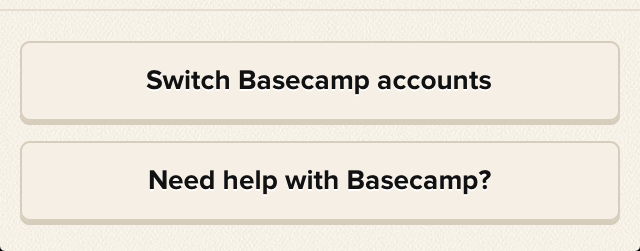
Here's an example of `Motion::Layout` usage from inside of [Basecamp for iPhone](https://itunes.apple.com/us/app/id599139477) on a `UITableView`'s `tableFooterView`:
``` ruby
Motion::Layout.new do |layout|
layout.view self.view.tableFooterView
layout.subviews "switch" => @switch, "help" => @help
layout.vertical "|-15-[switch]-10-[help(==switch)]-15-|"
layout.horizontal "|-10-[switch]-10-|"
layout.horizontal "|-10-[help]-10-|"
end
```
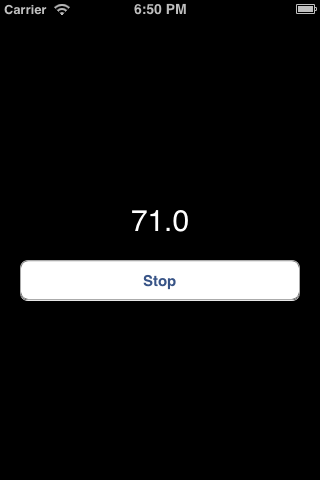
And here's an example you can run right inside this repo, the Time app converted to use Auto Layout from the [RubyMotionSamples](https://github.com/HipByte/RubyMotionSamples) repo:
``` ruby
Motion::Layout.new do |layout|
layout.view view
layout.subviews state: @state, action: @action
layout.metrics "top" => 200, "margin" => 20, "height" => 40
layout.vertical "|-top-[state(==height)]-margin-[action(==height)]"
layout.horizontal "|-margin-[state]-margin-|"
layout.horizontal "|-margin-[action]-margin-|"
end
```
## TODO
* Support finer grained constraints
* Better debugging messages
* More examples
## Contributing
I couldn't figure out how to test this automatically. Run `bundle` to get the gems you need, and then `rake` to generate a RubyMotion app in the iOS simulator
1. Fork it
2. Create your feature branch (`git checkout -b my-new-feature`)
3. Commit your changes (`git commit -am 'Add some feature'`)
4. Push to the branch (`git push origin my-new-feature`)
5. Create new Pull Request
## License
MIT. See `LICENSE`.