https://github.com/qrush/motion-settings-bundle
Create a Settings.bundle for your RubyMotion app
https://github.com/qrush/motion-settings-bundle
Last synced: over 1 year ago
JSON representation
Create a Settings.bundle for your RubyMotion app
- Host: GitHub
- URL: https://github.com/qrush/motion-settings-bundle
- Owner: qrush
- License: mit
- Created: 2012-09-10T16:39:35.000Z (almost 14 years ago)
- Default Branch: master
- Last Pushed: 2019-05-18T11:33:14.000Z (about 7 years ago)
- Last Synced: 2025-04-10T03:54:40.086Z (over 1 year ago)
- Language: Ruby
- Size: 1.44 MB
- Stars: 109
- Watchers: 8
- Forks: 6
- Open Issues: 2
-
Metadata Files:
- Readme: README.md
- License: LICENSE
Awesome Lists containing this project
README
# motion-settings-bundle
Create a Settings.bundle for your RubyMotion app. This allows your app to have a "global" settings entry in the Settings app.
## Installation
Add this line to your application's Gemfile:
gem 'motion-settings-bundle'
And then execute:
bundle
Or install it yourself as:
gem install motion-settings-bundle
## Usage
Add a chunk of code into your project's `Rakefile` like so:
``` ruby
require 'motion-settings-bundle'
Motion::SettingsBundle.setup do |app|
# A text field. Allows configuration of a string.
app.text "Name", key: "username", default: "Paul Atreides"
app.text "E-mail", key: "email", keyboard: "EmailAddress", autocapitalization: "None"
app.text "Password", key: "password", secure: true
# A read-only text field. Use for showing a small chunk of text, maybe a version number
app.title "Year of Birth", key: "yearOfBirth", default: "10,175 AG"
# An on/off switch. Turn something on or off. Default is `false` (off).
app.toggle "Kwisatz Haderach?", key: "superpowersEnabled", default: true
# MultiValue, to choose from some item
app.multivalue "Picture Resolution 1", key: "pictureResolution1", default: "1500", values: ["1500", "1200", "1000"]
# MultiValue 2, with values and different titles (required when the values are numbers not string)
app.multivalue "Picture Resolution 2", key: "pictureResolution2", default: 1500, values: [1500, 1200, 1000],
titles: ["1500px", "1200px", "1000px"]
# A slider, configure volume or something linear
app.slider "Spice Level", key: "spiceLevel", default: 50, min: 1, max: 100
# Child pane to display licenses in
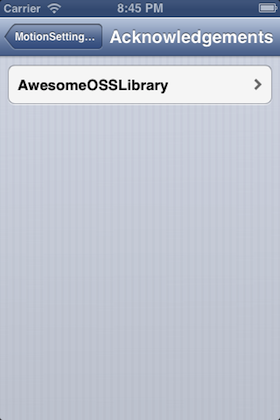
app.child "Acknowledgements" do |ack|
ack.child "AwesomeOSSLibrary" do |lic|
lic.group "Copyright 2013 AwesomeOSSContributor"
lic.group "More license text that is terribly formatted but fulfills legal requirements"
end
end
end
```
Now just run `rake` as normal!
This should now add a `Settings.bundle` folder into your `resources` directory. Make sure to commit it! If you ever change the data in the `Settings.setup` block, it will be re-built on the next `rake` run. You'll end up with something like this:


If you're wondering how to access this in code, it's pretty easy:
``` ruby
NSUserDefaults.standardUserDefaults["username"]
# returns "Paul Atreides"
```
And so on. Just remember, the defaults aren't populated until your user actually opens the Settings app, so make sure to handle all of your setting entries being `nil`.
## TODO
This project really solely exists to avoid creating/editing the Settings.bundle in XCode. The specs for it so far have been based off [mordaroso/rubymotion-settings-bundle](https://github/mordaroso/rubymotion-settings-bundle). Please feel free to contribute more ways to generate settings!
* Add a custom label, "Settings for Blah"
* Don't re-create files every time
* Slider default level doesn't seem to work yet
## Contributing
I couldn't figure out how to test this automatically. Run `bundle` to get the gems you need, and then `rake` to generate a RubyMotion app in the iOS simulator, and then open the Settings app.
If you've added a setting it would be really nice if you could update `screenshot.png` as well!
1. Fork it
2. Create your feature branch (`git checkout -b my-new-feature`)
3. Commit your changes (`git commit -am 'Add some feature'`)
4. Push to the branch (`git push origin my-new-feature`)
5. Create new Pull Request
## License
MIT. See `LICENSE`.