https://github.com/quailyquaily/mistermorph
Unified Agent CLI + reusable Go agent core.
https://github.com/quailyquaily/mistermorph
agent-library ai-agents golang
Last synced: 11 days ago
JSON representation
Unified Agent CLI + reusable Go agent core.
- Host: GitHub
- URL: https://github.com/quailyquaily/mistermorph
- Owner: quailyquaily
- License: apache-2.0
- Created: 2026-01-30T23:39:38.000Z (4 months ago)
- Default Branch: master
- Last Pushed: 2026-04-20T11:57:07.000Z (about 1 month ago)
- Last Synced: 2026-04-20T13:38:49.376Z (about 1 month ago)
- Topics: agent-library, ai-agents, golang
- Language: Go
- Homepage: https://mistermorph.com
- Size: 11.4 MB
- Stars: 69
- Watchers: 1
- Forks: 6
- Open Issues: 1
-
Metadata Files:
- Readme: README.md
- License: LICENSE
- Security: docs/security.md
- Agents: AGENTS.md
Awesome Lists containing this project
README
# Mister Morph
Desktop app, CLI, and reusable Go runtime for AI agents.
Other languages: [简体中文](docs/zh-CN/README.md) | [日本語](docs/ja-JP/README.md)
To try Mister Morph, start with the desktop App from [GitHub Releases](https://github.com/quailyquaily/mistermorph/releases). It includes the Console UI, starts the local backend, and guides first-run setup.
## Why Mister Morph
- 🖥️ App-first setup: use the desktop App to get started; use the CLI when you need a server or script.
- 🧩 Reusable Go core: run Mister Morph as an App, CLI, or Console backend, or embed it in your projects.
- 🤝 Connection: [Aqua](https://mistermorph.com/aqua) lets agents talk to each other, so multiple agents can plan and work together.
- 🛠️ Practical extensions: built-in tools, `SKILL.md` skills, and Go embedding cover local use and automation.
- 🔒 Security-minded: auth profiles, outbound policy, approvals, and redaction are built in.
## Quick Start
### Desktop App (recommended)
1. Download a release asset from the [GitHub Releases](https://github.com/quailyquaily/mistermorph/releases) page:
- macOS: `mistermorph-desktop-darwin-arm64.dmg`
- Linux: `mistermorph-desktop-linux-amd64.AppImage` or `mistermorph-desktop-linux-amd64.deb`
- Windows: `mistermorph-desktop-windows-amd64.zip`
2. Open the App.
3. Use the Agent.
Build, packaging, and platform notes: [docs/app.md](docs/app.md)
### CLI
Install the CLI:
```bash
curl -fsSL -o /tmp/install-mistermorph.sh https://raw.githubusercontent.com/quailyquaily/mistermorph/refs/heads/master/scripts/install-release.sh
sudo bash /tmp/install-mistermorph.sh
```
Or install from source:
```bash
go install github.com/quailyquaily/mistermorph/cmd/mistermorph@latest
```
Set up a workspace, set an API key, and run one task:
```bash
mistermorph install
export MISTER_MORPH_LLM_API_KEY="YOUR_API_KEY"
mistermorph run --task "Hello!"
```
If `config.yaml` is missing, `mistermorph install` starts the setup wizard and writes the first workspace files.
CLI modes and configuration details: [docs/modes.md](docs/modes.md), [docs/configuration.md](docs/configuration.md)
## What It Includes
- A desktop App with first-run setup and the Console UI.
- A CLI for one-shot tasks, scripts, automation, and server modes.
- A local Console server for setup, runtime management, and monitoring.
- Channel runtimes for Telegram, Slack, LINE, and Lark.
- A Go integration layer for embedding Mister Morph into other projects.
- Built-in tools and a `SKILL.md`-based skills system.
- Security controls for auth profiles, outbound policies, approvals, and redaction.
## Documentation
Start here:
- [Desktop App](docs/app.md)
- [Modes](docs/modes.md)
- [Configuration](docs/configuration.md)
- [Troubleshoots](docs/troubleshoots.md)
Reference:
- [Console](docs/console.md)
- [Aqua Connection](docs/aqua.md)
- [Tools](docs/tools.md)
- [Skills](docs/skills.md)
- [Security](docs/security.md)
- [Integration](docs/integration.md)
- [Architecture](docs/arch.md)
Channel setup:
- [Telegram](docs/telegram.md)
- [Slack](docs/slack.md)
- [LINE](docs/line.md)
- [Lark](docs/lark.md)
Full docs index: [docs/README.md](docs/README.md)
## Development
Useful commands:
```bash
./scripts/build-backend.sh --output ./bin/mistermorph
./scripts/build-desktop.sh --release
go test ./...
```
The Console frontend lives in `web/console/` and uses `pnpm`. See [docs/console.md](docs/console.md) and [docs/app.md](docs/app.md) for build details.
## Configuration Template
The canonical config template is [assets/config/config.example.yaml](assets/config/config.example.yaml).
Environment variables use the `MISTER_MORPH_` prefix. Full config notes and common flags are in [docs/configuration.md](docs/configuration.md).
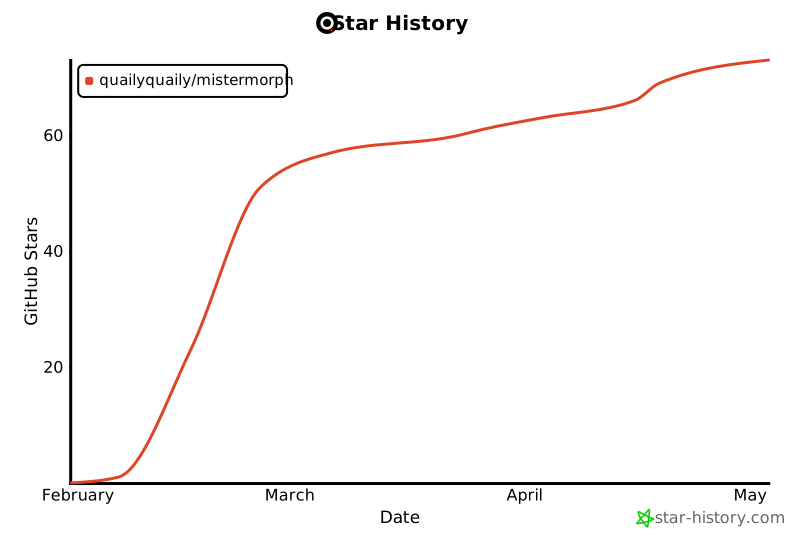
## Star History
[](https://www.star-history.com/#quailyquaily/mistermorph&type=date&legend=top-left)