https://github.com/qzruncode/react-vitual-keyboard
react vitual keyboard
https://github.com/qzruncode/react-vitual-keyboard
mobile-app react typescript
Last synced: 3 months ago
JSON representation
react vitual keyboard
- Host: GitHub
- URL: https://github.com/qzruncode/react-vitual-keyboard
- Owner: qzruncode
- Created: 2020-05-01T03:09:06.000Z (about 6 years ago)
- Default Branch: master
- Last Pushed: 2020-09-04T23:18:42.000Z (almost 6 years ago)
- Last Synced: 2025-04-07T22:41:44.575Z (over 1 year ago)
- Topics: mobile-app, react, typescript
- Language: JavaScript
- Size: 99.6 KB
- Stars: 2
- Watchers: 1
- Forks: 0
- Open Issues: 1
-
Metadata Files:
- Readme: README.md
Awesome Lists containing this project
README
[](https://www.npmjs.com/package/react-vitual-keyboard)
[](https://www.npmjs.com/package/react-vitual-keyboard)
## react-vitual-keyboard
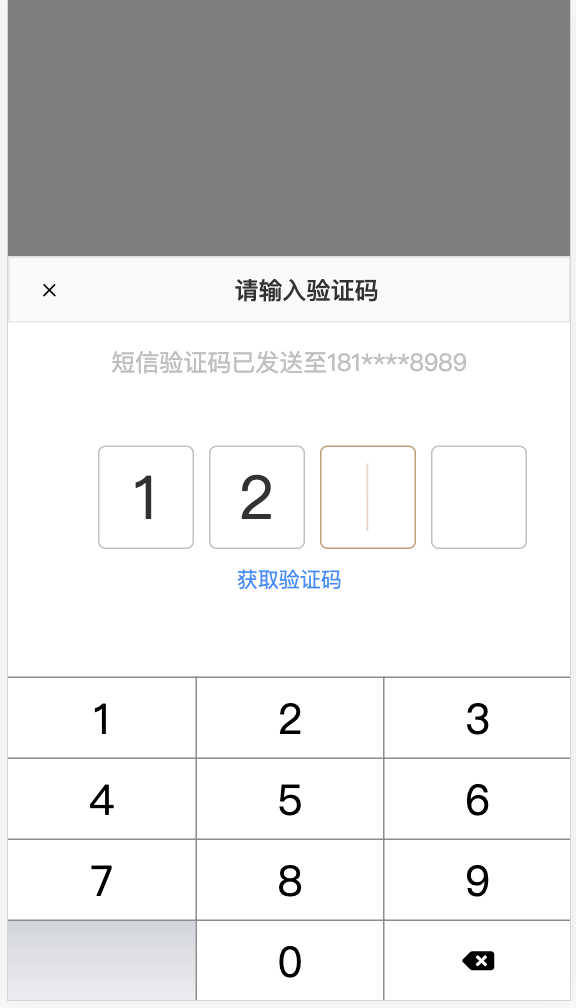
For mobile captcha virtual keyboard, using HTML5 instead of native development
### Install
```
npm install react-vitual-keyboard --save
```
### Usage
```
import React from 'react';
import CodeInput from 'react-vitual-keyboard';
import styles from './index.scss';
interface IProps {
}
interface IState {
show: boolean;
}
const rightCode = [8, 8, 8, 8];
class App extends React.Component {
constructor(props: IProps) {
super(props);
this.state = { show: false };
}
public handleInput(numbers: number[]) {
console.log('The user is typing', numbers);
}
public handleFinish(numbers: number[]) {
console.log('User input completed', numbers);
}
public handleSendCode() {
console.log('User click please send verification code');
return false; // If the captcha is successfully obtained return true
}
public render() {
return (
this.setState({show: true})}>open
this.setState({show})
}
onInput={this.handleInput} // optional (The callback being entered)[function]
onFinish={this.handleFinish} // optional (Enter the completed callback)[function]
onSendCode={this.handleSendCode} // optional (Send verification code)[function]
onValidation = (nubmers) => Promise.resolve('ok') // The captcha is entered correctly
/>
);
}
}
export default App;
```
### Development
> You can download the source code and modify it yourself from github [react-vitual-keyboard](https://github.com/qzruncode/react-vitual-keyboard)
```
npm install
npm run serve
npm run build
```