https://github.com/r-spatial/link2gi
Simplify the linking of GIS/RS and CLI tools
https://github.com/r-spatial/link2gi
Last synced: 9 months ago
JSON representation
Simplify the linking of GIS/RS and CLI tools
- Host: GitHub
- URL: https://github.com/r-spatial/link2gi
- Owner: r-spatial
- License: gpl-3.0
- Created: 2017-01-21T09:57:07.000Z (over 9 years ago)
- Default Branch: master
- Last Pushed: 2024-11-25T21:30:36.000Z (over 1 year ago)
- Last Synced: 2025-09-29T17:36:58.298Z (10 months ago)
- Language: R
- Homepage: https://r-spatial.github.io/link2GI
- Size: 13.3 MB
- Stars: 27
- Watchers: 8
- Forks: 8
- Open Issues: 6
-
Metadata Files:
- Readme: README.md
- Changelog: NEWS
- License: LICENSE
Awesome Lists containing this project
README
# link2GI
` `
[](https://cran.r-project.org/web/checks/check_results_link2GI.html)


[](https://cran.r-project.org/package=link2GI)
[](https://github.com/r-spatial/link2GI)
[](https://www.gnu.org/licenses/gpl-3.0.html)
` `
Package website: [release](https://r-spatial.github.io/link2GI/)
`link2GI` provide some functions which make it a bit easier to connect straightforward the common open source GI software packages to the R-biotop. It supports both the use of wrapper packages and the direct API-use via system calls. It focuses on `Linux` and `WindowsX` operating systems but nevertheless it should also work with `OSX`.
If you have several versions installed or if you want to use the full power of the GI software it will be a nice and helpful tool to deal with some strange behaviours and requirements. Especially helpful is the support of `OTB`, the `GDAL-Python` functions and a simple support to use any `SAGA` version via the CLI. Hopefully `RSAGA` and `Rsagacmd` will join forces in one package in the future. Anyway the current releases (1.4.1) of `RSAGA` as well as `Rsagacmd` will work with the environment settings as provided by `linkSAGA`.
# Installation
`link2GI`is up to CRAN. For the installation of the stable version please use `install.packages("link2GI")`.
However it is strongly recommended to install the latest stable version:
```r
# devtools package
devtools::install_github("r-spatial/link2GI", ref = "master")
# remotes package
remotes::install_github("r-spatial/link2GI",ref = "master")
```
## Third Party software
To utilize the power of the open source GI tools from within `R` you need to install them first. As a first promising opportunity to do fulfill most of the requirements you may install `QGIS, GRASS`, `SAGA-GIS` and `Orfeo-toolbox`. For further Information have a look at the [Installation guide for link2GI related Software](https://r-spatial.github.io/link2GI/articles/link2GI7.html).
# New Feature
## `initProj` for reproducible projects
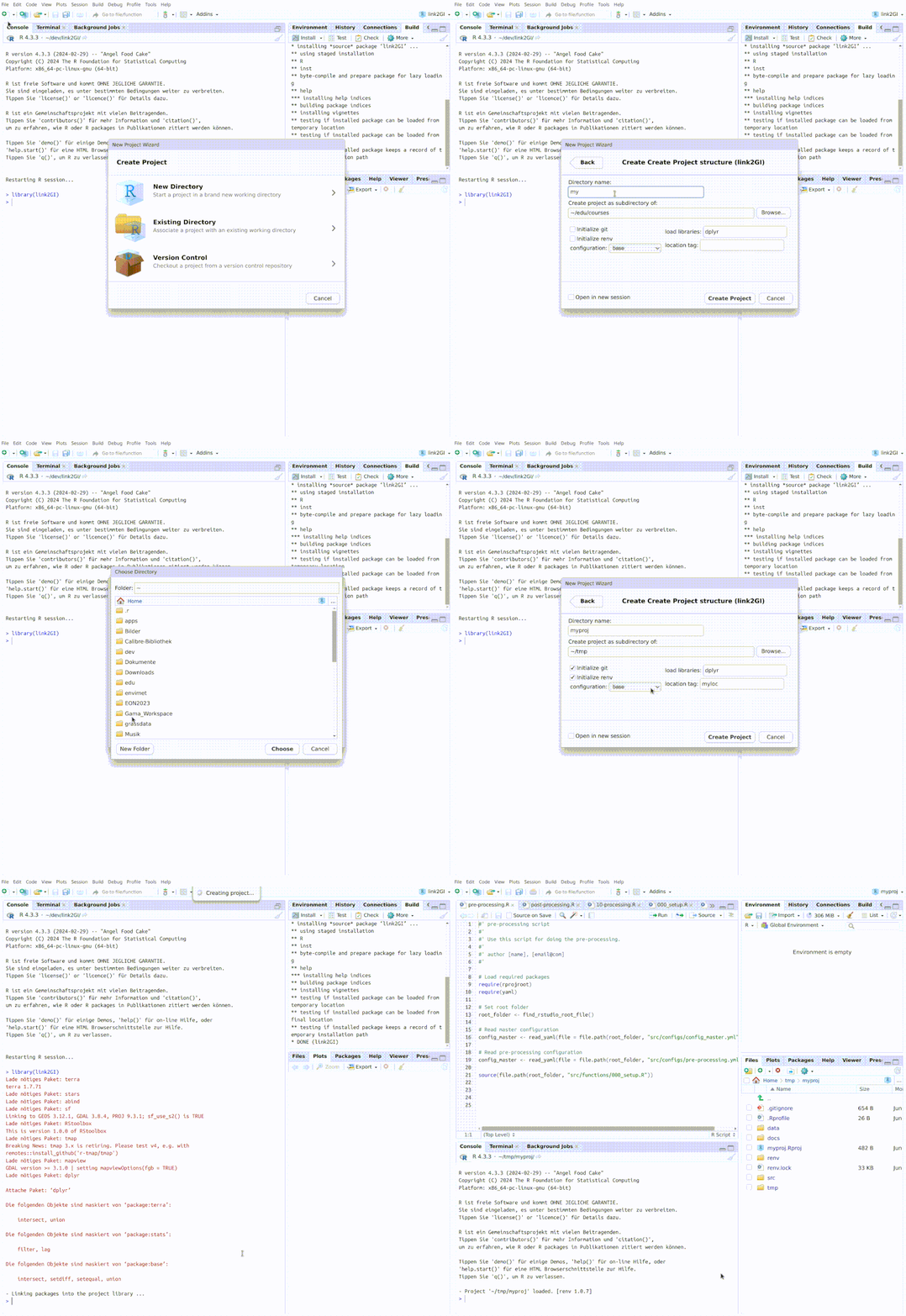
`initProj` provides a complete and flexible working environment for GI projects. The focus is on a simple but powerful structure. The basic framework is formed by a defined folder structure, initial scripts and configuration templates as well as optional Git repositories and an `renv` environment. A corresponding RStudio project file is also created. It supports the automatic installation (if needed) and loading of the required libraries including various standard setup skeletons to simplify project initialisation.
The function creates a skeleton of the skeleton scripts `main-control.R`, `pre-processing.R`, `10-processing.R` and `post-processing.R`, and creates corresponding parameter configurations files stored as `yaml` files in `scr/configs/`. The script src/functions/000_settings.R holds all specific project settings. Easy access to all project paths is provided via the list variable `dirs`, which enables simple, efficient and reproducible project management and data handling.
For further Information have a look at the article [Reproducible Projects](https://r-spatial.github.io/link2GI/articles/link2GI5.html).
When using RStudio, a new project can be created by simply selecting the ***Create Project Structure (link2GI)*** template from the ***File -> New Project -> New Directory -> New Project Wizard *** dialogue.