https://github.com/r0salman/psvmp
A tool that automatically downloads, converts, and transfers videos and music to your PS Vita with optimal compatibility settings.
https://github.com/r0salman/psvmp
automation gameconsolemedia homebrew media open-source ps psvita psvita-homebrew python vita vitashell
Last synced: 9 months ago
JSON representation
A tool that automatically downloads, converts, and transfers videos and music to your PS Vita with optimal compatibility settings.
- Host: GitHub
- URL: https://github.com/r0salman/psvmp
- Owner: R0salman
- License: mit
- Created: 2025-08-04T21:46:03.000Z (11 months ago)
- Default Branch: main
- Last Pushed: 2025-08-04T22:37:46.000Z (11 months ago)
- Last Synced: 2025-08-05T00:35:55.539Z (11 months ago)
- Topics: automation, gameconsolemedia, homebrew, media, open-source, ps, psvita, psvita-homebrew, python, vita, vitashell
- Language: Python
- Homepage:
- Size: 751 KB
- Stars: 0
- Watchers: 0
- Forks: 0
- Open Issues: 0
-
Metadata Files:
- Readme: README.md
- License: LICENSE
Awesome Lists containing this project
README


---
## Features
* Multi-platform support: Mega.nz, YouTube, SoundCloud, and more
* Modern GUI interface with dark/light themes
* Command-line interface for advanced users
* Automatic media conversion for PS Vita compatibility
* Direct FTP transfer to your PS Vita
* Optimized output: video (960x544), audio (MP3 320kbps)
* Real-time download and conversion progress
* Smart file management with organized storage
* Built-in update checker
* Enhanced metadata handling for music files
* Optional automatic cleanup of temporary files
## Supported Sources
* **Mega.nz** — via `megatools`
* **YouTube** — via `yt-dlp`
* **SoundCloud** — audio-only support with metadata preservation
* **Other websites** — generic support via `yt-dlp`
## Requirements
* Python 3.8 or later
* FFmpeg
* yt-dlp
* megatools
* PyQt6 (for GUI interface)
* PS Vita with VitaShell (FTP enabled)
## Installation
### Method 1: PyPI Installation (Recommended)
```bash
pip install psvmp
```
### Method 2: Manual Installation
#### 1. Clone the repository
```bash
git clone https://github.com/R0salman/PSVMP.git
cd PSVMP
```
#### 2. Install Python dependencies
```bash
pip install tqdm yt-dlp PyQt6
```
#### 3. Install system dependencies
##### Windows
* [Download FFmpeg](https://ffmpeg.org/download.html)
* [Download megatools](https://megatools.megous.com/)
* Install yt-dlp:
```bash
pip install yt-dlp
```
##### Linux (Ubuntu/Debian)
```bash
sudo apt update
sudo apt install ffmpeg megatools
pip install yt-dlp PyQt6
```
##### macOS
```bash
brew install ffmpeg megatools
pip install yt-dlp PyQt6
```
#### 4. Verify installation
```bash
python psmedia.py --check-deps
```
## PS Vita Setup
1. Install VitaShell on your PS Vita
2. Launch VitaShell and press `SELECT` to start the FTP server
3. Note the **IP** and **Port** address shown on your PS Vita
4. Ensure your computer and PS Vita are connected to the same Wi-Fi network
## Usage
### GUI Interface
Launch the graphical interface:
```bash
python psmedia.py --gui
```
The GUI provides an intuitive interface with the following features:
* Clean, modern design with dark/light theme options
* Paste button for easy URL input
* Real-time console output with color-coded messages
* Progress tracking with visual feedback
* File management tools (open output folder, delete files)
* Built-in update checker
* One-click processing workflow
### Command Line Interface
#### Basic Examples
Download and convert a YouTube video:
```bash
python psmedia.py "https://www.youtube.com/watch?v=VIDEO_ID" --type video
```
Download and convert SoundCloud music:
```bash
python psmedia.py "https://soundcloud.com/artist/track" --type music
```
Download from Mega.nz with custom Vita IP:
```bash
python psmedia.py "https://mega.nz/file/..." --ip 192.168.1.100 --port 1337
```
Check version:
```bash
python psmedia.py --version
```
## Command Line Options
```
positional arguments:
url URL of the media file (Mega.nz, YouTube, SoundCloud, etc.)
optional arguments:
-h, --help Show this help message and exit
--type {video,music} Type of media to process (default: video)
--ip IP PS Vita IP address (default: 192.168.1.7)
--port PORT PS Vita FTP port (default: 1337)
--check-deps Check if required dependencies are installed
--gui Launch the GUI interface
-v, --version Show version information and exit
```
## Tutorial
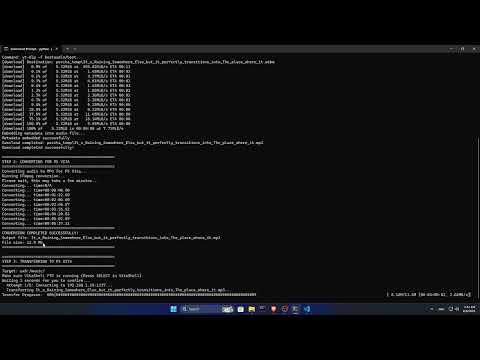
Watch the full tutorial on how to use PSVMP:
## File Organization
The application now uses an organized folder structure in your Documents directory:
```
Documents/PSvita media processer/
├── temp/ # Temporary downloads
└── converted/ # Processed files ready for Vita
```
## Output Locations
* Videos: `ux0:/video/shows/` (MP4 format)
* Music: `ux0:/music/` (MP3 format with embedded metadata)
## Technical Details
### Video Conversion
* Resolution: 960x544 (PS Vita native)
* Codec: H.264 Baseline Profile
* Bitrate: 1500k (max 2000k)
* Audio: AAC 128kbps, 44.1kHz
### Audio Conversion
* Format: MP3
* Bitrate: 320kbps
* Sample Rate: 44.1kHz
* Metadata: ID3v2.3 tags preserved and embedded
## Troubleshooting
### "Missing required tools" error
* Run `python psmedia.py --check-deps`
* Follow the installation instructions for any missing dependencies
### FTP connection failed
* Confirm that VitaShell FTP server is running (press `SELECT` in VitaShell)
* Check that your PS Vita and PC are on the same network
* Verify that the IP address and port are correct
### Download failed
* Retry the command (some sites rate-limit)
* For Mega links, confirm the link is still valid
* Check your internet connection
### Conversion failed
* Ensure the downloaded file is not corrupted
* Confirm FFmpeg is installed and on your system path
* Try using a different media source
### GUI Issues
* Ensure PyQt6 is installed: `pip install PyQt6`
* Try running with `--gui` flag
* Check console output for detailed error messages
## License
This project is licensed under the [MIT License](LICENSE).
## Acknowledgments
* Thanks to the VitaShell team for the FTP server functionality.
* Thanks to the FFmpeg team for media processing.
* Thanks to the yt-dlp developers for download handling.
* Thanks to the megatools developers for Mega.nz support.
* Thanks to the PyQt team for the GUI framework.
---
Made with ❤️ for the PS Vita community