https://github.com/rabbitmq/rabbitmq-boot-steps-visualiser
RabbitMQ UI plugin that visualises boot steps on the node
https://github.com/rabbitmq/rabbitmq-boot-steps-visualiser
internals management rabbitmq rabbitmq-internals rabbitmq-plugin visualization
Last synced: 5 months ago
JSON representation
RabbitMQ UI plugin that visualises boot steps on the node
- Host: GitHub
- URL: https://github.com/rabbitmq/rabbitmq-boot-steps-visualiser
- Owner: rabbitmq
- License: other
- Created: 2015-05-27T22:48:39.000Z (about 11 years ago)
- Default Branch: master
- Last Pushed: 2020-11-03T13:29:12.000Z (over 5 years ago)
- Last Synced: 2025-08-01T19:36:45.699Z (11 months ago)
- Topics: internals, management, rabbitmq, rabbitmq-internals, rabbitmq-plugin, visualization
- Language: Makefile
- Homepage:
- Size: 1.29 MB
- Stars: 7
- Watchers: 18
- Forks: 6
- Open Issues: 1
-
Metadata Files:
- Readme: README.md
- Contributing: CONTRIBUTING.md
- License: LICENSE
- Code of conduct: CODE_OF_CONDUCT.md
Awesome Lists containing this project
README
# RabbitMQ Boot Steps Visualiser #
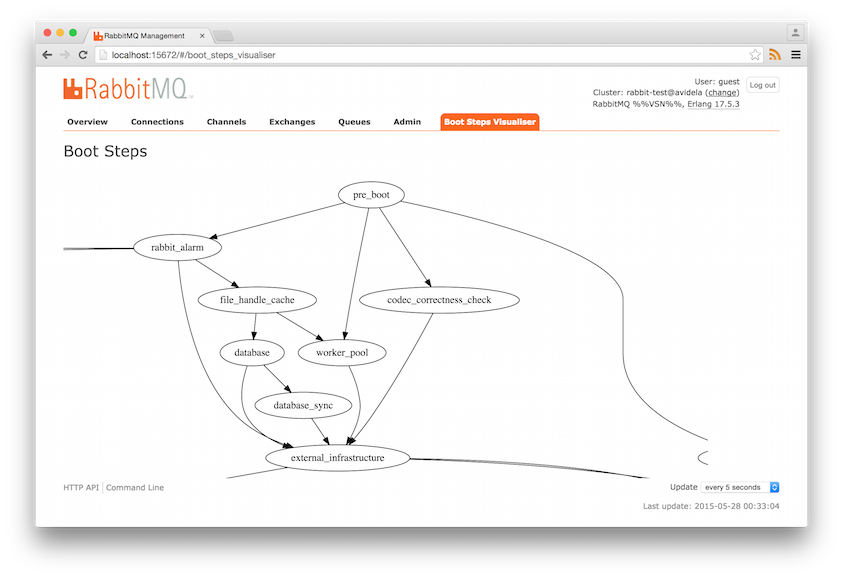
This plugin adds an extension to RabbitMQ's Management Web GUI to
visualise the current boot steps graph.
Boot Steps are a declarative way to tell RabbitMQ which components to
start, and in which order. Since plugins can make use of boot steps,
sometimes it's hard to know how a RabbitMQ broker was started, what
boot steps were executed, and in which order. This plugins solves that
problem by presenting the boot steps as a graph.
More information on the boot steps system can be found here:
https://github.com/videlalvaro/rabbit-internals/blob/master/rabbit_boot_process.md
It looks like this:
# Installing #
You must build this plugin from source.
See the RabbitMQ plugin [development guide](http://www.rabbitmq.com/plugin-development.html):
TL;DR
Clone the repo into the dep dir of rabbitmq-server
```bash
git clone https://github.com/rabbitmq/rabbitmq-server.git
cd rabbitmq-server
git clone https://github.com/rabbitmq/rabbitmq-boot-steps-visualiser.git deps/rabbitmq_boot_steps_visualiser
make -C deps/rabbitmq_boot_steps_visualiser
make RABBITMQ_ENABLED_PLUGINS='rabbitmq_management rabbitmq_boot_steps_visualiser' run-broker
```
# LICENSE #
See the LICENSE file.