https://github.com/racklin/simple-synoindex-server
Simple synoindex server for Synology NAS
https://github.com/racklin/simple-synoindex-server
Last synced: about 1 year ago
JSON representation
Simple synoindex server for Synology NAS
- Host: GitHub
- URL: https://github.com/racklin/simple-synoindex-server
- Owner: racklin
- Created: 2016-06-23T04:54:12.000Z (about 10 years ago)
- Default Branch: master
- Last Pushed: 2016-09-05T10:21:10.000Z (almost 10 years ago)
- Last Synced: 2024-04-09T15:28:36.349Z (over 2 years ago)
- Language: Go
- Size: 349 KB
- Stars: 33
- Watchers: 8
- Forks: 4
- Open Issues: 3
-
Metadata Files:
- Readme: README.md
Awesome Lists containing this project
README
Simple Synology NAS Media Index Server
-----------------------------
Simple Media Index Server is a web service wrapper for Synology NAS native `synoindex`.
Introduction
======
Since Synology DSM 6.0 comes Docker support (https://www.synology.com/en-global/dsm/6.0).
Users run many media services(ex. sickrage / couchpotato / transmission) in the docker.
But we can't notify Synology NAS to reindexing new files in the docker's container.
So, with `simple-synoindex-client` , now you can run `synoindex` inside the docker's container and request simple-synoindex-server to calling native `synoindex` to reindexing your new files.
Downloads
======
- [simple-synoindex-server-x86-0.3.zip for x86 cpu](https://github.com/racklin/simple-synoindex-server/releases/download/v0.3/simple-synoindex-server-x86-0.3.zip)
- [simple-synoindex-server-x86_64-0.3.zip for x86_64 cpu](https://github.com/racklin/simple-synoindex-server/releases/download/v0.3/simple-synoindex-server-x86_64-0.3.zip)
Install
======
1. Download Pre-Build Binary and Unzip it to any directory (ex. /volume1/homes/admin) .
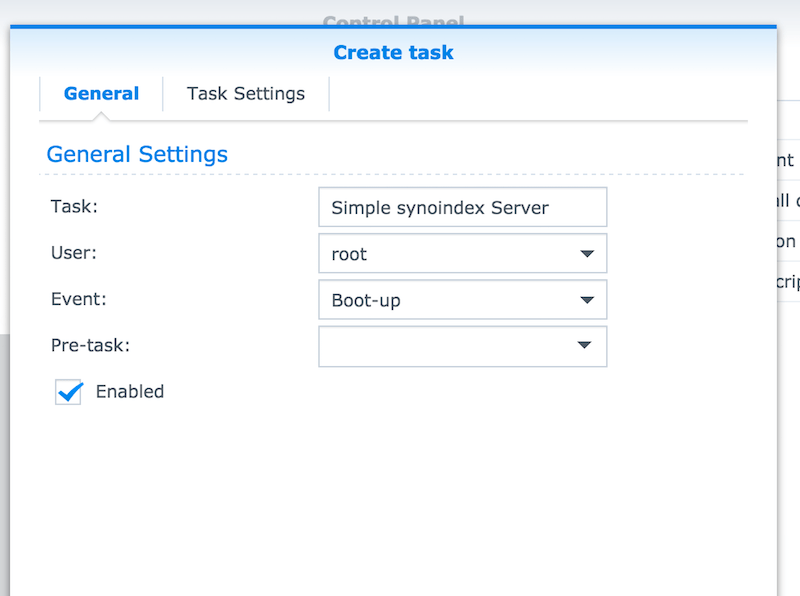
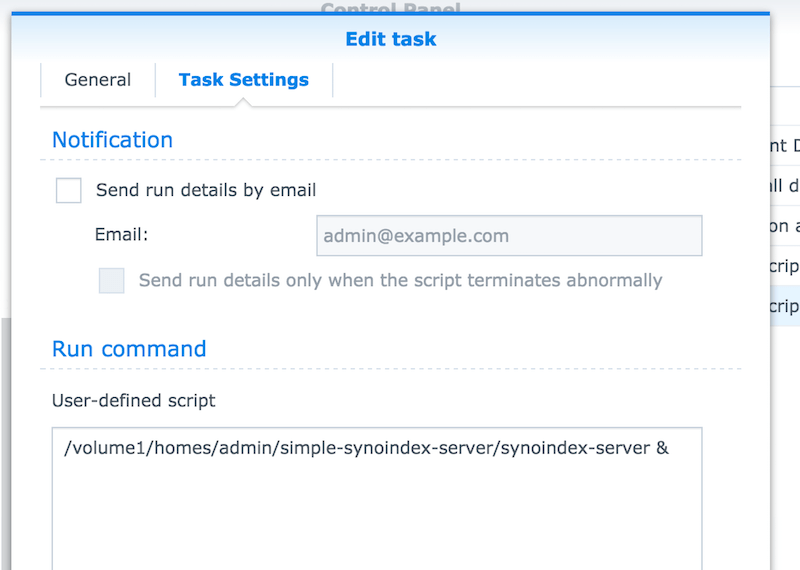
2. Runing `simple-synoindex-server` by Task Scheduler when Boot-Up or `/etc/rc.local`.
Docker Container Settings
======
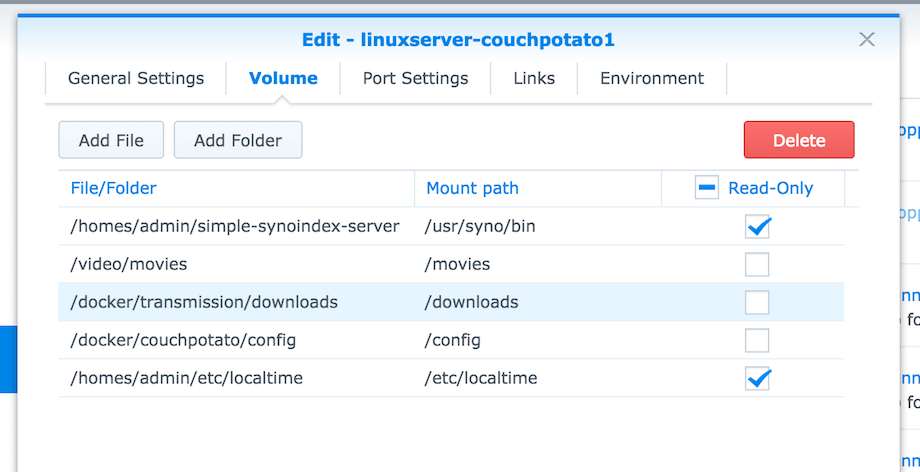
1. Add Volume `[your unzip director]/bin` to `/usr/syno/bin`
2. Modify `simple-synoindex-server.ini` `SERVER_IP` if your docker's network bridge ip is not `172.17.0.1` [OPTIONAL].
Volume Mapping Settings
======
You may add some volumes to docker's container with difference names (ex. /video/tv -> /tv ).
But Synology native `synoindex` need real pathname to indexing your files or folders.
With `[mappings]` section settings, you can setting mapping rules, `simple-synoindex-server` will remapping docker's volume to real path before calling `synoindex`.
Sample INI Settings
=======
```ini
[main]
SERVER_IP=172.17.0.1
SERVER_PORT=32699
[mappings]
/tv=/volume1/video/tv
/movies=/volume1/video/movies
```
Sample Docker Settings
======
Sample Task Settings
======