https://github.com/radeksvarz/evm-rpc-picker
A TUI tool to search for EVM chains, manage favorites securely, and select RPC URLs.
https://github.com/radeksvarz/evm-rpc-picker
cli evm rpc scripts tui web3
Last synced: 30 days ago
JSON representation
A TUI tool to search for EVM chains, manage favorites securely, and select RPC URLs.
- Host: GitHub
- URL: https://github.com/radeksvarz/evm-rpc-picker
- Owner: radeksvarz
- License: mit
- Created: 2026-04-25T02:03:21.000Z (about 2 months ago)
- Default Branch: main
- Last Pushed: 2026-05-23T16:23:45.000Z (30 days ago)
- Last Synced: 2026-05-23T16:26:50.430Z (30 days ago)
- Topics: cli, evm, rpc, scripts, tui, web3
- Language: Python
- Homepage:
- Size: 658 KB
- Stars: 1
- Watchers: 0
- Forks: 0
- Open Issues: 0
-
Metadata Files:
- Readme: README.md
- License: LICENSE
- Agents: AGENTS.md
Awesome Lists containing this project
README
# EVM RPC Picker
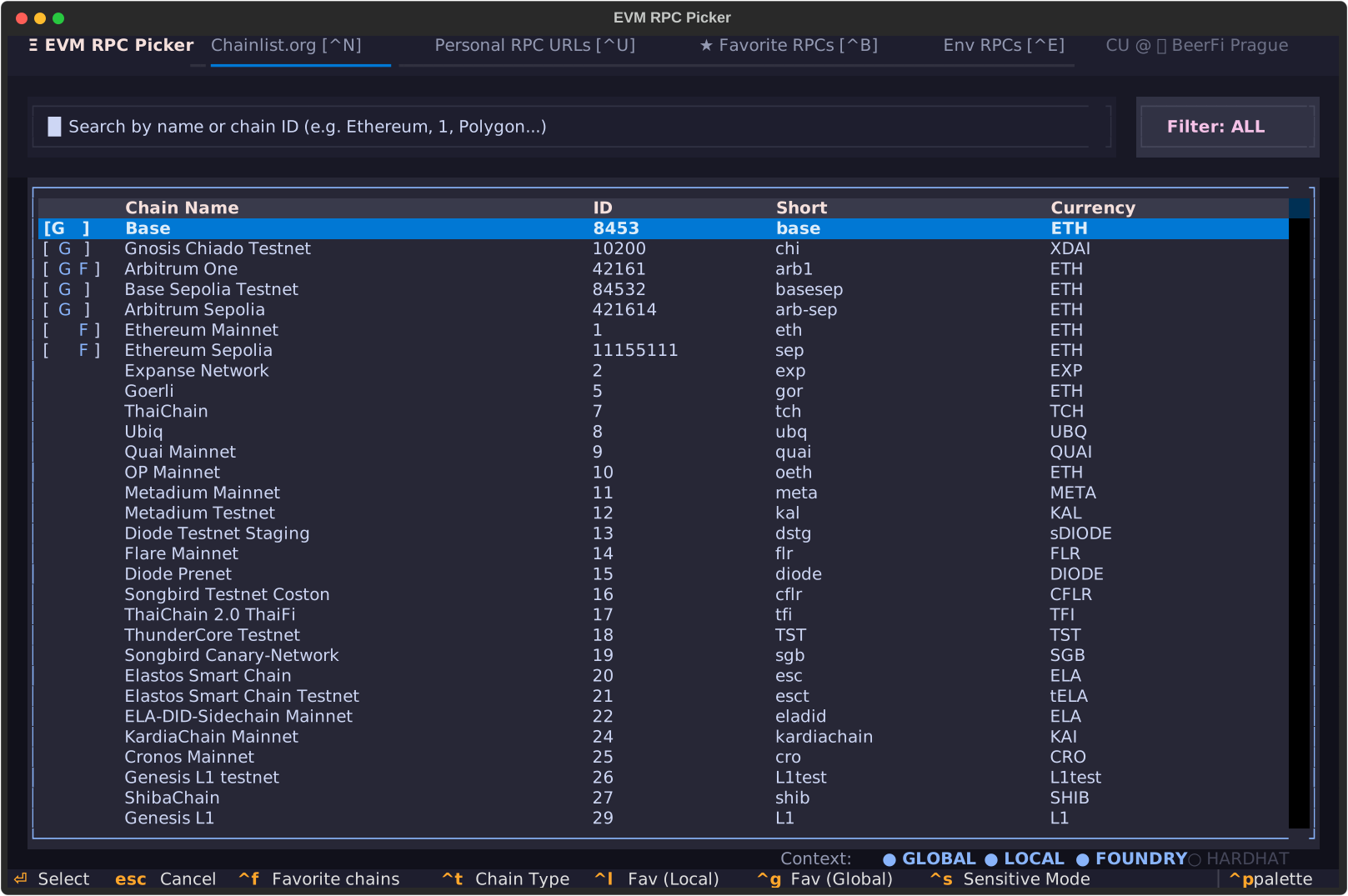
A powerful TUI (Terminal User Interface) tool to search for EVM chains and manage your RPC URLs securely. It helps you quickly select and set the `ETH_RPC_URL` environment variable with the fastest available RPC, whether it's public, private, or project-specific.
## Features
- **Instant Search**: Filter over 1000+ chains by name or Chain ID.
- **Latency Checks**: Real-time ping (using `eth_blockNumber`) to find the most responsive RPC.
- **Custom RPC Management**: Add, edit, and manage your own RPC endpoints for any chain.
- **Secure Storage**: Encrypt sensitive RPC URLs and store API keys securely in your system's **Keyring**.
- **Smart Context Detection**: Automatically detects networks and URLs defined in your `foundry.toml` or `hardhat.config.js`.
- **Favorites System**:
* **Project Level**: Store favorites in `.rpc-picker.toml` within your repository.
* **Global Level**: Store favorites in your global user config.
* **Favorite RPCs**: Bookmark both public chains and your own custom RPCs to easily access and test them from a dedicated unified dashboard.
- **Filtering**:
* Toggle between **Mainnet**, **Testnet**, or **All**.
* Quickly filter to show only your **Favorite** chains.
- **Notes**: Attach notes to your custom RPCs — stored as plain text (public) or AES-encrypted and portable inside the config file (private, when password-protected).
- **Sensitive Mode**: Toggle `Ctrl + S` to instantly mask all sensitive URLs and notes for screen sharing or streaming. Also available via `--privacy` / `-p` CLI flag.
## Installation
Ensure you have [uv](https://github.com/astral-sh/uv) installed.
```bash
# Run directly without installation
uvx evm-rpc-picker
```
## One-Off Command Execution
If you only want to select an RPC for a single command without modifying your current shell's `ETH_RPC_URL` environment variable, you can pass the output of `evm-rpc-picker` directly as a subshell argument:
```bash
# Run cast block-number with a freshly selected RPC
cast block-number --rpc-url $(uvx evm-rpc-picker)
```
## Shell Integration
Add the following function to your `.bashrc` or `.zshrc` to easily export the selected RPC:
```bash
pick-rpc() {
local rpc=$(uvx evm-rpc-picker)
[ -n "$rpc" ] && export ETH_RPC_URL="$rpc"
}
```
After restarting your shell, simply run `pick-rpc` to pick and export the RPC.
Since `ETH_RPC_URL` is now exported to your environment, all Foundry commands (`cast`, `forge`) will automatically pick it up without requiring manual `--rpc-url` parameters:
```bash
# Query the current block number using cast
cast block-number
```
## Python Usage
You can also use `evm-rpc-picker` as a module in your own Python scripts:
```python
from evm_rpc_picker import pick_rpc
# This will open the TUI
rpc_url = pick_rpc()
if rpc_url:
print(f"Selected RPC: {rpc_url}")
```
## Keyboard Shortcuts
### Main Screen
| Key | Action |
|-----|--------|
| `Tab` | **Switch Focus** (Table ↔ Personal RPCs ↔ Env Status) |
| `Enter` | **Select** highlighted chain to see RPCs |
| `Ctrl + F` | **Filter Favorites** toggle |
| `Ctrl + T` | **Filter Network Type** (All ↔ Mainnet ↔ Testnet) |
| `Ctrl + L` | **Toggle Local Favorite** (Project level) |
| `Ctrl + G` | **Toggle Global Favorite** (Global level) |
| `Ctrl + R` | **Refresh** chain data from network |
| `Ctrl + E` | **Use Current ETH_RPC_URL** (select current ENV and exit) |
| `Ctrl + U` | **Personal RPC URLs** (manage and select custom endpoints) |
| `Ctrl + B` | **Favorite RPCs** (view all bookmarked public and custom endpoints) |
| `Ctrl + S` | **Toggle Sensitive Mode** (mask all URLs and notes for screen sharing) |
### Chainlist.org chain's RPC Selection Screen
| Key | Action |
|-----|--------|
| `Enter` | **Select** RPC and exit |
| `Esc` | **Back** to main screen |
| `Ctrl + R` | **Refresh** latencies |
| `Ctrl + L` | **Toggle Local Favorite** (Project level) |
| `Ctrl + G` | **Toggle Global Favorite** (Global level) |
### Personal RPC URLs Screen
| Key | Action |
|-----|--------|
| `Enter` | **Select** RPC and exit |
| `Esc` | **Back** to main screen |
| `a` | **Add** custom RPC |
| `e` | **Edit** highlighted RPC |
| `Delete` | **Delete** highlighted RPC |
| `Ctrl + V` | **Paste & Add** (paste URL from clipboard into Add RPC modal) |
| `Ctrl + B` | **Toggle Favorite** (bookmark/unbookmark the selected custom RPC) |
### Favorite RPCs Screen
| Key | Action |
|-----|--------|
| `Enter` | **Select** RPC and exit |
| `Esc` | **Back** to main screen |
| `Ctrl + R` | **Refresh** latencies |
| `Ctrl + L` | **Toggle Local Favorite** (Project level) |
| `Ctrl + G` | **Toggle Global Favorite** (Global level) |
### Add/Edit Custom RPC Modal
| Key | Action |
|-----|--------|
| `Ctrl + S` | **Save** changes (when editing) |
| `Ctrl + G` | **Add Globally** (when adding) |
| `Ctrl + L` | **Add Locally** (when adding) |
| `Esc` | **Cancel** |
## Sensitive Mode (Streamer / Over-Shoulder Protection)
Sensitive Mode lets you instantly hide all sensitive RPC URLs and notes without closing the application — useful when sharing your screen, streaming, or recording.
### Activation
| Method | Command |
|--------|---------|
| **Runtime toggle** | `Ctrl + S` on the main screen |
| **CLI flag** | `evm-rpc-picker --privacy` or `evm-rpc-picker -p` |
### What gets masked
| Element | Normal display | Sensitive Mode |
|---------|---------------|----------------|
| URL with API key | `https://mainnet.infura.io/v3/mykey` | `https://mainnet.infura.io/••••••••` |
| URL with credentials | `https://user:pass@rpc.example.com/key` | `https://••••••••@rpc.example.com/••••••••` |
| RPC note | `my personal note` | `••••••••` |
The **host/domain** remains visible so you can still identify the provider. When Sensitive Mode is active, the header subtitle changes to **`[🙈] Sensitive Mode`** (displayed in red).
> **Note**: Sensitive Mode is display-only. Selecting an RPC still returns the real URL to the shell.
## Configuration
- **Global Config**: `~/.config/evm-rpc-picker/config.toml`
- **Project Config**: `.rpc-picker.toml` in your project root.
- **Cache**: Data from `chainlist.org` is cached for 24 hours in `~/.cache/evm-rpc-picker/chains.json`.
## Secure Storage & Encryption
### Zero-Prompt AES-GCM Hybrid Encryption
The application features a secure, industrial-grade hybrid encryption system designed to protect your private RPC endpoints and personal notes without ruining the developer experience:
- **Unencrypted Custom RPCs**: Standard custom RPCs store their URLs and notes in plain-text inside the `config.toml` or `.rpc-picker.toml` configuration files.
- **Password-Protected (Encrypted) Custom RPCs**:
- If password protection is enabled, the **entire URL** and the **note** are individually encrypted using **AES-256-GCM** (via `cryptography`).
- The encrypted payloads are saved directly inside the TOML configuration file as inline tables (`url_encrypted` and `note_encrypted`). This makes your configuration fully portable across different machines.
- To prevent having to type your password repeatedly, the password is automatically registered in your system's secure credential vault (macOS Keychain, Windows Credential Manager, or Linux Secret Service via `keyring`).
- **Zero-Prompt UX**: When selecting, editing, or performing background latency checks on an encrypted RPC, the app silently queries the keyring. If the credentials are present, it unlocks the endpoint **instantly without prompting the user**. If the credentials are missing, a secure password prompt modal will ask you for it and automatically persist it back to the keyring.
### Security Visual Indicators
- **Lock Icon `[🔒]`**: Displayed in front of password-protected RPCs in both the **Personal RPCs** and **Favorite RPCs** dashboards.
- **Privacy Masking (`Ctrl + S`)**: When Sensitive/Privacy Mode is active:
- For **unlocked** encrypted RPCs, the decrypted URL and note are masked display-only (e.g., displaying `[🔒] https://mainnet.infura.io/••••••••` and `••••••••`).
- For **locked** encrypted RPCs, both values remain completely hidden behind the secure `[🔒] Locked` placeholder.
## Development
```bash
git clone https://github.com/radeksvarz/evm-rpc-picker.git
cd evm-rpc-picker
uv sync
# Run normally
uv run evm-rpc-picker
```
### Hot Reloading (TUI Development)
For TUI development with hot reloading, open two terminals.
Terminal 1 (Console output):
```bash
uv run textual console
```
Terminal 2 (App with hot reload):
```bash
uv run textual run --dev evm_rpc_picker.tui:ChainRPCPicker
```
---
Created with 🍻 by **BeerFi Prague** web3 builders community | [Source and updates](https://github.com/radeksvarz/evm-rpc-picker)