https://github.com/rafaelpierre/pyjaws
PyJaws: A Pythonic Way to Define Databricks Jobs and Workflows
https://github.com/rafaelpierre/pyjaws
airflow apache-airflow apache-spark azure-databricks cicd data-engineering databricks mage mlops orchestration pyspark python spark workflow
Last synced: 7 days ago
JSON representation
PyJaws: A Pythonic Way to Define Databricks Jobs and Workflows
- Host: GitHub
- URL: https://github.com/rafaelpierre/pyjaws
- Owner: rafaelpierre
- License: mit
- Created: 2023-05-04T10:52:40.000Z (about 3 years ago)
- Default Branch: main
- Last Pushed: 2025-10-18T11:04:00.000Z (9 months ago)
- Last Synced: 2025-10-19T06:56:22.060Z (9 months ago)
- Topics: airflow, apache-airflow, apache-spark, azure-databricks, cicd, data-engineering, databricks, mage, mlops, orchestration, pyspark, python, spark, workflow
- Language: Python
- Homepage: https://pyjaws.readthedocs.io
- Size: 3.46 MB
- Stars: 43
- Watchers: 2
- Forks: 4
- Open Issues: 9
-
Metadata Files:
- Readme: README.md
- Contributing: CONTRIBUTING.md
- License: LICENSE.md
Awesome Lists containing this project
README
# PyJaws: A Pythonic Way to Define Databricks JaWs (Jobs and Workflows)
&style=for-the-badge&label=downloads)
    

* **PyJaws** enables declaring [Databricks Jobs and Workflows](https://docs.databricks.com/workflows/index.html) as Python code, allowing for:
* Code Linting
* Formatting
* Parameter Validation
* Modularity and reusability
* In addition to those, **PyJaws** also provides some nice features such as [cycle detection](https://networkx.org/documentation/stable/reference/algorithms/cycles.html) out of the box.
Folks who have used Python-based orchestration tools such as [Apache Airflow](https://airflow.apache.org/), [Luigi](https://luigi.readthedocs.io/en/stable/) and [Mage](https://pypi.org/project/mage-ai/) will be familiar with the concepts and the API if **PyJaws**.
## Getting Started
* First step is installing `pyjaws`:
```bash
pip install pyjaws
```
* Once it's installed, define your Databricks Workspace authentication variables:
```bash
export DATABRICKS_HOST = ...
export DATABRICKS_TOKEN = ...
```
* Last, define your Workflow Tasks (see `examples`) and run:
```bash
pyjaws create path/to/your/workflow_definitions
```
### Sample Job Definition
```python
from pyjaws.api.base import (
Cluster,
Runtime,
Workflow
)
from pyjaws.api.tasks import PythonWheelTask
cluster = Cluster(
job_cluster_key = "ai_cluster",
spark_version = Runtime.DBR_13_ML,
num_workers = 2,
node_type_id = "Standard_DS3_v2",
cluster_log_conf = {
"dbfs": {
"destination": "dbfs:/home/cluster_log"
}
}
)
# Create a Task object.
ingest_task = PythonWheelTask(
key = "ingest",
cluster = cluster,
entrypoint = "iot",
task_name = "ingest",
parameters = [
f"my_parameter_value",
"--output-table", "my_table"
]
)
transform_task = PythonWheelTask(
key = "transform",
cluster = cluster,
entrypoint = "iot",
task_name = "ingest",
dependencies = [ingest_task],
parameters = [
f"my_parameter_value2",
"--input-table", "my_table"
"--output-table", "output_table"
]
)
# Create a Workflow object to define dependencies
# between previously defined tasks.
workflow = Workflow(
name = "my_workflow",
tasks = [ingest_task, transform_task]
)
```
### Extra Features
* **Context Manager** for **Cluster** declarations:
```python
# cluster created with context manager
with Cluster(
job_cluster_key="mycluster_2",
spark_version=Runtime.DBR_13_ML,
node_type_id="Standard_E4ds_v4",
num_workers=3,
) as cluster_2:
task_2 = SparkPythonTask(
key="task_2",
cluster=cluster_2,
python_file="/Workspace/Repos/bob@mail.com/utils/task_2.py",
source=Source.WORKSPACE,
)
```
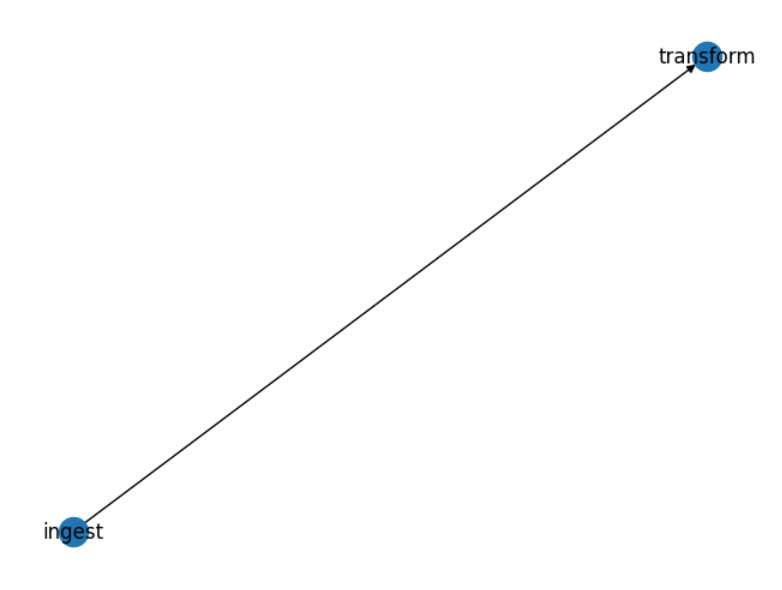
* **Workflow preview/visualization** on notebooks:
```python
display(workflow)
```
Result:
## Deploying Jobs
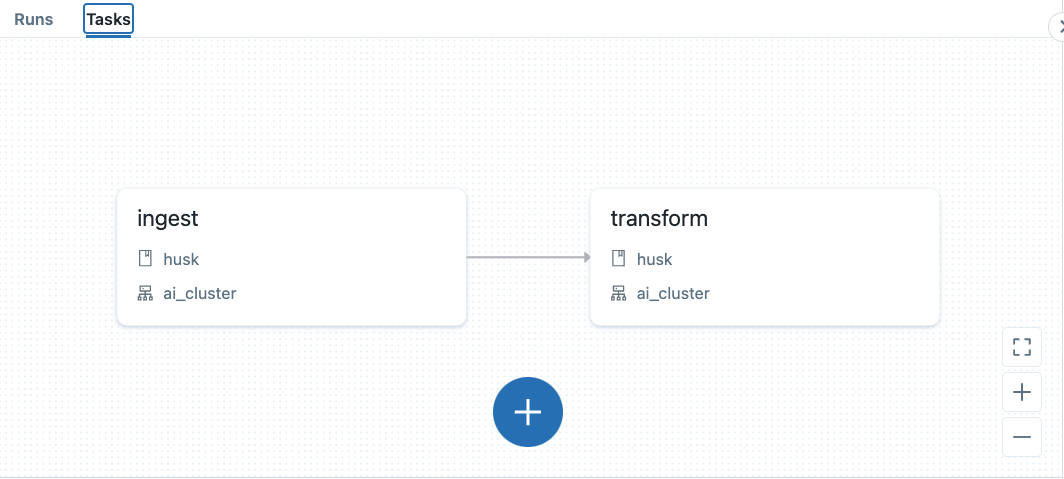
If you have a folder containing multiple workflow definition files written in Python with **PyJaws**, it is quite simple to deploy all of them to your Databricks Workspace with a one liner:
`pyjaws create examples/simple_workflow`
This would result in the following Workflow being deployed to your workspace:
By default, **pyjaws** also includes some useful tags into the workflows indicating which Git Repo hosts the Python definition, commit hash and when the workflow was last updated. For example:

## Documentation
* [PyJaws Documentation (Read the Docs)](https://pyjaws.readthedocs.io)
## Development & Testing
* **PyJaws** can be tested locally for development purposes. To run unit tests, make sure `tox`, `pytest`, `pytest-cov`, and `coverage` are installed and from a bash terminal, simply run `tox`.
## Disclaimer
* **PyJaws** is not developed, endorsed not supported by Databricks. It is provided as-is; no warranty is derived from using this package. For more details, please refer to the [license](https://github.com/rafaelpierre/pyjaws/blob/main/LICENSE.md).
## Reporting Bugs and Contributing
Feel free to create an issue if you feel something is not right. Contribution guidelines can be found [here](https://githubcom/rafaelpierre/pyjaws/blob/main/CONTRIBUTING.md).