https://github.com/rafi021/kafka-docker-compose
Docker Composer File for Kafka and Test using Express JS
https://github.com/rafi021/kafka-docker-compose
apache-kafka docker docker-compose docker-container expressjs kafka kafka-client message-broker pub-sub queue
Last synced: 3 months ago
JSON representation
Docker Composer File for Kafka and Test using Express JS
- Host: GitHub
- URL: https://github.com/rafi021/kafka-docker-compose
- Owner: rafi021
- Created: 2025-05-11T18:43:59.000Z (about 1 year ago)
- Default Branch: main
- Last Pushed: 2025-05-13T09:50:36.000Z (about 1 year ago)
- Last Synced: 2025-05-13T10:44:13.563Z (about 1 year ago)
- Topics: apache-kafka, docker, docker-compose, docker-container, expressjs, kafka, kafka-client, message-broker, pub-sub, queue
- Language: TypeScript
- Homepage:
- Size: 7.24 MB
- Stars: 0
- Watchers: 1
- Forks: 0
- Open Issues: 0
-
Metadata Files:
- Readme: README.md
Awesome Lists containing this project
README
# Kafka Docker Compose and Test with Express.js Application
# What is Kafka?
[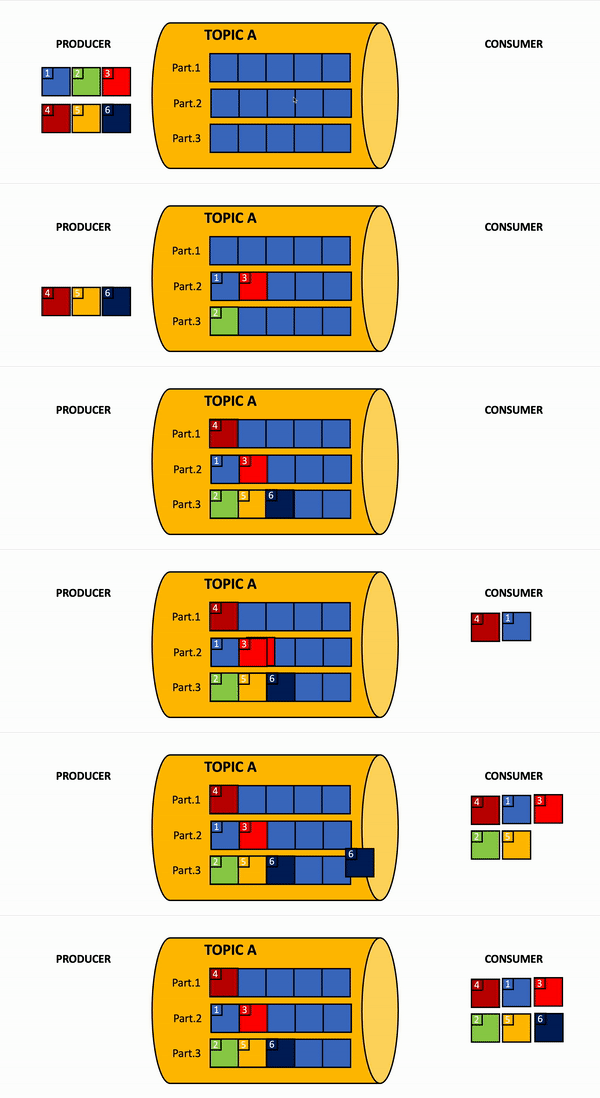](https://www.youtube.com/shorts/Bc6oyURRIxQ?feature=share)
This project sets up a Kafka environment using Docker and Docker Compose, along with a Node.js Express application (`kafka-express-app`) to test Kafka by producing and consuming messages.
---
## Prerequisites
- Docker and Docker Compose installed on your system.
- Node.js and npm installed for running the Express.js application.
---
## Project Structure
```
kafka-docker/
├── docker-compose.yml # Docker Compose file for Kafka setup
├── kafka-express-app/ # Node.js Express application
│ ├── src/
│ │ ├── kafka/
│ │ │ ├── producer.ts # Kafka producer logic
│ │ │ └── consumer.ts # Kafka consumer logic
│ │ ├── routes/
│ │ │ └── index.ts # Express routes
│ │ └── app.ts # Express app entry point
│ ├── package.json # Node.js dependencies and scripts
│ ├── tsconfig.json # TypeScript configuration
│ └── .env # Environment variables
└── README.md # Project documentation
```
---
## Kafka Setup
### Services in `docker-compose.yml`
- **Zookeeper**: Manages Kafka brokers.
- **Kafka Broker**: The Kafka server.
- **Schema Registry**: Manages Avro schemas for Kafka topics.
- **Kafka Connect**: For connecting Kafka to external systems.
- **Control Center**: Web UI for managing Kafka.
- **kafka-express-app**: Node.js application for testing Kafka.
### Steps to Start Kafka
1. **Start Docker Services**:
Run the following command to start all services:
```bash
docker-compose up -d
```
2. **Verify Services**:
Check if all services are running:
```bash
docker ps
```
3. **Access Control Center**:
Open the Confluent Control Center in your browser:
```
http://localhost:9021
```
---
## Kafka-Express-App Setup
### Environment Variables
Create a `.env` file in the `kafka-express-app` directory with the following content:
```env
KAFKA_CLIENT_ID=my-app
KAFKA_BROKERS=localhost:9092
KAFKA_GROUP_ID=test-group
KAFKA_TOPIC=test-topic
KAFKA_AUTH_ENABLED=false
```
If you connect to a secured Kafka cluster, set `KAFKA_AUTH_ENABLED=true` and provide `KAFKA_USERNAME`, `KAFKA_PASSWORD`, and optionally `KAFKA_SSL=true`.
### Install Dependencies
Navigate to the `kafka-express-app` directory and install the required dependencies:
```bash
cd kafka-express-app
npm install
```
### Build the Application
Compile the TypeScript code to JavaScript:
```bash
npm run build
```
### Run the Application
Start the application in development mode:
```bash
npm run dev
```
Or start the compiled application:
```bash
npm start
```
---
## Testing Kafka
### Produce a Message
Use a tool like `curl` or Postman to send a POST request to the `/api/publish` endpoint:
```bash
curl -X POST http://localhost:3000/api/publish \
-H "Content-Type: application/json" \
-d '{"topic": "test-topic", "message": "Hello Kafka!"}'
```
### Consume Messages
Send a GET request to the `/api/subscribe` endpoint to start consuming messages:
```bash
curl http://localhost:3000/api/subscribe
```
You should see the consumed messages logged in the console.
---
## Stopping Services
To stop all Docker services, run:
```bash
docker-compose down
```
---
## Troubleshooting
- **Kafka Broker Connection Issues**:
Ensure the `KAFKA_BROKERS` in `.env` matches the broker address in `docker-compose.yml` (for local Docker Compose, use `localhost:9092` from your app host or `broker:29092` from another container). Leave `KAFKA_AUTH_ENABLED=false` unless the broker actually requires SASL authentication.
- **Port Conflicts**:
Ensure the ports defined in `docker-compose.yml` (e.g., `9092`, `29092`, `9021`) are not in use by other applications.
---
## License
This project is licensed under the MIT License.