https://github.com/rafywp/term-importer
Term Importer for WordPress – Effortlessly import terms into any WordPress taxonomy, including categories, tags, and custom taxonomies, using a simple CSV file.
https://github.com/rafywp/term-importer
importer taxonomies taxonomy-terms terms wordpress wordpress-plugin
Last synced: about 2 months ago
JSON representation
Term Importer for WordPress – Effortlessly import terms into any WordPress taxonomy, including categories, tags, and custom taxonomies, using a simple CSV file.
- Host: GitHub
- URL: https://github.com/rafywp/term-importer
- Owner: RafyWP
- License: gpl-2.0
- Created: 2025-03-18T02:17:58.000Z (over 1 year ago)
- Default Branch: master
- Last Pushed: 2025-03-20T18:52:41.000Z (over 1 year ago)
- Last Synced: 2025-03-20T20:10:59.989Z (over 1 year ago)
- Topics: importer, taxonomies, taxonomy-terms, terms, wordpress, wordpress-plugin
- Language: PHP
- Homepage: https://rafy.com.br/ti
- Size: 35.2 KB
- Stars: 0
- Watchers: 1
- Forks: 0
- Open Issues: 0
-
Metadata Files:
- Readme: README.md
- License: LICENSE
Awesome Lists containing this project
README
# Term Importer for WordPress
**Term Importer** simplifies term management by allowing you to **bulk import terms** into any **WordPress custom taxonomy** with just a few clicks. Upload a **CSV file**, select your target taxonomy, and let the plugin handle the rest — no manual data entry required!
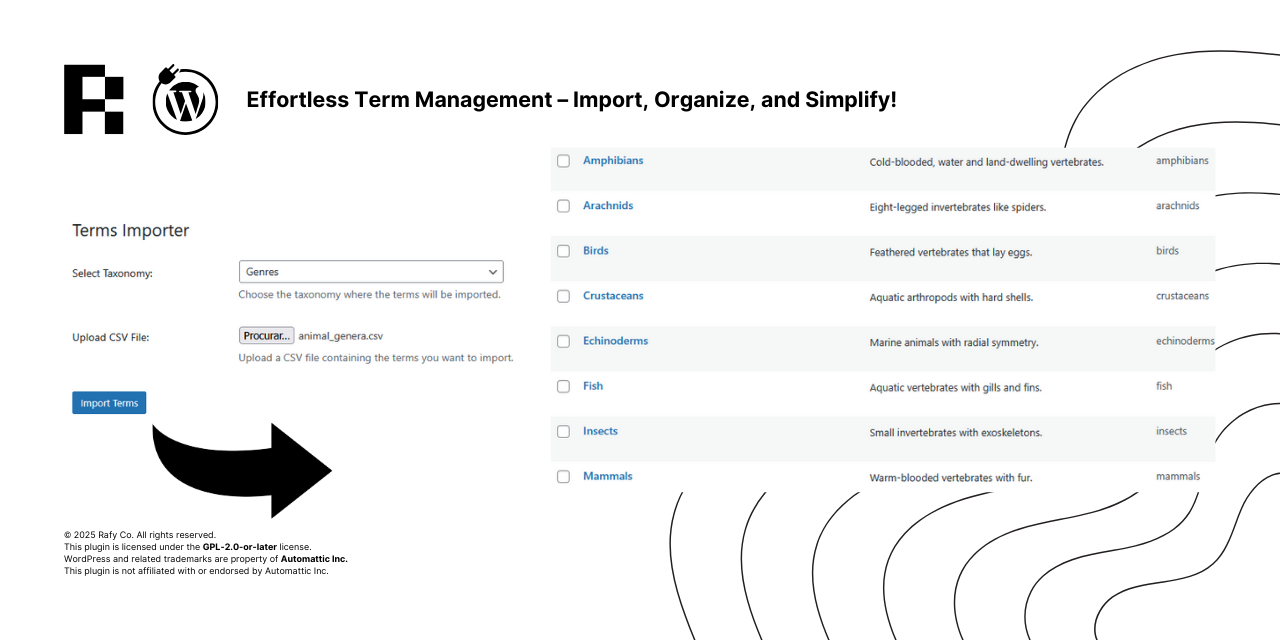
*Effortless Term Management – Import, Organize, and Simplify!*
## 🚀 Features
- Import terms from a CSV file into any custom taxonomy.
- Automatically detects all registered taxonomies in WordPress.
- Supports CSV fields: name, slug, description.
- Secure import process using nonce validation and capability checks.
- WordPress admin menu integration for easy access.
- Detailed error handling and debugging support.
---
## 🔧 Installation
### Install via WordPress Plugin Upload
1. Download the **Term Importer** plugin as a `.zip` file.
2. Go to **WordPress Dashboard** → **Plugins** → **Add New**.
3. Click **Upload Plugin**, then select the `.zip` file and click **Install Now**.
4. Activate the plugin.
### Install via FTP
1. Extract the `.zip` file and upload the `term-importer` folder to your `/wp-content/plugins/` directory.
2. Go to **WordPress Dashboard** → **Plugins**.
3. Find **Term Importer** in the list and click **Activate**.
### Install via Composer (Advanced Users)
Run the following command in your WordPress project root:
composer require rafyco/term-importer
After installation, run:
composer dump-autoload
This ensures that all classes are properly loaded.
---
## 📥 Importing Terms from CSV
### Prepare Your CSV File
Ensure your CSV file follows this structure:
name,slug,description
Category One,category-one,This is the first category.
Category Two,category-two,This is the second category.
📌 **Notes:**
- The `name` field is required.
- The `slug` is optional (auto-generated if missing).
- The `description` is optional.
### Upload CSV File
1. Go to **WordPress Dashboard** → **Term Importer**.
2. Select the taxonomy where the terms should be imported.
3. Upload the CSV file and click **Import Terms**.
4. The plugin will process the CSV and insert the terms into WordPress.
---
## 🛠 Debugging & Logging
If something goes wrong, enable debugging in `wp-config.php`:
define('WP_DEBUG', true);
define('WP_DEBUG_LOG', true);
define('WP_DEBUG_DISPLAY', false);
Logs will be saved in `wp-content/debug.log`. Errors related to **Term Importer** will be prefixed with `[TermImporter]`.
---
## ❓ FAQ
### What happens if I upload duplicate terms?
The plugin checks for existing terms in the selected taxonomy before inserting new ones.
### Does it work with WooCommerce product categories?
Yes! WooCommerce product categories (`product_cat`) are taxonomies, so they will appear in the dropdown.
### Can I import terms into built-in taxonomies (like post categories)?
Yes! The plugin detects all public taxonomies, including `category` and `post_tag`.
---
## 📜 License
This plugin is licensed under the **GPL-2.0-or-later**. See [LICENSE](https://www.gnu.org/licenses/gpl-2.0.html) for details.
---
## 📬 Support
For support and feature requests, visit:
🔗 [https://rafy.com.br/ti](https://rafy.com.br/ti/)
---
## 🎉 Credits
Developed and maintained by **Rafy Co.**
🔗 [https://rafy.com.br/](https://rafy.com.br/)