https://github.com/rails-lambda/lambda_punch
🐑👊 Asynchronous background job processing for AWS Lambda with Ruby using Lambda Extensions. Inspired by the SuckerPunch gem but specifically tooled to work with Lambda's invoke model.
https://github.com/rails-lambda/lambda_punch
activejob background-jobs jobs lambda-extensions rails ruby serverless
Last synced: 12 months ago
JSON representation
🐑👊 Asynchronous background job processing for AWS Lambda with Ruby using Lambda Extensions. Inspired by the SuckerPunch gem but specifically tooled to work with Lambda's invoke model.
- Host: GitHub
- URL: https://github.com/rails-lambda/lambda_punch
- Owner: rails-lambda
- License: mit
- Created: 2021-06-23T12:06:56.000Z (about 5 years ago)
- Default Branch: main
- Last Pushed: 2024-12-11T01:35:57.000Z (over 1 year ago)
- Last Synced: 2025-07-08T22:06:07.958Z (about 1 year ago)
- Topics: activejob, background-jobs, jobs, lambda-extensions, rails, ruby, serverless
- Language: Ruby
- Homepage: https://lamby.cloud
- Size: 949 KB
- Stars: 24
- Watchers: 10
- Forks: 0
- Open Issues: 3
-
Metadata Files:
- Readme: README.md
- Changelog: CHANGELOG.md
- License: LICENSE.txt
- Code of conduct: CODE_OF_CONDUCT.md
Awesome Lists containing this project
README

[](https://github.com/rails-lambda/lambda_punch/actions/workflows/test.yml)
# 👊 LambdaPunch
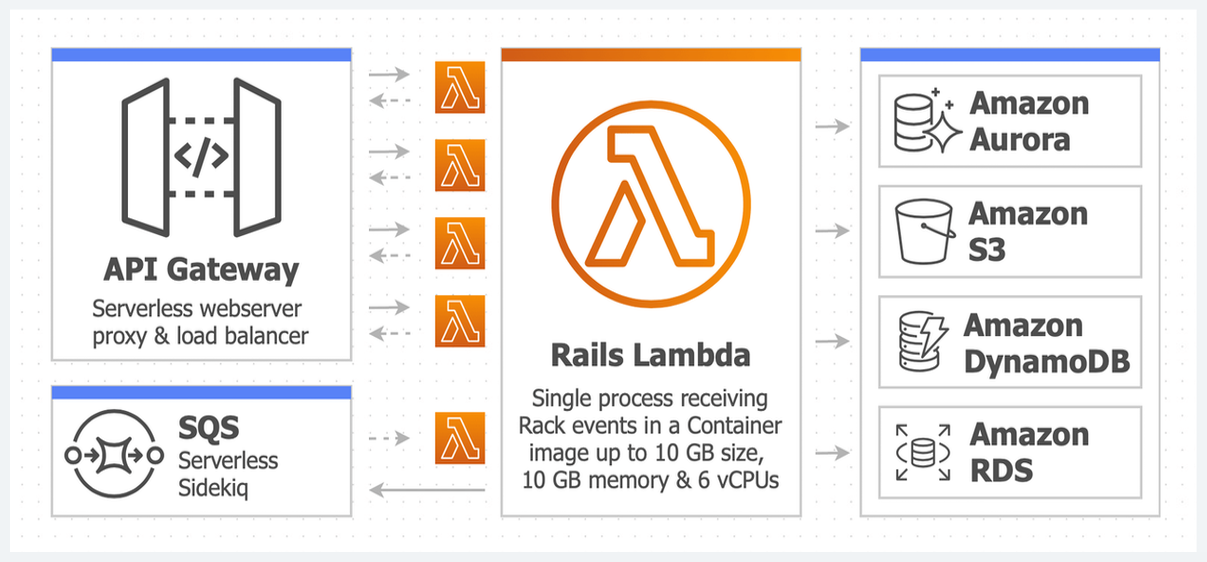 Asynchronous background job processing for AWS Lambda with Ruby using [Lambda Extensions](https://docs.aws.amazon.com/lambda/latest/dg/runtimes-extensions-api.html). Inspired by the [SuckerPunch](https://github.com/brandonhilkert/sucker_punch) gem but specifically tooled to work with Lambda's invoke model.
**For a more robust background job solution, please consider using AWS SQS with the [Lambdakiq](https://github.com/rails-lambda/lambdakiq) gem. A drop-in replacement for [Sidekiq](https://github.com/mperham/sidekiq) when running Rails in AWS Lambda using the [Lamby](https://lamby.cloud/) gem.**
## 🏗 Architecture
Because AWS Lambda [freezes the execution environment](https://docs.aws.amazon.com/lambda/latest/dg/runtimes-context.html) after each invoke, there is no "process" that continues to run after the handler's response. However, thanks to Lambda Extensions along with its "early return", we can do two important things. First, we leverage the [rb-inotify](https://github.com/guard/rb-inotify) gem to send the extension process a simulated `POST-INVOKE` event. We then use [Distributed Ruby](https://ruby-doc.org/stdlib-3.0.1/libdoc/drb/rdoc/DRb.html) (DRb) from the extension to signal your application to work jobs off a queue. Both of these are synchronous calls. Once complete the LambdaPunch extensions signals it is done and your function is ready for the next request.

The LambdaPunch extension process is very small and lean. It only requires a few Ruby libraries and needed gems from your application's bundle. Its only job is to send signals back to your application on the runtime. It does this within a few milliseconds and adds no noticeable overhead to your function.
## 🎁 Installation
Add this line to your project's `Gemfile` and then make sure to `bundle install` afterward. It is only needed in the `production` group.
```ruby
gem 'lambda_punch'
```
Within your project or [Rails application's](https://lamby.cloud/docs/anatomy) `Dockerfile`, add the following. Make sure you do this before you `COPY` your code. The idea is to implicitly use the default `USER root` since it needs permission to create an `/opt/extensions` directory.
```dockerfile
RUN gem install lambda_punch && lambda_punch install
```
LambdaPunch uses the `LAMBDA_TASK_ROOT` environment variable to find your project's Gemfile. If you are using a provided AWS Runtime container, this should be set for you to `/var/task`. However, if you are using your own base image, make sure to set this to your project directory.
```dockerfile
ENV LAMBDA_TASK_ROOT=/app
```
Installation with AWS Lambda via the [Lamby](https://lamby.cloud/) v4 (or higher) gem can be done using Lamby's `handled_proc` config. For example, appends these to your `config/environments/production.rb` file. Here we are ensuring that the LambdaPunch DRb server is running and that after each Lamby request we notify LambdaPunch.
```ruby
config.to_prepare { LambdaPunch.start_server! }
config.lamby.handled_proc = Proc.new do |_event, context|
LambdaPunch.handled!(context)
end
```
If you are using an older version of Lamby or a simple Ruby project with your own handler method, the installation would look something like this:
```ruby
LambdaPunch.start_server!
def handler(event:, context:)
# ...
ensure
LambdaPunch.handled!(context)
end
```
## 🧰 Usage
Anywhere in your application's code, use the `LambdaPunch.push` method to add blocks of code to your jobs queue.
```ruby
LambdaPunch.push do
# ...
end
```
A common use case would be to ensure the [New Relic APM](https://dev.to/aws-heroes/using-new-relic-apm-with-rails-on-aws-lambda-51gi) flushes its data after each request. Using Lamby in your `config/environments/production.rb` file would look like this:
```ruby
config.to_prepare { LambdaPunch.start_server! }
config.lamby.handled_proc = Proc.new do |_event, context|
LambdaPunch.push { NewRelic::Agent.agent.flush_pipe_data }
LambdaPunch.handled!(context)
end
```
### ActiveJob
You can use LambdaPunch with Rails' ActiveJob. **For a more robust background job solution, please consider using AWS SQS with the [Lambdakiq](https://github.com/rails-lambda/lambdakiq) gem.**
```ruby
config.active_job.queue_adapter = :lambda_punch
```
### Timeouts
Your function's timeout is the max amount to handle the request and process all extension's invoke events. If your function times out, it is possible that queued jobs will not be processed until the next invoke.
If your application integrates with API Gateway (which has a 30 second timeout) then it is possible your function can be set with a higher timeout to perform background work. Since work is done after each invoke, the LambdaPunch queue should be empty when your function receives the `SHUTDOWN` event. If jobs are in the queue when this happens they will have two seconds max to work them down before being lost.
**For a more robust background job solution, please consider using AWS SQS with the [Lambdakiq](https://github.com/rails-lambda/lambdakiq) gem.**
### Logging
The default log level is `error`, so you will not see any LambdaPunch lines in your logs. However, if you want some low level debugging information on how LambdaPunch is working, you can use this environment variable to change the log level.
```yaml
Environment:
Variables:
LAMBDA_PUNCH_LOG_LEVEL: debug
```
### Errors
As jobs are worked off the queue, all job errors are simply logged. If you want to customize this, you can set your own error handler.
```ruby
LambdaPunch.error_handler = lambda { |e| ... }
```
## 📊 CloudWatch Metrics
When using Extensions, your function's CloudWatch `Duration` metrics will be the sum of your response time combined with your extension's execution time. For example, if your request takes `200ms` to respond but your background task takes `1000ms` your duration will be a combined `1200ms`. For more details see the _"Performance impact and extension overhead"_ section of the [Lambda Extensions API
](https://docs.aws.amazon.com/lambda/latest/dg/runtimes-extensions-api.html)
Thankfully, when using Lambda Extensions, CloudWatch will create a `PostRuntimeExtensionsDuration` metric that you can use to isolate your true response times `Duration` [using some metric math](https://docs.aws.amazon.com/AmazonCloudWatch/latest/monitoring/using-metric-math.html). Here is an example where the metric math above is used in the first "Duration (response)" widget.


## 👷🏽♀️ Development
After checking out the repo, run the following commands to build a Docker image and install dependencies.
```shell
$ ./bin/bootstrap
$ ./bin/setup
```
Then, to run the tests use the following command.
```shell
$ ./bin/test
```
You can also run the `./bin/console` command for an interactive prompt within the development Docker container. Likewise you can use `./bin/run ...` followed by any command which would be executed within the same container.
## 💖 Contributing
Bug reports and pull requests are welcome on GitHub at https://github.com/rails-lambda/lambda_punch. This project is intended to be a safe, welcoming space for collaboration, and contributors are expected to adhere to the [code of conduct](https://github.com/rails-lambda/lambda_punch/blob/main/CODE_OF_CONDUCT.md).
## 👩⚖️ License
The gem is available as open source under the terms of the [MIT License](https://opensource.org/licenses/MIT).
## 🤝 Code of Conduct
Everyone interacting in the LambdaPunch project's codebases, issue trackers, chat rooms and mailing lists is expected to follow the [code of conduct](https://github.com/rails-lambda/lambda_punch/blob/main/CODE_OF_CONDUCT.md).