https://github.com/railsware/rbroutebuilder
Build routes without strings and headache
https://github.com/railsware/rbroutebuilder
Last synced: about 1 year ago
JSON representation
Build routes without strings and headache
- Host: GitHub
- URL: https://github.com/railsware/rbroutebuilder
- Owner: railsware
- License: mit
- Created: 2014-04-02T12:51:53.000Z (about 12 years ago)
- Default Branch: master
- Last Pushed: 2014-04-04T08:33:05.000Z (about 12 years ago)
- Last Synced: 2025-04-22T23:12:24.549Z (about 1 year ago)
- Language: C++
- Homepage:
- Size: 424 KB
- Stars: 15
- Watchers: 13
- Forks: 1
- Open Issues: 1
-
Metadata Files:
- Readme: README.md
- License: LICENSE
Awesome Lists containing this project
README
RBRouteBuilder
=================
RBRouteBuilder provides a mechanism to make routes for requests without headache with strings.
So instead of
```objectivec
NSString *path = [NSString stringWithFormat:@"users/%@/projects", userID];
```
might be used
```
NSString *path = router().users.withID(userID).projects.path;
```
[More real example](https://github.com/railsware/RBRouteBuilder/blob/master/README.md#example)
### Installation
```
pod 'RBRouteBuilder'
```
*Note:* RBRouteBuilder has a quite strange integration mechanism, so it provides a file template to simplify this process.
It can be installed by calling `install_templates.sh` script from the repository root
```bash
git clone https://github.com/railsware/RBRouteBuilder.git
cd RBRouteBuilder
sh install_templates.sh
```
### Usage
There are few things need to be done to start using RBRouteBuilder.
#### Routes definition
First of all, protocol with route definitions should be added, also this protocol can have one of the following methods:
`- (instancetype)root;` - returns builder instance with the root path
`- (NSString *)path;` - generates NSString from all called methods
`- (NSString *)URL` - generates NSURL from all called methods
Probable protocol definition
```objectivec
@protocol Router
- (instancetype)root;
- (NSString *)path;
- (NSURL *)URL;
- (instancetype)users;
- (instancetype)projects;
@end
```
**Note:** do not worry about implementation, all this stuff will be done by RBRouteBuilder internals
#### Builder instantiation
Builder should be instantiated by calling method `rb_route_builder` with the root path as a parameter. This method defined at `RouterBulider.h`, so do not forget to import it.
Here is a sample of how it could be done
```objectivec
static inline id routeBuilder()
{
return rb_route_builder(@"http://api.sample.com");
}
```
Static method `routeBuilder` can have any possible name, but it's return type must conform to the newly created protocol.
This rule affords using of chained calls:
```objectivec
routeBuilder().users.path;
routeBuilder().root.projects.URL;
```
#### Builder helpers
`RBRouteBuilder` has two helper methods, which might be very useful:
`add(NSString *)` - adds string to the bulider
`withID(NSNumber *)` - adds numeric identifier to the bulider
This methods also might be defined in the protocol if necessary. They use blocks under the hood and have the same rule as method `routeBuilder` from previous section: to allow method chaining the return type must conform to protocol:
```
- (id (^)(NSString *))add;
- (id (^)(NSNumber *))withID;
```
#### Xcode Template
Xcode template provided by `RBRouteBuilder` can be used to avoid all these routines.
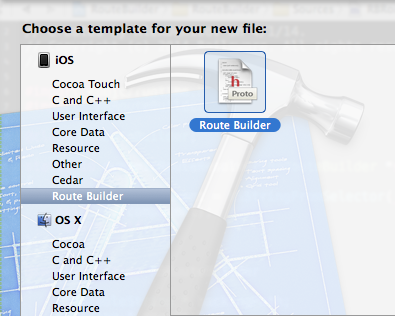.
#### Example
Here is how it might look for dealing with GitHub API routes
```objectivec
// GHRouter.h
#import
@protocol GHRouter
@optional
- (instancetype)root;
- (NSString *)path;
- (NSURL *)URL;
- (id(^)(NSString *))add;
- (id(^)(NSNumber *))withID;
// User-defined routes
- (instancetype)users;
- (instancetype)orgs;
@end
static id router()
{
return rb_route_builder(@"https://api.github.com");
}
// ...
// ...
// ...
NSURL *orgsURL = router().users.add(@"AlexDenisov").orgs.URL;
// NSURL: /users/AlexDenisov/orgs
NSString *fullOrgPath = router().root.orgs.add(@"Railsware").path;
// NSString: https://api.github.com/orgs/Railsware
```
### License
This project distributed under the MIT license.
See `LICENSE` for more details.