https://github.com/rajesh-royal/tweet-roaster
AI Powered TweetRoaster gives you 3 hilarious roast responses based on your mood and roast intensity. Try it free!
https://github.com/rajesh-royal/tweet-roaster
nextjs openai react serveractions tailwindcss typescript
Last synced: 11 months ago
JSON representation
AI Powered TweetRoaster gives you 3 hilarious roast responses based on your mood and roast intensity. Try it free!
- Host: GitHub
- URL: https://github.com/rajesh-royal/tweet-roaster
- Owner: Rajesh-Royal
- Created: 2025-07-03T03:28:27.000Z (11 months ago)
- Default Branch: main
- Last Pushed: 2025-07-04T16:54:21.000Z (11 months ago)
- Last Synced: 2025-07-19T07:33:53.515Z (11 months ago)
- Topics: nextjs, openai, react, serveractions, tailwindcss, typescript
- Language: TypeScript
- Homepage: https://tweetroaster.vercel.app
- Size: 684 KB
- Stars: 2
- Watchers: 0
- Forks: 1
- Open Issues: 1
-
Metadata Files:
- Readme: README.md
Awesome Lists containing this project
README
# 🔥 TweetRoaster - AI Powered
**Turn tweets into toasty burns.**
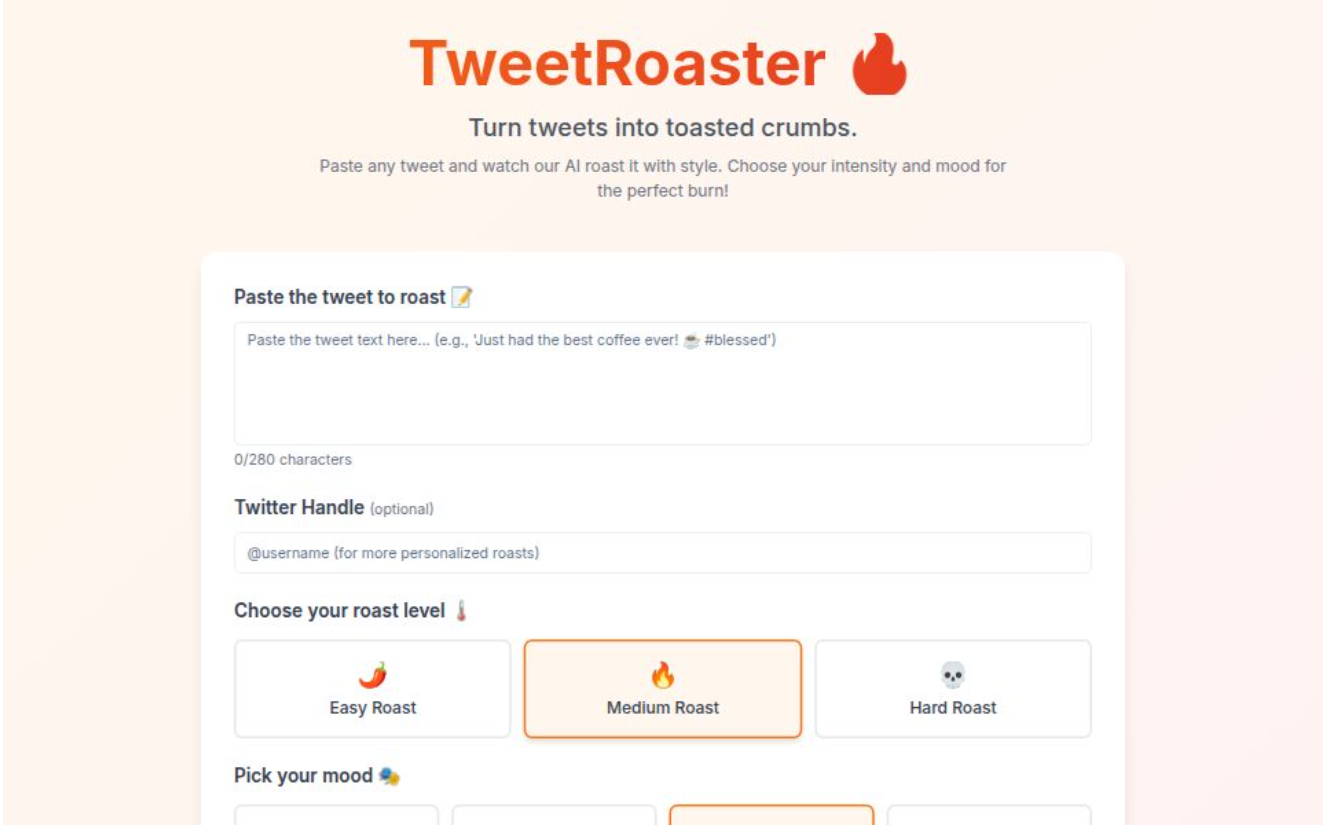
Paste any tweet. Choose your mood. Select roast level. Get 3 spicy, AI-generated comebacks — from mild sarcasm to nuclear savagery.
Fun, fast, open-source, and dangerously addictive.
---
## 🚀 Live Demo
👉 [https://tweetroaster.vercel.app](https://tweetroaster.vercel.app)
---
## 🎯 Features
- 🧠 **AI-powered roasts** with 3 levels:
- 🌶️ Easy
- 🔥 Medium
- 💀 Hard (savage mode)
- 🎭 Select your **mood**:
😡 Angry, 😂 Humorous, 😄 Happy, 🧐 Sarcastic
- 📝 Paste any tweet text
- 👤 Optional: Add Twitter handle for personalized roast context
- ✨ Generates **3 roast replies** per input
- 📋 **Copy Roast** buttons for quick sharing
- 💅 Clean, responsive, meme-friendly UI
- ⚡ Fast and serverless, hosted on **Vercel**
- 🌐 100% open-source
---
## 🛠️ Tech Stack
- [Next.js 14 (App Router)](https://nextjs.org/)
- [Tailwind CSS](https://tailwindcss.com/)
- [TypeScript](https://www.typescriptlang.org/)
- [OpenAI API](https://platform.openai.com/) _(optional)_
- [Vercel Hosting](https://vercel.com/)
---
## 🧪 Getting Started
### 1. Clone the repository
```bash
git clone https://github.com/your-username/tweetroaster.git
cd tweetroaster
```
### 2. Install dependencies
```bash
npm install
```
### 3. Set up environment variables
Create a `.env.local` file in the root:
```env
OPENAI_API_KEY=your_openai_key
NEXT_PUBLIC_BASE_URL=http://localhost:3000
```
> If you're not using the OpenAI API yet, you can mock the roast outputs for development.
### 4. Start the development server
```bash
npm run dev
```
Visit [http://localhost:3000](http://localhost:3000) in your browser.
---
## 🧑🎨 Screenshots
Coming soon...
---
## 💡 Contributing
We love contributions!
If you have:
- 🐛 Found a bug
- 💡 A feature suggestion
- 🎨 UI/UX ideas
- 🔥 Better roast jokes
Please fork the repo, create a branch, and open a pull request.
Check out the [issues tab](https://github.com/your-username/tweetroaster/issues) to see where help is needed.
---
## 📄 License
MIT License — feel free to fork, remix, and share. Just don’t roast us too hard 😅
---
## 🧠 Meta
**Author:** [Rajesh Royal](https://github.com/Rajesh-Royal)
**Twitter:** [@yourTwitterHandle](https://twitter.com/rajesh_896)
**GitHub Repo:** [TweetRoaster](https://github.com/rajesh-royal/tweet-roaster)
---
## 📢 Shoutout
Follow [@Web3Wiz](https://twitter.com/rajesh_896) for updates, AI fun, memes, and bangers like this.
---
🔥 Built with memes, caffeine, and zero chill.