https://github.com/rajsinghtech/tsflow
Network flow visualizer for Tailscale
https://github.com/rajsinghtech/tsflow
tailscale
Last synced: 4 months ago
JSON representation
Network flow visualizer for Tailscale
- Host: GitHub
- URL: https://github.com/rajsinghtech/tsflow
- Owner: rajsinghtech
- Created: 2025-05-31T10:21:06.000Z (about 1 year ago)
- Default Branch: main
- Last Pushed: 2025-06-16T19:52:20.000Z (about 1 year ago)
- Last Synced: 2025-06-16T20:41:41.791Z (about 1 year ago)
- Topics: tailscale
- Language: TypeScript
- Homepage: https://tsflow.rajsingh.info
- Size: 48.5 MB
- Stars: 3
- Watchers: 0
- Forks: 0
- Open Issues: 0
-
Metadata Files:
- Readme: README.md
Awesome Lists containing this project
README
# TSFlow - Tailscale Network Flow Visualizer
A real-time network traffic visualization dashboard for Tailscale networks. Monitor device connectivity, analyze bandwidth usage, and explore network flows with an interactive graph interface.
## Installation
### Homebrew (macOS/Linux)
```bash
brew install rajsinghtech/tap/tsflow
```
### Docker
```bash
docker pull ghcr.io/rajsinghtech/tsflow:latest
```
### Binary Download
Download from [GitHub Releases](https://github.com/rajsinghtech/tsflow/releases).
## Quick Start
> **Note:** TSFlow requires **Tailscale Network Flow Logs** (Premium/Enterprise plans). Enable it in your [Tailscale admin console](https://login.tailscale.com/admin/logs).
### Run with Homebrew
```bash
export TAILSCALE_OAUTH_CLIENT_ID=your-client-id
export TAILSCALE_OAUTH_CLIENT_SECRET=your-client-secret
tsflow
```
Open `http://localhost:8080`
### Run with Docker
```bash
docker run -d \
--name tsflow \
-p 8080:8080 \
-v tsflow_data:/app/data \
-e TAILSCALE_OAUTH_CLIENT_ID=your-client-id \
-e TAILSCALE_OAUTH_CLIENT_SECRET=your-client-secret \
ghcr.io/rajsinghtech/tsflow:latest
```
## Configuration
### Authentication
TSFlow supports OAuth (recommended) or API key authentication.
**OAuth Setup:**
1. Go to [OAuth clients](https://login.tailscale.com/admin/settings/oauth) in Tailscale Admin
2. Create a new OAuth client with `all:read` scope
3. Set `TAILSCALE_OAUTH_CLIENT_ID` and `TAILSCALE_OAUTH_CLIENT_SECRET`
**API Key Setup:**
1. Go to [API keys](https://login.tailscale.com/admin/settings/keys) in Tailscale Admin
2. Create a new API key
3. Set `TAILSCALE_API_KEY`
### Environment Variables
#### Tailscale Authentication
| Variable | Description | Default |
|----------|-------------|---------|
| `TAILSCALE_OAUTH_CLIENT_ID` | OAuth client ID | - |
| `TAILSCALE_OAUTH_CLIENT_SECRET` | OAuth client secret | - |
| `TAILSCALE_OAUTH_SCOPES` | OAuth scopes (comma-separated) | `all:read` |
| `TAILSCALE_API_KEY` | API key (alternative to OAuth) | - |
| `TAILSCALE_TAILNET` | Tailnet name (`-` for auto-detect) | `-` |
| `TAILSCALE_API_URL` | API endpoint | `https://api.tailscale.com` |
#### Server Settings
| Variable | Description | Default |
|----------|-------------|---------|
| `PORT` | Server port | `8080` |
| `ENVIRONMENT` | `development` or `production` | `development` |
#### Data Storage & Polling
| Variable | Description | Default |
|----------|-------------|---------|
| `TSFLOW_DB_PATH` | SQLite database path | `./data/tsflow.db` |
| `TSFLOW_POLL_INTERVAL` | How often to poll Tailscale API for new logs | `5m` |
| `TSFLOW_INITIAL_BACKFILL` | How far back to fetch logs on startup | `6h` |
| `TSFLOW_RETENTION` | How long to keep flow logs | `168h` (7 days) |
### Data Storage
TSFlow stores flow logs in SQLite with:
- **7-day retention** for raw flow logs (configurable via `TSFLOW_RETENTION`)
Mount a volume to persist data: `-v tsflow_data:/app/data`
## Development
### Setup
```bash
git clone https://github.com/rajsinghtech/tsflow.git
cd tsflow
# Install dependencies
cd frontend && npm install && cd ..
cd backend && go mod download && cd ..
```
### Development Mode
Run backend and frontend separately for hot reload:
```bash
# Terminal 1: Backend (no embedded frontend)
make dev-backend
# Terminal 2: Frontend with Vite dev server
make dev-frontend
```
Frontend runs on `http://localhost:5173` and proxies `/api` to backend on `:8080`.
### Production Build
```bash
make build
./backend/tsflow
```
This builds the SvelteKit frontend and embeds it in the Go binary.
## Deployment
### Docker Compose
```yaml
services:
tsflow:
image: ghcr.io/rajsinghtech/tsflow:latest
ports:
- "8080:8080"
environment:
- TAILSCALE_OAUTH_CLIENT_ID=${TAILSCALE_OAUTH_CLIENT_ID}
- TAILSCALE_OAUTH_CLIENT_SECRET=${TAILSCALE_OAUTH_CLIENT_SECRET}
volumes:
- tsflow_data:/app/data
restart: unless-stopped
volumes:
tsflow_data:
```
### Kubernetes
```bash
cd k8s
# Edit kustomization.yaml with your credentials
kubectl apply -k .
```
## Star History
[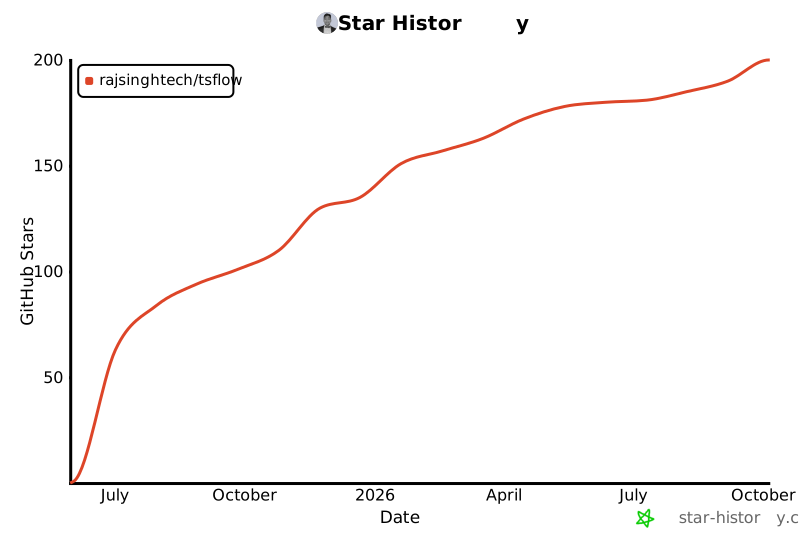](https://star-history.com/#rajsinghtech/tsflow&Date)
## License
MIT
---
Built with ❤️ for the Tailscale community