https://github.com/ralfbecher/orionbelt-semantic-layer
API-first semantic engine and query planner for AI agents that compiles declarative YAML models into optimized, dialect-specific SQL across BigQuery, PostgreSQL, Snowflake, ClickHouse, Dremio, Databricks, DuckDB, and MySQL.
https://github.com/ralfbecher/orionbelt-semantic-layer
agentic-ai ai-analytics ai-workflow bigquery business-intelligence clickhouse data-analytics databricks dremio duckdb mcp mcp-server model-context-protocol mysql postgresql rest-api semantic-layer snowflake yaml
Last synced: 2 months ago
JSON representation
API-first semantic engine and query planner for AI agents that compiles declarative YAML models into optimized, dialect-specific SQL across BigQuery, PostgreSQL, Snowflake, ClickHouse, Dremio, Databricks, DuckDB, and MySQL.
- Host: GitHub
- URL: https://github.com/ralfbecher/orionbelt-semantic-layer
- Owner: ralfbecher
- License: other
- Created: 2026-02-10T16:10:48.000Z (5 months ago)
- Default Branch: main
- Last Pushed: 2026-04-30T21:04:30.000Z (3 months ago)
- Last Synced: 2026-04-30T22:13:34.810Z (3 months ago)
- Topics: agentic-ai, ai-analytics, ai-workflow, bigquery, business-intelligence, clickhouse, data-analytics, databricks, dremio, duckdb, mcp, mcp-server, model-context-protocol, mysql, postgresql, rest-api, semantic-layer, snowflake, yaml
- Language: Python
- Homepage: https://ralforion.com/orionbelt-semantic-layer/
- Size: 13.3 MB
- Stars: 41
- Watchers: 4
- Forks: 5
- Open Issues: 0
-
Metadata Files:
- Readme: README.md
- Changelog: CHANGELOG-versions.md
- License: LICENSE
- Cla: CLA.md
Awesome Lists containing this project
- awesome-data-engineering - OrionBelt Semantic Layer - Open-source semantic sidecar that compiles YAML-defined dimensions, measures, and metrics into optimized SQL across 8 engines (BigQuery, ClickHouse, Databricks, Dremio, DuckDB, MySQL, PostgreSQL, Snowflake). Unified REST, MCP, and Postgres wire protocol; one model powers AI agents, analytics, DQ rules, and KPIs. (Workflow)
- awesome-business-intelligence - OrionBelt Semantic Layer - source semantic sidecar that compiles YAML semantic models to optimized SQL across 8 engines (BigQuery, ClickHouse, Databricks, Dremio, DuckDB, MySQL, PostgreSQL, Snowflake). REST API, Arrow Flight SQL, and Postgres wire surfaces. (Semantic Layers & Metrics)
- awesome-duckdb - OrionBelt Semantic Layer - Open-source semantic sidecar that compiles YAML semantic models to optimized SQL across 8 engines including DuckDB. Ships with an `ob-duckdb` driver, REST + Arrow Flight SQL + Postgres wire surfaces, and a baked-in DuckDB quickstart on Colab. (Integrations / Web Clients (WebAssembly))
README

OrionBelt Semantic Layer
Compile and execute YAML semantic models as analytical SQL across multiple database dialects
[](https://orionbelt.ralforion.com/ui/?__theme=dark)
[](https://colab.research.google.com/github/ralfbecher/orionbelt-semantic-layer/blob/main/examples/quickstart_colab.ipynb)
[](https://github.com/ralfbecher/orionbelt-semantic-layer)
[](https://github.com/ralfbecher/orionbelt-semantic-layer/releases)
[](https://pypi.org/project/orionbelt-semantic-layer/)
[](https://hub.docker.com/repositories/ralforion)
[](https://www.python.org/downloads/)
[](https://github.com/ralfbecher/orionbelt-semantic-layer/blob/main/LICENSE)
[](https://fastapi.tiangolo.com)
[](https://docs.pydantic.dev)
[](https://www.gradio.app)
[](https://cloud.google.com/bigquery)
[](https://www.postgresql.org)
[](https://www.snowflake.com)
[](https://clickhouse.com)
[](https://www.dremio.com)
[](https://www.databricks.com)
[](https://duckdb.org)
[](https://www.mysql.com)
OrionBelt Semantic Layer is an **API-first** semantic engine and query planner for AI agents that compiles and executes declarative YAML model definitions as optimized SQL for BigQuery, ClickHouse, Databricks, Dremio, DuckDB/MotherDuck, MySQL, Postgres, and Snowflake. Query using business concepts — dimensions, measures, and metrics — instead of raw SQL.
**Analytics as Code** — Define your analytical semantics in version-controlled YAML, compile to dialect-specific SQL, and execute against live databases, all through a single API. No BI tool in the middle: the full loop from declarative model to query results is programmable, reviewable, and reproducible.
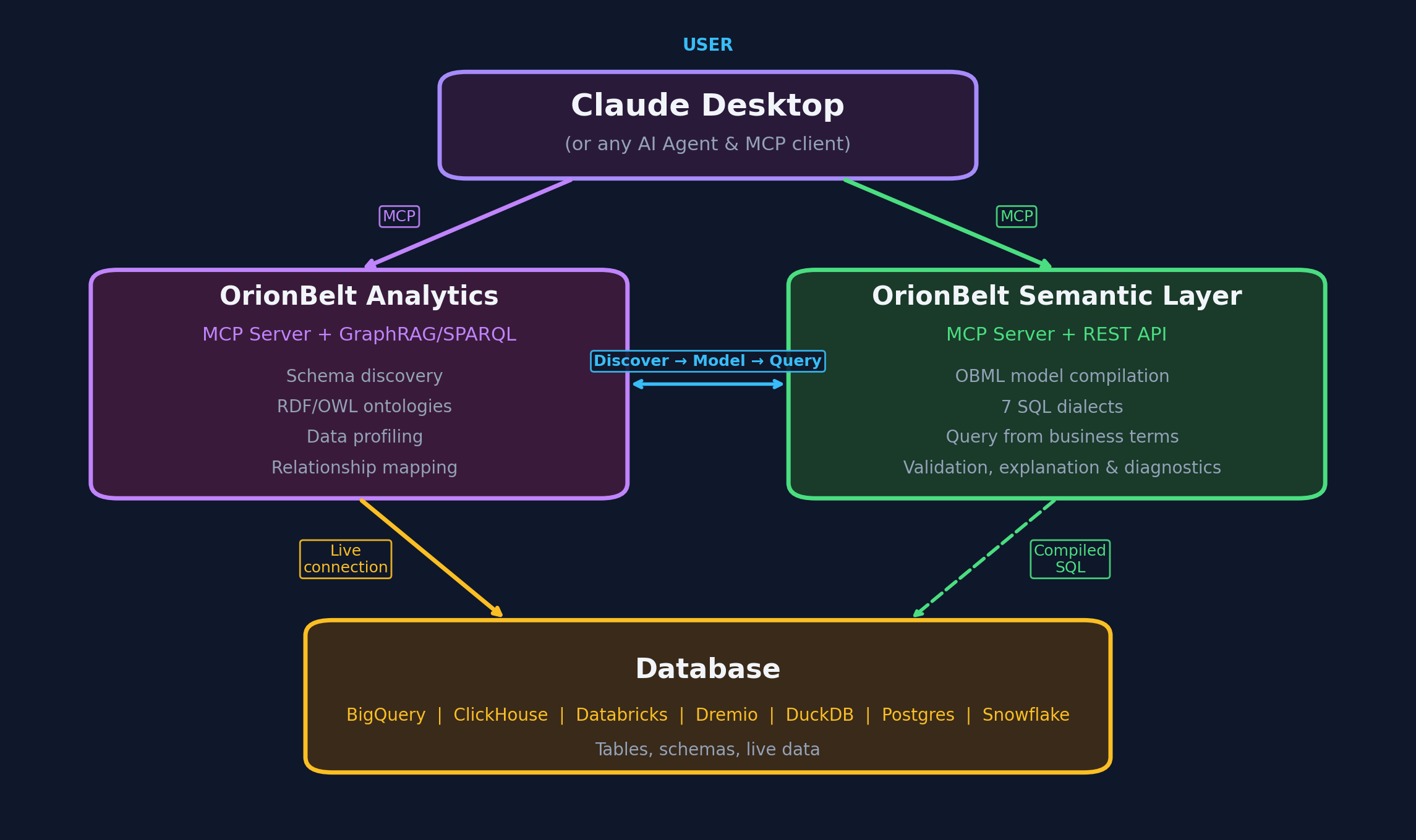
> **Companion Project:** [OrionBelt Analytics](https://github.com/ralfbecher/orionbelt-analytics) — an ontology-based MCP server that analyzes database schemas and generates RDF/OWL ontologies. Together they let AI assistants navigate your data landscape through ontologies and compile safe, dialect-aware analytical SQL.
## Table of Contents
- [Try it in 30 Seconds](#try-it-in-30-seconds) — Live Demo | Colab | PyPI | uv | Docker
- [Claude Desktop / MCP](#claude-desktop--mcp)
- [Why OrionBelt?](#why-orionbelt)
- [Features](#features)
- [Example](#example)
- [Gradio UI](#gradio-ui)
- [Documentation](#documentation)
- [Status & Roadmap](#status--roadmap)
- [Companion Project](#companion-project)
- [Development](#development)
---
## Try it in 30 Seconds
### Option A: Live Demo (no install)
**[Open the Live Demo](https://orionbelt.ralforion.com/ui/?__theme=dark)** — Gradio UI with a pre-loaded example model. Paste a query, pick a dialect, see SQL instantly.
API explorer: [Swagger UI](https://orionbelt.ralforion.com/docs) | [ReDoc](https://orionbelt.ralforion.com/redoc)
### Option B: Google Colab (no install)
[](https://colab.research.google.com/github/ralfbecher/orionbelt-semantic-layer/blob/main/examples/quickstart_colab.ipynb) — Interactive notebook with TPC-H data: explore the model, compile queries across dialects, execute against DuckDB, and see results. Requires Python 3.12 runtime.
### Option C: Install from PyPI
```bash
pip install orionbelt-semantic-layer
```
Then paste into a Python REPL:
```python
from orionbelt.parser import ReferenceResolver, TrackedLoader
from orionbelt.compiler.pipeline import CompilationPipeline
from orionbelt.models.query import QueryObject, QuerySelect
model_yaml = """
version: "1.0"
dataObjects:
Orders:
code: ORDERS
columns:
Price: { code: PRICE, abstractType: float }
Country: { code: COUNTRY, abstractType: string }
dimensions:
Country:
dataObject: Orders
column: Country
resultType: string
measures:
Total Revenue:
resultType: float
aggregation: sum
expression: "{[Orders].[Price]}"
"""
loader = TrackedLoader()
raw, source_map = loader.load_string(model_yaml)
resolver = ReferenceResolver()
model, result = resolver.resolve(raw, source_map)
query = QueryObject(select=QuerySelect(dimensions=["Country"], measures=["Total Revenue"]))
pipeline = CompilationPipeline()
output = pipeline.compile(query, model, "postgres")
print(output.sql)
```
Output:
```sql
SELECT
"Orders"."COUNTRY" AS "Country",
CAST(SUM("Orders"."PRICE") AS NUMERIC(18, 2)) AS "Total Revenue"
FROM ORDERS AS "Orders"
GROUP BY "Orders"."COUNTRY"
```
No env file needed — the compilation pipeline is stateless.
**Start the servers:**
```bash
orionbelt-api # REST API on :8000 (Swagger UI at /docs, Gradio UI at /ui)
orionbelt-ui # standalone Gradio UI on :7860 (connects to API on :8000)
FLIGHT_ENABLED=true orionbelt-api # API + Arrow Flight SQL on :8815 (DBeaver, Tableau, Power BI)
```
### Option C2: Install with uv
```bash
uv pip install orionbelt-semantic-layer
```
```bash
uv run orionbelt-api # REST API on :8000 (Swagger UI at /docs, Gradio UI at /ui)
uv run orionbelt-ui # standalone Gradio UI on :7860 (connects to API on :8000)
FLIGHT_ENABLED=true uv run orionbelt-api # API + Arrow Flight SQL on :8815 (DBeaver, Tableau, Power BI)
```
### Option D: Docker
**Stage 1 — Zero-config start** (models loaded later via API or UI):
```bash
docker run -p 8080:8080 ralforion/orionbelt-api
```
Open [http://localhost:8080/docs](http://localhost:8080/docs) to explore the API.
**Stage 2 — Realistic setup** with docker compose:
```yaml
# docker-compose.yml
services:
api:
image: ralforion/orionbelt-api:2.3.1
ports: ["8080:8080"]
env_file: .env
volumes:
- ./models:/app/models:ro
environment:
MODEL_FILE: /app/models/my-model.obml.yml
ui:
image: ralforion/orionbelt-ui:2.3.1
ports: ["7860:7860"]
environment:
API_BASE_URL: http://api:8080
```
```bash
docker compose up -d
```
See [`.env.template`](.env.template) for the full environment variable reference.
> **Docker notes:**
> - `API_SERVER_HOST` is already `0.0.0.0` inside the container — no override needed.
> - MCP via stdio does not work in Docker. Use the [MCP HTTP client](https://github.com/ralfbecher/orionbelt-semantic-layer-mcp) for containerized deployments.
> - Mount models to `/app/models` (or any path) and set `MODEL_FILE` to pre-load on startup.
> - For production, pin a version tag (`:2.3.1`) rather than `:latest`.
### Claude Desktop / MCP
The MCP server is a separate thin client that delegates to the REST API:
**[orionbelt-semantic-layer-mcp](https://github.com/ralfbecher/orionbelt-semantic-layer-mcp)**
Add to your Claude Desktop `claude_desktop_config.json`:
```json
{
"mcpServers": {
"orionbelt": {
"command": "uvx",
"args": ["orionbelt-semantic-layer-mcp"]
}
}
}
```
Also works with Copilot, Cursor, and Windsurf. See the [MCP repo](https://github.com/ralfbecher/orionbelt-semantic-layer-mcp) for full setup options.
---
## Why OrionBelt?
| | OrionBelt | dbt Semantic Layer | Cube | Malloy |
|---|---|---|---|---|
| **Model format** | YAML-only (OBML) | Python + YAML | JavaScript | Custom DSL |
| **SQL generation** | AST-based (injection-safe) | String templates | String templates | Compiler |
| **Multi-dialect** | 8 dialects, no runtime lock-in | dbt Cloud required | Cube Cloud or self-host | BigQuery-focused |
| **Multi-fact queries** | Star Schema + CFL planner (fan-trap prevention) | Limited | Pre-aggregations | Automatic joins |
| **Integration surface** | REST API + MCP + Gradio UI | dbt Cloud API | REST + GraphQL | VS Code extension |
| **Deployment** | Self-host anywhere, single binary | SaaS (Cloud) | SaaS or self-host | Library |
| **License** | BSL 1.1 (converts to Apache 2.0) | Apache 2.0 | AGPL / proprietary | MIT |
---
## Features
### Semantic Modeling
- **OBML Format** — YAML-based semantic models with data objects, dimensions, measures, metrics, and joins
- **Cross-Schema Queries** — model data objects across multiple databases and schemas in a single model
- **Static Model Filters** — mandatory WHERE conditions baked into the model, auto-applied with join extension
- **OBSL Graph & SPARQL** — RDF graph export and read-only SPARQL querying for every loaded model
- **OSI Interoperability** — bidirectional conversion between OBML and Open Semantic Interchange format
### SQL Compilation
- **8 SQL Dialects** — BigQuery, ClickHouse, Databricks, Dremio, DuckDB/MotherDuck, MySQL, Postgres, Snowflake
- **AST-Based Generation** — custom SQL AST ensures correct, injection-safe SQL (not string templates)
- **Star Schema & CFL** — automatic join resolution with Composite Fact Layer for multi-fact queries
- **Data Types & Precision** — automatic CAST wrapping with dialect-specific type rendering and precision clamping
- **Display Formatting** — number format patterns (`#,##0.00`, `0.00%`) on measures/metrics with locale-aware rendering
- **Timezone Settings** — auto-detect database session timezone with `defaultTimezone` fallback and ISO 8601 serialization
- **sqlglot Validation** — post-generation syntax check across all supported dialects
### Integration Surface
- **REST API** — FastAPI endpoints for model management, validation, compilation, and execution
- **MCP Server** — [separate thin client](https://github.com/ralfbecher/orionbelt-semantic-layer-mcp) for Claude, Copilot, Cursor, Windsurf
- **AI Integrations** — LangChain, OpenAI Agents SDK, CrewAI, Google ADK, Vercel AI SDK, n8n, ChatGPT
- **Gradio UI** — interactive web interface for model editing, query testing, and ER diagrams
- **DB-API 2.0 + Flight SQL** — PEP 249 drivers and Arrow Flight SQL server for DBeaver, Tableau, Power BI
### Agent-Facing API
- **Model Health on Load** — every model load returns a `health` block with orphan dataObjects, fan-trap risks, and unreachable dimensions — agents skip the defensive second round trip
- **Query Plan Endpoint** — `POST /query/plan` returns the planner's understanding (planner choice, physical tables, join path, `would_compile`) without compiling SQL or executing; opt-in `include_database_explain` adds the warehouse's raw EXPLAIN
- **Structured Warnings** — every `warnings` list across the API uses a stable `{code, severity, message, path, hint, context}` shape with a documented code taxonomy; agents branch on codes instead of parsing messages
- **Fuzzy `/find` Recovery** — when a search produces no exact or synonym hits, deterministic Levenshtein + trigram fallback returns near-miss candidates with scores and reasons
- **Model Examples** — optional OBML `examples:` block of canonical queries; `GET /examples` (with `?intent=` filtering) gives agents one-round-trip discovery of what a model is designed to answer
### Freshness-Driven Result Cache
- **Source-level freshness contracts** — declare `refresh:` blocks on `dataObject` entries (interval / heartbeat / static); the cache derives query TTLs from the contracts of the physical tables a query touched, not from caller guesses
- **Heartbeat invalidation** — one `POST /v1/heartbeat` to a physical table invalidates every cached query that depends on it, across every dataObject and session
- **DuckDB metadata + Parquet results** — file-backed cache with type-precise serialization, lazy expiration, LRU capacity sweep; opt-in via `CACHE_BACKEND=file`
- **Inverts the Cube/dbt/Looker pattern** — contracts live on the source, not the semantic abstraction; one source of truth across every cube/explore/saved query reading the table
### Developer Experience
- **Source-Position Errors** — validation errors report exact YAML line and column
- **ER Diagrams** — interactive Mermaid diagrams with zoom and download (MD/PNG/Turtle)
- **Session Management** — TTL-scoped sessions with thread-safe model isolation
- **JSON Schema** — full OBML and query schema for IDE autocompletion (`yaml-language-server`)
---
## Example
### Define a Semantic Model (OBML)
```yaml
# yaml-language-server: $schema=https://raw.githubusercontent.com/ralfbecher/orionbelt-semantic-layer/main/schema/obml-schema.json
version: "1.0"
dataObjects:
Customers:
code: CUSTOMERS
database: WAREHOUSE
schema: PUBLIC
columns:
Customer ID: { code: CUSTOMER_ID, abstractType: string }
Country: { code: COUNTRY, abstractType: string }
Orders:
code: ORDERS
database: WAREHOUSE
schema: PUBLIC
columns:
Order Customer ID: { code: CUSTOMER_ID, abstractType: string }
Price: { code: PRICE, abstractType: float }
Quantity: { code: QUANTITY, abstractType: int }
joins:
- joinType: many-to-one
joinTo: Customers
columnsFrom: [Order Customer ID]
columnsTo: [Customer ID]
dimensions:
Country:
dataObject: Customers
column: Country
resultType: string
measures:
Revenue:
resultType: float
aggregation: sum
expression: "{[Orders].[Price]} * {[Orders].[Quantity]}"
dataType: "decimal(18, 2)"
```
### Compile via REST API
```bash
# Create a session
curl -s -X POST http://localhost:8080/v1/sessions | jq .session_id
# -> "a1b2c3d4"
# Load the model
curl -s -X POST http://localhost:8080/v1/sessions/a1b2c3d4/models \
-H "Content-Type: application/json" \
-d '{"model_yaml": "..."}' | jq .model_id
# -> "abcd1234"
# Compile a query
curl -s -X POST http://localhost:8080/v1/sessions/a1b2c3d4/query/sql \
-H "Content-Type: application/json" \
-d '{"model_id":"abcd1234","query":{"select":{"dimensions":["Country"],"measures":["Revenue"]}},"dialect":"postgres"}' \
| jq -r .sql
```
Generated SQL (Postgres)
```sql
SELECT
"Customers"."COUNTRY" AS "Country",
CAST(SUM("Orders"."PRICE" * "Orders"."QUANTITY") AS NUMERIC(18, 2)) AS "Revenue"
FROM WAREHOUSE.PUBLIC.ORDERS AS "Orders"
LEFT JOIN WAREHOUSE.PUBLIC.CUSTOMERS AS "Customers"
ON "Orders"."CUSTOMER_ID" = "Customers"."CUSTOMER_ID"
GROUP BY "Customers"."COUNTRY"
```
Change `dialect` to `bigquery`, `clickhouse`, `databricks`, `dremio`, `duckdb`, `mysql`, or `snowflake` for dialect-specific SQL.
---
## Gradio UI
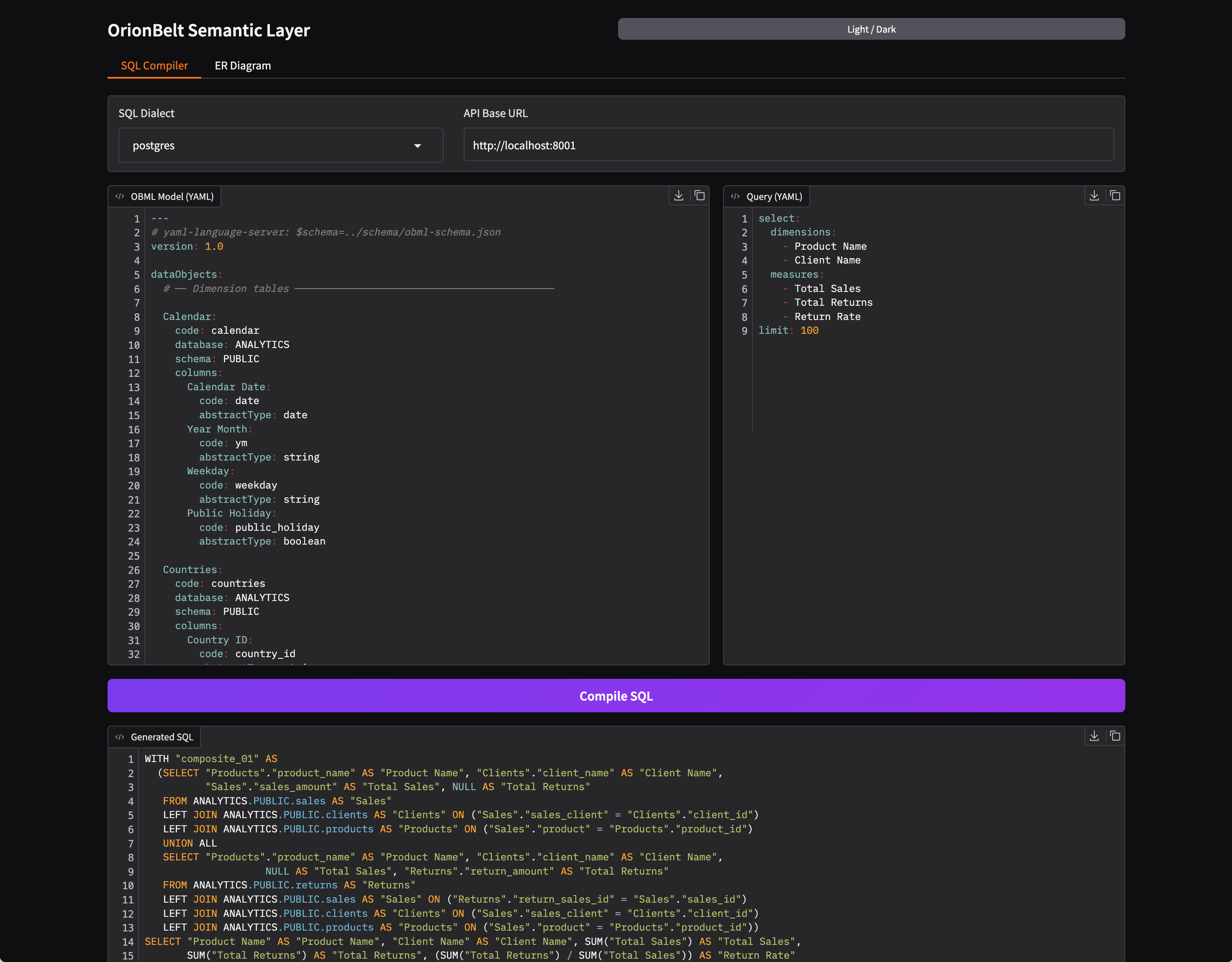
- **SQL Compiler** — side-by-side OBML model and query editors with syntax highlighting, 8 dialect selector, one-click compilation with formatted SQL output and query explain
- **Query Execution** — execute compiled queries against a connected database, view results with locale-aware number formatting, response metadata panel, TSV download and clipboard copy (requires `QUERY_EXECUTE=true`)
- **ER Diagram** — interactive Mermaid ER diagram with zoom, column toggle, and download (MD/PNG/Turtle)
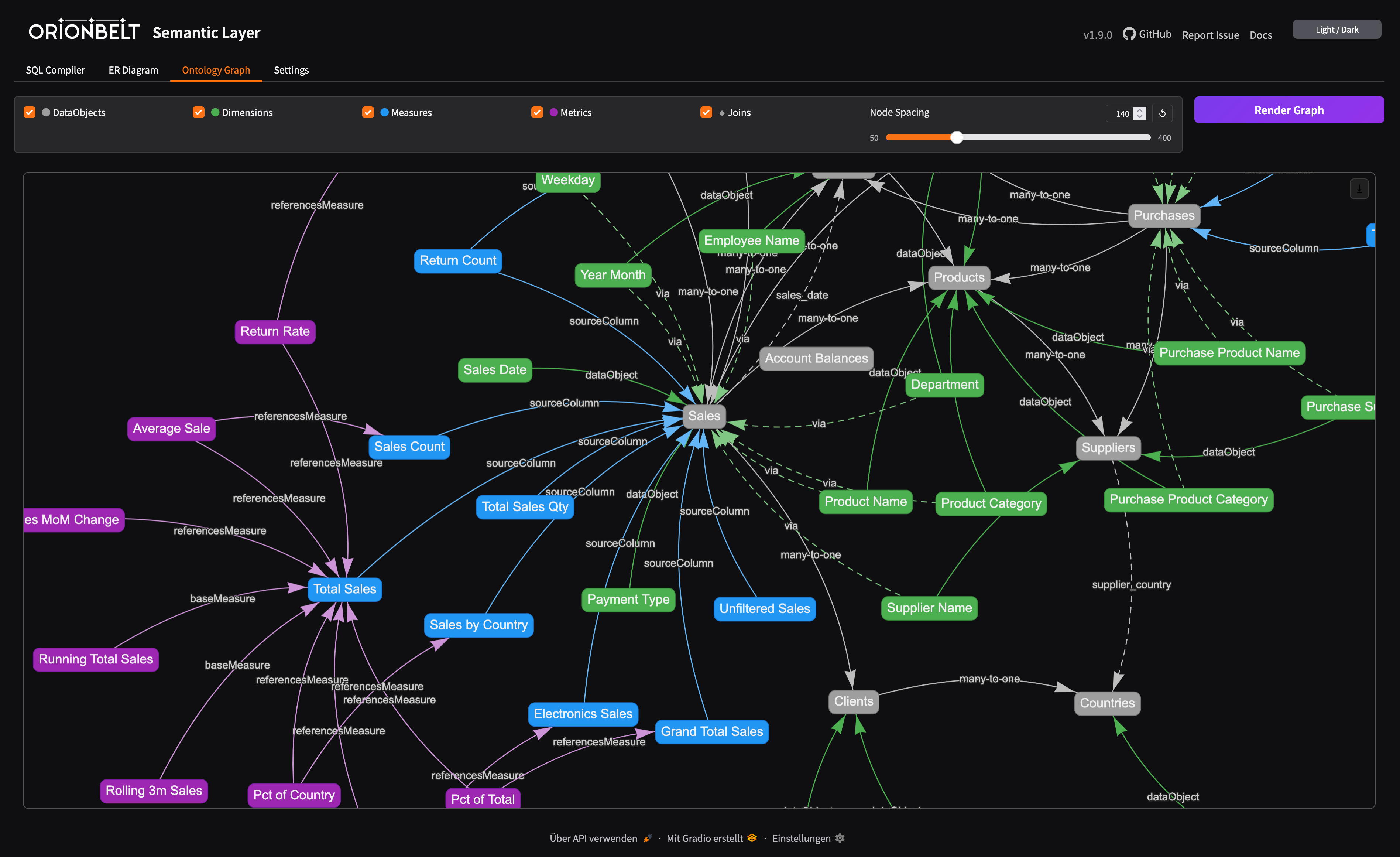
- **Ontology Graph** — interactive vis-network visualization of the OBML graph (data objects, dimensions, measures, metrics, joins) with toggleable layers and adjustable node spacing
- **Editor Toolbar** — clear, undo, redo, upload, download, and copy buttons on all code editors
- **OSI Import/Export** — convert between OBML and OSI formats
- **Dark/Light Mode** — toggle via header button, state persisted across sessions
**Embedded mode** — the UI is mounted at `/ui` on the API server:
```bash
pip install orionbelt-semantic-layer && orionbelt-api
# -> UI at http://localhost:8000/ui
```
**Standalone mode** — run API and UI as separate processes:
```bash
orionbelt-api # API on :8000
orionbelt-ui # UI on :7860 (connects to API on :8000)
API_BASE_URL=http://remote-api:8080 orionbelt-ui # point UI to a remote API
```
---
## Documentation
| Topic | Link |
|-------|------|
| Full docs site | [ralforion.com/orionbelt-semantic-layer](https://ralforion.com/orionbelt-semantic-layer/) |
| Installation | [getting-started/installation](https://ralforion.com/orionbelt-semantic-layer/getting-started/installation/) |
| Quick Start | [getting-started/quickstart](https://ralforion.com/orionbelt-semantic-layer/getting-started/quickstart/) |
| Docker & Deployment | [getting-started/docker](https://ralforion.com/orionbelt-semantic-layer/getting-started/docker/) |
| Development | [getting-started/development](https://ralforion.com/orionbelt-semantic-layer/getting-started/development/) |
| OBML Model Format | [guide/model-format](https://ralforion.com/orionbelt-semantic-layer/guide/model-format/) |
| Query Language | [guide/query-language](https://ralforion.com/orionbelt-semantic-layer/guide/query-language/) |
| SQL Dialects | [guide/dialects](https://ralforion.com/orionbelt-semantic-layer/guide/dialects/) |
| Period-over-Period Metrics | [guide/period-over-period](https://ralforion.com/orionbelt-semantic-layer/guide/period-over-period/) |
| Compilation Pipeline | [guide/compilation](https://ralforion.com/orionbelt-semantic-layer/guide/compilation/) |
| OBSL Graph & SPARQL | [guide/obsl](https://ralforion.com/orionbelt-semantic-layer/guide/obsl/) |
| Gradio UI | [guide/ui](https://ralforion.com/orionbelt-semantic-layer/guide/ui/) |
| AI Integrations | [guide/integrations](https://ralforion.com/orionbelt-semantic-layer/guide/integrations/) |
| OSI Interoperability | [guide/osi](https://ralforion.com/orionbelt-semantic-layer/guide/osi/) |
| REST API Endpoints | [api/endpoints](https://ralforion.com/orionbelt-semantic-layer/api/endpoints/) |
| DB-API Drivers & Flight SQL | [drivers](https://ralforion.com/orionbelt-semantic-layer/drivers/) |
| Architecture | [reference/architecture](https://ralforion.com/orionbelt-semantic-layer/reference/architecture/) |
| Configuration | [reference/configuration](https://ralforion.com/orionbelt-semantic-layer/reference/configuration/) |
| Sales Model Walkthrough | [examples/sales-model](https://ralforion.com/orionbelt-semantic-layer/examples/sales-model/) |
| Multi-Dialect Output | [examples/multi-dialect](https://ralforion.com/orionbelt-semantic-layer/examples/multi-dialect/) |
| Multi-Fact: Sales & Returns | [examples/multi-fact](https://ralforion.com/orionbelt-semantic-layer/examples/multi-fact/) |
| TPC-DS Benchmark | [examples/tpcds](https://ralforion.com/orionbelt-semantic-layer/examples/tpcds/) |
| Quickstart Notebook | [examples/quickstart.ipynb](examples/quickstart.ipynb) |
| **Comparison: Overview** | [comparison/](https://ralforion.com/orionbelt-semantic-layer/comparison/) |
| Comparison: vs. dbt Semantic Layer | [comparison/dbt](https://ralforion.com/orionbelt-semantic-layer/comparison/dbt/) |
| Comparison: vs. Malloy | [comparison/malloy](https://ralforion.com/orionbelt-semantic-layer/comparison/malloy/) |
| Comparison: vs. LookML / Looker | [comparison/lookml](https://ralforion.com/orionbelt-semantic-layer/comparison/lookml/) |
| Comparison: vs. Cube | [comparison/cube](https://ralforion.com/orionbelt-semantic-layer/comparison/cube/) |
| Comparison: vs. AtScale | [comparison/atscale](https://ralforion.com/orionbelt-semantic-layer/comparison/atscale/) |
---
## Status & Roadmap
| Status | Area |
|--------|------|
| Shipped | 8 SQL dialects, REST API, MCP server, Gradio UI, DB-API drivers, Flight SQL, OBSL/SPARQL, OSI interop, AI integrations (LangChain, CrewAI, ADK, etc.), model inheritance & extends, data types & numerical precision, timezone settings, grain & filter context overrides |
| In progress | Additional dialects, CLI tool |
| Planned | Authentication & API tokens, CLI for automation & CI/CD, DDL view generation (CREATE VIEW from queries), additional BI tool integrations |
---
## Companion Project
### [OrionBelt Analytics](https://github.com/ralfbecher/orionbelt-analytics)
An ontology-based MCP server that analyzes relational database schemas and generates RDF/OWL ontologies. Together with OrionBelt Semantic Layer, it enables AI assistants to navigate your data landscape through ontologies and compile safe, dialect-aware analytical SQL.
---
## Development
Contributing to OrionBelt or running from source:
```bash
git clone https://github.com/ralfbecher/orionbelt-semantic-layer.git
cd orionbelt-semantic-layer
uv sync # install all deps (dev, docs, ui, flight, drivers)
uv run orionbelt-api # start API on :8000
```
```bash
# Quality
uv run pytest # run tests
uv run ruff check src/ # lint
uv run ruff format src/ tests/ # format
uv run mypy src/ # type check
# Docs
uv sync --extra docs && uv run mkdocs serve # docs on :8080
```
---
## License
Copyright 2025 [RALFORION d.o.o.](https://ralforion.com)
Licensed under the [Business Source License 1.1](LICENSE). The Licensed Work will convert to Apache License 2.0 on 2030-03-16.
By contributing to this project, you agree to the [Contributor License Agreement](CLA.md).
---
