https://github.com/ralforion/orionbelt-ontology-builder
Browser-based ontology workbench for OWL ontologies and SKOS vocabularies. Streamlit + rdflib, no Java, no Protégé. Bulk operations, OWL-RL reasoning, gist upper-ontology starters, merge-aware imports, interactive vis-network graph.
https://github.com/ralforion/orionbelt-ontology-builder
knowledge-graph ontology ontology-editor owl owl-editor owl-rl protege-alternative python rdf rdf-graph rdflib semantic-modeling semantic-web skos sparql streamlit
Last synced: 4 days ago
JSON representation
Browser-based ontology workbench for OWL ontologies and SKOS vocabularies. Streamlit + rdflib, no Java, no Protégé. Bulk operations, OWL-RL reasoning, gist upper-ontology starters, merge-aware imports, interactive vis-network graph.
- Host: GitHub
- URL: https://github.com/ralforion/orionbelt-ontology-builder
- Owner: ralforion
- License: other
- Created: 2025-11-25T22:45:40.000Z (8 months ago)
- Default Branch: main
- Last Pushed: 2026-07-11T20:15:58.000Z (12 days ago)
- Last Synced: 2026-07-11T21:12:39.978Z (12 days ago)
- Topics: knowledge-graph, ontology, ontology-editor, owl, owl-editor, owl-rl, protege-alternative, python, rdf, rdf-graph, rdflib, semantic-modeling, semantic-web, skos, sparql, streamlit
- Language: Python
- Homepage: https://orionbelt.streamlit.app/
- Size: 1.6 MB
- Stars: 121
- Watchers: 2
- Forks: 12
- Open Issues: 4
-
Metadata Files:
- Readme: README.md
- License: LICENSE
- Agents: AGENTS.md
- Cla: CLA.md
Awesome Lists containing this project
README

OrionBelt Ontology Builder
A browser-based ontology workbench built with Streamlit and rdflib
[](https://github.com/ralforion/orionbelt-ontology-builder)
[](https://pypi.org/project/orionbelt-ontology-builder/)
[](https://www.python.org/downloads/)
[](https://github.com/ralforion/orionbelt-ontology-builder/blob/main/LICENSE)
[](https://streamlit.io)
[](https://rdflib.readthedocs.io)
[](https://owl-rl.readthedocs.io)
[](https://visjs.github.io/vis-network/docs/network/)
[](https://hub.docker.com/r/ralforion/orionbelt-ontology-builder/tags)
[](https://hub.docker.com/r/ralforion/orionbelt-ontology-builder)
[](https://hub.docker.com/r/ralforion/orionbelt-ontology-builder/tags)
**Try it now:** [orionbelt.streamlit.app](https://orionbelt.streamlit.app/)
---
## What is this?
OrionBelt lets you build, edit, and maintain OWL ontologies and SKOS vocabularies in your browser. No Java, no desktop install - just `pip install` and go.
It works with **OWL ontologies** (classes as `owl:Class`, properties as `owl:ObjectProperty` / `owl:DatatypeProperty`). Pure RDFS vocabularies like schema.org that use `rdfs:Class` and `rdf:Property` are not currently surfaced in the Classes / Properties panels.
It's not trying to be Protégé. It's meant for people who want something lighter: a workbench that's easy to pick up, hard to break things with, and good enough for real ontology work.
## What it's good at
**Not losing your work.** Every change creates an undo checkpoint. Deletes show you what will break before you confirm. Imports show a diff so you can review before applying.
**Keeping your ontology clean.** Validation catches orphan classes, duplicate labels, domain/range mismatches, missing annotations, and SKOS-specific issues like broader/narrower cycles. Not just "you have warnings" but "here's what's wrong and where."
**Moving fast in large ontologies.** Global search across everything. Usage/backlink views for any resource. Click a node in the graph and jump straight to the editor. Bulk add/edit/delete so you're not filling out forms one entity at a time.
**Working with others.** Merge-aware imports with three strategies (replace, merge, merge-overwrite). Conflict detection. Prefix reconciliation. Change reports you can download. You can actually review what an import would do before committing it.
---
## Features
### Ontology editing
Full CRUD for classes, object/data properties, individuals, restrictions, relations, and annotations. Hierarchy management, rename with reference updates, and tabbed editing per entity type.
### Bulk operations
Every entity page has a Bulk Operations tab:
- **Add** - paste names (one per line) or CSV with headers like `Name, Label, Parent`
- **Edit** - spreadsheet view of all entities with editable labels, comments, parents
- **Delete** - multi-select and remove in one go
Annotations have their own bulk editor with per-row add/delete actions.
### SKOS vocabularies
A dedicated page for building controlled vocabularies:
- Concept schemes with concept counts
- Concepts with prefLabel, definition, broader/narrower (inverses auto-managed)
- Hierarchy tree view, filterable by scheme
- Full SKOS relation support (broader, narrower, related, all match types)
- SKOS validation: missing prefLabels, orphans, duplicate labels, cycles
### Templates
Five starter templates you can merge into or replace your current ontology: Organization, Product Catalog, Event, Person/Contact, and SKOS Thesaurus. Each is a valid Turtle snippet with a preview before you apply it.
### Upper Ontologies
Start from a professionally built upper ontology instead of redefining foundational concepts for every project. Two options ship in the box:
- [**gist**](https://www.semanticarts.com/gist/) by Semantic Arts — a minimalist upper ontology covering ~100 classes (Event, Person, Organization, Agreement, Specification, etc.) and ~100 properties. Select which modules to load (Core, RDFS Annotations, SubClass Assertions, Media Types) and merge or replace your current ontology.
- [**gUFO**](https://nemo-ufes.github.io/gufo/) (gentle UFO) — a lightweight OWL implementation of the Unified Foundational Ontology, suitable for OntoUML-style conceptual modeling with kinds, roles, phases, events, situations, qualities, and relators.
### Reference Ontologies
A separate tab for importing widely-used domain and reference vocabularies. The loader supports both bundled vocabularies (instant) and on-demand downloads (verified against a pinned SHA256 and cached on disk). Currently ships with [**PROV-O**](https://www.w3.org/TR/prov-o/), [**FOAF**](http://xmlns.com/foaf/spec/), and [**GoodRelations**](http://www.heppnetz.de/ontologies/goodrelations/) — all bundled.
### Import & export
| Format | Extension | Import | Export |
| --------- | ---------- | ------ | ------ |
| Turtle | .ttl | ✅ | ✅ |
| RDF/XML | .owl, .rdf | ✅ | ✅ |
| N-Triples | .nt | ✅ | ✅ |
| N3 | .n3 | ✅ | ✅ |
| JSON-LD | .jsonld | ✅ | ✅ |
Imports on an empty ontology go straight through. Otherwise you get a review panel: diff summary, conflict table, prefix changes, import mode selector, and a downloadable change report.
### Validation & reasoning
- Missing labels, domains, ranges
- Orphan classes, duplicate labels, domain/range mismatches
- Untyped individuals
- SKOS checks (see above)
- RDFS and OWL-RL reasoning via owlrl
### Visualization
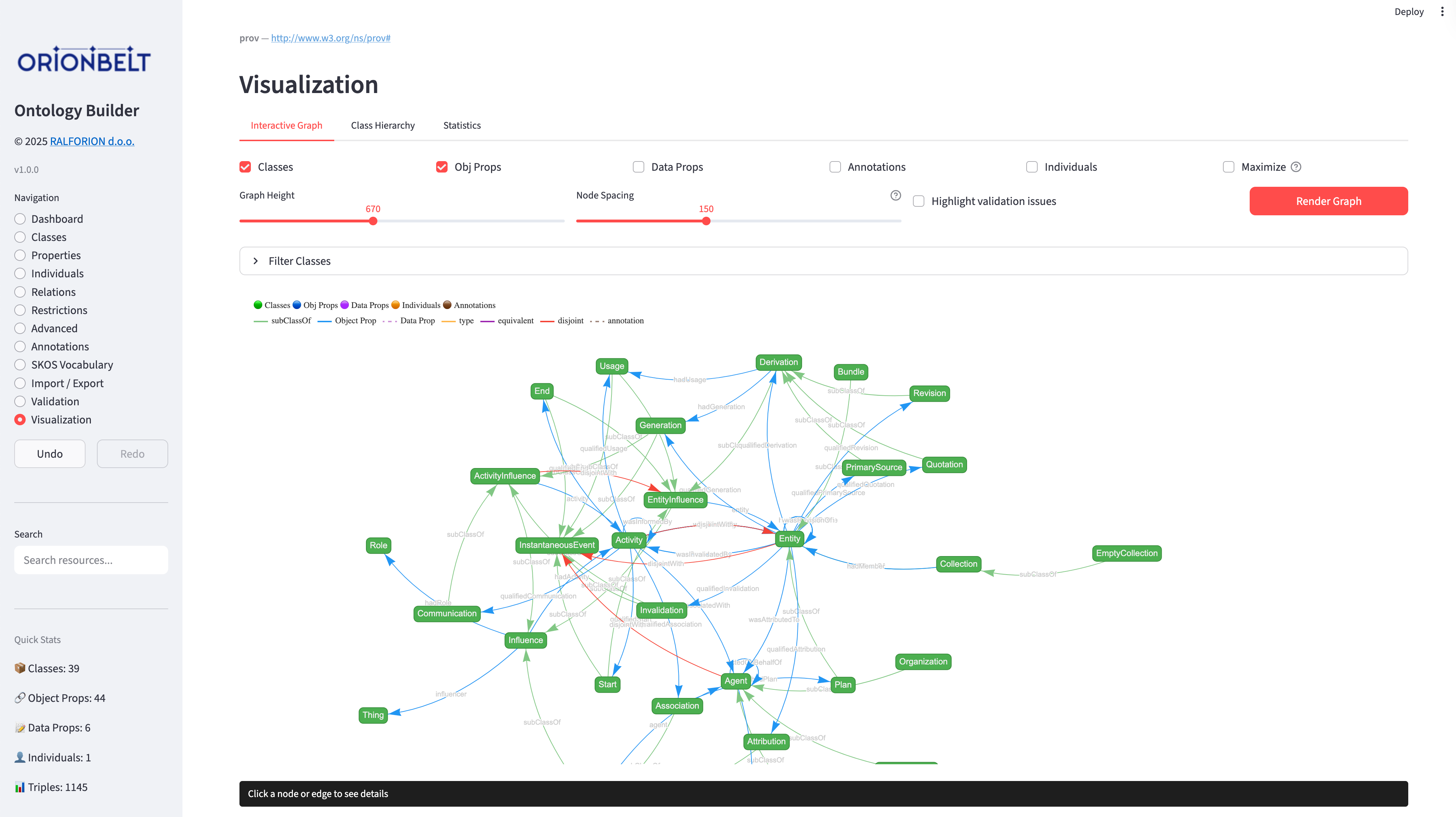
Interactive vis-network graph with class filtering, configurable node limits, click-to-navigate into the editor, Ctrl/Cmd-click a node to add it to the "Focus on one node" selection (narrowing the graph to its neighbourhood), hierarchy tree view, and statistics charts.
### Safety
- Full undo/redo with labeled checkpoints
- Delete impact analysis before confirmation
- Bulk operations create a single undo point
- Namespace prefix management from the Dashboard
---
## Quick Start
```bash
# Clone and install
git clone https://github.com/ralforion/orionbelt-ontology-builder.git
cd orionbelt-ontology-builder
uv sync # or: pip install .
# Or install from PyPI
pip install orionbelt-ontology-builder
# Run
streamlit run app.py
```
Open http://localhost:8501
### Run as a command
Installing the package also provides an `orionbelt-ontology-builder` command that
launches the app for you, so there is no need to call `streamlit run` yourself:
```bash
# Install as an isolated tool and run it (uv or pipx)
uv tool install orionbelt-ontology-builder
orionbelt-ontology-builder # boots the app, opens the browser
# Or run it one-off without installing
uvx orionbelt-ontology-builder
pipx run orionbelt-ontology-builder
```
Any extra arguments are forwarded to Streamlit, e.g.
`orionbelt-ontology-builder --server.port 8502`.
### Use as a Python library
The app is a thin wrapper over `OntologyManager`, the rdflib-backed engine. It
needs no Streamlit runtime, so you can build ontologies from a script, a
notebook, or a CI job:
```python
from orionbelt_ontology_builder.ontology_manager import OntologyManager
ont = OntologyManager()
ont.add_class("Question")
# The same text format the Bulk Operations page accepts: name,label,parent
entries = ont.parse_bulk_text(
"1,,Question\n1a,,1",
default_columns=["name", "label", "parent"],
)
result = ont.bulk_add_classes(entries)
print(result["errors"]) # bulk methods report per entry, they do not raise
ont.save_to_file("out.ttl") # format inferred from the extension, written atomically
```
Three things that are easy to trip over:
- Bulk methods return `{"created": [...], "errors": [...], "skipped": [...]}`
rather than raising, so a script that ignores `errors` will look like it
succeeded on input it silently rejected.
- A parent referenced by a row but never given a row of its own is declared as a
bare `owl:Class`, so the `rdfs:subClassOf` target is a real node. Twenty rows
can legitimately produce twenty-one classes.
- `parse_bulk_text` is a `@staticmethod`, so `OntologyManager.parse_bulk_text(...)`
works without an instance.
The same applies to the rest of the app: classes, properties, individuals, class
expressions, SKOS, reasoning and export are all `OntologyManager` methods. See
[`orionbelt_ontology_builder/ontology_manager.py`](orionbelt_ontology_builder/ontology_manager.py)
for the full surface.
There is no REST/HTTP API, and the `orionbelt-ontology-builder` command only
launches the app. In-process Python is the way to automate it.
### Run as a native desktop app
Prefer a native window over a browser tab? Install the optional `desktop` extra
and use the `orionbelt-ontology-builder-desktop` command. It runs the app in a
native window (via [`streamlit-desktop-app`](https://pypi.org/project/streamlit-desktop-app/),
pywebview + a real Streamlit server), so there is no browser tab to manage and no
manual start/stop of the server:
```bash
pip install "orionbelt-ontology-builder[desktop]"
orionbelt-ontology-builder-desktop # opens a native window
```
On Linux and Windows the extra also installs PySide6 and qtpy to give pywebview a
native Qt rendering backend (macOS uses the system WebKit backend, so they are
not needed there).
The desktop window follows your OS light/dark appearance by default. Once you
pick a specific theme in the toolbar's Settings menu, that choice is remembered
across launches. To go back to following the system, clear the stored setting
(delete `theme_base` from `~/.orionbelt_ontology_builder/config.json`).
#### Choosing a rendering backend
The `desktop` extra uses the Qt backend, which works out of the box. On Linux you
can use GTK instead with the `gtk` extra (`qt` is an explicit alias for the Qt
default):
```bash
pip install "orionbelt-ontology-builder[gtk]"
```
GTK needs system packages that pip cannot install. On Debian/Ubuntu:
```bash
sudo apt install python3-gi gir1.2-gtk-3.0 gir1.2-webkit2-4.1 \
libgirepository1.0-dev
```
The launcher auto-selects whichever backend is installed; set `PYWEBVIEW_GUI=qt`
or `PYWEBVIEW_GUI=gtk` to override.
This is fully opt-in: the plain install and the `orionbelt-ontology-builder`
command above are unchanged.
#### Upgrading
`uv tool upgrade` can occasionally leave the tool's environment inconsistent
(for example the app's Streamlit server quitting when you switch to a tab). If
the app misbehaves after an upgrade, do a clean reinstall, keeping your backend
extra (issue #95):
```bash
uv tool uninstall orionbelt-ontology-builder
uv tool install "orionbelt-ontology-builder[qt]" # or [gtk]; omit the extra for the browser-only command
orionbelt-ontology-builder-desktop # start it once
```
### Local file storage
When you launch the app locally (the `orionbelt-ontology-builder` command or the
native desktop window), it persists to disk instead of browser storage:
- **Crash recovery.** With no linked file set, your working ontology is saved to
a recovery file under `~/.orionbelt_ontology_builder/` on every change, so an
unexpected close (crash, freeze) is recovered automatically on the next launch.
When a linked file is set it becomes the store (below), and the recovery file
is only written as a fallback if a linked-file write fails — so each change is
one write, not two.
- **Linked working file.** Use the sidebar's "Linked working file" control to
point the app at any file path. If the file already exists, you choose whether
to **load it** into the workspace (the default, so pointing at an existing
ontology opens it) or **overwrite** it with the current ontology; a new path is
created from your current work. Once linked, the file tracks your working
ontology and is loaded again on startup. Point it at a synced folder
(Nextcloud, Dropbox, ...) for fully automatic off-machine backups. The format
follows the file extension (`.ttl`, `.owl`/`.rdf`, `.nt`, `.n3`, `.jsonld`;
Turtle if unknown).
Autosave is gated on actual edits and debounced, so normal clicking around does
no work even for large ontologies — the graph is serialized straight to a temp
file and atomically swapped in only after edits settle (and immediately after an
import or a new-ontology action). The sidebar shows "Saved to disk" only once
that write completes, so a crash can lose at most the last second or two of
edits. If a linked or recovery file can't be read or parsed on startup, disk
autosave is paused (with a sidebar notice) so the unreadable file is never
overwritten. The hosted demo on Streamlit Cloud has no local filesystem, so it
keeps using per-browser autosave instead — which shares the same dirty/debounced
scheduling and disables itself (until the graph shrinks) when an ontology exceeds
the browser storage quota.
### Run with Docker
A prebuilt image is published to Docker Hub. No local Python setup required:
```bash
docker run --rm -p 8501:8501 ralforion/orionbelt-ontology-builder
```
Then open http://localhost:8501. Use `:1.16.7` to pin a specific version instead of `latest`.
To build the image yourself from a checkout:
```bash
docker build -t ralforion/orionbelt-ontology-builder .
docker run --rm -p 8501:8501 ralforion/orionbelt-ontology-builder
```
The container runs Streamlit headless on `0.0.0.0:8501` as a non-root user.
### Upload size limit
Imported files are capped at **200 MB** by default (Streamlit's `maxUploadSize`).
To import larger ontologies, raise the limit in `.streamlit/config.toml`:
```toml
[server]
maxUploadSize = 1000 # MB
```
or pass it at launch:
```bash
streamlit run app.py --server.maxUploadSize 1000
```
Parsing happens in memory, so the practical ceiling is the host machine's
available RAM rather than this setting. The hosted demo is RAM-limited and keeps
the 200 MB default; raise the value only when self-hosting with enough memory.
---
## Pages
| Page | What it does |
| ------------------- | -------------------------------------------------------------- |
| **Dashboard** | Metadata, base URI, statistics, prefix management, validation |
| **Classes** | Class hierarchy, CRUD, bulk operations |
| **Properties** | Object & data properties, CRUD, bulk operations |
| **Individuals** | Instance management, property assertions, bulk operations |
| **Relations** | Class, property, and individual relations |
| **Restrictions** | OWL restrictions and cardinality constraints |
| **Advanced** | Advanced OWL features |
| **Annotations** | RDFS, SKOS, Dublin Core annotations with bulk editing |
| **SKOS Vocabulary** | Concept schemes, concepts, hierarchy, SKOS validation |
| **Import / Export** | File import with merge review, export, new ontology, templates |
| **Source** | Live Turtle source view of the ontology |
| **Validation** | Ontology validation and OWL reasoning |
| **Visualization** | Interactive graph (OWL + SKOS), hierarchy tree, statistics |
## Project structure
```
orionbelt-ontology-builder/
├── app.py # Streamlit Cloud entry point (delegates to package)
├── ontology_manager.py # Backward-compat shim
├── templates.py # Backward-compat shim
├── orionbelt_ontology_builder/ # The actual installable package
│ ├── app.py # Streamlit UI
│ ├── ontology_manager.py # Core OWL/SKOS engine (rdflib)
│ ├── templates.py # Built-in templates / upper / reference ontologies
│ ├── samples/ # Bundled gist, gUFO, FOAF, PROV-O, GoodRelations, …
│ ├── lib/ # Frontend libraries (vis-network, Tom Select)
│ ├── assets/ # Logos and screenshots
│ └── favicon.png
├── pyproject.toml # Project metadata
└── tests/ # pytest suite
```
Dependencies: streamlit, rdflib, owlrl, networkx, pyvis.
---
## Companion Project
### [OrionBelt Analytics](https://github.com/ralfbecher/orionbelt-analytics)
An ontology-based MCP server that analyzes relational database schemas (PostgreSQL, Snowflake, Dremio) and generates RDF/OWL ontologies with embedded SQL mappings. Together with the Ontology Builder, they form a toolkit for ontology-driven data modeling.
## License
Copyright 2025–2026 [RALFORION d.o.o.](https://ralforion.com)
Licensed under the [Business Source License 1.1](LICENSE). The Licensed Work will convert to Apache License 2.0 on 2030-03-30.
By contributing to this project, you agree to the [Contributor License Agreement](CLA.md).
---

Copyright © 2026 RALFORION d.o.o.
OrionBelt® is a registered trademark of RALFORION d.o.o.