https://github.com/rameel/ramstack.chromalog.js
A small and simple library for log highlighting before printing text to the terminal
https://github.com/rameel/ramstack.chromalog.js
colors console formatting highlight highlighting log terminal
Last synced: 4 months ago
JSON representation
A small and simple library for log highlighting before printing text to the terminal
- Host: GitHub
- URL: https://github.com/rameel/ramstack.chromalog.js
- Owner: rameel
- License: mit
- Created: 2026-01-17T19:34:38.000Z (4 months ago)
- Default Branch: main
- Last Pushed: 2026-01-30T23:29:15.000Z (4 months ago)
- Last Synced: 2026-01-31T14:27:34.220Z (4 months ago)
- Topics: colors, console, formatting, highlight, highlighting, log, terminal
- Language: TypeScript
- Homepage:
- Size: 1.04 MB
- Stars: 0
- Watchers: 0
- Forks: 0
- Open Issues: 0
-
Metadata Files:
- Readme: README.md
- License: LICENSE
Awesome Lists containing this project
README
# @ramstack/chromalog
[](https://www.npmjs.com/package/@ramstack/chromalog)
[](https://github.com/rameel/ramstack.chromalog.js/blob/main/LICENSE)
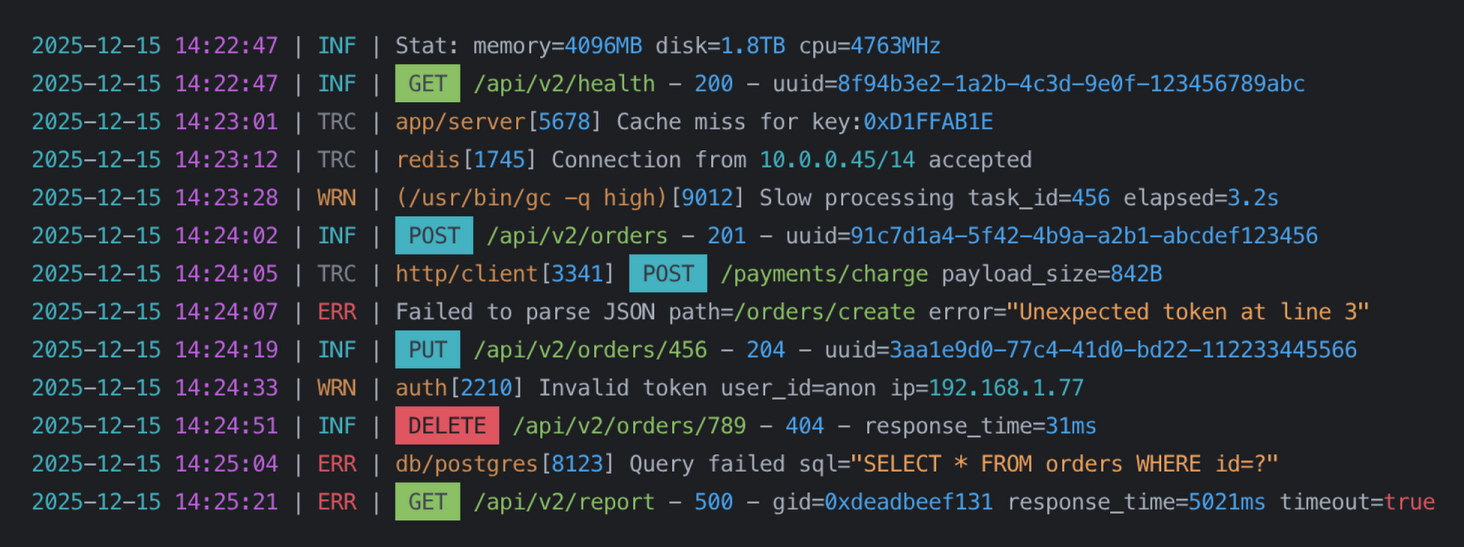
A small and simple library for log highlighting before printing text to the terminal.
## Installation
```bash
npm install @ramstack/chromalog
```
## Basic usage
The simplest case is using the built-in rules.
```ts
import { highlight } from "@ramstack/chromalog";
console.log(
highlight("INFO 2024-01-31 12:45:10 User logged in")
);
```
By default, `@ramstack/chromalog` highlights:
* dates and times
* ISO date-time strings
* numbers
* strings (single and double quoted)
* IPv4 addresses
* GUID / UUID values
* common keywords (log levels, HTTP methods, booleans)
* Unix and Windows paths
* Unix process names
## Using custom rules
You can fully control what gets highlighted by passing your own rules.
```ts
import {
createNumberHighlighter,
createStringHighlighter,
highlight
} from "@ramstack/chromalog";
const rules = [
createNumberHighlighter(),
createStringHighlighter()
];
console.log(
highlight("value=42 name='test'", rules)
);
```
If `rules` are provided, the default rules are **not** used.
## Customizing colors
Each highlighter accepts an optional `apply` function. It receives the matched text and must return a string.
Example with `picocolors`:
```ts
import pc from "picocolors";
import {
highlight,
createNumberHighlighter
} from "@ramstack/chromalog";
const rules = [
createNumberHighlighter(value => pc.bgYellow(pc.black(value)))
];
console.log(highlight("price=199", rules));
```
You can use any coloring library or return plain text if needed.
## Writing your own highlighter
A highlighter is just an object with three fields:
* `regex` — global regular expression
* `apply` — function that transforms the match
* `order` (optional) — conflict priority
### Simple example
```ts
import pc from "picocolors";
import { highlight } from "@ramstack/chromalog";
const errorCodeHighlighter = {
regex: /E\d{3}/g,
apply: (value: string) => pc.red(value)
};
console.log(
highlight("Error E404 occurred", [errorCodeHighlighter])
);
```
## Rule priority (`order`)
Sometimes multiple rules can match the same fragment of text.
In such cases:
1. Matches earlier in the string win
2. Longer matches win over shorter ones
3. If both are equal, `order` is used
Lower `order` values have higher priority.
Example:
```ts
const ruleA = { regex: /abc/g, apply: () => "A", order: 0 };
const ruleB = { regex: /abc/g, apply: () => "B", order: 5 };
```
`ruleA` will be applied.
## Color support
`@ramstack/chromalog` respects terminal color support automatically.
Colors are **disabled** when:
- the terminal does not support colors
- Node.js is started with `--no-color`
- `NO_COLOR` environment variable is set
In these cases, the original text is returned without any modifications.
Colors can be forced when:
- Node.js is started with `--color`
- `FORCE_COLOR=true` environment variable is set
This behavior follows standard Node.js and ecosystem conventions.
## Notes
> [!NOTE]
> * This package is **Node.js only**.
> * Regular expressions must use the global (`/g`) flag.
> * For performance reasons, built-in highlighters do not validate values.
They only match patterns and intentionally use simple regular expressions.
## Contributions
Bug reports and contributions are welcome.
## License
This package is released as open source under the **MIT License**.
See the [LICENSE](https://github.com/rameel/ramstack.chromalog.js/blob/main/LICENSE) file for more details.