https://github.com/ramonbecker/workshop-springboot2-jpa
https://github.com/ramonbecker/workshop-springboot2-jpa
Last synced: about 1 year ago
JSON representation
- Host: GitHub
- URL: https://github.com/ramonbecker/workshop-springboot2-jpa
- Owner: RamonBecker
- Created: 2021-10-04T22:35:17.000Z (almost 5 years ago)
- Default Branch: main
- Last Pushed: 2024-12-31T14:28:21.000Z (over 1 year ago)
- Last Synced: 2025-02-16T23:13:38.254Z (over 1 year ago)
- Language: Java
- Size: 101 KB
- Stars: 0
- Watchers: 2
- Forks: 0
- Open Issues: 0
-
Metadata Files:
- Readme: README.md
Awesome Lists containing this project
README
# Workshop Java SpringBoot
## :information_source: Information
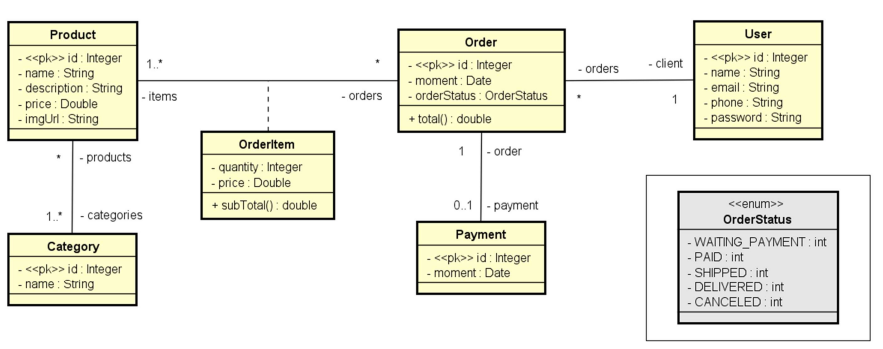
The project had as its theme a basic sales workshop system that was developed during the Java programming course. During development, the following technologies were used: Hibernat, Spring Boot, H2 Database, etc. Only the BackEnd part of the project was carried out. Next, I will show the modeling that was carried out for the development of the system – class diagram – and also how to register and test the system.
## ⚠️ Prerequisite
[](https://www.oracle.com/br/java/technologies/javase-downloads.html) >= 8


 OR 
## 📌 Class Diagram
## 🔧 Install

```
https://github.com/RamonBecker/workshop-springboot2-jpa.git
```

```
git clone https://github.com/RamonBecker/workshop-springboot2-jpa.git
or install github https://desktop.github.com/
```
## ⚙️ Testing the project
To test the project you will need to clone the repository on your machine. You can choose both tools: postman or insomnia.
```
To download postman go to the following link: https://www.postman.com/downloads/
```
```
To download insomnia rentre from the following link: https://insomnia.rest/download
```
Remembering that you must choose the operating system corresponding to your machine.
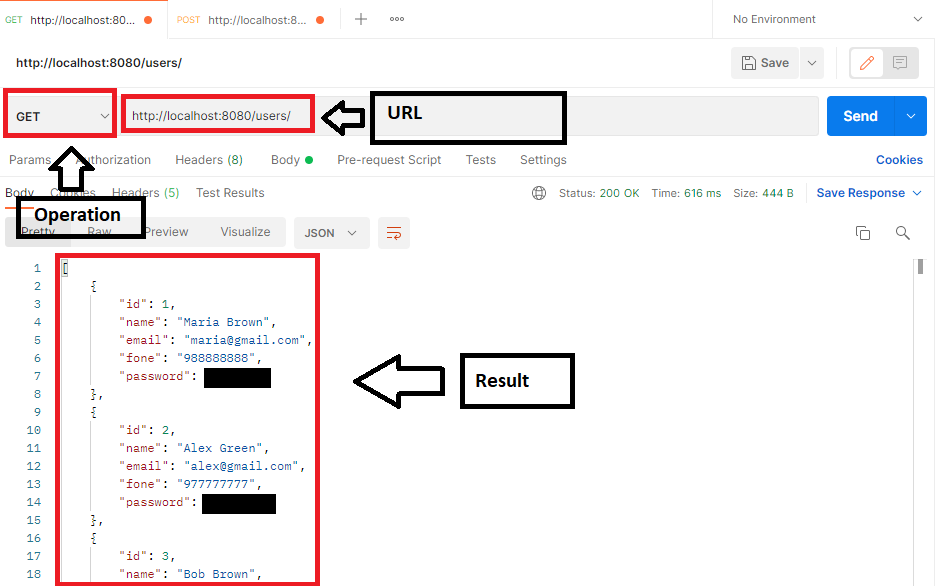
After you have made your registration in these tools, run them and you must type the following in the address:
```
http://localhost:8080/users/
```
according to the image below, to perform, for example, the GET operation, to search for all users in the database.
The following HTPP methods were implemented: PUT, DELETE, GET and POST.
The example was performed using Postman.
## Accessing the H2 database
If you want to modify the user to access the database, modify the application.properties file.
Change the following:
```
spring.datasource.username=user
spring.datasource.password=password
```
Access in browser
```
http://localhost:8080/h2-console
```
If the JDBC URL is not configured, replace it with:
```
jdbc:h2:mem:testdb
```

## :zap: Technologies
- Java
- JPA
- Hibernate
- Spring Boot
- H2 Database
## :memo: Developed features
- [x] CRUD User
- [x] CRUD Product
- [x] CRUD Category
- [x] CRUD Order
## :technologist: Author
By Ramon Becker 👋🏽 Get in touch!
[ ](https://github.com/RamonBecker) [
 ](https://www.linkedin.com/in/https://www.linkedin.com/in/ramon-becker-da-silva-96b81b141//)
