https://github.com/ramxcodes/wallet-sync
Wallet Sync is a next.js app that allows users to connect all their crypto wallets and exchanges in a few clicks, offering comprehensive analytics and tracking. With advanced security and performance monitoring, Wallet Sync ensures your portfolio is managed securely and efficiently.
https://github.com/ramxcodes/wallet-sync
acernity-ui frontend-web nextjs react sentry three-js
Last synced: 2 months ago
JSON representation
Wallet Sync is a next.js app that allows users to connect all their crypto wallets and exchanges in a few clicks, offering comprehensive analytics and tracking. With advanced security and performance monitoring, Wallet Sync ensures your portfolio is managed securely and efficiently.
- Host: GitHub
- URL: https://github.com/ramxcodes/wallet-sync
- Owner: ramxcodes
- Created: 2024-10-15T11:06:11.000Z (over 1 year ago)
- Default Branch: main
- Last Pushed: 2024-11-30T16:34:51.000Z (over 1 year ago)
- Last Synced: 2025-01-29T22:27:59.998Z (over 1 year ago)
- Topics: acernity-ui, frontend-web, nextjs, react, sentry, three-js
- Language: TypeScript
- Homepage: https://wallet-sync-new.vercel.app
- Size: 42.9 MB
- Stars: 0
- Watchers: 1
- Forks: 0
- Open Issues: 0
-
Metadata Files:
- Readme: README.md
Awesome Lists containing this project
README
# Wallet Sync
**The Ultimate Crypto Portfolio Tracker**
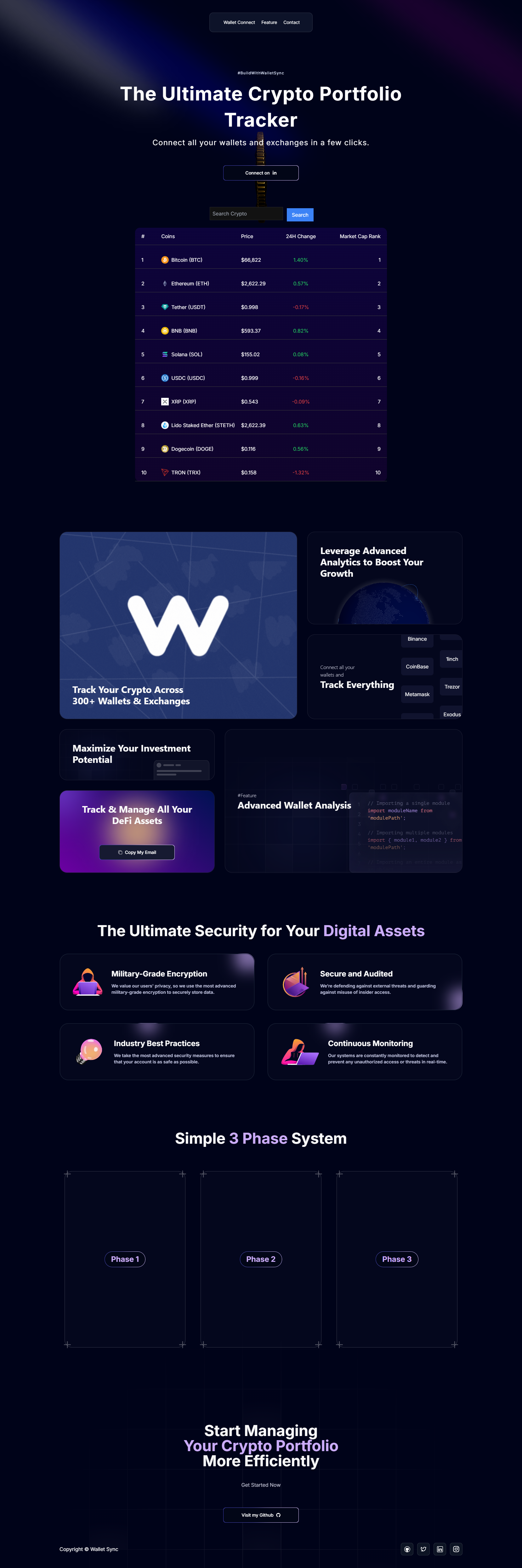
Wallet Sync is a next.js app that allows users to connect all their crypto wallets and exchanges in a few clicks, offering comprehensive analytics and tracking. With advanced security and performance monitoring, Wallet Sync ensures your portfolio is managed securely and efficiently.
## Features
- **Advanced Wallet Analysis**: Track and manage all your DeFi assets in one place.
- **Military-Grade Security**: Protect your digital assets with advanced encryption and security measures.
- **Real-Time Performance Monitoring**: Get insights into portfolio performance, market changes, and top gainers/losers.
- **Support for 300+ Wallets & Exchanges**: Connect your Binance, Coinbase, Metamask, and more.
- **Built with cutting-edge technology**: Utilizes Three.js, Next.js, React, and TypeScript for a smooth and efficient user experience.
## Tech Stack
- **Frontend**: Next.js, React, TypeScript, Tailwind CSS, Framer Motion
- **3D Rendering**: Three.js, React Three Fiber
- **State Management**: Zustand
- **Data Visualization**: Chart.js, React Chart.js 2
- **UI Components**: Aceternity UI
- **Error Tracking**: Sentry
- **Deployment**: Vercel
## Installation
To run this project locally, follow these steps:
1. Clone the repository:
```bash
git clone https://github.com/ramxcodes/Wallet-Sync.git
```
2. Install dependencies:
```bash
npm install
```
3. Run the development server:
```bash
npm run dev
```
4. Open [http://localhost:3000](http://localhost:3000) in your browser to view the app.
## Contact
You can reach out to me on the following platforms:
- [GitHub](https://github.com/ramxcodes)
- [Twitter](https://x.com/ramxcodes)
- [LinkedIn](https://www.linkedin.com/in/ramcodes)
- [Instagram](https://instagram.com/__ramfr)
© Wallet Sync