https://github.com/ranman/gitshots-client
Gitshots client
https://github.com/ranman/gitshots-client
Last synced: 4 months ago
JSON representation
Gitshots client
- Host: GitHub
- URL: https://github.com/ranman/gitshots-client
- Owner: ranman
- Created: 2015-09-08T05:42:36.000Z (almost 11 years ago)
- Default Branch: master
- Last Pushed: 2015-09-23T22:46:48.000Z (over 10 years ago)
- Last Synced: 2025-08-24T01:58:28.272Z (10 months ago)
- Language: Python
- Homepage: http://gitshots.com
- Size: 375 KB
- Stars: 6
- Watchers: 1
- Forks: 2
- Open Issues: 3
-
Metadata Files:
- Readme: README.md
Awesome Lists containing this project
README
# Gitshots — Remember every commit
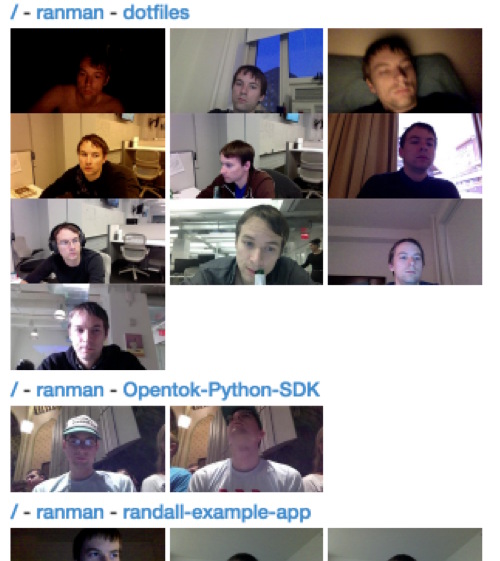
[gitshots.com](http://gitshots.com) - Take a picture and collect some stats every time you commit!
Gitshots uses `imagesnap` gitshots will make you remember every commit you have ever done, it also can collect files changed and your location.
Everything will be stored locally. You can upload your gitshots to a [remote server](https://github.com/ranman/gitshots-server) of your own, or you can use the public [ranman's gitshot server](http://gitshots.ranman.org) and share your gitshots with the world.
--------------------------
### Installation using install.sh
```sh
curl -s https://raw.githubusercontent.com/ranman/gitshots-client/master/install.sh | sh
```
### Manual Installation
* Required: python `requests` library
```bash
pip install requests
```
* Required: `imagesnap`, on OSX you can easily install it with [homebrew](http://mxcl.github.io/homebrew/):
```bash
brew install imagesnap
```
* Optional: CoreLocationCLI to fetch your location from CoreLocation.
```bash
brew install corelocationcli
```
* Required: Install post-commit.py
```bash
cd /tmp
git clone git@github.com:ranman/gitshots-client.git
chmod +x install.sh
./install.sh
```
### Optional Configurations
Add the following line to your `.bash_profile` or `.bashrc`. If you don't add this line with your server URL, your gitshots will be posted to [ranman's gitshot server](http://gitshots.ranman.org).
export GITSHOTS_SERVER_URL=
If you'd rather not post to Gitshots in general, just set the GITSHOTS_SERVER_URL to `False`
export GITSHOTS_SERVER_URL=False
--------------------------
### Enjoy!
Now just run git init in any repo you want to use the commit hook in!
### License
Licensed under the MIT License