https://github.com/raphaelbussa/HeaderView
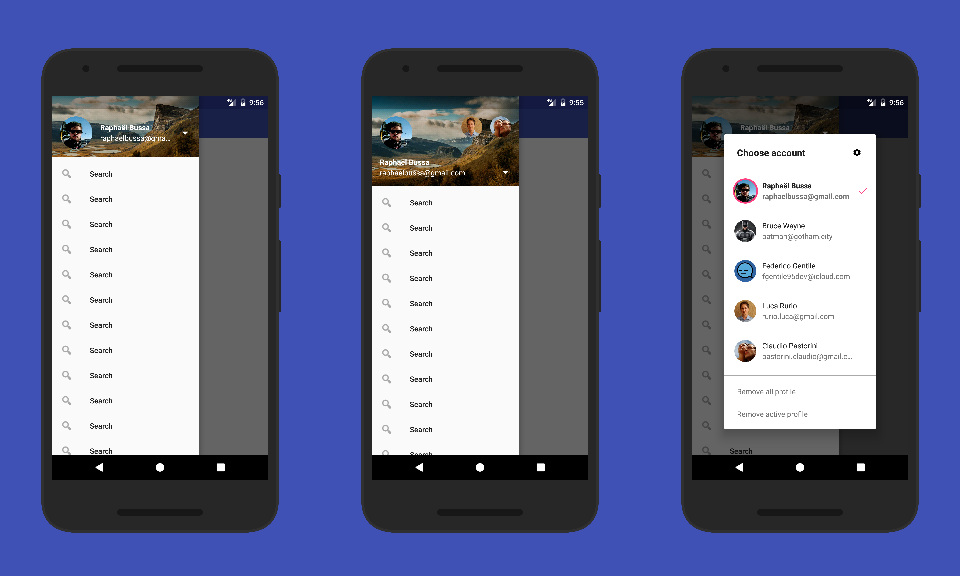
Create an header for com.google.android.material.navigation.NavigationView
https://github.com/raphaelbussa/HeaderView
android customview drawerlayout headerview
Last synced: about 1 year ago
JSON representation
Create an header for com.google.android.material.navigation.NavigationView
- Host: GitHub
- URL: https://github.com/raphaelbussa/HeaderView
- Owner: raphaelbussa
- License: mit
- Created: 2015-07-11T19:56:00.000Z (about 11 years ago)
- Default Branch: master
- Last Pushed: 2020-05-07T12:14:01.000Z (about 6 years ago)
- Last Synced: 2024-11-20T05:32:47.400Z (over 1 year ago)
- Topics: android, customview, drawerlayout, headerview
- Language: Java
- Homepage: https://raphaelbussa.github.io/HeaderView/
- Size: 9.34 MB
- Stars: 107
- Watchers: 1
- Forks: 22
- Open Issues: 4
-
Metadata Files:
- Readme: README.md
- License: LICENSE
Awesome Lists containing this project
- awesome-android-ui - https://github.com/rebus007/Header-View
README
# Header View
[  ](https://bintray.com/raphaelbussa/maven/header-view/_latestVersion) [](http://android-arsenal.com/details/1/2123)

This is a view for NavigationView in android.support.design library
### Import
At the moment the library is in my personal maven repo
```Gradle
repositories {
maven {
url 'http://dl.bintray.com/raphaelbussa/maven'
}
}
```
```Gradle
dependencies {
implementation 'rebus:header-view:3.0.2'
}
```
### How to use
#### Via XML
Create a layout named like this header_drawer.xml
```XML
```
And in your NavigationView
```XML
```
#### Manage Profiles
The new HeaderView manage different profile and a new profile chooser inspired from YouTube android app
- Create a profile
```Java
Profile profile = new Profile.Builder()
.setId(2)
.setUsername("Raphaël Bussa")
.setEmail("raphaelbussa@gmail.com")
.setAvatar("https://github.com/rebus007.png?size=512")
.setBackground("https://images.unsplash.com/photo-1473220464492-452fb02e6221?dpr=2&auto=format&fit=crop&w=767&h=512&q=80&cs=tinysrgb&crop=")
.build();
```
- Add a profile
```Java
headerView.addProfile(profile);
```
- Set a profile active
```Java
headerView.setProfileActive(2);
```
- Remove a profile
```Java
headerView.removeProfile(2);
```
- Get actual active profile
```Java
int activeProfileId = headerView.getProfileActive();
```
#### Customize Profile Chooser
You can also customize the profile chooser
- Add bottom items
```Java
Item item = new Item.Builder()
.setId(1)
.setTitle("Remove all profile")
.build();
headerView.addDialogItem(item);
```
- HighlightColor in dialog
```
headerView.setHighlightColor(ContextCompat.getColor(this, R.color.colorAccent));
app:hv_highlight_color="@color/colorAccent"
```
- Change dialog title
```
headerView.setDialogTitle("Choose account");
app:hv_dialog_title="Dialog title"
```
- Change dialog top icon
```
headerView.setAddIconDrawable(R.drawable.ic_action_settings);
app:hv_add_icon="@drawable/ic_action_settings"
```
- Or hide dialog top icon
```
headerView.setShowAddButton(true);
app:hv_show_add_button="true"
```
- Dismiss profile chooser dialog
```Java
headerView.dismissProfileChooser();
```
#### Callback
```Java
headerView.setCallback(new HeaderCallback() {
@Override
public boolean onSelect(int id, boolean isActive) {
//return profile id selected and if is the active profile
return true; //true for close the dialog, false for do nothing
}
@Override
public boolean onItem(int id) {
//return witch buttom item is selected
return true; //true for close the dialog, false for do nothing
}
@Override
public boolean onAdd() {
return true; //true for close the dialog, false for do nothing
}
});
```
#### Loading image from network
Just add this in your class Application (of course you can use your preferred libs for load images)
```Java
ImageLoader.init(new ImageLoader.ImageLoaderInterface() {
@Override
public void loadImage(Uri url, ImageView imageView, @ImageLoader.Type int type) {
switch (type) {
case ImageLoader.AVATAR:
Glide.with(imageView.getContext())
.load(url)
.asBitmap()
.placeholder(R.drawable.ic_placeholder)
.error(R.drawable.ic_placeholder)
.into(imageView);
break;
case ImageLoader.HEADER:
Glide.with(imageView.getContext())
.load(url)
.asBitmap()
.placeholder(R.drawable.ic_placeholder_bg)
.error(R.drawable.ic_placeholder_bg)
.into(imageView);
break;
}
}
});
```
#### Use custom font with Calligraphy
You can set a custom font with [Calligraphy](https://github.com/chrisjenx/Calligraphy) just add a CustomViewTypeface with HeaderView.class in CalligraphyConfig
```Java
CalligraphyConfig.initDefault(new CalligraphyConfig.Builder()
.setDefaultFontPath("Oswald-Stencbab.ttf")
.setFontAttrId(R.attr.fontPath)
.addCustomViewWithSetTypeface(HeaderView.class)
.build()
);
```
### Screen
### Sample
Browse the sample code [here](https://github.com/rebus007/HeaderView/tree/master/sample) or download sample app from the [Play Store](https://play.google.com/store/apps/details?id=rebus.header.view.sample)
### Javadoc
Browse Javadoc [here](https://rebus007.github.io/HeaderView/javadoc/)
### App using Header View
If you use this lib [contact me](mailto:raphaelbussa@gmail.com) and I will add it to the list below:
- [Mister Gadget](https://play.google.com/store/apps/details?id=rebus.mister.gadget)
- [Git Chat](https://github.com/rebus007/Git-Chat)
- [The Coding Love](https://play.google.com/store/apps/details?id=rebus.thecodinglove)
- [Romanews.eu](https://play.google.com/store/apps/details?id=it.daigan.romanews)
- [Mob@rt](https://play.google.com/store/apps/details?id=it.artigiancassa.mobile.android.mobart)
### Developed By
Raphaël Bussa - [raphaelbussa@gmail.com](mailto:raphaelbussa@gmail.com)
[  ](https://twitter.com/raphaelbussa)[  ](https://www.linkedin.com/in/raphaelbussa)
### License
```
The MIT License (MIT)
Copyright (c) 2017 Raphaël Bussa
Permission is hereby granted, free of charge, to any person obtaining a copy
of this software and associated documentation files (the "Software"), to deal
in the Software without restriction, including without limitation the rights
to use, copy, modify, merge, publish, distribute, sublicense, and/or sell
copies of the Software, and to permit persons to whom the Software is
furnished to do so, subject to the following conditions:
The above copyright notice and this permission notice shall be included in all
copies or substantial portions of the Software.
THE SOFTWARE IS PROVIDED "AS IS", WITHOUT WARRANTY OF ANY KIND, EXPRESS OR
IMPLIED, INCLUDING BUT NOT LIMITED TO THE WARRANTIES OF MERCHANTABILITY,
FITNESS FOR A PARTICULAR PURPOSE AND NONINFRINGEMENT. IN NO EVENT SHALL THE
AUTHORS OR COPYRIGHT HOLDERS BE LIABLE FOR ANY CLAIM, DAMAGES OR OTHER
LIABILITY, WHETHER IN AN ACTION OF CONTRACT, TORT OR OTHERWISE, ARISING FROM,
OUT OF OR IN CONNECTION WITH THE SOFTWARE OR THE USE OR OTHER DEALINGS IN THE
SOFTWARE.
```