https://github.com/raphox/trinity_expo
Trinity Bank is a concept validation project inspired by the cyber-reality of The Matrix. Designed as a sandbox for testing new technologies and user experiences.
https://github.com/raphox/trinity_expo
expo gluestack react react-hook-form react-native tailwind zod
Last synced: 4 months ago
JSON representation
Trinity Bank is a concept validation project inspired by the cyber-reality of The Matrix. Designed as a sandbox for testing new technologies and user experiences.
- Host: GitHub
- URL: https://github.com/raphox/trinity_expo
- Owner: raphox
- License: mit
- Created: 2025-10-15T15:19:18.000Z (9 months ago)
- Default Branch: main
- Last Pushed: 2025-10-17T20:17:56.000Z (9 months ago)
- Last Synced: 2025-10-26T09:51:51.531Z (9 months ago)
- Topics: expo, gluestack, react, react-hook-form, react-native, tailwind, zod
- Language: TypeScript
- Homepage: https://trinity-expo.web.app/
- Size: 1.88 MB
- Stars: 0
- Watchers: 0
- Forks: 0
- Open Issues: 0
-
Metadata Files:
- Readme: README.md
- License: LICENSE
Awesome Lists containing this project
README
# Welcome to your Trinity app 👋
This is an [Expo](https://expo.dev) project created with [`create-expo-app`](https://www.npmjs.com/package/create-expo-app).
I built it as a personal challenge to explore new ideas, test design concepts, and experiment with performance patterns — while proving I can move from zero to prototype quickly.
The goal was simple: build something that looks and feels real, while pushing my creativity and coding speed to the limit.
I’m excited about the results — clean design, smooth navigation, and modern animations that make the experience feel truly next-gen.
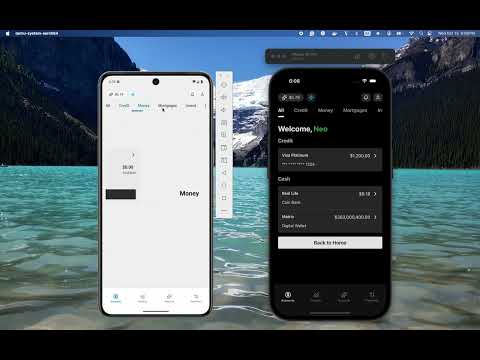
Youtube Video
## Get started
1. Install dependencies
```bash
npm install
```
2. Start the app
```bash
npx expo start
```
In the output, you'll find options to open the app in a
- [development build](https://docs.expo.dev/develop/development-builds/introduction/)
- [Android emulator](https://docs.expo.dev/workflow/android-studio-emulator/)
- [iOS simulator](https://docs.expo.dev/workflow/ios-simulator/)
- [Expo Go](https://expo.dev/go), a limited sandbox for trying out app development with Expo
You can start developing by editing the files inside the **app** directory. This project uses [file-based routing](https://docs.expo.dev/router/introduction).
## Get a fresh project
When you're ready, run:
```bash
npm run reset-project
```
This command will move the starter code to the **app-example** directory and create a blank **app** directory where you can start developing.
## Learn more
To learn more about developing your project with Expo, look at the following resources:
- [Expo documentation](https://docs.expo.dev/): Learn fundamentals, or go into advanced topics with our [guides](https://docs.expo.dev/guides).
- [Learn Expo tutorial](https://docs.expo.dev/tutorial/introduction/): Follow a step-by-step tutorial where you'll create a project that runs on Android, iOS, and the web.
## Join the community
Join our community of developers creating universal apps.
- [Expo on GitHub](https://github.com/expo/expo): View our open source platform and contribute.
- [Discord community](https://chat.expo.dev): Chat with Expo users and ask questions.
## Packages Used in This Project
This project leverages several powerful packages to enhance development and user experience. Below is a list of the key packages, their benefits, and how they are utilized in this project:
### `@gluestack-ui/core` and `@gluestack-ui/utils`
- **Benefits**: These packages provide a robust and customizable UI component library and utility functions for building consistent and reusable UI elements.
- **Usage**: Used to create a cohesive design system and streamline the development of UI components across the app.
### `@hookform/resolvers`
- **Benefits**: Simplifies the integration of validation libraries like `zod` with `react-hook-form`.
- **Usage**: Used to validate form inputs seamlessly, ensuring data integrity and user-friendly error handling.
### `expo` and `expo-router`
- **Benefits**: Expo simplifies the development of React Native apps by providing a managed workflow, while `expo-router` enables file-based routing for better navigation management.
- **Usage**: Core to the app's structure, enabling cross-platform development and intuitive navigation.
### `lucide-react-native`
- **Benefits**: Offers a collection of beautifully designed, customizable icons.
- **Usage**: Used to enhance the app's visual appeal with high-quality icons.
### `nativewind`
- **Benefits**: Brings the power of Tailwind CSS to React Native, enabling rapid styling with utility-first classes.
- **Usage**: Used to style components efficiently and maintain a consistent design language.
### `react` and `react-dom`
- **Benefits**: The foundation of the app, providing a declarative and component-based approach to building user interfaces.
- **Usage**: Core libraries for rendering the app on web and mobile platforms.
### `react-aria`
- **Benefits**: Provides accessible UI primitives to ensure the app is usable by everyone, including those with disabilities.
- **Usage**: Used to enhance accessibility features across the app.
### `react-hook-form`
- **Benefits**: A performant and flexible library for managing forms in React.
- **Usage**: Used to handle form state and validation efficiently.
### `react-native` and `react-native-web`
- **Benefits**: `react-native` enables building mobile apps using React, while `react-native-web` extends this capability to the web.
- **Usage**: Core frameworks for developing a truly cross-platform application.
### `react-native-chart-kit`
- **Benefits**: Simplifies the creation of beautiful and interactive charts.
- **Usage**: Used to visualize data in the app, such as insights and analytics.
### `react-native-gesture-handler` and `react-native-reanimated`
- **Benefits**: Enable smooth and responsive gestures and animations.
- **Usage**: Used to create a dynamic and engaging user experience.
### `react-native-safe-area-context`
- **Benefits**: Handles safe area insets for notched devices.
- **Usage**: Ensures the app layout adapts to various screen sizes and device types.
### `react-native-screens`
- **Benefits**: Optimizes memory usage and performance by managing screens efficiently.
- **Usage**: Used to improve navigation performance.
### `react-native-svg`
- **Benefits**: Enables the use of scalable vector graphics (SVGs) in React Native.
- **Usage**: Used for rendering icons and other vector-based graphics.
### `react-native-tab-view`
- **Benefits**: Provides a customizable tab view component.
- **Usage**: Used to implement tab-based navigation in the app.
### `tailwindcss`
- **Benefits**: A utility-first CSS framework for rapid UI development.
- **Usage**: Used in conjunction with `nativewind` to style components consistently and efficiently.
### `zod`
- **Benefits**: A TypeScript-first schema declaration and validation library.
- **Usage**: Used to define and validate data schemas, ensuring type safety and data integrity.