https://github.com/rapid7/le_lambda
https://github.com/rapid7/le_lambda
Last synced: over 1 year ago
JSON representation
- Host: GitHub
- URL: https://github.com/rapid7/le_lambda
- Owner: rapid7
- License: mit
- Created: 2015-10-28T22:45:33.000Z (over 10 years ago)
- Default Branch: master
- Last Pushed: 2025-03-05T10:39:05.000Z (over 1 year ago)
- Last Synced: 2025-04-13T00:44:02.718Z (over 1 year ago)
- Language: Python
- Size: 947 KB
- Stars: 16
- Watchers: 53
- Forks: 15
- Open Issues: 3
-
Metadata Files:
- Readme: README.md
- Contributing: .github/CONTRIBUTING.md
- License: LICENSE
Awesome Lists containing this project
README
# le_lambda
Follow the instructions below to send logs stored on AWS S3 to Logentries.
All source code and dependencies can be found on the [le_lambda Github page](https://github.com/logentries/le_lambda).
###### Example use cases:
* Forwarding AWS ELB and CloudFront logs
* (make sure to set ELB/CloudFront to write logs every 5 minutes)
* When forwarding these logs, the script will format the log lines according to Logentries KVP or JSON spec to make them easier to analyze
* Forwarding OpenDNS logs
## Obtain log token
1. Log in to your Logentries account
2. Add a new [token based log](https://logentries.com/doc/input-token/)
## Deploy the script to AWS Lambda using AWS Console
1. Create a new Lambda function
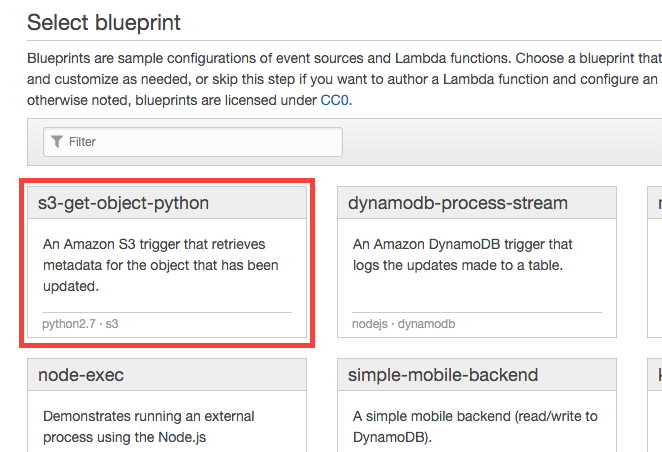
2. Choose the Python blueprint for S3 objects
3. Configure triggers:
* Choose the bucket log files are being stored in
* Set event type "Object Created (All)"
* Tick "Enable Trigger" checkbox
4. Configure function:
* Give your function a name
* Set runtime to Python 2.7
5. Upload function code:
* Create a .ZIP file, containing ```le_lambda.py``` and the folder ```certifi```
* Make sure the files and ```certifi``` folder are in the **root** of the ZIP archive
* Choose "Upload a .ZIP file" in "Code entry type" dropdown and upload the archive created in previous step
6. Set Environment Variables:
* Token value should match UUID provided by Logentries UI or API
* Region should be that of your LE account - currently only ```eu```
| Key | Value |
|-----------|------------|
| region | eu |
| token | token uuid |
7. Lambda function handler and role
* Change the "Handler" value to ```le_lambda.lambda_handler```
* Choose "Create a new role from template" from dropdown and give it a name below.
* Leave "Policy templates" to pre-populated value
8. Advanced settings:
* Set memory limit to a high enough value to facilitate log parsing and sending - adjust to your needs
* Set timeout to a high enough value to facilitate log parsing and sending - adjust to your needs
* Leave VPC value to "No VPC" as the script only needs S3 access
* If you choose to use VPC, please consult [Amazon Documentation](http://docs.aws.amazon.com/lambda/latest/dg/vpc.html)
9. Enable function:
* Click "Create function"
## Gotchas:
* The "Test" button execution in AWS Lambda will **ALWAYS** fail as the trigger is not provided by the built in test function. In order to verify, upload a sample file to source bucket